


 視頻轉換大師
 屏幕錄影大師
 影片修復
影片修復
 安全下載
安全下載將 MXF 轉換為 MKV 的經過測試和驗證的方法
Are you having trouble playing your MXF file on VLC Media Player and other programs? It only means that VLC hardly recognized your file. Then, you must convert your MXF file to other file formats. You can convert it to an MKV file because you can play this on VLC Media Player and other programs. In that case, we will show you the best and greatest ways to convert MXF to MKV quickly. Read this article to find more important details you need.

第 1 部分:將 MXF 轉換為 MKV 的最佳方式
If you want to look for one of the top-notching video converters, you can try the Video Converter Ultimate. It helps you convert MXF to MKV file format. Also, it supports numerous file formats, including M4V, SWF, MTS, MP4, WMV, FLV, AVI, 3GP, and 100+ more. The best experience you can have when using this tool is that you can convert your MXF file 30x faster than other converters. And also, you can convert multiple video files in one go because it has a batch conversion function. But wait, there’s more. If your MXF video has a watermark, you can remove it using the Toolbox features before converting it. Under the Toolbox panel, you will find the Video Watermark Remover function. Also, if there are some instances that you want to play your video backward, then Video Converter Ultimate got your back! This tool also offers a Video Reverser function, so you can reverse your video and play them backward effortlessly.
功能特色
◆ 轉換各種視頻文件格式。
◆ 適合製作音樂視頻。
◆ 非常適合製作視頻或照片拼貼畫。
◆ 可轉換圖片格式,如JPG、PNG、GIF等。
◆ 提供用於改進視頻的工具箱選項。
◆ 能夠壓縮視頻和音頻。
◆ 它可以將視頻速度減慢至0.125 倍,將速度提高至比正常速度快8 倍。
優點
- 它具有超高速轉換過程,比其他應用程序快 30 倍。
- 可以一鍵轉換多個文件。
- 使用戶能夠從圖像或視頻自定義 GIF。
- 適合初學者,界面簡單。
- 可以轉換 1000 多種文件格式,例如 MP4、AVI、FLV、WMV、WEBM、MOV 等。
缺點
- 更多精彩功能可在付費版體驗。
按照以下簡單步驟將 MXF 文件轉換為 MKV 格式。
Step 1: Click the Download button below to download the Video Converter Ultimate on your Windows or Mac. Go to the installation process and run the application.
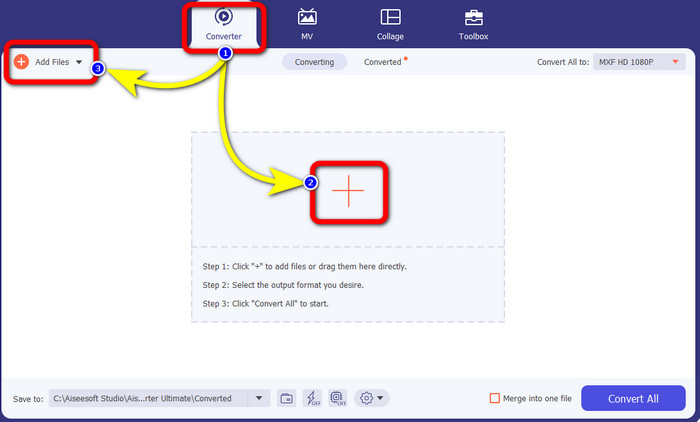
Step 2: Select the Converter panel when the interface shows up. Press the Plus icon to attach your video with an MXF file you want to convert. Also, you can select the Add Files button to add your video.
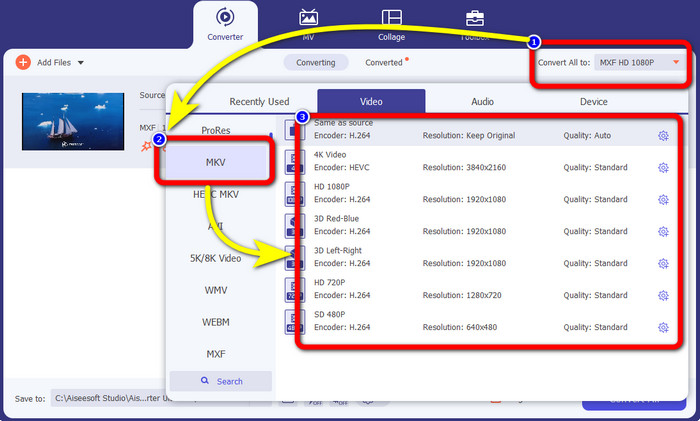
Step 3: After adding your file, click the Convert All to option. The format options will appear, then select the MKV file format.
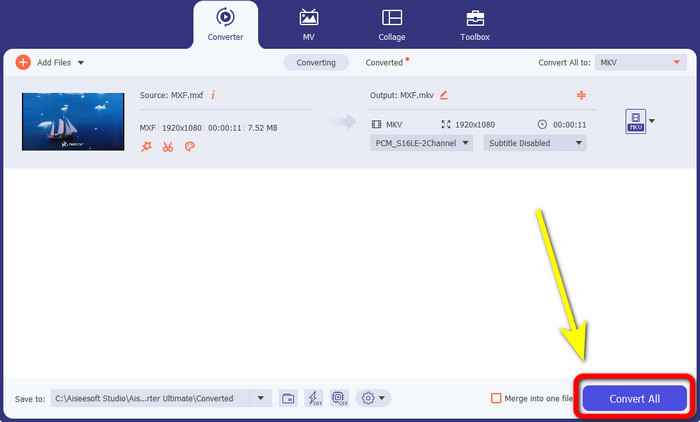
Step 4:Finally, you can already click the Convert All button to convert your MXF file to MKV format.
第 2 部分:將 MXF 轉換為 MKV 的在線方法
在線使用 FVC 免費視頻轉換器
When it comes to converting MXF to MKV format online, FVC Free Video Converter Online is for you. This online tool can convert more files, including MP4, MOV, FLV, GIF, MPG, 3GP, MKV, VOB, WEBM, etc. You don’t need to worry about how to use it because it only has three simple steps to convert files, which is perfect for any user, especially for beginners. In addition, this online tool video quality up to 1080p. It is also accessible on many browsers, such as Google Chrome, Mozilla Firefox, Microsoft Edge, and more. Moreover, aside from converting video formats, you can also convert audio formats, like MP3, M4A, AAC, AC3, WMA, FLAC, etc.
讓我們使用 FVC Free Video Converter Online 將您的 MXF 文件轉換為 MKV。
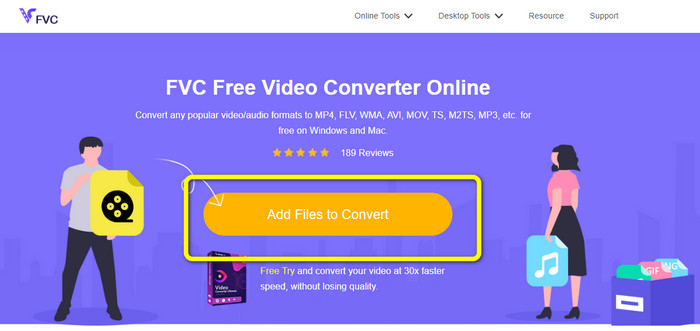
Step 1: Visit the FVC Free Video Converter Online website. Click the Add File to Convert button in the middle to upload your video with an MXF file.
Step 2: A small box on your screen will appear after uploading your MXF file. Then, you will see the format options on the lower part. Select your desired format, which is the MKV file format.
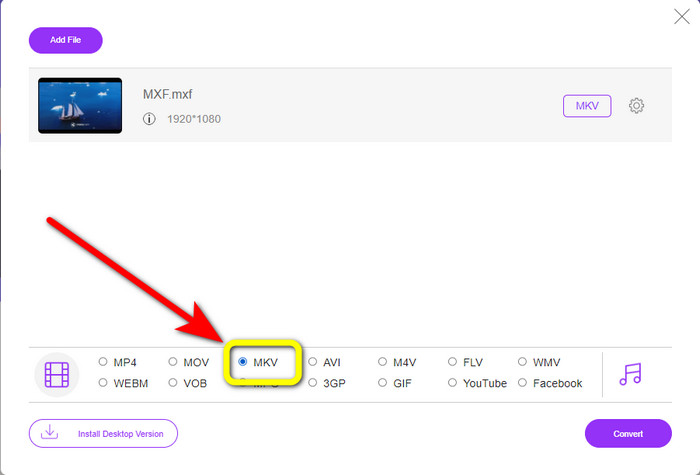
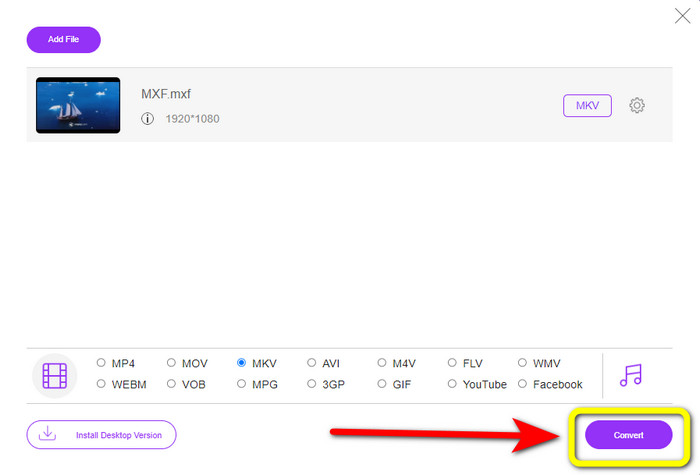
Step 3: For your last step, press the Convert button to convert the MXF file to MKV. Wait for the conversion process and save your video. You can also use this tool to convert MXF to WMV.
使用轉換
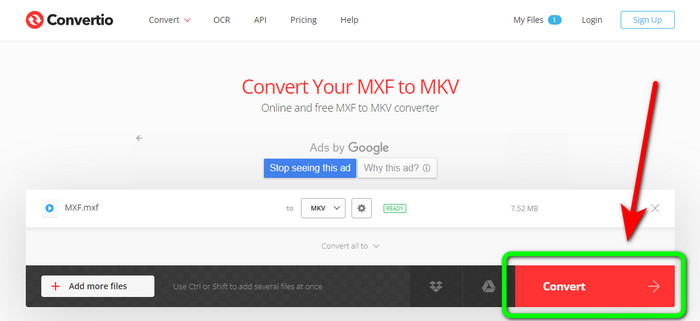
Convertio is another online tool you can use to convert MXF to MKV file format. This online software can convert your video file to 37 formats, including MP4, MOV, WEBM, AVI, MTS, MPEG, XVID, DIVX, and more. You can also convert image and audio formats, like GIF, MP3, AAC, FLAC, M4R, etc. Aside from converting, Convertio allows you to compress video, add subtitles to a video, create a meme, and edit videos. However, even though it has many good tools and features, this online software has limitations when using the free version. Sadly, you can only convert files with a maximum of 100Mb file sizes. It only means you must purchase the subscription to converter unlimited files and experience more features from this tool. Follow the simple guides below to convert the MXF file to MKV format.
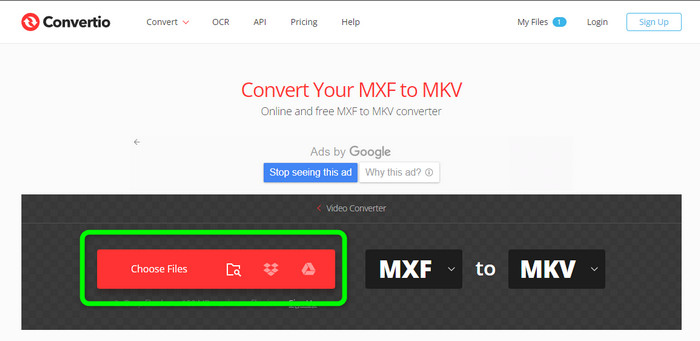
Step 1: Go to the Convertio website. Click the Choose Files button to attach your MXF file.
Step 2: When the file is already uploaded, click the format options and select the MKV file format.
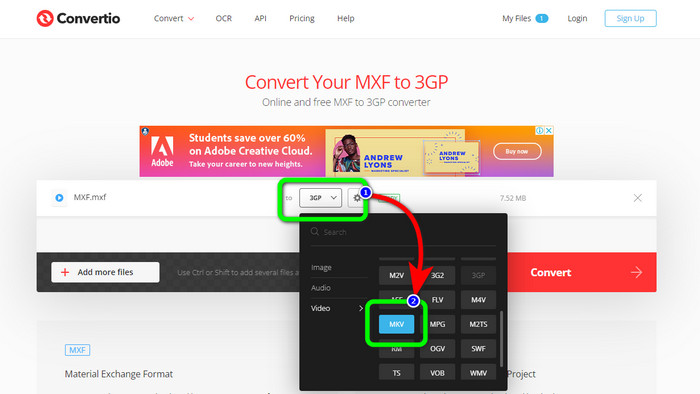
Step 3: After choosing your desired file format, the MKV file, you can click the Convert button. Wait for the process of converting the file and save it on your device.
使用 Cloudconvert
If you are still looking for another online converter to convert MXF to MKV, you must visit Cloudconvert. This online tool is good for converting various files, such as MKV, FLV, AVI, WEBM, WMV, etc. In addition, you can convert many files without losing the quality of your videos. However, you can only convert 25 files per day using the free version of this software. In this case, if you want to convert more files, you must buy a subscription. Also, there are times when the conversion process is slow, depending on your internet connection speed. But, Cloudconvert only has eight supported output file formats, which is not great for users. If you are ready to convert your video from an MXF file to MKV format, use the steps below..
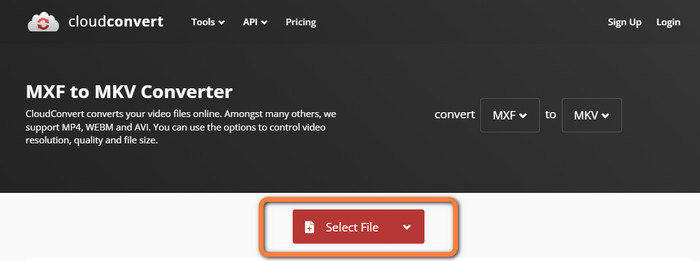
Step 1: Visit the website of Cloudconvert. Click the Select File button to insert the MXF file you want to convert to MKV.
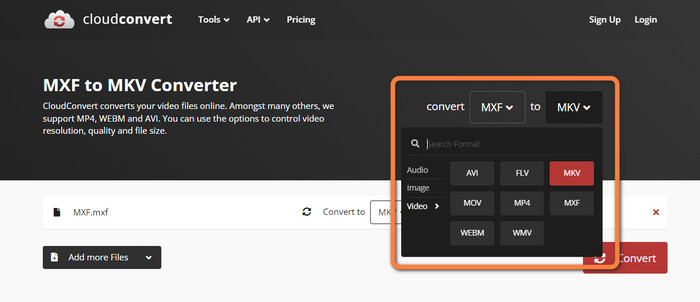
Step 2: After you insert your MXF file, proceed to the format options and select the MKV file format.
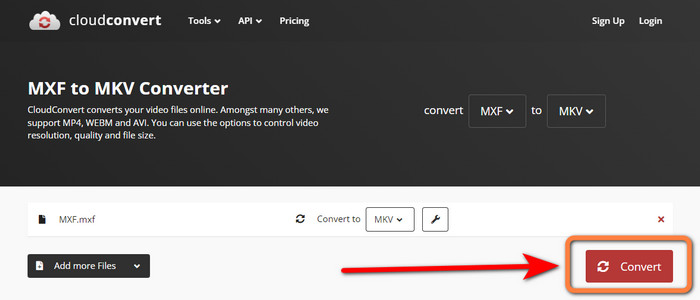
Step 3: The last step is to press the Convert button. Then, wait for the conversion process and save your final video. This tool also helps you convert TRP to MKV.
第 3 部分:比較 MXF 與 MKV
| MXF | MKV | |
| 文件擴展名 | .mxf | mkv |
| 描述 | 一種稱為 MXF 的多媒體容器格式包含視頻、音頻和元數據,以加速不同計算機之間的視頻交換。 MXF 文件經常用於將在劇院放映的電影和電視廣告。 | Matroska 多媒體容器格式或 MKV 將其他類型的視頻、音頻和字幕軌道(例如 USF 或 SRT)組合到一個文件中。短片和音頻樣本的在線分發經常使用 MKV 文件。 |
| 開發者 | 電影電視工程師協會 | CoreCodec 公司 |
| MIME 類型 | 應用程序/mxf | 視頻/x-matroska |
| 視頻編解碼器 | MPEG-4 AVC/H.264、MPEG-1、MPEG-2、MPEG-4 Visual 等 | MPEG-1、Theora、Real Video、Microsoft MPEG4 V2、VP8、MVC 等。 |
| 相關項目 | 文件查看器加上 Adobe Premiere Pro Windows Media Player | VLC 媒體播放器 DIVX 播放器 MX 播放器 GOM 播放器 KMPlayer PotPlayer |
第 4 部分:有關將 MXF 轉換為 MKV 的常見問題解答
1、MKV是容器還是編解碼器?
Matroska 使用的視頻多媒體容器格式稱為 MKV 文件。可擴展二進制元語言是 MKV 的基礎,它支持多種視頻和音頻壓縮格式。 MKV 是一個容器,而不是編解碼器,這是它與其他視頻格式的主要區別。
2. MKV 比 MP4 好嗎?
他們都很棒。對於在瀏覽器中播放視頻,MP4 得到更廣泛的支持並且文件開銷更低。 MKV 容器廣泛用於將藍光光盤和 DVD 轉換為視頻文件。
3.MXF是視頻文件嗎?
當然,是的。 MXF 是一種音頻和視頻文件格式。 MXF 文件包含有關內部媒體的信息。這些信息也稱為元數據,包括幀大小、幀速率、創建日期等。
結論
This article offers the most excellent, tested, and proven methods to convert MXF to MKV using desktop tools and online applications. If you want to convert unlimited files easily and instantly, you can visit the FVC Free Video Converter Online.
-
 如何免費在線和離線將 MKV 轉換為 DivX
 您是否正在尋找免費將 MKV 轉換為 DivX 格式的最佳方法。繼續閱讀以了解最好的 MKV 到 DivX 在線和離線轉換器
-
 關於如何免費將 AMV 轉換為 MKV 的最佳程序
 您想免費輕鬆地將 AMV 轉換為 MKV 嗎?我們將為您提供足夠的信息和您可以使用的轉換器的最佳應用。讓我們繼續吧!
-
 使用這些終極轉換器輕鬆將 MTV 轉換為 MKV
 你想知道將 MTV 轉換為 MKV 的絕妙方法嗎?這篇文章提供了三種在 Windows/Mac 上在線轉換文件的簡單方法
