


 視頻轉換大師
 屏幕錄影大師
 影片修復
影片修復
 安全下載
安全下載在 Mac 和 Windows 上將 OGV 轉換為 M4V 的 2 種最值得注意的方法
你還不知道如何將 OGV 轉換為 M4V 嗎?那就來看看這篇指南,你還能發現其他你需要的重要資訊。本文將為你提供在 Mac 和 Windows 上將 OGV 轉換為 M4V 的簡便步驟。迫不及待想學習這些方法了嗎?那就把這篇文章從頭到尾看完吧!

第 1 部分:OGV 和 M4V 簡介
| 姓名 | 遠洋貨車 | M4V |
| 文件名 | OGG Vorbis 視頻文件 | PEG-4 視頻 |
| 文件擴展名 | .ogv | .m4v |
| 由開發 | 劍網 | 蘋果公司。 |
| 描述 | Microsoft Media Player 主要負責 OGV 文件。 OGG 視頻文件具有“OGV”文件擴展名。在媒體播放期間,OGV 文件可能包含多個視頻流、音頻流、文本流、演示文本數據和元數據。 Theora 經常用於對保存為 OGV 文件的視頻進行編碼。得益於 Theora 編解碼器,可以以低比特率存儲高質量視頻。它是一種開源的有損視頻壓縮方法。在 OGV 文件中,您還可以集成 Daala、Tarkin 和 Dirac 視頻編解碼器。OGV 的音頻流可以使用 FLAC、Opus、Vorbis 或 Speex 進行編碼。 OGV 文件可以在 VLC 等視頻播放器上查看和播放。 | Apple 開發了 M4V 視頻格式。它是一種保存視頻的方法,類似於 MP4 格式。不過,這次 DRM 複製保護可能是針對 M4V 文件的,這就有所不同了。 Apple 在其 iTunes Store 中使用 M4V 編碼標準。 Apple 的 FairPlay 複製保護有助於防止不需要的 M4V 文件複製。 QuickTime 將具有 FairPlay DRM 的 M4V 視頻稱為“AVC0 媒體”。 |
| 技術細節 | 向後兼容的超集使 Theora 視頻壓縮格式從根本上兼容 VP3 視頻壓縮格式。 VP3 和 Theora 無需重新壓縮即可組合,因為 Theora 是 VP3 的超集。 | 可以使用 Apple 的 FairPlay 複製保護來保護 M4V 文件,以防止未經授權的複制。只有使用用於購買視頻的帳戶獲得批准(通過 iTunes)的計算機才能播放受 FairPlay 保護的 M4V 文件。 |
| 相關項目 | FFmpeg 播放器 VLC媒體播放器 | 蘋果iTunes 蘋果 QuickTime 播放器 VLC媒體播放器 縮放播放器 媒體播放器經典 K-多媒體播放器 真實玩家 |
| MIME 類型 | 視頻/ogg | 視頻/x-m4v |
第 2 部分:如何使用在線工具將 OGV 轉換為 M4V
若要輕鬆將 OGV 轉換為 M4V 檔案格式,你只需要一款可靠的轉檔工具。因此,在本部分中,我們將示範如何使用 FVC Free Video Converter Online 將 OGV 轉換為 M4V。透過這個工具,你可以轉換各種檔案格式,例如 MP4、MOV、VOB、MOV、AVI、FLV 等等。它也支援批次轉檔,因此你可以無損地一次轉換多個檔案。此外,只需點擊幾下,你就能完成檔案轉換,因為它具有直觀的介面。從這些基礎流程來看,你就能知道這款視訊轉檔工具非常適合初學者使用。你還可以將解析度調整到最高 1920x1080,也能將位元率調整到最高 20000 kbps。最後,它也能將影格率調整到最高 60fps。此外,你還可以進入音訊設定來編輯音訊。你可以調整音訊的位元率與取樣率。它也支援 FLAC、MP3、AC3、AAC 等各種音訊格式。
功能特色
◆ 轉換各種視頻格式,如OGV、M4V、MP4、AVI、FLV、MKV等。
◆ 提供批量轉換。
◆ 編輯視頻的比特率、幀率和分辨率。
◆ 支持MP3、AC3、AAC、FLAC、WAV等音頻格式。
◆ 編輯音頻的比特率和採樣率。
使用 FVC Free Video Converter Online 將您的 OGV 文件轉換為 M4V 格式。請按照以下簡單步驟操作。
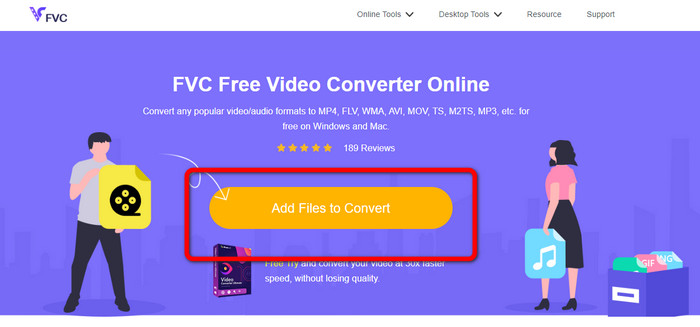
步驟 1: 前往 FVC Free Video Converter Online 網站。接著,要上傳 OGV 視訊檔案時,按一下 Add Files to Convert 按鈕。電腦資料夾會顯示在螢幕上,然後選擇你想要轉換的視訊。
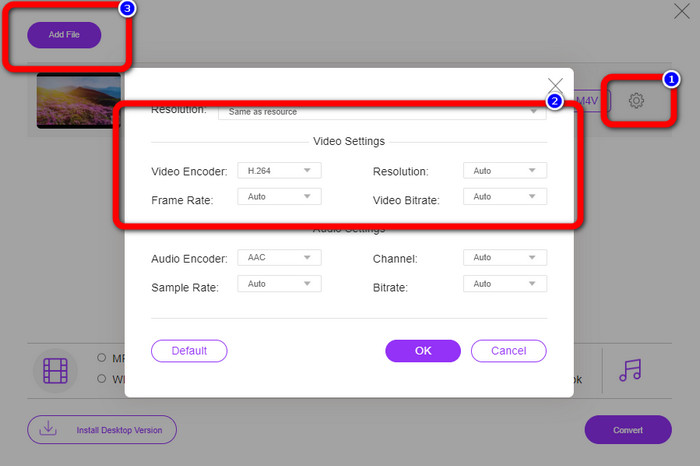
步驟 2: 上傳 OGV 視訊檔案後,你可以點擊 Setting 圖示來變更位元率、影格率與解析度。然後按一下 OK。若你想加入更多檔案,也可以點擊介面左上方的 Add File 按鈕。
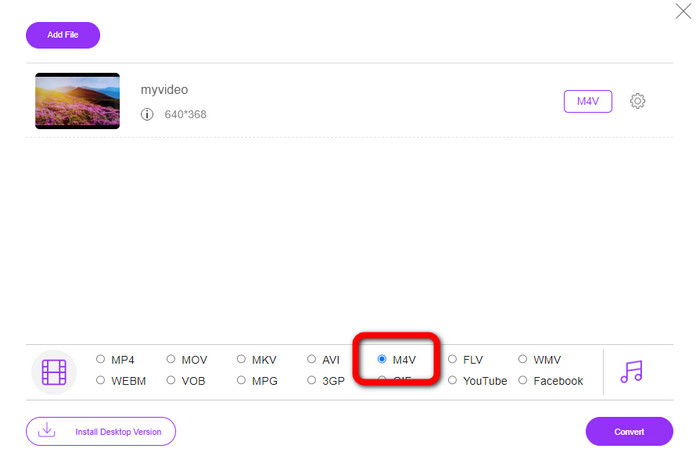
步驟 3: 對 OGV 視訊檔案做完一些調整後,從介面下方的格式選項中選擇 M4V 檔案格式。接著,將視訊儲存到你想要的檔案位置。
第 3 部分:將 OGV 離線轉換為 M4V 的簡易指南
在離線應用方面,您可以使用 Video Converter Ultimate 在 Mac 和 Windows 上將 OGV 轉換為 M4V。該工具是一流的可下載轉換器。它可以輕鬆轉換多個文件,因為它使用戶能夠進行批量轉換。此外,它具有超快的轉換過程,比其他轉換器快 30 倍。這樣,您可以單手轉換許多視頻。此外,即使您正在轉換視頻,您仍然可以使用視頻編輯工具自定義或編輯它們。您可以添加濾鏡、剪切視頻、增強視頻等。
此外,Video Converter Ultimate 還有更多功能可供你體驗。它具備音訊校正功能(Audio Sync),可以讓音訊與畫面同步。如果你打算提高影片音量,也完全沒問題。由於這款工具提供音量增強功能(Volume Booster),你可以將音量提升至 200%。你還需要實際使用這款視訊轉檔工具,才能發掘更多實用功能。
功能特色
◆ 轉換視頻文件,如M4V、OGV、SWF、MP4、AVI、FLV、MOV、VOB、MKV、WMV 等。
◆ 可以創建有吸引力的拼貼畫。
◆ 提供用於改善視頻的視頻編輯工具,如視頻增強器、色彩校正、修剪器、去水印等。
◆ 可以創建音樂視頻。
◆ 調整視頻的速度。
◆ 提供視頻和音頻壓縮器
◆ 從 2D 自定義 3D 視頻
步驟 1: 若你想下載 Video Converter Ultimate,請按下方的 Download 按鈕。完成安裝流程後啟動此應用程式。
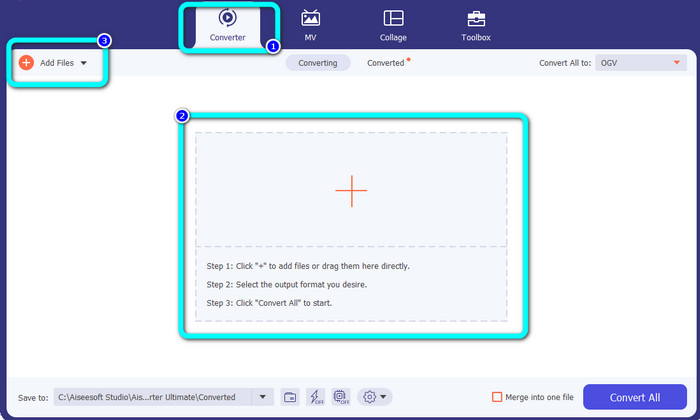
步驟 2: 選擇 Converter 分頁,然後按一下 Plus 加號按鈕加入 OGV 視訊檔案。你也可以點擊 Add Files 按鈕,或將檔案直接拖放到方框中。
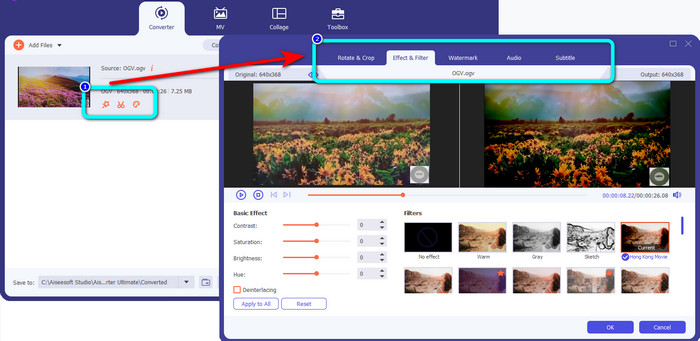
步驟 3: 若你想編輯 OGV 視訊,可點擊第一個方框中的各種圖示。如此一來,你就能裁切與旋轉影片,並加入濾鏡、浮水印等效果。編輯完成後,選擇 OK。
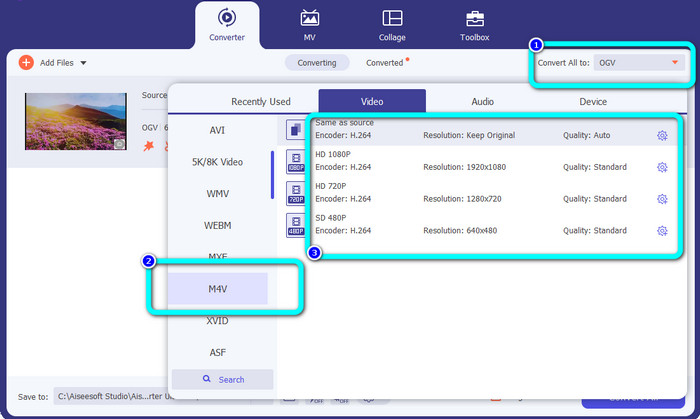
步驟 4: 之後,要將 OGV 轉換為 M4V,請前往 Convert All to 按鈕以顯示格式選項。選擇 M4V 檔案格式,並選取你想要的解析度。
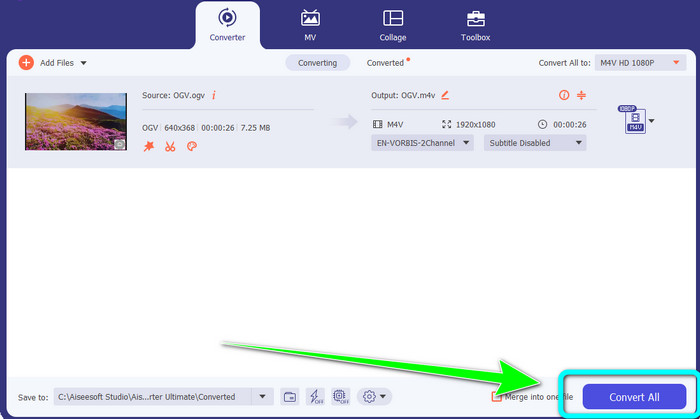
步驟 5: 最後一步,按一下 Convert All 按鈕即可將 OGV 檔案轉換成 M4V 格式,並將影片儲存到你的裝置中。
延伸閱讀:
第 4 部分:關於將 OGV 轉換為 M4V 的常見問題解答
OGV 有損嗎?
是的。 OGV 格式與稱為 .ogv 文件擴展名的開源視頻壓縮標準相結合,主要由 Xiph.org 創建;它與 OGG Vorbis 密切相關,可用於有損存儲或在線流媒體。
將 OGV 轉換為 MP4 需要多長時間?
這取決於你所使用的轉檔工具。如果你想要轉檔速度快的工具,請使用 Video Converter Ultimate。它提供高達 30 倍的轉檔加速。
我可以在所有設備上打開我的 M4V 文件嗎?
不幸的是,不是。您只能通過 Apple 授權的計算機訪問 M4V 文件。如果您想在所有設備上播放您的視頻,您可以將您的視頻轉換為 MP4 文件。
結論
只要你了解合適的實用程式,在 Mac 與 Windows 上將 OGV 轉換為 M4V 一點也不難。本文已為你介紹兩款能讓你輕鬆又快速將 OGV 轉換為 M4V 的優秀工具。若要使用線上轉檔工具,你可以操作 FVC Free Video Converter Online。另一方面,若你想離線轉檔,則可以使用 Video Converter Ultimate。
-
 你不應該錯過的了不起的 OGV 到 FLV 轉換器 [已驗證]
 如果您想知道如何快速將 OGV 轉換為 FLV 文件,本文將向您展示您永遠需要的唯一轉換器。
-
 5 個有用的 OGV 到 WMV 轉換器來轉換您的 OGV 文件
 您可以使用 5 種不同的 OGV 到 WMV 轉換器來轉換 OGV 文件。本文提供了有關 5 個可用的 ogv 轉換器的重要事實。
-
 高效輕鬆地將 OGV 轉換為 MKV 的驚人方法
 本指南將為您提供一個輕鬆的過程,將 OGV 無損地轉換為 MKV。試試這些最可靠的轉換器,體驗它們的強大功能。
