


 視頻轉換大師
 屏幕錄影大師
 影片修復
影片修復
 安全下載
安全下載如何輕鬆即時地將 SWF 轉換為 3GP
Small Web Format,或稱 SWF,是一種由 Adobe 推出的檔案格式,內含向量式動畫與影片。不過,這種檔案格式並不常見,而且僅有少數瀏覽器與程式支援,因此很難直接播放。在這種情況下,最好將 SWF 檔案轉換成其他瀏覽器與程式支援的格式,例如 3GP 格式。幸運的是,本文將介紹多種轉換工具,提供有效的方法將SWF 轉 3GP。事不宜遲,透過閱讀本文來了解這些實用的方法吧。

第 1 部分:將 SWF 更改為 3GP 的最可靠的 SWF 到 3GP 轉換器
通過 Video Converter Ultimate 將 SWF 轉換為 3GP
Video Converter Ultimate 是最可靠的 Windows 和 Mac 離線工具之一。此應用程式可讓你立即將 SWF 轉換為 3GP。此外,它支援超過 100 種檔案格式,包括 MP4、MOV、MKV、FLV、DIVX、XVID 等,因此你可以轉換更多檔案。除此之外,這款離線工具的轉檔速度可比其他轉檔器快上 30 倍,你也可以免費使用。而且它支援批次轉檔,一次就能轉換多個檔案,無需長時間等待。最棒的是,所有使用者都能輕鬆上手,因為它的介面簡潔,轉換各種檔案只需基本幾個步驟。
此外,Video Converter Ultimate 還具有比您想像的更多的強大功能。如果您想增強您的 SWF 視頻,您可以繼續使用工具箱功能。您可以使用視頻增強器來增強視頻的分辨率、亮度和對比度。您甚至可以消除視頻中的噪音。這只是您在使用此轉換器時可以體驗到的重要功能之一。如果您想發現更多功能,請使用 Video Converter Ultimate 並親自查看。
功能特色
◆ 轉換多種視頻文件,如MP4、AVI、FLV、SWF、M4V、MTS等。
◆ 製作具有不同精彩主題的音樂視頻。
◆ 使用大量免費模板和過濾器製作拼貼畫。
◆ 它有一個工具箱,提供各種增強視頻的工具,如視頻增強器、色彩校正、3D Maker 等。
◆ 將視頻速度調整為快8 倍。
◆ 添加和刪除視頻水印。
◆ 可以改變視頻的文件大小。
◆ 能夠轉換圖像。
優點
- 適用於每個用戶。
- 它支持 1000 多種文件格式。
- 可在 Windows 和 Mac 上訪問。
- 它可以輕鬆增強視頻。
缺點
- 想要體驗更多強大功能,建議購買專業版。
要輕鬆地將您的 SWF 轉換為 3GP,請遵循以下基本指南。
步驟 1: 點擊下方下載按鈕,在 Windows 或 Mac 上下載 Video Converter Ultimate 應用程式。接著完成安裝流程並啟動程式。
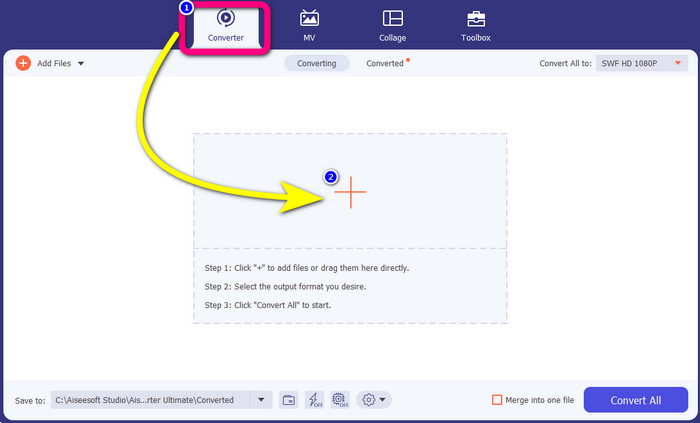
步驟 2: 在介面上方的四個選項中,選擇 Converter(轉換)面板。按一下加號(Plus)圖示,選擇你想要轉換的 SWF 影片檔。
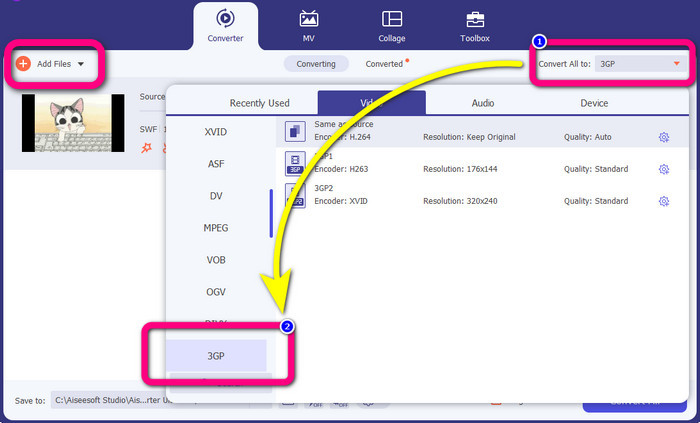
步驟 3: 按一下Convert all to(全部轉換為)按鈕,從格式選項中選擇 3GP 格式。它支援批次轉檔,因此如果你想轉換更多檔案,或是將 SWF 檔案轉換為其他格式,例如 MP4、MKV、MOV、AVI 等,請點擊Add Files(新增檔案)按鈕。你可以一次全部轉換。
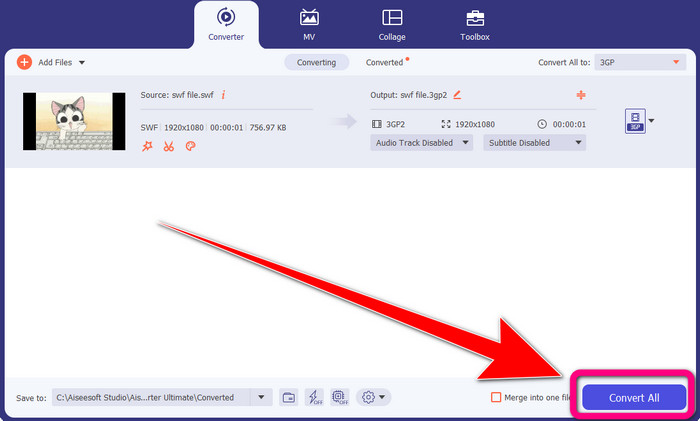
步驟 4: 最後,選好 3GP 檔案格式後,點擊Convert All(全部轉換)按鈕。等待快速轉檔完成後,將最終的影片輸出儲存起來。
第 2 部分:將 SWF 轉換為 3GP 的優秀在線工具
FVC 免費在線視頻轉換
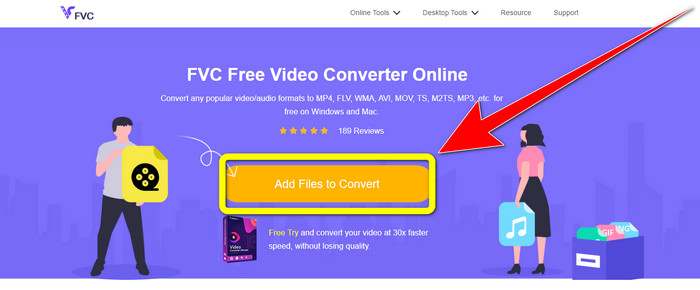
在將 SWF 線上轉換為 3GP 時,你可以使用 FVC Free Video Converter Online。這款線上工具可可靠地轉換各種影音格式,例如 FLV、MP4、MTS、MP3、AVI、WMA 等,而且可在 Mac 與 Windows 上免費使用。此外,它非常適合所有使用者,尤其是初學者。它具備簡潔又完善的操作方式,你不必費心研究。若你迫不及待想用 FVC Free Video Converter Online 來將 SWF 轉成 3GP,請依照下列步驟操作。
步驟 1: 造訪 FVC Free Video Converter Online 網站。點擊橘色方框來匯入你的 SWF 影片檔。
步驟 2: 匯入影片檔後,你就可以從格式選項中選擇 3GP 檔案格式並點擊。
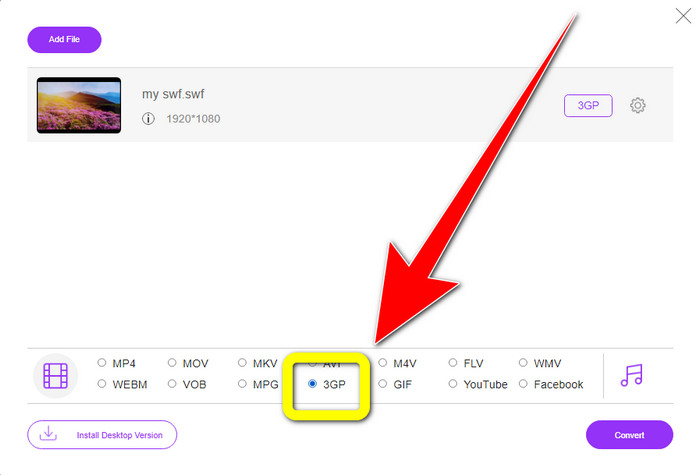
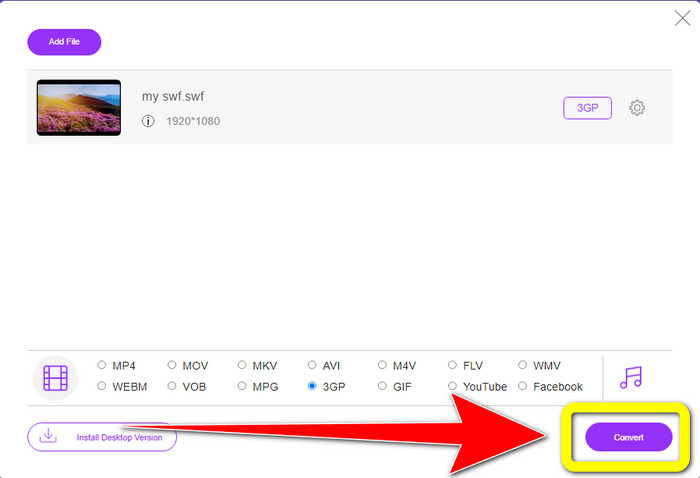
步驟 3: 按一下Convert(轉換)按鈕,即可將 SWF 檔案轉換成 3GP 格式。
在線免費轉換
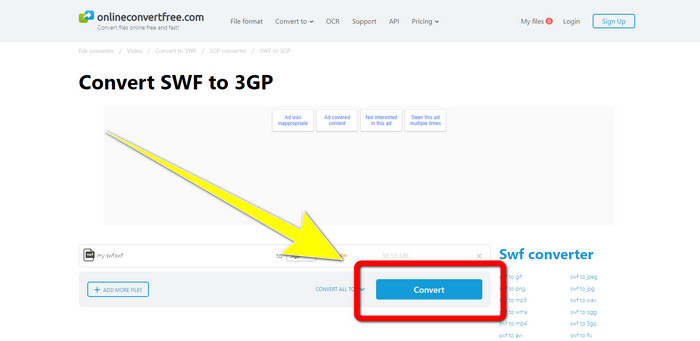
另一個用來將 SWF 轉成 3GP 的實用線上工具是 Online Convert Free。藉由此線上軟體,你可以轉換各種檔案,包括 M4V、MP4、AVI、WEBM、XVID、FLV 等。因此,你也可以使用這個工具將 MP4 轉換成 3GP。此外,它也適用於轉換圖片、音訊、文件等。其轉換過程快速且操作簡單,對非專業使用者來說是一項優勢。不過,使用免費版本進行轉換時,單一檔案的大小上限為 100MB。若要提高可轉換的最大檔案大小,則需要購買訂閱。請按照下列步驟,使用這款線上工具將 SWF 轉換為 3GP。
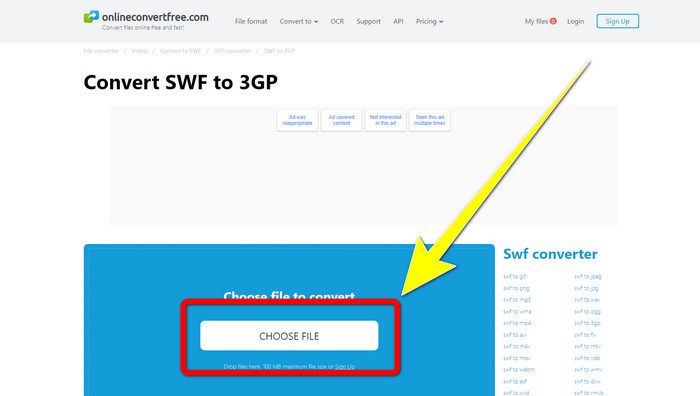
步驟 1: 前往 Online Convert Free 網站。點擊 Choose File(選擇檔案)按鈕匯入影片檔。
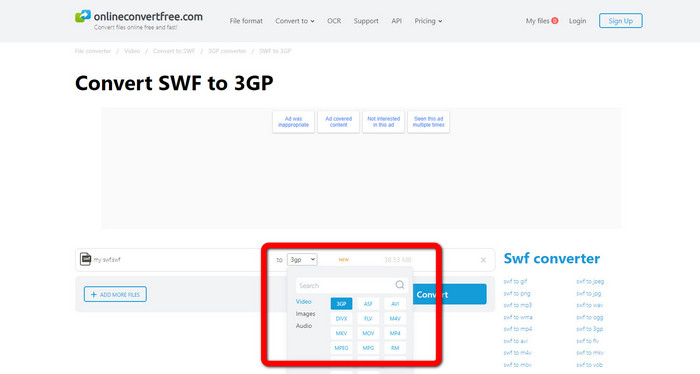
步驟 2: 匯入影片檔後,從格式選項中選擇 3GP 檔案格式。
步驟 3: 若要將檔案轉為 3GP,請按一下Convert(轉換)按鈕,並將輸出檔案儲存到桌面。
第 3 部分:SWF 與 3GP
| SWF | 3GP | |
| 描述 | 包含用 ActionScript 編寫的矢量、光柵圖形、文本和交互式內容的動畫。 | 3GPP 為 3G UMTS 服務定義的多媒體容器。 |
| 由開發 | 土坯 | 第三代合作夥伴計劃 |
| 文件類型 | Adobe Flash 文件格式 | 3GPP 多媒體格式 |
| 優點 | 通常可用於高效傳送多媒體內容。 | 幾乎適用於所有程序/設備 |
| 缺點 | 其他瀏覽器或程序不支持。 | 低質量的視頻存儲 |
第 4 部分:有關將 SWF 轉換為 3GP 的常見問題解答
1、SWF文件有音頻嗎?
- SWF 格式用於保存矢量圖形和動畫,但它也可以保存其他類型的數據,如文本、視頻和聲音。這些文件經常用於製作動畫、玩遊戲以及網站上的視頻和音頻。
2.什麼可以打開.SWF文件?
- 要打開 SWF 文件,您可以使用開發人員經常使用的 VLC 播放器或來自 Adobe 的隱藏的 Flash 播放器。
3.我可以將SWF文件轉換成其他格式嗎?
- 當然可以!最好的解決方案是在 Windows 或 Mac 上下載 Video Converter Ultimate。這款應用程式可讓你將SWF 檔案轉成 MKV及其他多種格式。
結論
以上就是轉換 SWF 為 3GP 格式的最詳細指南。多數人都偏好簡單而非複雜的方式,因此,如果你想輕鬆轉換各種檔案,建議使用 FVC Free Video Converter Online。
-
 在 Windows 和 Mac 上將 MPG 轉換為 3GP 的 3 種方法 [免費]
 如果您正在尋找將 MPG 轉換為 3GP 的方法,請閱讀本文以了解在 Windows 和 Mac 上將 MPG 轉換為 3GP 的最佳方法。
-
 在桌面上編輯、刪除和查看 3GP 元數據的最佳方式
 什麼是 3GP 元數據?如何查看、更改和編輯我的 3GP 上的標籤?如果你有同樣的問題,那麼這篇文章就是給你的。
-
 如何在 Windows、Mac 和在線上將 DIVX 轉換為 3GP
 如何將 DIVX 轉換為 3GP?如果您正在尋找答案,請閱讀這篇文章。我們將在不同轉換器的幫助下向您展示出色的程序。
