


 視頻轉換大師
 屏幕錄影大師
 影片修復
影片修復
 安全下載
安全下載將 TRP 轉換為 MKV 的 3 種輕鬆方法
你是否因為無法在媒體播放器或其他程式中播放 TRP 檔案而感到困擾?如果你也是遇到這類問題的使用者,非常建議你閱讀這篇文章。你可以將 TRP 檔轉換成 MKV,因為大多數程式都支援 MKV 格式。本文將示範如何在 Windows、Mac,以及線上,使用簡單的方法把TRP 轉成 MKV。還在等什麼?別再浪費時間了,立刻開始閱讀這篇文章吧!

第 1 部分:TRP 和 MKV 的定義
什麼是跨國激進黨?
TRP 是一種以 MPEG-2 Part 1 傳輸格式編碼的高畫質媒體檔案,常用於數位影像廣播。此外,它也用於音訊串流、輸出同步以及數位多工的影像處理,並具備優秀的錯誤校正功能。TRP 檔同時包含 AC3 音訊資料與 H.264 視訊,可透過多種影片播放程式來播放。
什麼是 MKV?
MKV,又稱 Matroska,是一種多媒體容器格式,可以在單一檔案中管理多個音訊、字幕與視訊檔。MKV 與 MP4、AVI 等其他多媒體標準不同之處在於它是開放原始碼格式,能透過開放原始碼軟體實作進行自訂。最後,MKV 檔案格式最常被用於高畫質影片以及線上影音串流。
第 2 部分:將 TRP 離線轉換為 MKV 的最簡單方法
使用 Video Converter Ultimate
您必須下載並使用 Video Converter Ultimate 才能無損地將 TRP 轉換為 MKV。使用此應用程序,您可以轉換任何您想要的視頻文件格式,包括 TRP 和 MKV。您可以在一個過程中轉換多個視頻文件,因為此工具具有批量轉換功能。此外,它的轉換過程快了 30 倍,因此您不必花費更多時間來轉換不同的文件。此應用程序支持除 TRP 和 MKV 之外的多種格式,如 5K/8K 視頻、ProRes、DV、ASF、M4V、MXF、MP4、MOV 等。最好的部分是您可以在 Windows 和 Mac 上使用此應用程序,這對所有用戶來說都是個好消息。此外,如果您想更改視頻的速度,可以使用視頻速度控制器功能。您可以將視頻速度從 0.125 倍減慢到比原始速度快 8 倍。此外,如果您想裁剪視頻,也可以這樣做。該工具還提供視頻裁剪功能,
要進一步了解這款出色的軟件,您必須下載並親自試用。
功能特色:
◆ 轉換多種文件格式。
◆ 可以製作有創意的拼貼畫。
◆ 提供Music Video Creator。
◆ 提供增強視頻的工具箱。
優點
- 比其他軟件轉換器快 30 倍。
- 具有友好的用戶界面,適合非專業用戶使用。
- 除了轉換之外還有不同的功能。
- 適用於 Windows 和 Mac。
- 轉換各種文件格式,如 FLV、MP4、MOV、WBM、GIF、AMV 等。
- 可以單獨或批量更改日期詳細信息。
缺點
- 購買訂閱以使用更多高級功能。
如果您渴望將 TRP 轉換為 MKV,請按照以下這些簡單步驟操作。
步驟 1: 在你的 Windows 或 Mac 上,按一下下方的 下載按鈕以下載 Video Converter Ultimate。下載並安裝完成後,開啟該應用程式。
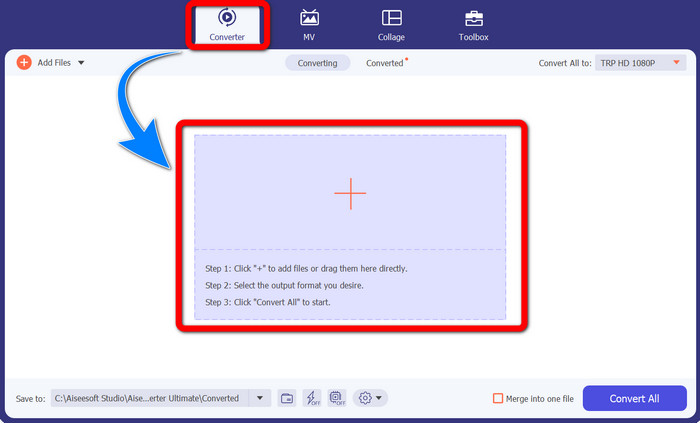
步驟 2: 啟動 Video Converter Ultimate 之後,選擇轉檔工具面板。接著,點擊「+」號以匯入你的 TRP 格式影片。
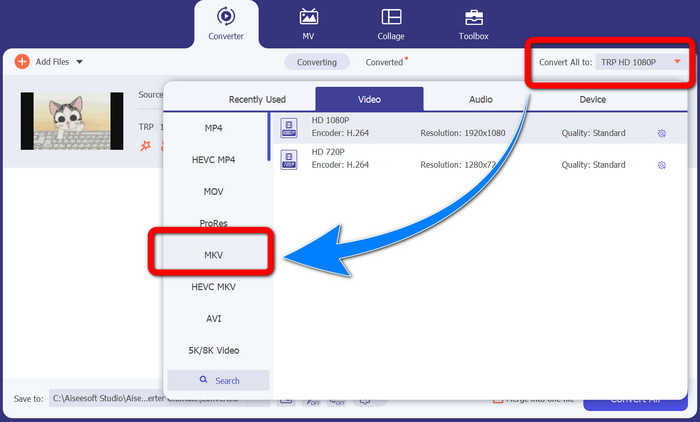
步驟 3: 匯入影片後,點擊全部轉換為圖示,於格式選項中尋找 MKV 格式並點擊它。
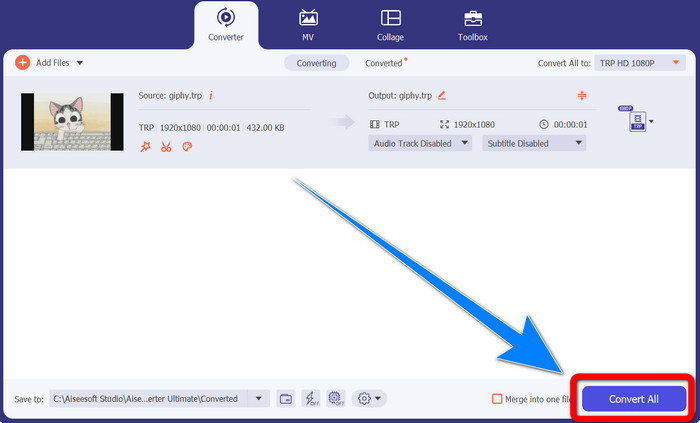
步驟 4: 然後,按一下全部轉換按鈕,將 TRP 檔轉換成 MKV 格式。
使用棱鏡視頻轉換器
Prism 是另一款可在 Windows 和 Mac 上下載的應用程式。這套軟體能輕鬆協助你將TRP 轉換為 MKV。此外,它也支援多種檔案格式,例如 AMV、MP4、DVD, VOB、MOV、DIVX、AVI、3GP 等等。不過,這款程式在 Windows 或 Mac 上安裝後的執行速度相當緩慢,轉檔過程也較耗時。而且介面較為複雜,容易讓初學者感到困惑,因此你可能需要尋找一些教學,或請進階使用者協助。如果你想下載並使用此程式,請依照以下簡易步驟操作。
步驟 1: 在 Mac 或 Windows 上下載Prism Video Converter。
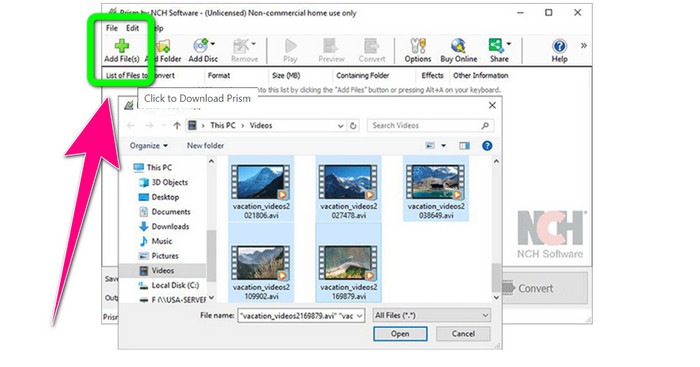
步驟 2: 按下綠色的加入檔案按鈕,匯入你的 TRP 檔案。
步驟 3: 設定輸出格式,於格式選項中點選 MKV 檔。
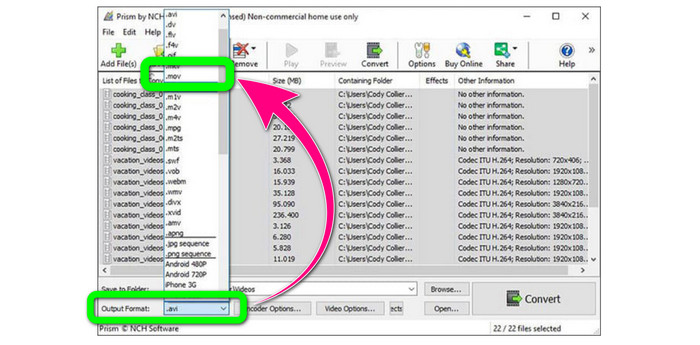
步驟 4: 最後,選擇轉換按鈕,將 TRP 檔案轉成 MKV 格式。
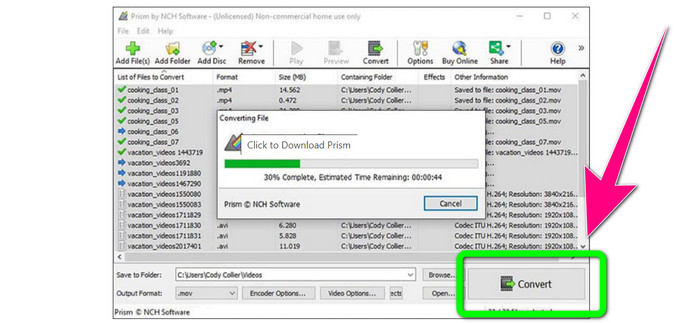
第 3 部分:將 TRP 轉換為 MKV 的在線應用程序
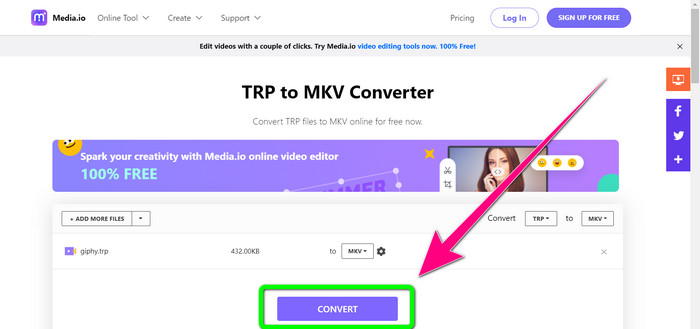
你有興趣在網路上將 TRP 轉成 MKV 嗎?那麼你可以使用 Media.io。透過這個線上工具,你可以把 TRP 轉換為 MKV。此外,它還支援更多格式,例如 MP4、AVI、WMV、MOV、FLV、DIVX、XVID、3GP 等等,也是一款音訊與圖片轉檔工具。
此外,它還能夠進行視頻編輯。您可以裁剪、修剪、合併、循環播放視頻等。但是,當涉及到轉換過程時,它很慢。您需要稍等片刻才能完成該過程。它還在屏幕上顯示令人不安的廣告。此外,它需要快速的互聯網連接才能正常運行。如果您想使用 Media.io 將 TRP 轉換為 MKV,請按照以下步驟操作。
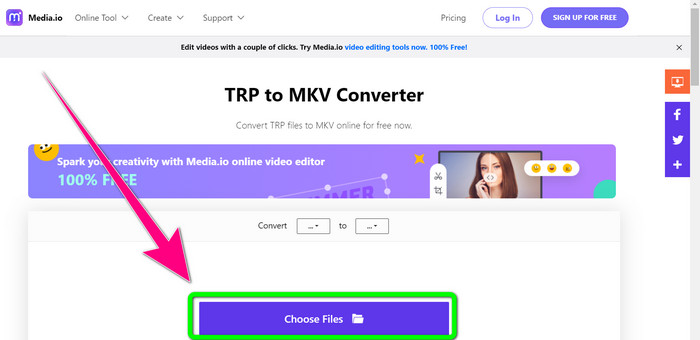
步驟 1: 前往 Media.io 的官方網站。然後點擊選擇檔案按鈕,加入你的 TRP 格式影片。
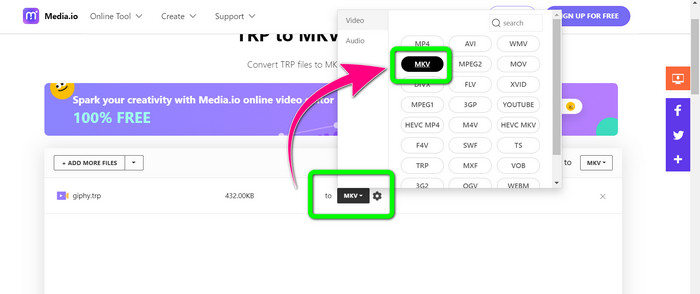
步驟 2: 加入影片後,前往格式選項中尋找 MKV 檔,並選取它。
步驟 3: 最後一步,按下轉換按鈕,等待轉檔完成,接著將影片儲存為 MKV 檔案格式。
延伸閱讀
第 4 部分:有關將 TRP 轉換為 MKV 的常見問題解答
為什麼我的電視不支持 MKV 文件?
MKV 文件只是一個視頻容器,可以使用許多編解碼器進行編碼,例如 HEVC、MPEG-4、VP9 等。電視與這些編解碼器的兼容性很差,這就是您無法在電視上播放 MKV 的原因。
MKV 文件質量好嗎?
MKV 文件格式在高質量視頻中很流行。它還具有更大的文件大小。也就是說MKV是一個容器,對質量沒有影響。
我可以在我的電腦上使用快速轉換器嗎?
絕對,是的!如果您正在尋找一個快速的軟件轉換器,那麼 Video Converter Ultimate 是最好的應用程序。您可以更快、更輕鬆地轉換文件。
結論
綜合以上各種將TRP 轉換成 MKV的應用程式與方法,我們強烈建議使用 Video Converter Ultimate。它能以超高速轉檔速度,同時轉換多個檔案。那還等什麼?親自試試看,發掘更多功能吧。
-
 2 款最令人印象深刻的可將 TRP 轉換為 MOV 的軟件
 無法將 TRP 文件轉換為 MOV?然後按照本文中提供的指南進行操作。當我們挑選出您可以用來轉換 TRP 文件的最佳工具時。
- 2 款最令人印象深刻的可將 TRP 轉換為 MOV 的軟件
無法將 TRP 文件轉換為 MOV?然後按照本文中提供的指南進行操作。當我們挑選出可用於轉換 TRP 文件的最佳工具時
-
 2 個專業轉換器將 TRP 轉換為 WMV 格式 [指南]
 您是對 TRP 文件感到困惑的用戶之一嗎?如果是這樣,讓我們繼續閱讀本文以了解如何將 TRP 轉換為 WMV 並了解更多信息
