


 視頻轉換大師
 屏幕錄影大師
 影片修復
影片修復
 安全下載
安全下載將 WEBM 轉換為 DIVX 的 4 種直接方法
Converting video files is the best procedure to do when the video is not supported in a certain program. In this post, you will learn the easiest methods you can do to transform your WEMB file to DIVX format. You can find many WEBM to DIVX converters online and offline, but some of them are not effective and complicated to utilize. In that case, we tested numerous applications to show you the most useful and excellent converters with understandable methods you can download on your Mac, Windows, and online. Are you excited to know these outstanding methods? Then let’s go and read this informative article.

第 1 部分:以最佳質量將 WEBM 離線轉換為 DIVX
Converting different files is difficult, especially when you don’t know the process and the application you must use. So, do you want to convert the WEBM file to DIVX with excellent quality? Then download the Video Converter Ultimate on your Windows and Mac. This application is easy to use when converting various files because it has basic methods and a friendly user interface, which is why it won’t complicate the procedures. In addition, it supports 1000+ formats, including WEBM, DIVX, ASF, OGV, MTV, GIF, MPEG, DPG, MOV, M4V, MP4, FLV, etc. Moreover, Video Converter Ultimate can enhance your videos because it has great video editing tools. We can do more things on your WEBM video. To compress your video, go to the Toolbox and select Video compressor. Also, to add watermarks to your WEBM video, select the Video Watermark Tool.
功能特色
◆ 轉換許多視頻多達 1000 多種文件格式。
◆ 文件轉換速度比其他轉換器快 30 倍。
◆ 為拼貼製作者提供免費的過濾器和主題。
◆ 能夠製作音樂視頻。
◆ 提供了一個用於改進視頻的工具箱,例如視頻壓縮器、色彩校正、音頻同步器、增強器等。
優點
- 它具有易於使用的界面,適合初學者。
- 這是一個免費下載的應用程序。
- 它允許批量轉換。
- 能夠在不損失質量的情況下轉換文件。
缺點
- 要使用專業版,請購買訂閱。
使用 Video Converter Ultimate 將 WEBM 轉換為 DIVX。
Step 1: Install the Video Converter Ultimate on your computer. Then, launch it.
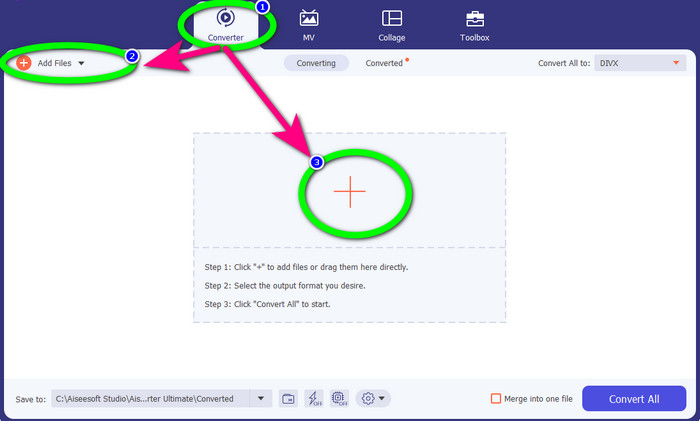
Step 2: When the interface shows up, select the Converter panel and click Add Files button or the Plus icon to add the WEBM file.
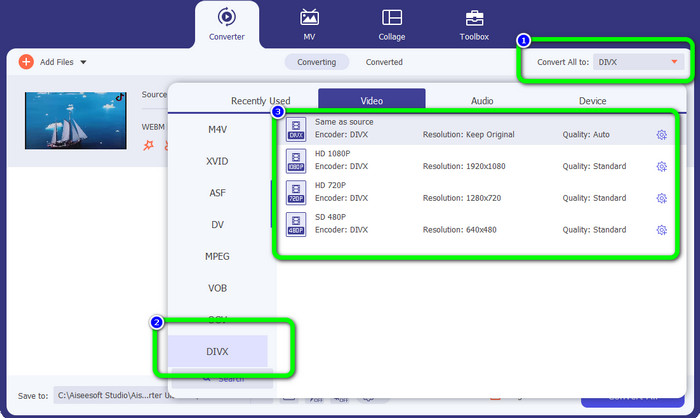
Step 3: After adding the WEBM file, click the Convert All to button. Select your desired format, which is the DIVX file format. You can also pick the quality of your video from 480p to 1080p.
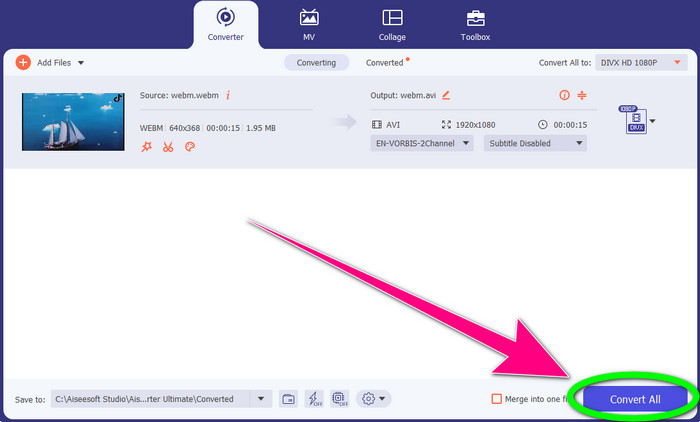
Step 4: You can finally click the Convert All button to convert the WEBM file to DIVX format.
第 2 部分:將 WEBM 在線轉換為 DIVX 的 3 種方法
使用 WEBM.to
Are you searching for a WEBM to DIVX converter online? WEBM.to is the tool you don’t want to miss. It can convert different files using your browsers, like Google Chrome, Mozilla Firefox, Microsoft Edge, etc. It supports file formats such as MOV, FLV, M4V, TS, MT2S, and more. Like the converter above, WEB.to is easy to use because it only focuses on converting files. Lastly, your file is safe here because your file will be automatically deleted after 24 hours. However, the conversion process is slow. It also won’t perform well if you don’t have a stable internet connection. Let’s convert your WEBM file to DIVX using this online tool.
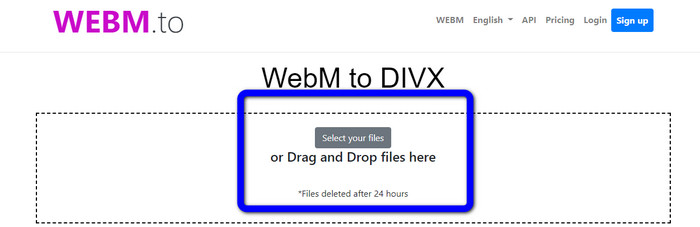
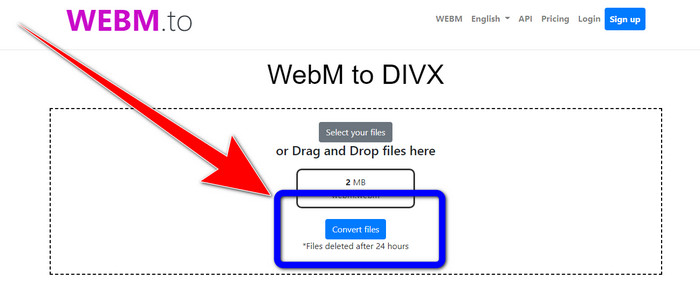
Step 1: Visit the WEBM.to website. Click the Select your files button to import your WEBM file. You can also drag your file in the box.
Step 2: Click the Convert Files button after adding the WEBM file. Wait for the process of converting the file and save your final video.
使用 Evano
You can also use Evano to convert WEBM to DIVX. This online tool is also reliable. It can convert different file formats, like MP4, AVI, DIVX, XVID, 3GP, FLV, VOB, MOV, etc. So, you can convert WEBM to FLV using this tool. In addition, EVANO is not just a converter but also an audio editor and optimizer, so you can do more things with this tool. But this application has a limit when using the free version. You can only convert with a maximum file size of 100Mb. It means that you must buy a subscription to get unlimited file sizes. Also, you must have a fast internet connection. It is a web-based application, and an internet connection is highly recommended. Follow the steps below to convert WEBM to DIVX using Evano.
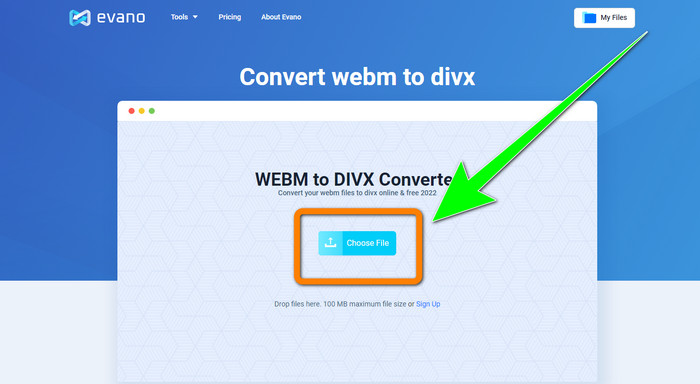
Step 1: Visit the website of Evano. Press the Choose File button to add the WEBM file.
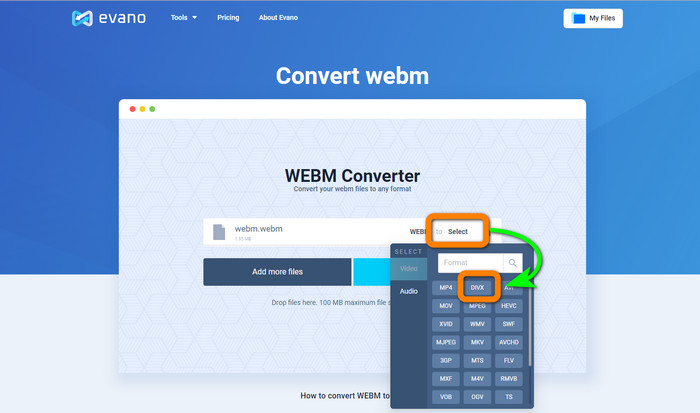
Step 2: Click the Select button to proceed to the format options. Then, select the DIVX file format.
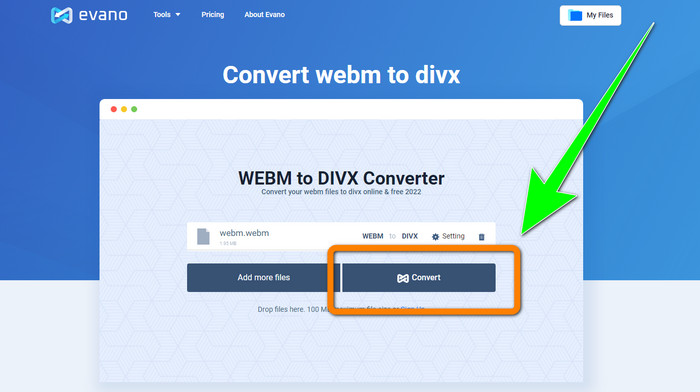
Step 3: For the final step, click the Convert button. Patiently wait for the conversion process and save the video with a DIVX file format.
使用 FileProInfo
FileProInfo is one of the online converters you can easily use to convert WEBM to DIVX. With the help of this online tool, you don’t need to worry about how to convert your file to other formats. You also can use this tool to convert WEBM to MKV. Moreover, it has simple methods for converting files. In addition, aside from converting, you can use this tool for plagiarism checks, complete website reviews, ping website tools, and more. However, there are times when FileProInfo is not working. Also, when it comes to the process of converting files, it is too slow. Like the other online converters, it has a maximum file size of 150MB. So, let’s proceed with converting the WEBM file to DIVX using his online tool.
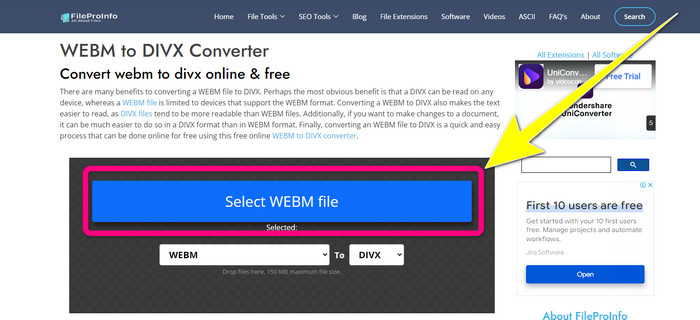
Step 1: Go to the website FileProInfo. Click the blue box to insert the WEBM file.
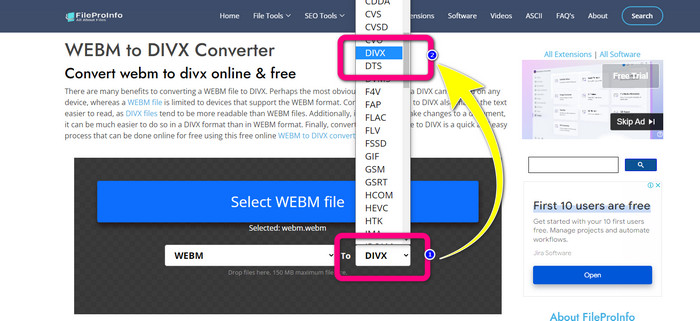
Step 2: After you insert the WEBM file, proceed to the format options and select the DIVX file format.
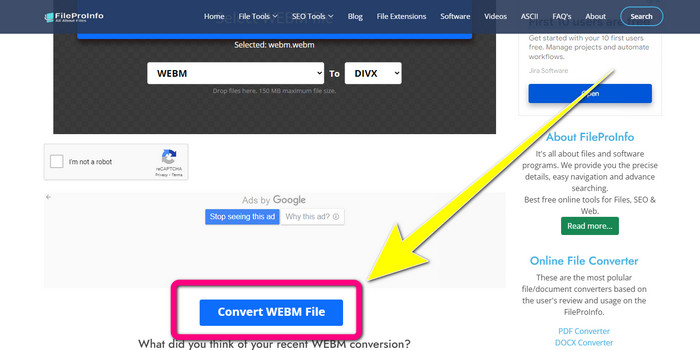
Step 3: Scroll down, and click the Convert WEBM file button.
第 3 部分:WEBM 與 DIVX
| WEBM | DIVX | |
| 視頻文件擴展名 | 一種名為 WebM 的開源、免版稅多媒體格式用於互聯網內容流。它包括使用 Oupus 或 Vorbis 編解碼器的壓縮音頻流和使用 VP8 或 VP9 的壓縮視頻流。由於其輕量級設計和實時分發功能,它已成為在線流媒體視頻最流行的文件格式之一。 | 一種高質量、高壓縮率的視頻編解碼器,支持高達 1080 HD 的分辨率,並將視頻壓縮到標準尺寸的一小部分,而不會犧牲太多質量。 |
| 由開發 | 谷歌公司 | DIVX 網絡公司 |
| 優點 | 忠誠免費和開源,支持大多數編解碼器。 | 體積小,免費使用 |
| 缺點 | 缺乏互動元素 | |
| 副學士課程 | VLC 媒體播放器、Mozilla Firefox、谷歌瀏覽器、Windows 媒體播放器 | XBox 360、汽車音響、DVD 播放器、藍光播放器 |
第 4 部分:有關將 WEBM 轉換為 DIVX 的常見問題解答
1、WEBM轉DIVX有什麼好處?
DIVX 文件格式比 WEBM 文件更具可讀性和廣泛接受性。此外,轉換為 DIVX 文件有助於提高安全性。
2、WEBM和MP4哪個更好?
關於視頻文件大小,WEBM 小於 MP4。但是,就質量和兼容性而言,MP4 更好。
3.WEBM有聲音嗎?
是的當然。開源 WebM 項目推廣 WebM,這是一種可以同時容納音頻和視頻的數字多媒體容器文件格式。 WEBM 只是一種容器格式。其中包含 Matroska 多媒體容器格式的一個子集。
結論
These are the most excellent applications you can use to convert WEBM to DIVX with effective methods. So, what are you waiting for? Download and use Video Converter Ultimate now. It can convert your files faster and easier.
-
 關於如何將 Xvid 轉換為 DivX 的易於學習的方法
 您是否正在尋找免費將 Xvid 轉換為 DivX 的最佳解決方案?本文將幫助您解決問題。所以,繼續閱讀這篇文章。
-
 如何在沒有質量損失的情況下將 MPG 轉換為 DivX
 您是否正在尋找可用於將 MPG 轉換為 DivX 的無故障應用程序?本文將為您提供您必須嘗試的不同有效方法。
-
 如何在 Windows、Mac 和在線上將 DIVX 轉換為 3GP
 如何將 DIVX 轉換為 3GP?如果您正在尋找答案,請閱讀這篇文章。我們將在不同轉換器的幫助下向您展示出色的程序。
