


 視頻轉換大師
 屏幕錄影大師
 影片修復
影片修復如何輕鬆地將 WebM 文件轉換為 WMV
WebM is a media file format supported by most web browsers like Google Chrome, Mozilla Firefox, Microsoft Edge, Opera, and more. It is being used on HTML5 videos and HTML5 audios for streaming purposes. However, WebM files do not support Mac and iOS devices without using other tools. Therefore, if you want to open WebM files on any device, we recommend converting it to a WMV file widely supported by almost all devices and players. In this article, we listed the best WebM to WMV Converters for you to try.

第 1 部分。 將 WebM 無損轉換為 WMV 文件的三大工具
FVC Video Converter Ultimate
FVC Video Converter Ultimate is widely popular on the entire web when talking about file converters. This file converter allows you to convert your WebM file to a WMV file easily. It also has unique features in which you can edit your file, enhance, and even compress your file without the quality being ruined. In addition to that, this tool supports varieties of conversion that you need, including WMV files. Therefore, if you want to convert a WebM file to WMV efficiently, this is the app for you.
優點
- 允許您編輯、增強和壓縮文件。
- 可以轉換各種文件格式,包括 WebM、WMV、MP4、M4V、MOV、AVI 等。
- 易於使用的界面。
缺點
- 您需要先下載該應用程序,然後才能使用它。
FVC免費視頻轉換
FVC Free Video Converter is a free online converter that allows you to convert various file formats, including WebM to WMV, MP4, FLV, MOV, and more. This converter is also easy-to-use, because of its simple interface. Moreover, this converter does not need to be downloaded because it is web-based. However, since it is an online converter, you may experience slow conversion because it is an internet-dependent converter. Nevertheless, many have used this converter and approved it as one of the best online converters to convert your WebM to WMV free online.
優點
- 不包含令人不安的廣告。
- 允許您轉換多種文件格式,包括 WebM、WMV、MP4、FLV、WMA 等。
- 您無需下載該應用程序。
缺點
- 轉換可能很慢。
- 只有有限的功能可以使用。
SavetheVideo.com
SavetheVideo.com is a free online converter that converts major video file formats. With this converter, you can convert videos from famous social media applications like Facebook, Twitter, Instagram, TikTok, and more. Despite that, you may encounter converting files, mainly if the file is not supported.
優點
- 它可以在任何設備上轉換多達 420 多種格式的視頻。
- 您可以從 android 和 iphone 設備轉換。
缺點
- 它有一個難以遵循的界面。
- 您可能會遇到轉換緩慢。
第 2 部分。如何使用 FVC Video Converter Ultimate 將 WebM 轉換為 WMV
This part of the article will show you how to convert WebM files to WMV file format using the FVC Video Converter Ultimate. Because this converter is what we think is the best among the converters that trend in the market nowadays. Among other WebM to WMV converters available today, this online free converter shows promising performance, especially with its great features.

FVC Video Converter Ultimate
5,689,200+ 次下載- 它支持在幾次點擊內將 WebM 轉換為 WMV、MP4、MOV、MKV 或 200 多種格式。
- 它提供批量轉換以同時轉換多個 WebM 文件。
- 超快速轉換可讓您在幾秒鐘內完成閃電般的轉換過程。
- 它具有編輯功能,您可以在其中旋轉、剪切、合併等。
Steps in converting WebM to WMV using FVC Video Converter Ultimate:
Step 1. For you to download this converter, click the download button below. Follow the installation process, then open the app.
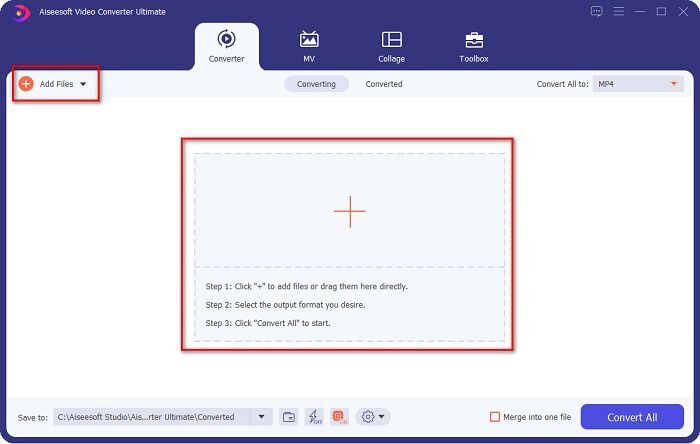
Step 2. After opening the application, click the Add Files button, or you may also click the + button to upload your WebM file in the tool's main interface. And a computer folder will appear, where you will locate your WebM file. Then press the Open button to upload your file. Additionally, you can add more WebM files because this tool supports batch conversion.
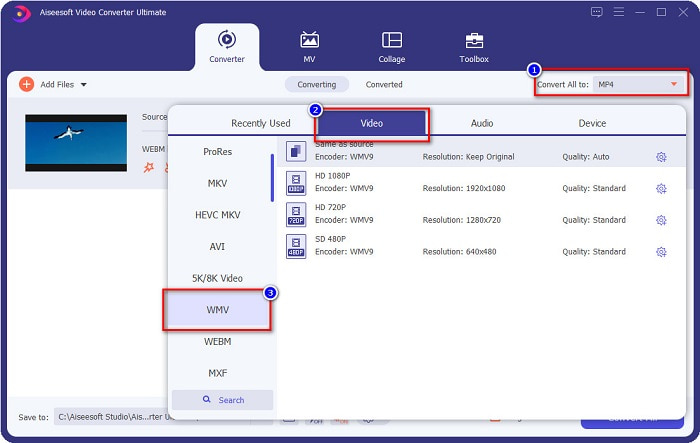
Step 3. In the upper right corner of the software, you will see the Convert All to button, click it, then select the WMV format on the list to change the file format from WebM to WMV format.
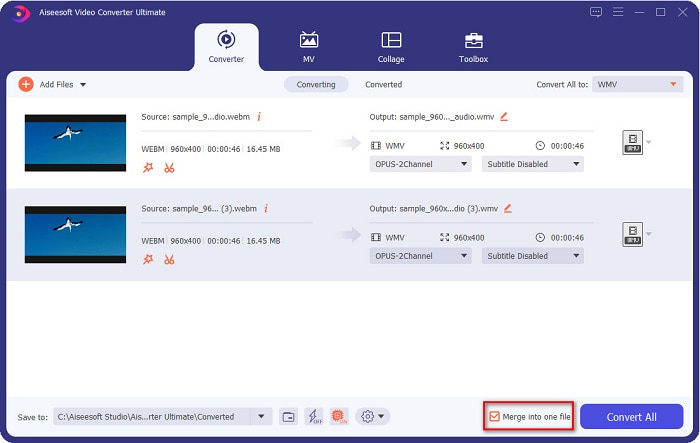
Optional. Do you want to know how to merge multiple WebM files into one? This ultimate tool has a compelling feature to merge them into one file. To do this, tick the box located in the bottom right corner of your software. In doing so, when you convert your files, they will automatically merge into one file. But if you do not wish to merge your files, you can skip this part and proceed to the next step.
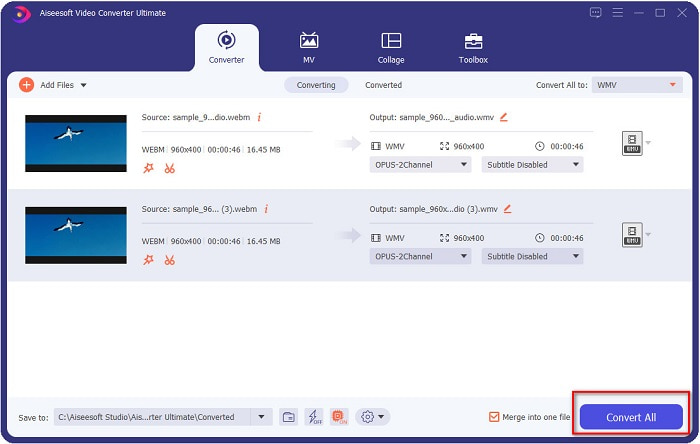
Step 4. When you select the file format that you want, click the Convert All button to start converting your WebM file to WMV. And voila! Your WebM file is now converted to a WMV file!
您可以通過這些簡單的步驟輕鬆地將您的 WebM 文件轉換為 WMV 文件。
Part 3. 關於 WebM 和 WMV 的擴展知識
為了更好地理解這兩個文件,我們將在本文的這一部分解決它們。
WebM file is a video file format that widely supports web browsers. HTML5 websites use this format for video streaming purposes. Moreover, this type of file contains video streams compressed with VP8 or VP9 codecs. While on the other hand, Windows develops WMV or Windows Media Video; therefore, Windows System usually plays this type of file. Many encoders also support this type of file. In addition to that, this file format uses a compressor that helps your file make it smaller in size without ruining the quality.
第 4 部分。關於將 WebM 轉換為 WMV 的常見問題解答
終極視頻轉換器可以將 WebM 文件轉換為 MP4 文件格式嗎?
Certainly. Using FVC Video Converter Ultimate can convert your WebM file into MP4. You can click this link and read thoroughly for more information about converting your WebM file to MP4 file format.
QuickTime 是否支持 WebM 文件?
QuickTime does not support WebM file formats. Because QuickTime does not contain many codecs like other media players, you can convert your WebM file to file formats like MOV, which is supported by the codecs of QuickTime. To have more Infos about converting WebM to MOV, click this link.
Internet Explorer 是否支持 WebM 文件?
是的。 Internet Explorer 支持 WebM 文件。儘管如此,Internet Explorer 已經被淘汰了。
結論
To sum it all up, the WebM to WMV converters presented above will help you convert your WebM files to WMV files easily. Moreover, the tools shown above have different features which allow you to do more when converting. But we believe that FVC Video Converter Ultimate is the best tool that helps you meet your needs. Still can't decide which converter to use? Download it now, and try it!
-
 將 WebM 轉換為 MP3 而不損失音質的 3 種方法
 有問題,因為 WebM 文件不能用於播放您保存的音頻?然後閱讀本文,因為我們通過將 WebM 轉換為 MP3 提供了有效的幫助。
-
 3 用於將 WebM 文件轉換為 AVI 格式的令人驚嘆的軟件
 不知道如何將 WebM 轉換為 AVI?那麼讓我們開始閱讀這篇文章。正如我們在 WebM 上指定的所有詳細信息以及您可以用來轉換的三個轉換器。
-
 WebM 到 FLV 轉換器免費在 Web 和桌面上的最佳選擇
 在您的智能手機上播放 WebM 文件是否有同樣的問題?然後花5分鐘閱讀這篇文章,了解如何將WebM轉換為FLV。
