


 視頻轉換大師
 屏幕錄影大師
 影片修復
影片修復
 安全下載
安全下載將 Xvid 轉換為 DivX 的 4 個最佳應用程序
在這個現代時代,影片隨處可見。人們喜歡觀看電影、短片等。不過,有時會突然遇到影片與某個平台不相容的情況。最常見的原因之一,就是該平台不支援影片的檔案格式。這種情況下,最好的解決方式就是把影片轉換成另一種檔案格式。在轉換檔案格式時,你需要找到一款優秀的軟體,幫助你把一種格式轉成另一種格式。如果你想學習如何將Xvid 轉成 DivX,繼續往下讀即可了解詳情。

第 1 部分:在計算機上轉換的最佳應用程序
Video Converter Ultimate是一款優秀且出色的軟體應用程式,你可以用它在電腦上將 Xvid 轉換為 DivX。此應用程式同時支援 Windows 和 Mac。此外,它支援多種檔案格式,如 GIF、FLV、AVI、MOC、MKV 等。這款轉檔工具可以將與其他程式或裝置不相容的檔案轉換成可用的格式。你也可以在不失真、不降低品質的情況下進行轉檔。而且,Video Converter Ultimate 操作簡單、介面友善,非常適合想要輕鬆轉檔的新手使用。此外,這款應用程式不只在各種檔案轉換方面表現優異,還內建多種編輯工具可供你使用,例如拼貼製作工具、影片倍速調整、影片壓縮、音訊壓縮、浮水印新增與移除、影片裁切、拼貼製作工具、新增浮水印、色彩校正等。如果你想將 Xvid 轉成 DivX,請依照下列簡單步驟操作。
步驟 1: 在電腦上下載Video Converter Ultimate。安裝完成後啟動此應用程式。
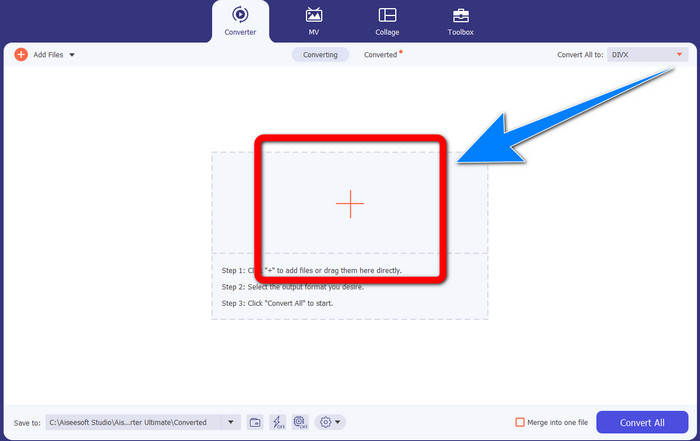
步驟 2: 啟動Video Converter Ultimate後,前往轉換器(Converter)功能。接著按一下加號(Plus)按鈕,匯入你想要轉成 DivX 的 Xvid 影片檔。
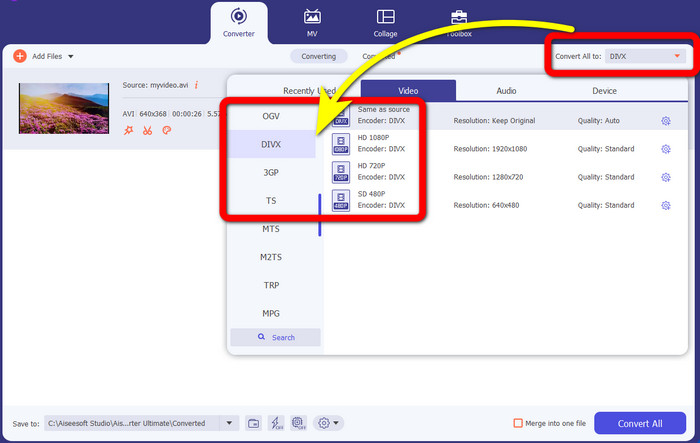
步驟 3: 匯入 Xvid 影片檔後,按一下全部轉換為(Convert All to)按鈕。然後選擇DivX檔案格式,再挑選你想要的畫質,如 480p、720p 或 1080p。
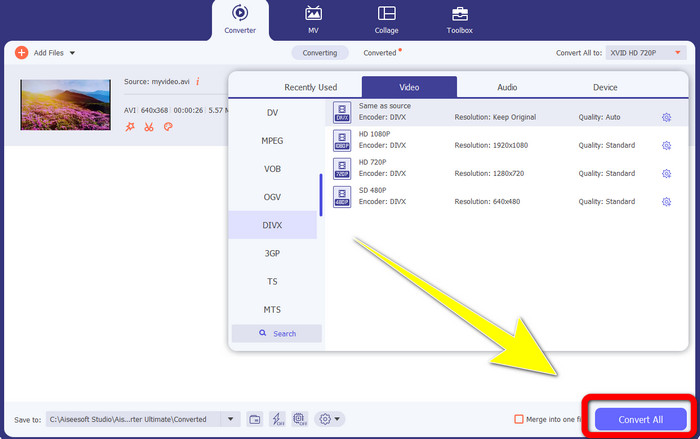
步驟 4: 將影片的格式從 Xvid 變更為 DivX 後,按一下全部轉換(Convert All)按鈕,即可開始轉檔並儲存最終輸出檔。接著你就可以在裝置上試播已轉換的檔案,確認是否已經相容。
第 2 部分:將 Xvid 轉換為 DivX 的免費軟件
另一款你可以免費使用的影片轉換工具是HitPaw Video Converter。你可以在 Windows 和 Mac 上下載這款應用程式。此軟體可以幫你將 Xvid 轉換成 DivX。此外,它還能轉換超過 1000 種以上的檔案格式,例如 MP4、M4V、MOV、MKV、WMV、MPEG、AVI、FLV 等等。而且,HitPaw Video Converter 是一款操作簡單、適合各種使用者的應用程式。使用這款軟體,你可以更輕鬆地批次轉換多個檔案。不過,安裝過程可能需要花一些時間,而且進階功能只在付費版本中提供。如果你想把 Xvid 轉成 DivX,請依照以下步驟進行。
步驟 1: 在 Windows 或 Mac 上下載HitPaw Video Converter。安裝完成後啟動程式。
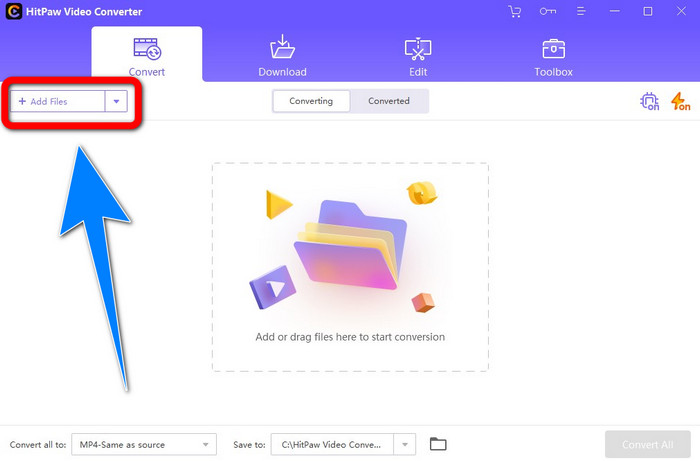
步驟 2: 按一下新增檔案(Add File)按鈕,加入你的 Xvid 檔案。
步驟 3: 前往格式選項(format options),然後按一下DivX 檔案。
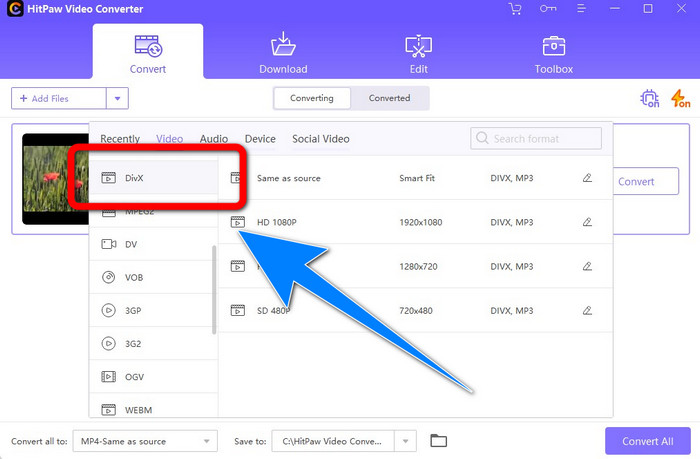
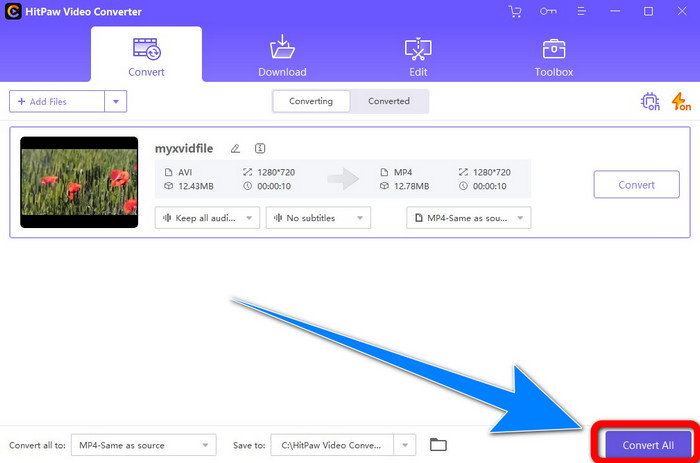
步驟 4: 選擇 DivX 檔案格式後,按一下全部轉換(Convert All)按鈕,以轉換並儲存最終輸出檔。
第 3 部分:使用在線工具將 Xvid 轉換為 DivX
1.使用Evano
Evano 是一款相當可靠且實用的軟體,你可以用它將 Xvid 檔案轉換為 DivX 檔案。此外,此軟體免費使用,轉檔步驟簡單,十分適合新手。它也支援各種音訊與視訊格式。音訊方面,支援 MP3、WAV、FLAC、M4R、DTS、AAC、MP2 等多種格式;視訊方面,支援 DivX、Xvid、AVI、MPEG、MKV、MOV、MJPEG、WEBM 等。不過,此軟體也有一些限制:每天最多只能轉換約 10 個檔案,對於需要大量轉檔的使用者來說並不理想。此外,轉檔速度較慢,可能需要幾分鐘。如果你想使用 Evano 將 Xvid 轉成 DivX,請依照以下步驟進行。
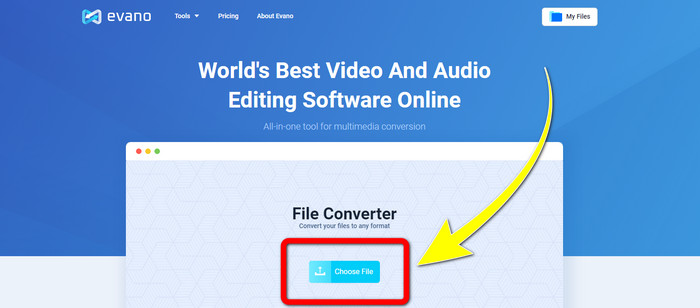
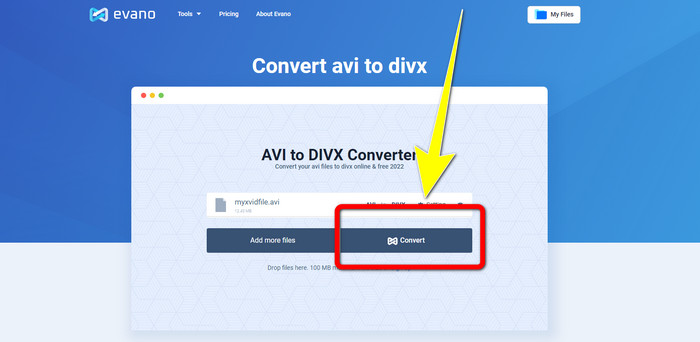
步驟 1: 前往 Evano 的官方網站。然後點選選擇檔案(Choose file),加入你的 Xvid 影片檔。
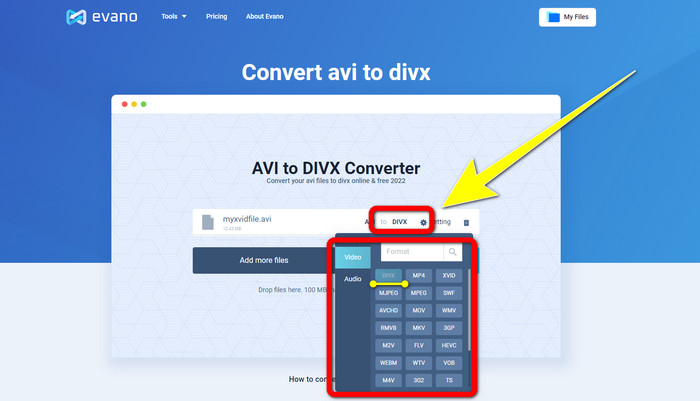
步驟 2: 匯入影片檔後,前往格式選項(Format options),選擇DivX 檔案格式。
步驟 3: 按下 DivX 檔案後,點選轉換(Convert)按鈕。等待轉檔過程完成後,再下載(Download)你已轉換好的檔案。
2. 使用 AnyConv
如果你正在尋找另一款能在線上協助你將 Xvid 轉換成 DivX 的實用工具,AnyConv 就是你可以使用的軟體。此外,你無需購買訂閱,因為這款工具是免費的。而且它支援許多音訊、視訊與圖片格式,例如 3GP、DIVX、MOV、FLAC、FLV、H264、JPEG、JPG、MP3、MP4、MPEG 等。這款軟體的操作也非常簡單,只需要三個步驟就能把 Xvid 檔案轉成 DivX。不過,AnyConv 的轉檔速度偏慢,而且有時軟體運作並不穩定。但如果你想用這個線上工具轉換各種檔案格式,可以依照下列步驟操作。
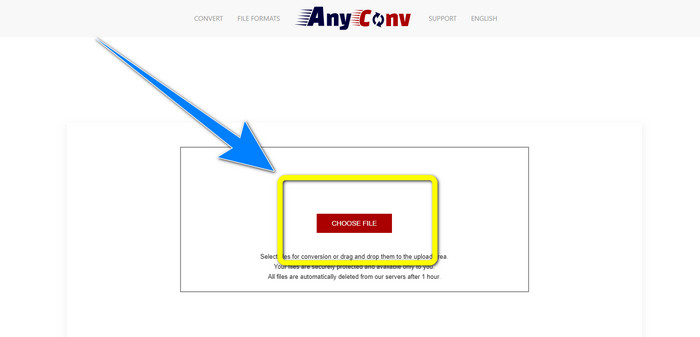
步驟 1: 造訪AnyConv的官方網站。按一下選擇檔案(Choose File)按鈕,匯入你想要轉換的影片。
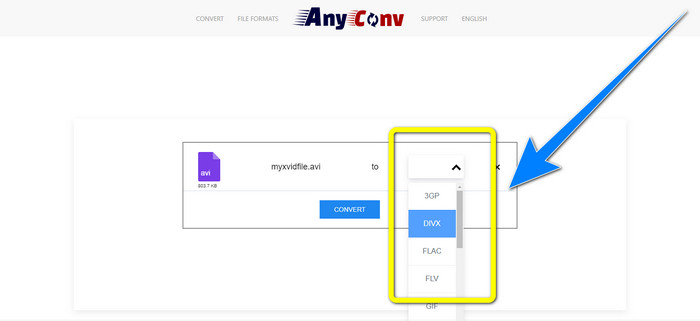
步驟 2: 匯入檔案後,前往格式選項(format options),選擇DivX格式。
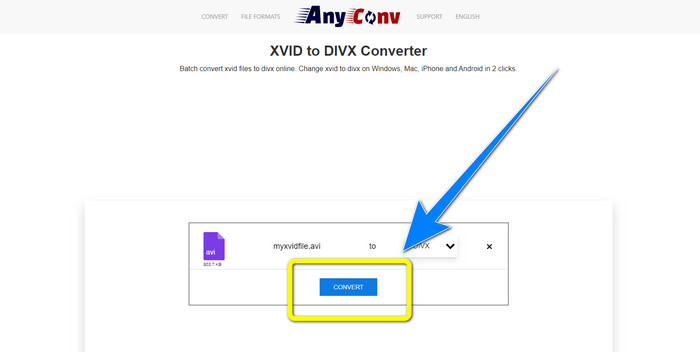
步驟 3: 然後按一下轉換(Convert)按鈕。待轉檔完成後,下載你已轉換的檔案並儲存到裝置中。
相關內容:
第 4 部分:Xvid 和 DivX 介紹
Xvid 是一款基於 MPEG-4 格式、依據 GNU 通用公共授權條款(GNU General Public License)發佈的軟體。它提供足夠的壓縮率,能讓一整部 DVD 長片塞進一張 CD 裡。此外,它最初源自 DivX,並且是 DivX 的直接競爭對手。而且,Xvid 是較新的技術,所提供的技術也優於許多其他檔案格式。另一方則是DivX,它是市面上歷史最悠久的影片編解碼器之一,同樣屬於 MPEG-4 家族。不過,DivX 檔案的檔案大小相較其他格式更小。最大優點是,DivX 檔在多種作業系統與裝置上都有良好的相容性。
第 5 部分:有關將 Xvid 轉換為 DivX 的常見問題解答
將我的 Xvid 轉換為 DivX 文件需要多長時間?
視頻轉換過程的速度將取決於您使用的應用程序。有些應用程序只需幾秒鐘即可轉換,有些則需要一段時間。此外,它仍然取決於視頻的文件大小。
我可以使用我的 Mac 將 Xvid 轉換為 DivX 文件嗎?
當然可以!你可以在 Mac 上將 Xvid 轉成 DivX 檔案。適合你裝置的應用程式就是Video Converter Ultimate。它同時支援 Windows 與 Mac。此外,它的轉檔速度比其他應用程式更快,可幫助你更迅速完成轉換。
我還可以使用 Video Converter Ultimate 將我的 MP4 文件轉換為另一個文件嗎?
是的你可以! Video Converter Ultimate 支持多種視頻文件格式,例如 MP4、WEBM、MXF、FLV、GIF、XVID、DIVX、AVI、5K/8K 視頻等。這樣,您就可以使用此應用程序轉換不同的文件格式。
為什麼我需要將我的文件轉換為另一種格式?
有時您必須將文件轉換為其他格式,以使其與您的設備更兼容。
結論
由此可見,將 Xvid 轉成 DivX 非常重要。這不只是單純更改檔案格式,而是關係到你能否在特定裝置上順利播放影片、不遇到任何問題。轉檔是最佳的解決方案,特別是當影片在你的裝置上格式不合或不相容時。此外,如果你想轉換更多檔案並把它們改成其他格式,最值得信賴、最優秀的轉檔工具,就是Video Converter Ultimate。
-
 將 XviD 轉換為 MOV 的前 2 個推薦轉換器 [在線和離線]
 找出可用於將 XviD 文件轉換為 MOV 格式的 2 種建議轉換器仔細閱讀本文,了解如何轉換 Xvid 文件。
-
 如何在不損失視頻質量的情況下將 XviD 轉換為 AVI [2021]
 您想將您的 XviD 文件轉換為 AVI 嗎?如果是這樣,請閱讀本文,因為我們會更多地討論 XviD 以及如何將您的 XviD 文件轉換為 AVI 格式。
-
 如何免費在線和離線將 MKV 轉換為 DivX
 您是否正在尋找免費將 MKV 轉換為 DivX 格式的最佳方法。繼續閱讀以了解最佳 MKV 到 DivX 在線和離線轉換器。
