


 視頻轉換大師
 屏幕錄影大師
 影片修復
影片修復下載 5 種最佳工具,只需點擊幾下即可使視頻速度提高 2 倍
有時候,你會需要將影片加速播放,例如提升到2 倍速影片。因為有些片段你想略過,或者你希望影片播放得更快,好縮短觀看時間。如果你想學習如何讓你的影片加速播放,那就繼續閱讀這篇文章。藉此你可以充分了解該怎麼做,以及為什麼應該使用 2 倍速。

第 1 部分。什麼是 2x 視頻?
速度觀看是觀看加速到其自然播放速度的視頻的行為。只需調整我們正在觀看的視頻的速度;它可以以不同的方式幫助我們。因此,如果您想知道將自然速度視頻轉換為 2 倍視頻速度有什麼好處。然後閱讀下面的詳細信息以了解更多信息。
觀看加速影片的好處。
◆如果您以2 倍速播放視頻,您可以輕鬆確定該視頻是否值得觀看。這可能適用於持續時間較長的視頻,並且大部分時間以正常速度觀看所有視頻都很無聊。
◆它可以讓我們比正常播放速度節省很多時間。在這種情況下,如果您必須觀看 2 個或更多時長為 15 分鐘的視頻,最好將它們的觀看速度提高 2 倍。比以正常速度觀看它更快地吸收細節。因此,您可以在這段時間內觀看 2 個視頻,而不是在 15 分鐘內觀看 1 個視頻。
◆喜歡看快播視頻的人,大多是喜歡在一分鐘內記住所有內容的人。這對忙碌的人或匆忙的人最有效。
◆以2倍的速度播放視頻會更好地提高和訓練您的注意力和聽力技巧,而不是正常速度。現在,您知道加快視頻速度有什麼好處了。現在是使用可幫助您提高視頻速度的工具的正確時機。下一部分將討論您需要使用的不同工具。
第 2 部分。 如何製作 2x 視頻
如果你想把影片調成 2 倍速播放,不妨試試這款超好用的影片編輯工具——Video Converter Ultimate。這個工具已經幫助許多使用者解決各式各樣的問題,尤其是在轉檔、製作 GIF、影片增強等方面。因此,想要讓你的影片播放得更快,靠這個工具就能輕鬆完成。另外,在你調整影片速度的同時,也可以在下方預覽 2 倍速的播放效果,以判斷這個速度是否適合你。現在,就依照以下步驟來了解如何變更影片的播放速度。
如何將視頻加速至 2 倍速度的步驟
步驟 1. 將此工具下載到桌面,下載完成後安裝。
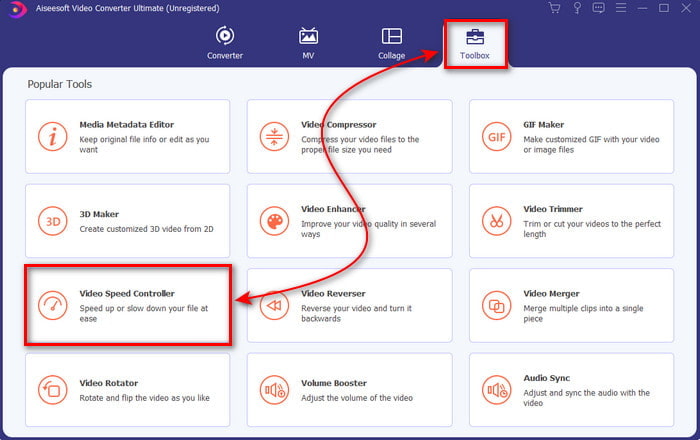
步驟 2. 接著前往工具箱,並找到影片變速器(Video Speed Controller)。
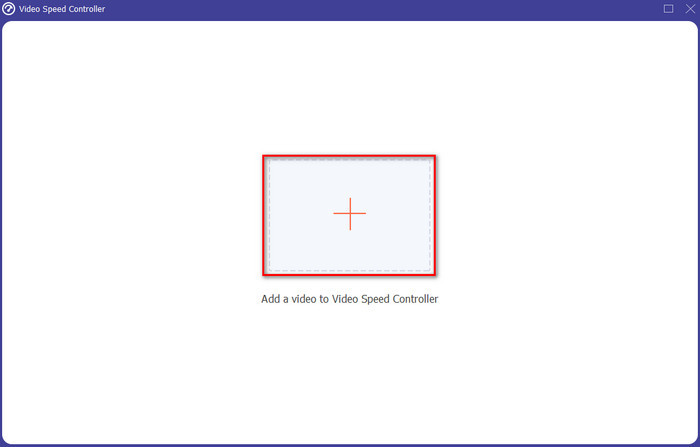
步驟 3. 點擊 + 按鈕匯入你想要以 2 倍速觀看的檔案,然後點擊開啟以繼續。
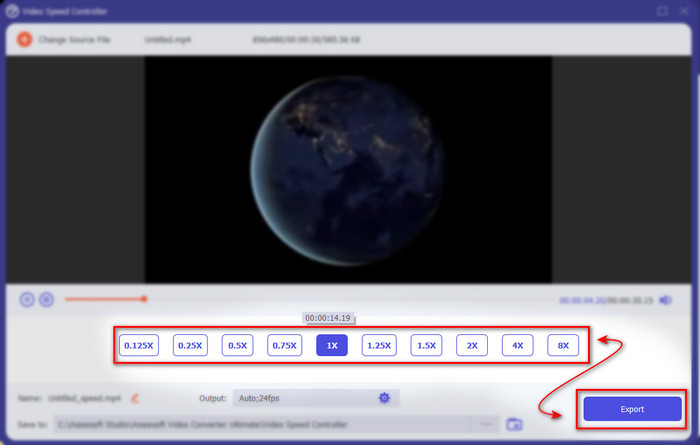
步驟 4. 匯入檔案後,在可選的影片速度列表中選擇2x。接著點擊匯出(Export)按鈕來儲存加速後的影片。
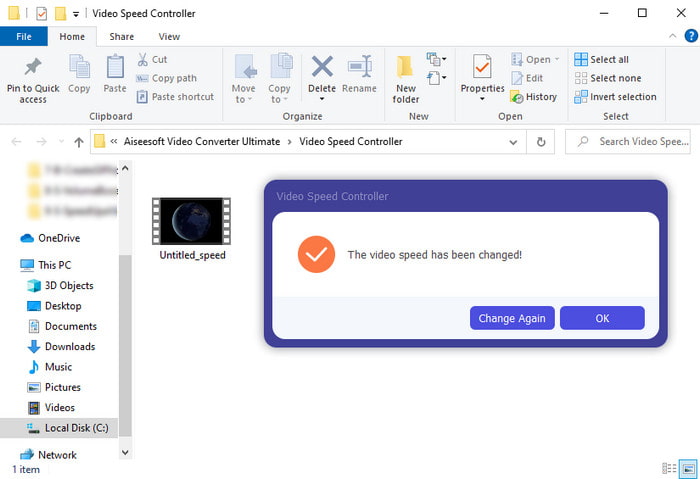
步驟 5. 檔案匯出完成後,畫面上會跳出資料夾視窗;點擊該檔案即可觀看加速版本的影片。
第 3 部分。 如何以 2 倍速度播放視頻
1. VLC 媒體播放器
你可以在 PC 或 Mac 上下載的最知名媒體播放器之一,就是VLC Media Player。這款桌面工具深受愛看電影、影片剪輯的使用者喜愛。此外,它幾乎能播放網路上大多數常見的格式。不過,有些使用了較複雜編解碼器的影片仍無法播放,例如部分 AVI 或 MKV 檔。如果你想知道如何使用VLC Media Player將影片加速到 2 倍速,請依照下面的步驟操作。
步驟 1. 將 VLC 下載到桌面後開啟。
步驟 2. 將檔案拖曳到介面中,然後點擊你剛剛放入的影片檔。
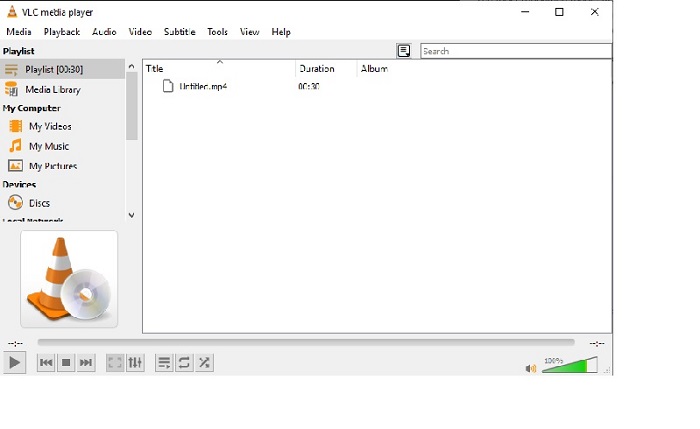
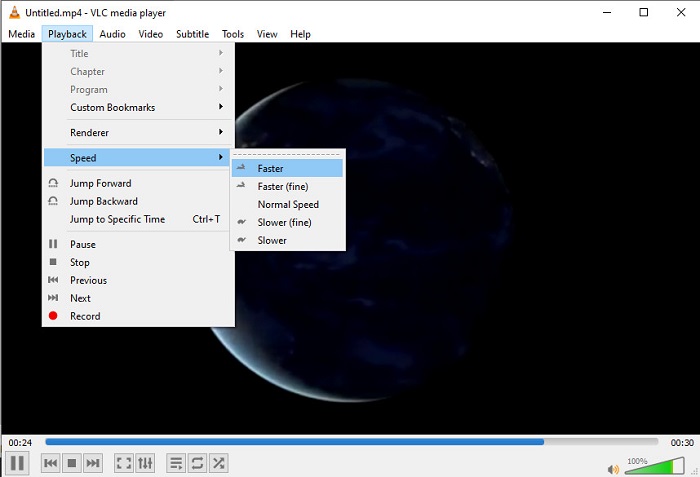
接著前往播放選單,點擊速度,以變更影片的原始播放速度。
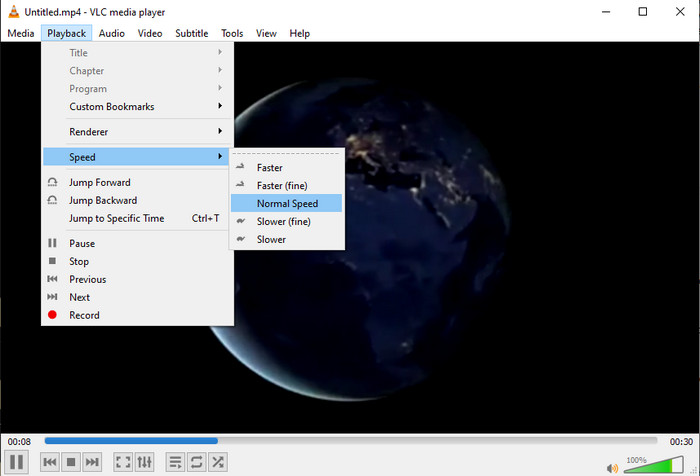
步驟 3. 如果你想將速度調回正常,請再次前往播放選單並點擊速度,然後選擇正常速度。
2. QuickTime 播放器
Mac 內建的原生媒體播放器,也能協助你以 2 倍速度播放影片,那就是QuickTime Player。這款播放器在 Mac 上是預先安裝好的,不像 VLC 還需要另外下載。不過,若你是 Windows 使用者,就無法使用這個工具,因為它不支援 Windows 電腦。即便在 Mac 上能使用,QuickTime 仍有不少功能限制,例如格式支援度不足,許多由 Windows 系統常見或開發的格式在這裡都無法播放。所以,如果你使用的是 Mac,不妨依照以下步驟試試看。
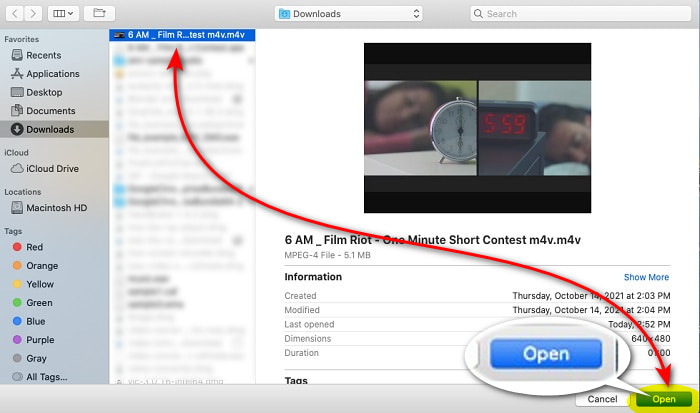
步驟 1. 在 Finder 中搜尋 QuickTime,然後啟動工具。點擊檔案再選擇開啟檔案,找到並開啟該影片。
步驟 2. 影片播放時,點擊快轉按鈕即可加速播放。
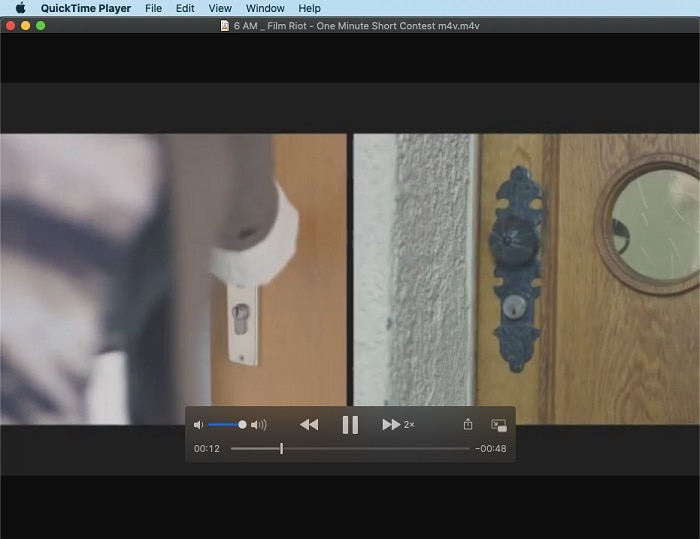
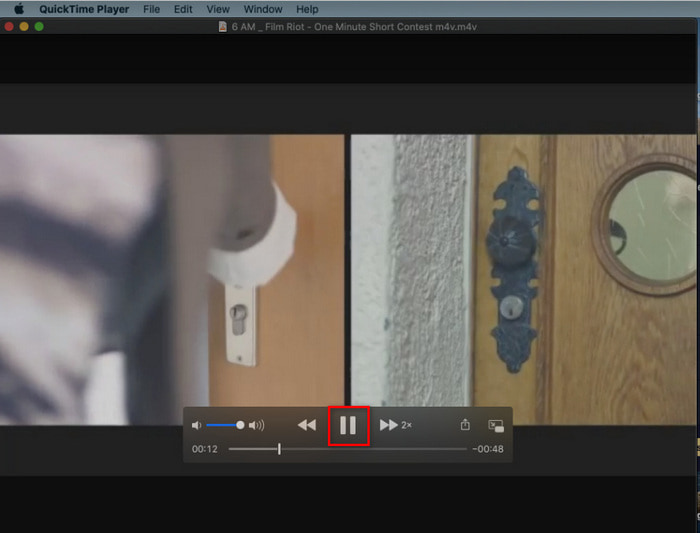
步驟 3. 若你想停止加速播放,按一下暫停/播放按鈕即可。
3. 視窗媒體播放器
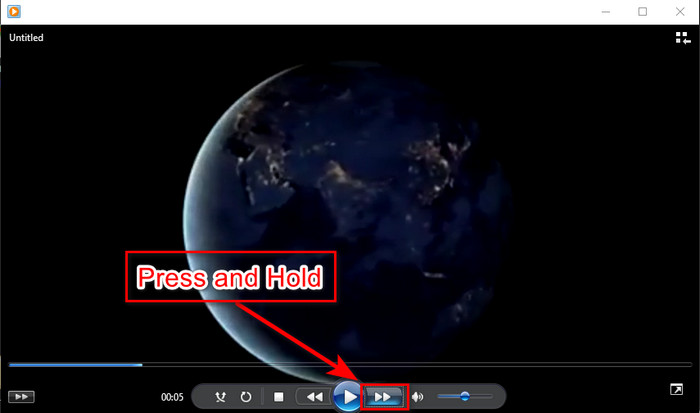
如果 Mac 有自己的預載媒體播放器,那麼 Windows 也有其專屬的媒體播放器——Windows Media Player。和 QuickTime 一樣,它在 Windows 系統中是預先安裝好的,可以直接用來觀看影片,並將影片加速到 2 倍速。然而,我們認為這款工具的加速效果相對較差,因為畫面會缺少部分影格,呈現從一個秒數跳到另一個秒數,而不是順暢的快速播放。不過,如果你能接受這種效果,那就依照下列步驟來進行加速。
步驟 1. 在 Windows 桌面上啟動此工具。
步驟 2. 點擊播放清單,然後拖曳影片檔到右側的小方框中。
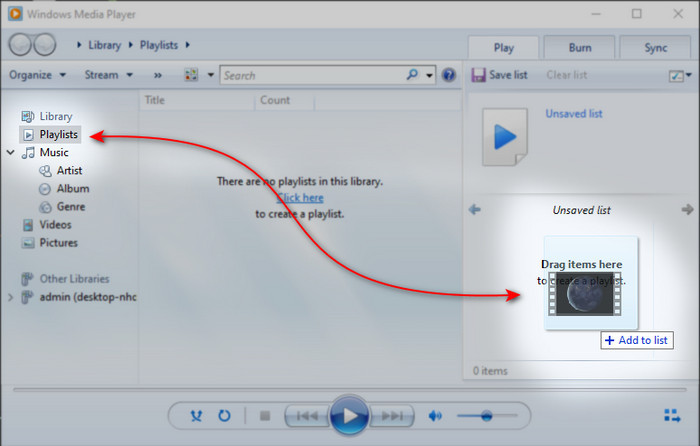
步驟 3. 影片會自動開始播放,若要加速,請按住快轉按鈕不放,放開按鈕即可停止加速。
第 4 部分。 關於 2x 視頻的常見問題解答
哪個更好:慢動作還是加速?
實際上,這取決於您打算使用它的情況。儘管您將進行的兩種調整都會對您有所幫助。因此,如果您正在觀看教程或想揭示魔術師的技巧,請使用慢動作。但是,如果您匆忙並需要觀看許多視頻剪輯,那麼必須觀看它以加快播放速度。
我可以錄製成超快動作回放嗎?
是的,您可以使用延時將一小時長的視頻製作為一分鐘或一秒。但與加速不同的是,延時比通常的 2 倍、4 倍、8 倍加速要快得多。
以 2 倍速觀看視頻有什麼缺點?
雖然以這種速度觀看視頻對您有很大幫助,但播放速度可能會發生很多缺點。例如,如果播放視頻成為您的習慣,那麼視頻的正常速度會變慢。
結論
現在你已經知道有哪些不同工具可以用來以 2 倍速觀看影片,是時候選擇你比較偏好的方案了。希望這篇文章能幫助你判斷哪一種方式更適合你。無論是使用媒體播放器來調整速度,還是使用像Video Converter Ultimate這樣的編輯工具,只要選擇適合自己的方式,它們都能為你這位使用者帶來相當好的體驗。
-
 適用於不同用途的 Android 手機前 4 名最佳 VOB 播放器
 當您下載 VOB 視頻並想在 Android 上觀看它們時,您可以從本文的以下 4 個 VOB 播放器中選擇最合適的一個。
-
 適用於 Android 手機的 5 大最佳 Windows Media Player 替代品
 由於您無法下載適用於 Android 的 Windows Media Player,您應該閱讀本文並了解 Windows Media Player 的 5 種最佳替代方案。
-
 2025 年不容錯過的 5 款最佳 iPhone 影片播放器
 要在 iPhone 上播放所有格式的視頻並獲得更好的觀看體驗,您應該閱讀本文並了解適用於 iPhone 12/11/X/8/7/6 的最佳 5 視頻播放器。
