


 視頻轉換大師
 屏幕錄影大師
 影片修復
影片修復
 安全下載
安全下載如何使用桌面上的最佳軟件將專輯封面添加到 MP3 的分步說明
在音樂中加入專輯封面會非常實用,特別是當你想讓聽眾對正在播放的音樂產生更深連結時。有了專輯封面,使用者便能從畫面中大致窺見音樂想傳達的氛圍與主題,尤其是數位音樂檔。在某些情況下,MP3 檔沒有正確的專輯封面,或是封面沒有嵌入到檔案裡。如果你也遇到這種情形,就有必要學習如何在桌面上替 MP3 新增專輯封面。想更深入了解這個主題,請繼續閱讀本文,我們將針對這個問題提供精要而完整的說明。

第 1 部分。如何使用 Video Converter Ultimate [推薦標籤編輯器] 將專輯封面添加到 MP3
你是否正在尋找一款終極軟體來為 MP3 新增專輯封面?FVC Video Converter Ultimate就是這項任務中推薦使用的標籤編輯器。這套軟體並不是毫無理由就被推薦的。與其他軟體不同的是,多數軟體能上傳並作為 MP3 封面的專輯封面格式相當有限,但這款工具卻沒有這樣的限制。使用這款終極軟體,你可以在 MP3、WAV、WMA、AAC、FLAC 以及超過 1000 種影音格式中加入專輯封面。是不是很厲害?這款工具是為專輯新增封面圖片的首選。想知道如何使用這款終極軟體嗎?那麼,你可以仔細閱讀並跟隨下方我們提供的操作示範。
步驟一: 點擊下方的下載按鈕,選擇你目前使用的作業系統。下載完成後,繼續安裝這套工具。全部完成後,點擊「立即開始」以在桌面上啟動這套軟體。
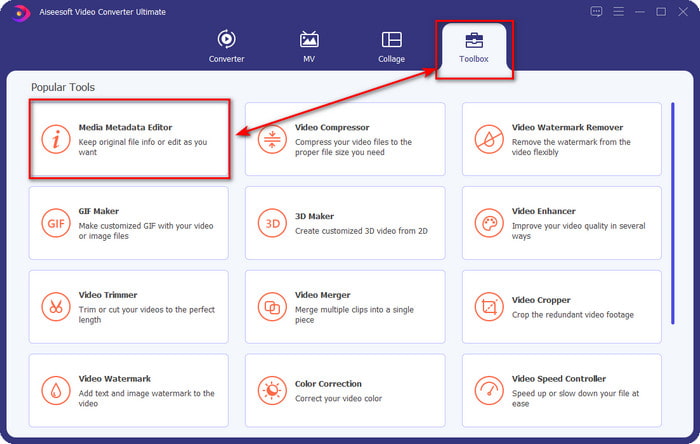
步驟二: 前往工具箱區域,然後點擊底下的媒體中繼資料編輯器(Media Metadata Editor)。
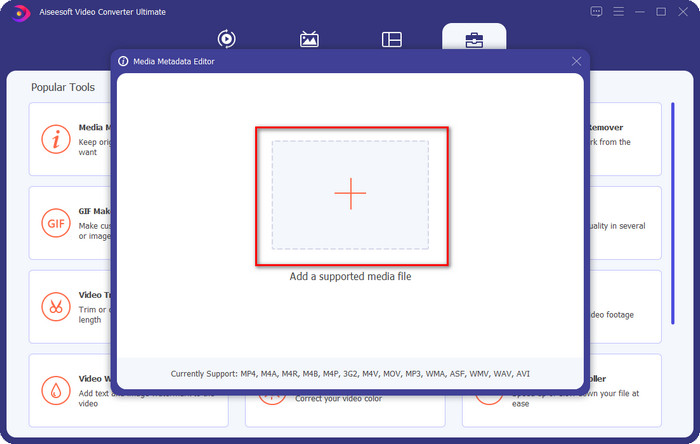
步驟三: 按一下 + 按鈕,選擇你想要加入專輯封面的音樂檔。選擇完音樂檔後,點擊開啟(Open)以匯入該檔案。
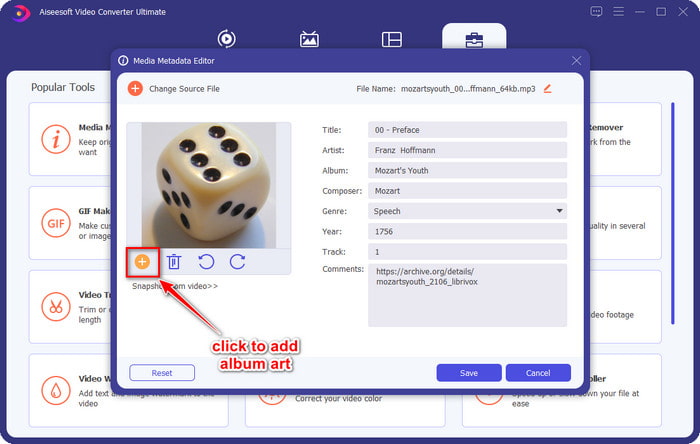
步驟四: 接著,點擊介面左下角的+按鈕,尋找你想使用的專輯封面圖片,並點擊開啟(Open)。若有需要,你也可以在文字框(textbox)中新增其他中繼資料。
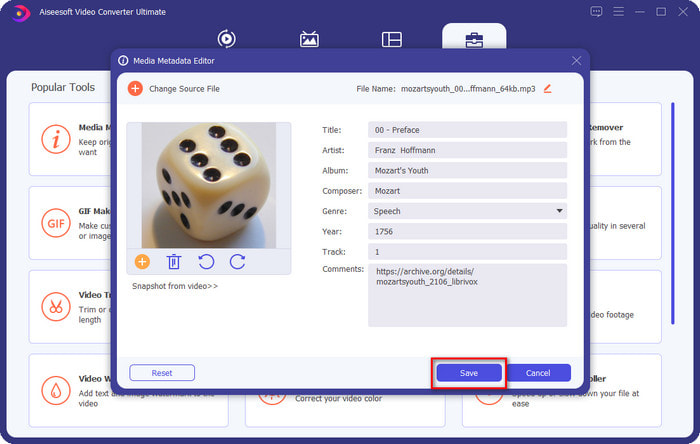
步驟五: 當你完成在 MP3 檔上加入專輯封面及其他中繼資料後,就可以點擊「儲存」(Save),將專輯封面正式嵌入你上傳的 MP3 檔中。是不是很簡單?只要使用這款終極工具,一切問題都能變得輕鬆又容易解決。
第 2 部分。如何使用 VLC 媒體播放器免費元數據編輯器將專輯封面添加到 MP3]
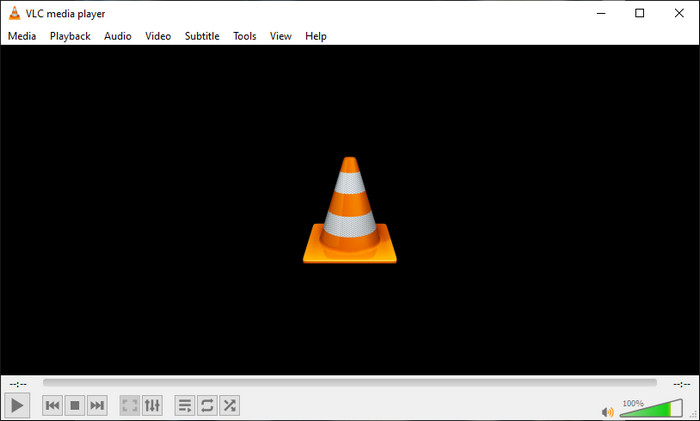
VLC 媒體播放器(VLC Media Player)是多數人電腦中最常用的播放器之一。這款工具幾乎可以播放任何影片檔案,同時也具備編輯中繼資料的功能,例如替音樂檔加入專輯封面。有了這款播放器,你可以自由調整或新增中繼資料。如果你想在 Windows 10/11 或 Mac 上,利用這款工具為 MP3 新增專輯封面,下列步驟就是為你準備的教學。
步驟一: 在桌面下載並安裝這款媒體播放器,接著將其開啟。
步驟二: 在主介面上點擊「工具」(Tools),在其下拉選單中再點擊資訊(Information)。
步驟三: 在右下角對 VLC 圖示點擊滑鼠右鍵,新增專輯封面,接著點擊儲存(Save)。
第 3 部分。如何在 iTunes 中將專輯封面添加到 MP3 [Mac 上的內置元數據編輯器]
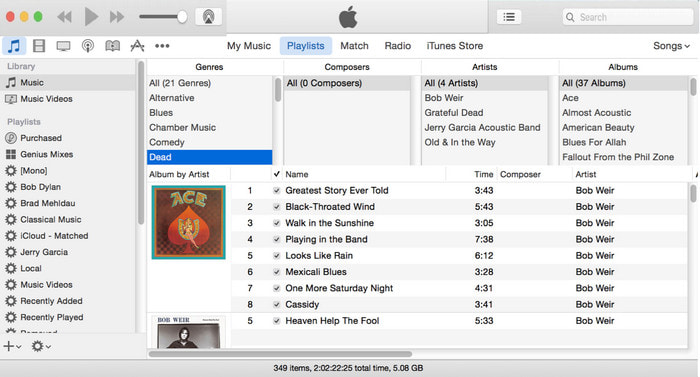
對於 Mac 使用者來說,iTunes曾是我們在 MP3 檔上新增封面圖片時的首選中繼資料編輯器。這款內建應用程式能幫助我們編輯儲存在 Mac 上檔案的中繼資料。然而,該軟體目前在部分新版 Mac 上已無法使用,因為它已被拆分為三個獨立的應用程式,分別承擔原本 iTunes 的功能。不過在某些舊版 macOS 上仍然可以使用 iTunes。如果你是 Mac 使用者之一,並且想知道如何在 iTunes 中為 MP3 新增專輯封面,可以依照下列步驟操作。
步驟一: 在 Mac 上開啟 iTunes 應用程式。
步驟二: 點選音樂(Music),再點選資料庫(Library),然後在沒有專輯封面的音樂檔上按滑鼠右鍵。
步驟三: 在上方選項中點擊封面(Artwork),再按加入封面(Add Artwork),選取你想上傳的圖片,最後點擊確定(OK)以套用。
第 4 部分。有關如何在 MP3 上添加專輯封面的常見問題解答
我可以在 Audacity 上將專輯封面添加到 MP3 嗎?
不幸的是,您無法在使用 Audacity 的 MP3 文件上添加圖像藝術。此工具不支持任何圖像或視頻格式,因為它旨在用作音樂編輯器。但是,如果您想編輯 MP3 元數據,您仍然可以使用 Audacity 作為元數據編輯器。
為什麼我的音頻文件中缺少專輯封面?
音頻文件中缺少專輯封面的三個原因。第一個原因是您要下載的文件不包括專輯封面,特別是如果這是盜版。我們在網絡上下載的大多數音樂文件都沒有提供專輯封面以避免文案問題。接下來,由於圖像未正確附加,該文件丟失了。有些用戶遇到這個問題,很難處理,所以使用專業的專輯封面添加器是必不可少的。最後,圖像已損壞;如果您上傳的文件無法用作專輯封面或您的音樂文件已損壞,這可能是其背後的原因。
我可以使用的最佳元數據是什麼?
如果上述我們介紹的中繼資料編輯器仍然無法滿足你的需求,你可以點擊這個連結,前往另一篇文章,蒐集更多可使用的最佳中繼資料編輯器。
結論
現在我們有了在 MP3 上添加專輯封面的想法,是時候選擇我們認為最適合我們的工具了。如果您是 Mac 用戶並且不想在桌面上下載任何軟件,則必須選擇 iTunes。但 iTunes 在 Mac 的更新版本上已被淘汰。如果您想下載一個免費工具來幫助您為音樂添加封面,那麼 VLC 是一個不錯的選擇。但是,該工具不是專業工具。因此,如果您想要可以在 Windows 和 Mac 兩種操作系統上為您提供此任務的專家軟件,那麼請使用終極軟件。單擊上面顯示的下載按鈕,將軟件下載到您的桌面上,以便使用專業工具。
-
 如何在 iOS 上輕鬆查看照片和視頻的元數據
 您想知道如何在 iPhone 和 iPad 上查看元數據嗎?那麼閱讀這篇文章可能會幫助您毫不費力地解決這個問題。
-
 如何在 iTunes 上編輯 iD3 標籤的最佳技術 [有效提示]
 需要知道如何在 iTunes 上編輯標籤?那麼你來對地方了。正如我們討論的方法,您可以按照使用 iTunes 編輯標籤。
-
 如何在 Windows 10/11 和 Mac 上編輯 WAV 文件的屬性 [已解決]
 您是否正在尋找一種在 Windows 10/11 上編輯 WAV 文件屬性的方法?如果您繼續閱讀本文,這個問題將會有答案。
