如何像專業人士一樣將慢動作視頻更改為正常速度

Technology has evolved extensively over the years. Various software has been developed, and advanced equipment has been invented to bring out uniqueness and creativity in a mere video. One of such is a slow-motion video. However, most people are only familiar with making said video and do not revert it to normal speed. One example is using random or specific videos online for a project in school or any video-producing activities people are up to that might have been in a playback speed not preferential to that people. So, this article intends to solve this issue one might be facing now and then by providing the best ways to change a slow-motion video to normal playback speed for Mac, Windows, iOS, and Android operating systems.

將慢動作視頻更改為正常速度

第 1 部分。 如何在 Mac 和 Windows 上將慢動作視頻更改為正常速度

It is possible to resolve the problem of changing the speed of the slow-motion video to normal by downloading and using converters offline. On the other hand, Video Converter Ultimate is one of the best editing programs available, thanks to the numerous features it provides. Due to its accessibility and ease of use for the general public, we highly recommend it for anyone who wants to convert slow-motion video to normal speed on a Mac or Windows machine. Here are the suggested steps for properly addressing the software: handle it well.

Step 1: Click the Free Download button to save the program to your computer's hard drive. You can then set up the software and customize it.

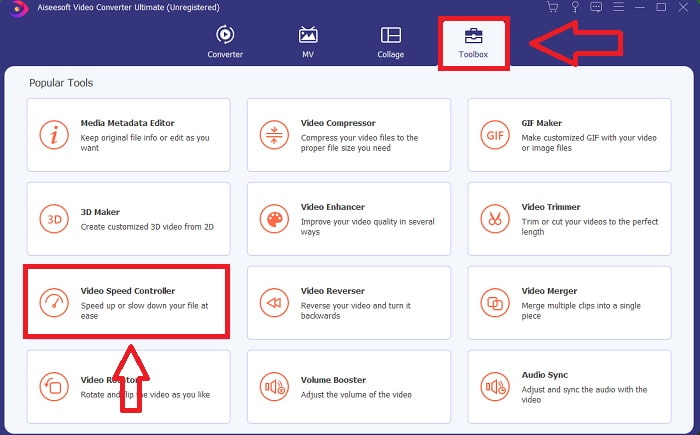
Step 2: Activate the software by clicking on the Toolbox icon in the menu bar and selecting Video Speed Controller from the list.

單擊此處工具箱

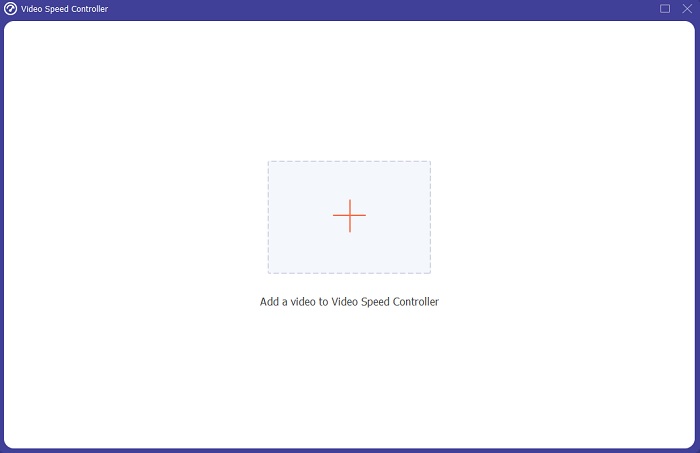
Step 3: To add the slow motion video, click the + button in your preference bar and then continue to edit the video.

文件添加控制器

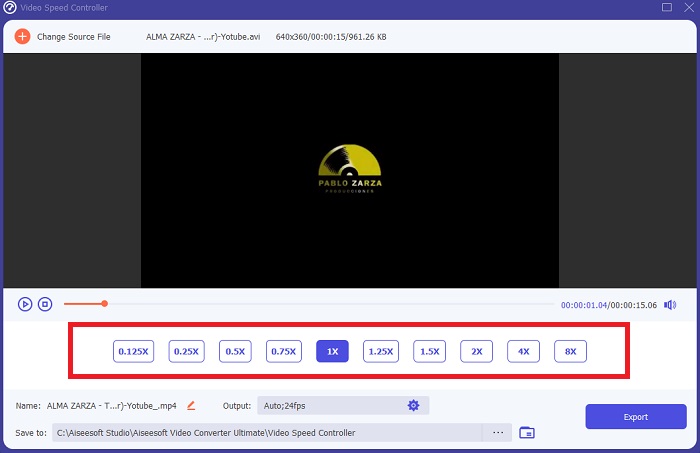
Step 4: Increase or decrease the video rate to adjust the playback speed.

播放速度選擇

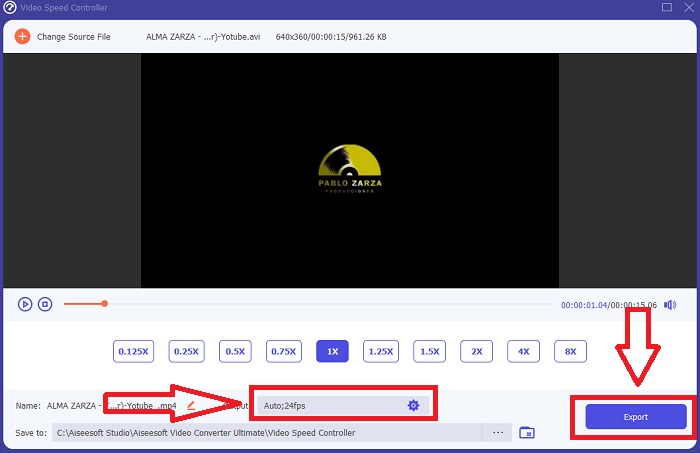
Step 5: The output format, resolution, quality, and so on can all be edited after the playback speed of your video clip has been adjusted. When you're ready to save your work, click Export and choose a location.

格式化和導出文件

第 2 部分。如何使用照片在 iPhone/iPad 上將慢動作視頻更改為正常速度

Slow-motion videos are one of the best options any content creators or videographers have in their arsenal to add a dramatic effect to any clips only using their mobile phone like iPhone. Since iPhone is one of the mobile phones that has a high-end quality of camera that can make a video captured at higher frames per second, so you can get yourself a satisfying clip to watch. However, videos with a lesser playback speed are not always the best approach in every video you are making – there are types that slow-motion would not suffice or are irrelevant. So, changing the slow-motion video to normal speed on your iPhone becomes your only option. To do this, here are the easy-to-follow steps:

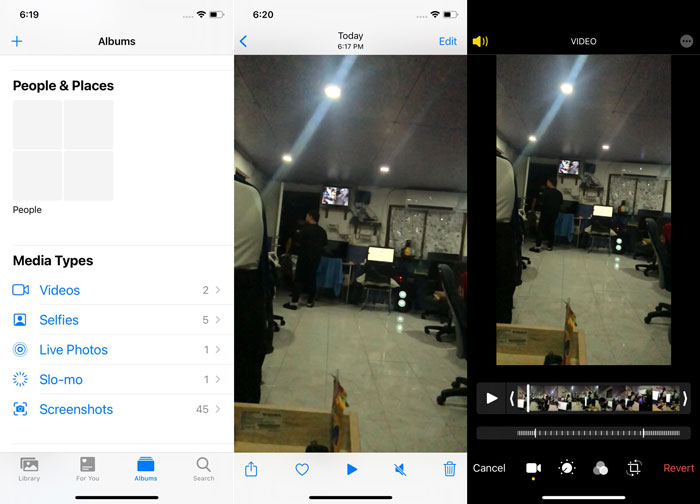
Step 1: Open the Photos app on your iPhone or iPad and go to the albums tab. Scroll to the bottom and tap Slo-mo from the Media Types section. To make a video full screen, tap on it.

Step 2: Select Edit in the upper right corner.

Step 3: A little slider with vertical white lines will appear. The slow-motion effect is represented by the lines spaced widely apart, while the tightly packed lines represent the normal-speed effect. Both parts are divided by two sliders. Drag a Slider from one end of the screen to the other. All of the wide-spaced lines will be perfectly aligned. This indicates that the video will now play at a normal speed. To see whether it is working, press the triangle play button. The once slow-motion video is now at normal playback speed. However, you can undo this action by selecting Edit, Revert, Revert to Original. You can also use the sliders to choose which parts of the footage to play at a slower or faster speed at your liking.

如何更改慢速視頻

相關閱讀:

How to Fix Videos Not Playing on iPhone

iPhone 最佳影片播放器

第 3 部分。如何使用 Google 照片在 Android 上將慢動作視頻更改為正常速度

Android users may adjust the speed of a slow-motion video to normal for free, much like their iPhone counterparts. In this scenario, you will need to utilize the Google Photos application that came pre-installed on your phone, but you may alternatively use a third-party app. For the sake of accessibility and convenience, we will be using Google Photos to change the slow-motion video to normal speed on Android, and here is how:

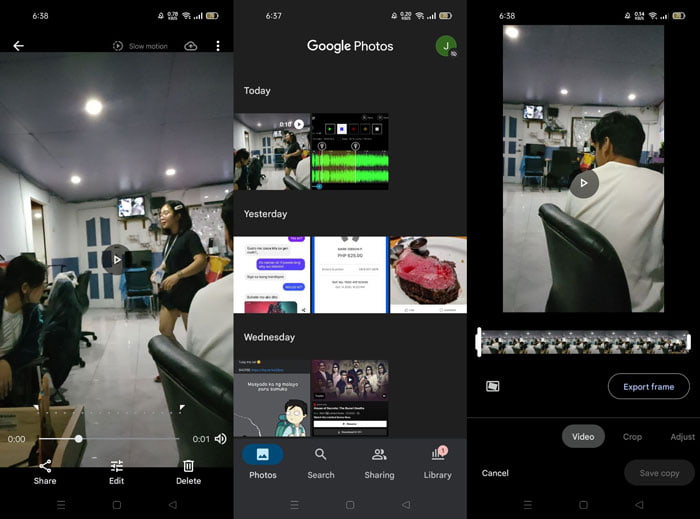
Step 1: Open the Google Photos app on your android phone and click on the video you wish to speed up. Select Edit on the bottom of the screen, and a playback speed controller will appear.

Step 2: Drag the Slider to increase the playback speed by 1.5x or 2x, depending on the rate of your slow-motion video.

Step 3: Click the triangle play button to check if the video is now at the speed of your liking. Once satisfied, select Done to save it.

如何更改慢速視頻 Android

第 4 部分。 有關將慢動作視頻更改為正常速度的常見問題解答

如何反轉慢動作視頻?

要改變主意並再次將此視頻製作成慢動作剪輯,只需打開視頻並點擊屏幕底部的“編輯”按鈕即可。然後單擊“還原”並選擇“還原為原始”以確認您的決定。

您可以使用照片應用程序將低幀率視頻轉換為慢動作嗎?

照片應用程序不允許您將以 30fps 或 24fps 錄製的普通 iPhone 視頻轉換為慢動作。但是,您可以使用第三方應用程序(如 iMovie)或其他蘋果編輯應用程序來執行此操作。

Google 相冊是將慢動作視頻轉換為正常速度的最佳應用嗎?

可以想像,使用這個免費應用程序有一些缺點。首先,視頻處理速度相對較慢,尤其是在編輯較長的視頻剪輯時。此外,如果您在更改播放速度之前分割視頻,背景音頻或語音旁白將被靜音。無論如何,它是一個很棒的免費 Android 應用程序。您仍然可以使用第三方應用程序,但大多數易於使用的應用程序都不是免費的。

結論

The versatility of videos can serve different needs, and merely changing the playback speed can satisfy different genres, whether for entertainment or educational purposes. The fact that it can be done easily nowadays with accessible applications and software will bring out our creativity and be of convenience to us depending on our preference. Although changing slow-motion video to normal speed online is also convenient, downloading software lessens the hassle of connectivity issues. This article can be of great help to those who are not yet well-versed with such methods and have the answers to their questions.

艾倫·米勒2021 年 10 月 28 日

優秀的

Rating: 3.6 / 5 (based on 160 votes)