


 視頻轉換大師
 屏幕錄影大師
 影片修復
影片修復
 安全下載
安全下載壓縮 3GP - 這是在批處理中減少 3GP 文件的終極指南
3GP以文件小、移動性強而著稱。當您需要釋放黑莓手機的更多空間時,備份和減少 3GP 文件是最有效的方法。當然,您可以簡單地在線免費壓縮 3GP 視頻以減小視頻大小。當您需要縮小 3GP,甚至管理視頻時,您可以從文章中選擇專業的 3GP 壓縮器。

第 1 部分:如何在線免費批量壓縮 3GP 視頻
線上壓縮多個 3GP 視訊的最佳方式是什麼?多數線上視訊壓縮工具一次只能減少一個影片的大小。Free Video Compressor 是理想的 3GP 視訊壓縮工具,只需幾下點擊即可縮小大量影片。它允許你調整視訊參數,例如解析度、位元率等。
- 1.通過簡單的步驟在線壓縮多個3GP視頻。
- 2. 調整視頻分辨率、比特率、視頻大小等。
- 3. 易於使用,不會在您的視頻文件中添加水印。
- 4. 批量壓縮 3GP 的速度比其他工具快 30 倍。
步驟一: 將 3GP 視訊從智慧型手機傳輸出來後,你可以前往免費的 3GP 線上壓縮工具,點擊 Add Files to Compress 按鈕,匯入你想要壓縮的 3GP 檔案。

步驟二: 之後,你可以調整解析度、位元率及其他更多參數。預覽 3GP 視訊大小後,就可以點擊 Compress 按鈕在線上壓縮 3GP 視訊。

步驟三: 下載完成 3GP 檔案後,你可以直接點擊 Change Source File 按鈕,更換為另一個 3GP 檔案。它對 3GP 視訊檔案的數量沒有任何限制。更多 3GP 播放器 請見此處。
第 2 部分:批量壓縮 3GP 文件的專業方法
如果你需要同時壓縮多個 3GP 視訊,甚至將影片分割成更小的檔案,Video Converter Ultimate 是一款多功能的 3GP 壓縮工具,不僅能減少 3GP 視訊大小,還能分割與裁剪 3GP 視訊。此外,你也可以將 3GP 視訊轉換成 MP4 及其他視訊格式。
- 1. 一鍵同時壓縮多個3GP視頻。
- 2. 選擇起點和終點以修剪所需的 3GP 文件。
- 3. 使用比特率、視頻格式、分辨率等來縮小 3GP 視頻。
- 4. 將 3GP 轉換為 MP4,並將更多其他視頻格式轉換為更小的尺寸。
安裝 Video Converter Ultimate 後,您可以在計算機上啟動該程序。它提供了 3 種不同的方式來壓縮 3GP 視頻。只需查看下面的詳細過程。
1:從工具箱壓縮 3GP 文件
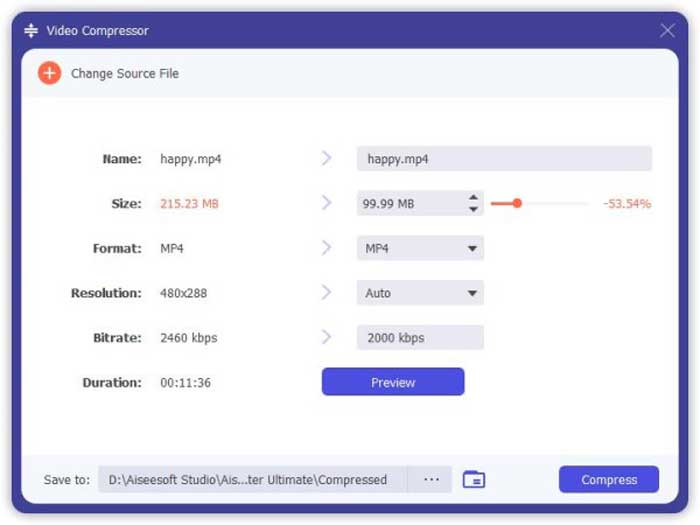
在使用者介面中前往 Toolbox 功能表,你可以選擇 Video Compressor 選項來減少 3GP 檔案的大小。你可以微調視訊編碼、位元率、解析度以及其他更多設定。之後,你可以預覽視訊大小以壓縮 3GP 檔案。
2:批量壓縮3GP
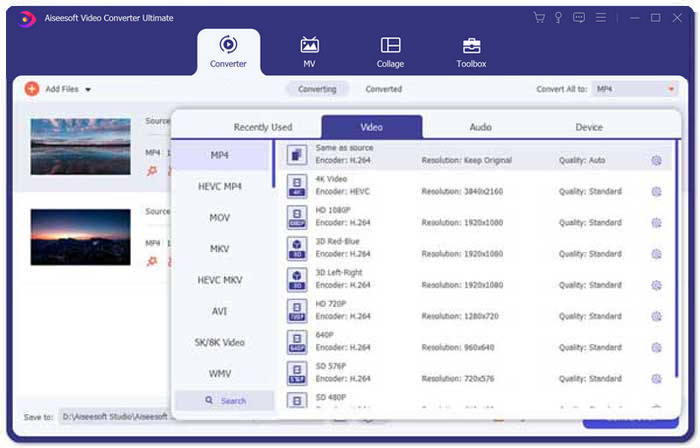
前往 Converter 功能表並選擇 Add Files,將 3GP 視訊匯入程式。接著,在 Convert All to: 欄位旁選擇 MP4 作為輸出格式。此外,你也可以微調視訊位元率、視訊編碼等,以降低 3GP 檔案大小。
3. 修剪所需的 3GP 視頻部分
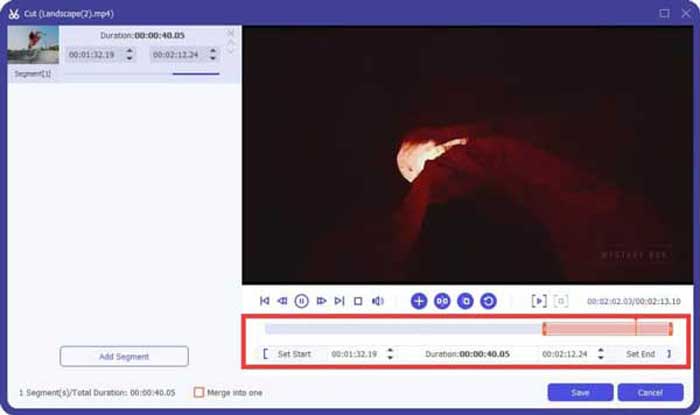
當你只需要保留想要的片段時,可以點擊 Scissor 圖示來分割 3GP 視訊。只需選擇起始點與終點,就能壓縮 3GP 的檔案大小。完成後,點擊 Convert All 按鈕,匯出所需的 3GP 視訊片段。
第 3 部分:有關如何壓縮 3GP 視頻的常見問題解答
1. 什麼是 3GP 視頻格式?
3GP 也稱為第三代合作夥伴項目組。作為多媒體文件容器,3GP 旨在節省空間、數據使用量和帶寬。如果您經常在智能手機上拍攝視頻,則必須壓縮 3GP 文件。
2. 我應該將 3GP 壓縮成 MP4 嗎?
與 3GP 相比,MP4 是一種更加流行和靈活的文件格式。如果您無法在設備上打開或播放 3GP,您可以選擇將 3GP 壓縮為 MP4。只需將 3GP 視頻添加到任何視頻轉換器。您只需點擊幾下即可將 3GP 轉換為 MP4 格式。
3. 是否有適用於黑莓的 3GP 視頻壓縮器?
是的。您可以簡單地為 BlackBerry 搜索 3GP 視頻編輯器或 3GP 視頻壓縮器。當然,您也可以使用 Google Drive 和一些在線 3GP 視頻壓縮器根據您的要求對 3GP 視頻進行縮小和縮小。
結論
本文分享了壓縮 3GP 視頻的兩種有效方法。如果您想免費在線壓縮您的 3GP,FVC Online Video Compressor 應該是正確的選擇。當您需要在批處理中減少 3GP 文件時,Video Converter Ultimate 應始終是您的首選。
-
 3種方法來壓縮和轉換WhatsApp的大視頻文件
 從本文中,您可以獲得3種簡單的方法來在線壓縮WhatsApp的視頻。為什麼您不能在WhatsApp上發送視頻?如何解決WhatsApp視頻大小限制?只是閱讀並檢查。
-
 高質量壓縮GIF和減小文件大小的教程
 這是在計算機或手機上壓縮GIF的2種簡單方法。您可以使用FVC Free Online Video Compressor和Photoshop在不同方面減小GIF文件的大小。
-
 將 MP4 輕鬆轉換為 3GP 的 3 種方法
 想要將MP4輕鬆快速地轉換為3GP嗎?在這裡,我們將共享3個MP4至3GP轉換器,以將MP4轉換為3GP,以便在各種手機上播放。
