


 視頻轉換大師
 屏幕錄影大師
 影片修復
影片修復
 安全下載
安全下載有效在線壓縮ASF文件的終極指南
ASF是Advanced Streaming Format的縮寫。它以高壓縮率以及良好的視頻質量而著稱。因此,ASF文件在視頻流的傳輸中具有很大的優勢。因此,出現了一個問題:如何壓縮ASF視頻文件?要弄清楚這個問題,您可以仔細閱讀本文。稍後,您將更好地了解如何輕鬆壓縮ASF文件。

第1部分:如何免費在線壓縮ASF文件
To compress your target ASF file, the first choice should always be the Free Video Compressor. As a free compressing tool, it can help you to compress the ASF video file without losing quality. If you have more than one ASF file, it also supports batch compressing. Moreover, it can protect your privacy so that there will not be information leakage. The interface is clean and intuitive, which is quite convenient for all users.
- 1.壓縮4K視頻,同時保持驚人的質量。
- 2.批量壓縮ASF的速度是其他程序的30倍。
- 3.壓縮後將不會留下水印。
- 4.壓縮ASF文件時,此免費工具易於使用。
Step 1: Head to the main interface
To compress your ideal ASF, you should go to the official site of the Free Video Compressor first. Then you can click the Add Files to Compress button.

Step 2: Add your ASF video file
只需等待幾秒鐘即可安裝用於ASF壓縮的啟動器。之後,您可以選擇目標ASF文件並將其添加到彈出窗口。
Step 3: Customize the compressing effects
Before you compress your ASF file, you can adjust the video resolution, frame rate, bitrate, output format, and more. Then you can click the Compress button to start compressing your ASF. You can also compress more than one ASF file at a time.

第2部分:如何為PC釋放壓縮ASF文件
Aside from the online ASF compressor, you can also use the Free Video Compressor to compress the ASF video file on PC. Through this free and lightweight video compressing software, you can compress lots of common video files, such as ASF, MP4, etc. Moreover, this software also has the Desired Video Size feature, which can help you to calculate the output video format.
Step 1: Download the Free Video Compressor
如果要使用Free Video Compressor壓縮較小的ASF,則應首先在PC上下載並安裝此軟件。
Step 2: Open your target ASF file
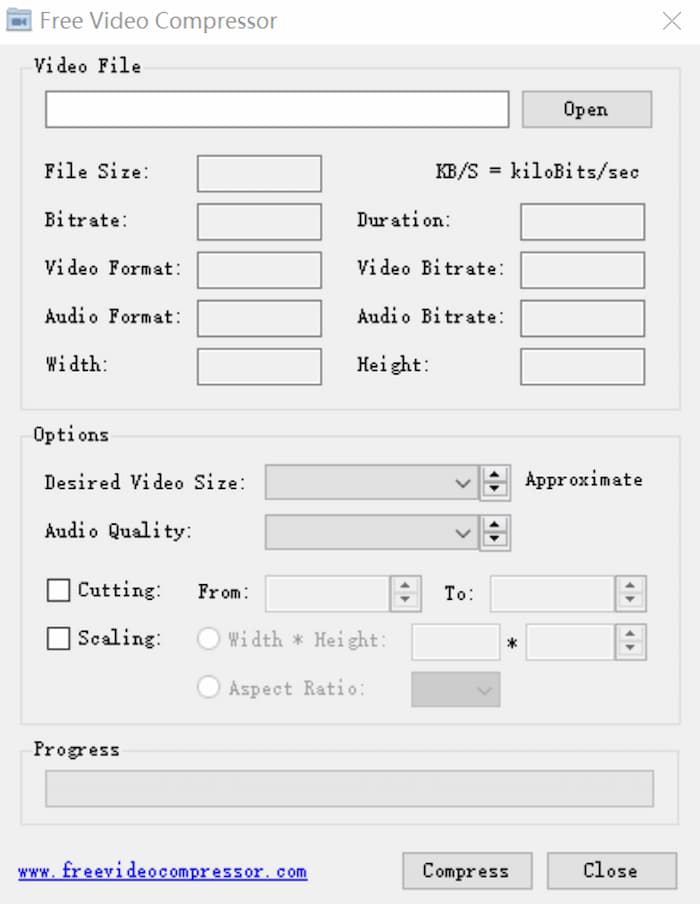
After you launch this tool, you will be at the main interface. Just click the Open button on the top right to add your ASF file.
Step 3: Adjust some settings
如果要調整某些設置,則可以在文件大小,視頻格式,音頻格式等選項後面的方框中輸入理想的參數。此外,您還可以在此ASF壓縮程序中剪切不需要的部分。
第3部分:壓縮ASF文件的常見問題解答
1.什麼是ASF?
ASF(高級系統格式)是由Microsoft公司開發的可擴展文件格式。它是專為存儲和播放同步視頻流以及在網絡上傳輸這些視頻而設計的。
2.我可以在線將ASF轉換為MP4嗎?
Yes. If you want to convert your ASF file to MP4, you can use some popular video converters, such as the Free Online Video Converter. It enables you to achieve the ASF to MP4 conversion quickly.
3.我可以使用Free Video Compressor在Mac上壓縮PDF嗎?
是的。您可以使用Free Video Compressor在Mac上壓縮PDF。該程序不僅免費,而且可以保持最高質量。您只需要添加PDF文件,然後在進入網站後單擊“壓縮”按鈕即可。
結論
本文共享兩個不同的程序,以幫助您有效地壓縮ASF文件。您可以選擇其中任何一個來將ASF壓縮得更小。但是,如果您不打算安裝軟件但希望保持質量,則應嘗試使用Free Video Compressor。您可以檢查一下自己。如果您有任何疑問或建議,可以在網站上留言。
-
 如何免費在Windows / Mac /在線壓縮大型AVI文件
 閱讀並獲取3種免費方法來壓縮計算機上的AVI文件。您可以減小AVI視頻的文件大小而不會降低質量。您的AVI視頻大小可以像您想像的一樣小。
-
 3種方法來壓縮和轉換WhatsApp的大視頻文件
 從本文中,您可以獲得3種簡單的方法來在線壓縮WhatsApp的視頻。為什麼您不能在WhatsApp上發送視頻?如何解決WhatsApp視頻大小限制?只是閱讀並檢查。
-
 高質量壓縮GIF和減小文件大小的教程
 這是在計算機或手機上壓縮GIF的2種簡單方法。您可以使用FVC Free Online Video Compressor和Photoshop在不同方面減小GIF文件的大小。
