


 視頻轉換大師
 屏幕錄影大師
 影片修復
影片修復
 安全下載
安全下載2種縮小OGV大文件的快速方法[免費和在線]
OGV 檔案經常搭配 HTML5 的

第1部分。使用OGV壓縮器在線壓縮OGV文件的方法
Free Video Compressor 是一款廣受歡迎且實用的免費線上 OGV 壓縮工具。與許多其他常見的免費線上工具不同,Free Video Compressor 對上傳檔案的數量和大小都沒有任何限制。更重要的是,輸出的影片檔不會被加上浮水印。此外,它還支援壓縮 MP4、AVI、WMV、MOV 等多種常見影片格式,同時不會破壞畫質。
如何使用免費的視頻壓縮器壓縮OGV文件
步驟 1. 在瀏覽器中輸入 https://www.free-videoconverter.net/free-video-compressor/ 前往線上 OGV 影片壓縮網站。
步驟 2. 找到並點擊 Add Files to Compress(新增要壓縮的檔案)按鈕,然後下載啟動程式以啟用服務。在跳出的視窗中尋找你的 OGV 檔案並按下 Open(開啟)加以確認。

步驟 3. 接著你需要設定壓縮參數,以縮小檔案大小。你可以調整影片檔案大小、修改解析度、選擇位元率等。

步驟 4. 點擊 Compress(壓縮)按鈕開始進行壓縮。完成後,檔案會自動下載到你的電腦中。

此外,這個免費的視頻壓縮器可以幫助您解決其他視頻壓縮問題。只需查看以下文章:
如何在 Windows 與 Mac 上免費壓縮 AVCHD 影片檔
第2部分。如何使用Clideo壓縮和優化OGV文件
Clideo是一個免費的多合一視頻工具包。它適用於所有流行的格式,並且可以快速壓縮,無需下載。它允許您免費壓縮最大500MB的OGV文件,但沒有數量限制。現在,您可以按照以下步驟減小OGV文件的大小。
步驟 1. 前往 https://clideo.com/compress-video,然後點擊 Choose file(選擇檔案)按鈕。
步驟 2. 從電腦上傳你想要壓縮的 OGV 檔案。你也可以點擊藍色向下箭頭,從 Dropbox 或 Google 雲端硬碟中選取檔案。
步驟 3. 檔案上傳完成後,工具會自動開始處理影片。處理時間長短取決於影片檔案的大小。
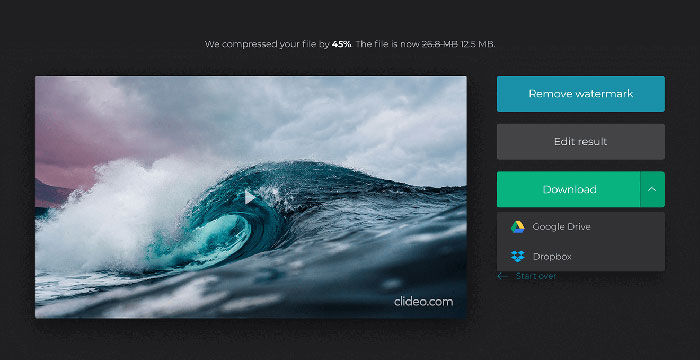
步驟 4. 壓縮完成後,你可以看到壓縮前與壓縮後的檔案大小。現在你可以先預覽結果,確認效果是否理想。如果滿意,便可點擊 Download(下載)按鈕,將檔案儲存到你的裝置或雲端空間。
第3部分。壓縮OGV文件的常見問題解答
什麼是OGV文件?
OGV文件是以Xiph.Org開源Ogg容器格式保存的視頻文件。它包含可能使用一種或多種不同編解碼器的視頻流,例如Theora,Dirac或Daala。可以使用各種媒體播放器來播放OGV文件。
OGV壓縮如何工作?
當涉及OGV文件壓縮時,幀間壓縮可通過消除視頻幀之間出現的相似性來減小文件大小。
如何將MP4壓縮為OGV格式?
您可以使用上述工具-Free Video Compressor將MP4文件壓縮為OGV。或者,您可以選擇一個視頻轉換器應用程序來幫助您。
結論
以上在線方法可以幫助您有效壓縮OGV視頻。您更喜歡使用哪一個?您可以在下面的評論中分享您的建議!
-
 從50MB到5MB –如何在幾秒鐘內壓縮MP4文件
 MP4視頻太大,無法上傳?是否要縮小視頻尺寸?這是3種無限制地將MP4文件壓縮為較小尺寸的有效方法。
-
 教程–免費壓縮視頻而不損失質量的7種方法
 閱讀並獲得7種在計算機或電話上免費壓縮視頻的方法。您可以輕鬆地將大型視頻縮小為較小的文件大小,以用於電子郵件,Twitter,Instagram,YouTube,WhatsApp等。
-
 如何在Windows,Mac,iPhone和Android上壓縮MOV文件
 本文詳細介紹瞭如何在手機或計算機上壓縮QuickTime MOV視頻。如果您的MOV視頻太大而無法發送,共享或保存,則可以在此處獲得4種可行的解決方案。
