


 視頻轉換大師
 屏幕錄影大師
 影片修復
影片修復
 安全下載
安全下載如何在沒有Flash Player的情況下在線減少SWF文件大小
SWF是一種Adobe Flash文件格式,用於通過Internet流式傳輸。無論您是下載SWF文件還是要在線上傳SWF視頻,SWF的大文件尺寸都難以區分。
但好的一面是,你可以壓縮 SWF 檔案來解決這個問題。

最初,官方的SWF播放器Adobe Flash Player可以通過更改比特率和分辨率來壓縮SWF文件,但在2020年12月31日之後不再受支持。
不用擔心,您可以選擇!
本篇文章分享一個免費線上 SWF 檔案壓縮工具,幫助你在 PC 和 Mac 上輕鬆減小 SWF 影片大小。
第1部分。最佳的免費在線SWF文件壓縮器
好的工具是必不可少的。要壓縮SWF文件,可以使用SWF文件壓縮器。
免費線上影片壓縮工具是一個免費精靈,可在線將 SWF 檔案大小壓縮得更小。無需註冊,你只需幾個簡單步驟就能完成 SWF 檔案壓縮流程。它可以壓縮 Flash 橫幅廣告、投影片播放、動畫、遊戲、影片等,方便地縮小 SWF 檔案體積。此外,這款線上 SWF 壓縮工具還可以:
- 1.將SWF文件大小最多減少95%,而質量損失減少到零或減少為零。
- 2.壓縮300多種視頻格式,例如SWF,MP4,MOV,AVI,WebM,MKV等。
- 3.可以自由壓縮和轉換沒有水印的視頻格式。
- 4.支持1080p HD,720p HD和其他視頻分辨率。

我們將在下一節中引導您完成如何壓縮SWF文件的過程。
第2部分。如何在線壓縮SWF(免費提供100%)
在線壓縮SWF文件的過程可以通過幾個簡單的步驟完成。
步驟 1. 新增 SWF 檔案
在 Windows 或 Mac 電腦的瀏覽器中開啟這個免費線上 SWF 檔案壓縮工具。點擊新增待壓縮檔案(Add Files to Compress)按鈕,系統會提示你下載並安裝壓縮啟動器。
成功安裝後,將彈出開源窗口,您應該在計算機上找到SWF文件並將其添加到此工具中。

步驟 2. 選擇壓縮率與大小
在大小(Size)旁邊,你可以看到目前 SWF 檔案的大小。點擊向下或向上的箭頭圖示來調整輸出 SWF 檔案大小。或者,你也可以拖動右側的滑桿,依照壓縮率來減小檔案大小。
在格式(Format)旁邊,你可以選擇 MP4、MOV、MKV、AVI、FLV 等其他格式,把 SWF 轉換為其他格式。
選擇較低的解析度(Resolution)輸出選項,同樣有助於進一步縮小 SWF 檔案大小。
將SWF文件壓縮為較小的大小時,該文件的比特率將在顯示屏中相應降低。
步驟 3. 壓縮 SWF
點擊壓縮(Compress),選擇一個資料夾作為儲存壓縮後 SWF 檔案的目的位置,然後開始減小 SWF 檔案大小。
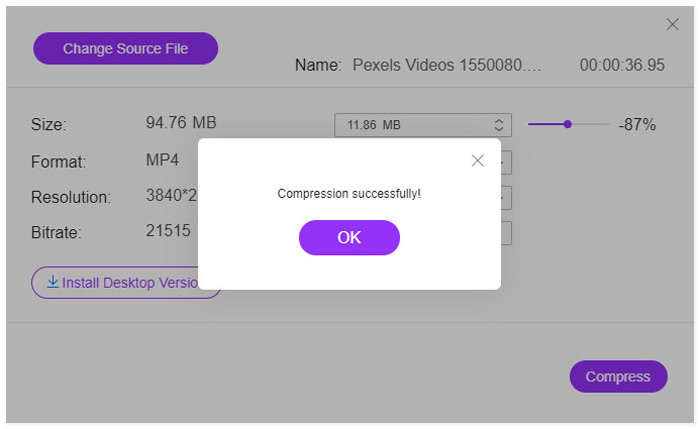
壓縮過程完成後,您將看到彈出窗口。然後,您可以通過導航設置位置來找到壓縮文件。
需要說明的是:這款免費線上 SWF 壓縮工具在壓縮後,會將 SWF 檔案轉換為其他格式。如果你想在保留 SWF 原始格式的情況下進行壓縮,或壓縮 4K 影片,建議下載這款 SWF 壓縮工具的桌面版——Video Converter Ultimate。
第3部分。減小SWF文件大小的常見問題解答
什麼程序將打開SWF文件?
最初,SWF 檔案可以透過其官方瀏覽器播放器 Adobe Flash Player 開啟。不過,Adobe Flash Player 自 2021 年 1 月起已停止支援。其他像 VLC、Windows Media Player 等SWF 播放器軟體也能開啟 SWF 檔案。
SWF是否已壓縮?
SWF使用無損壓縮來保持圖像的質量,這意味著存儲在SWF文件中的視頻不會被壓縮,並且文件大小很大。
為什麼Adobe Flash會關閉?
多年來,諸如HTML5,WebGL和WebAssembly之類的開放標準一直在不斷成熟,並可以作為Flash內容的可行替代方案。而且,主要的瀏覽器供應商正在將這些開放標準集成到他們的瀏覽器中,並且不贊成使用其他大多數插件(例如Flash Player)。因此,Adobe決定關閉Adobe Flash Player。
結論
SWF 檔案為無失真格式,因此會佔用較多空間。無論你是想在電腦上為 SWF 下載節省更多空間,或是順利在線上上傳 SWF 檔案,壓縮 SWF 檔案都成為常見需求。本文以 3 個步驟示範如何使用線上 SWF 壓縮工具免費減小 SWF 檔案大小。全程無浮水印、無需註冊,你可以快速完成壓縮流程。
現在輪到您了。
您是否掌握了減小SWF視頻大小的方法?
還是您有其他建議來完成SWF壓縮?
在下面留下您的評論,讓我知道。
-
 如何將MP4視頻壓縮到較小的尺寸
 MP4視頻太大,無法上傳?是否要縮小視頻尺寸?這是3種無限制地將MP4文件壓縮為較小尺寸的有效方法。
-
 兩種壓縮YouTube視頻的方法
 YouTube視頻太大且上傳速度慢嗎?只需通過在線和計算機兩種方式將視頻文件的大小壓縮為YouTube較小的大小即可。
-
 如何將Facebook的視頻壓縮從GB釋放到MB
 如果您被禁止在Facebook上上傳大型視頻,請不要擔心。只需使用免費的視頻壓縮器將大視頻大小從GB壓縮到MB。
