


 視頻轉換大師
 屏幕錄影大師
 影片修復
影片修復2種在線和桌面上為Instagram壓縮視頻的方法
如何為Instagram壓縮視頻?當您發現自己工作了幾個小時的視頻無法上傳到Instagram時,是否感到絕望?不要驚慌您來對地方了。本文將為您提供2種最簡單的方法來壓縮視頻以供Instagram上傳。

第1部分:為什麼我需要為Instagram壓縮視頻
如上所述,過大的視頻文件無法上傳到Instagram。您需要將Instagram視頻壓縮為20MB以下的MP4文件。視頻幀速率應為每秒30幀,其比特率應為3500KBPS。視頻大小通常為1080像素寬。建議使用4:5的分辨率。此外,您的視頻必須在3秒以上且在60秒以下。
第2部分:如何為Instagram在線壓縮視頻文件
FVC Free Video Compressor 是一款智慧型線上工具,可壓縮各種格式的影片。你無需下載程式,整個壓縮過程都在網頁上完成。透過它,你可以將影片縮小到任意想要的大小。
主要功能:
- 1.壓縮各種大型視頻,例如MKV,FLV,WMV,AVI,TS,MOV等。
- 2.易於使用的界面,供初學者自定義設置
- 3.以30倍的更快速度工作,並且在輸出中不留水印
- 4.處理4K超高清視頻,而沒有任何質量損失
以下是使用此工具在線為Instagram壓縮視頻文件的步驟:
步驟一: 在瀏覽器中開啟 FVC Free Video Compressor。
點擊中間的 Add Files to Compress 按鈕。第一次使用此工具時,你需要先下載名為 fvc-launcher 的檔案並執行,才能繼續操作。之後,再次點擊 Add Files to Compress 按鈕,就可以選擇你想壓縮用於 Instagram 的影片檔。

步驟二: 自訂你要壓縮供 Instagram 使用的影片設定
Size(大小): 你可以拖曳百分比滑桿來調整大小。要將影片壓縮用於 Instagram,請確保輸出檔案小於 20 MB。輸出大小的變化也會同時影響輸出位元率(Bitrate)。
Format(格式): 目前你可以將影片轉換為包含 MP4、MKV、AVI、FLV 等在內的 12 種格式。若要壓縮用於 Instagram,只需選擇 MP4 格式即可。
Resolution(解析度): 你可以將解析度降至較低的數值,例如 320*240、480*360 等。或者,你也可以保留原始解析度,只透過降低位元率來壓縮用於 Instagram 的影片。

步驟三: 開始壓縮並等待工具完成任務。
點擊紫色的 Compress 按鈕,並選擇你要儲存輸出影片的目標位置。在影片處理期間,請勿關閉瀏覽器或網頁,否則你就必須從頭開始重新壓縮 Instagram 用的影片。處理速度在很大程度上取決於你的硬體效能。
第3部分:如何在桌面上為Instagram壓縮視頻文件
除了大小限制外,影片長度也應介於 3 到 60 秒之間。不過,由於這款線上工具是透過網頁運作,其功能相對簡單,無法支援剪輯影片。如果你想不只能壓縮,還能同時編輯影片,要用什麼工具?Aiseesoft Video Converter Ultimate 可能是你的最佳選擇。
主要功能:
- 1.兼容1,000多種格式,包括WMA,MP4,AVI,MOV,WMV,MP3,FLAC等。
- 2.先進的硬件加速技術確保前所未有的速度
- 3.使用一系列濾鏡和基本效果修剪和合併視頻剪輯。
- 4. 3D Maker工具可讓您在3D眼鏡中欣賞令人難以置信的3D視頻
- 5.創建幾乎專業的分屏視頻
- 6.內置四種增強視頻效果的終極方式
使用Video Converter Ultimate壓縮Instagram視頻的步驟:
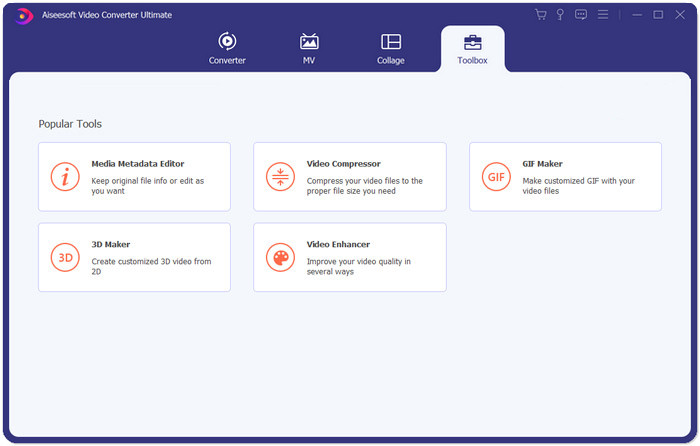
步驟一: 下載、安裝並啟動 Aiseesoft Video Converter Ultimate。切換到 Toolbox 分頁,點擊「+」按鈕加入你想壓縮用於 Instagram 的影片。
步驟二: 新增影片後,你會進入 Video Compressor(影片壓縮器)介面。拖曳大小滑桿以調整輸出檔案的大小,並選擇你想要的解析度與輸出格式。
注意: 你只能透過嘗試不同的解析度與輸出大小組合,間接改變位元率。
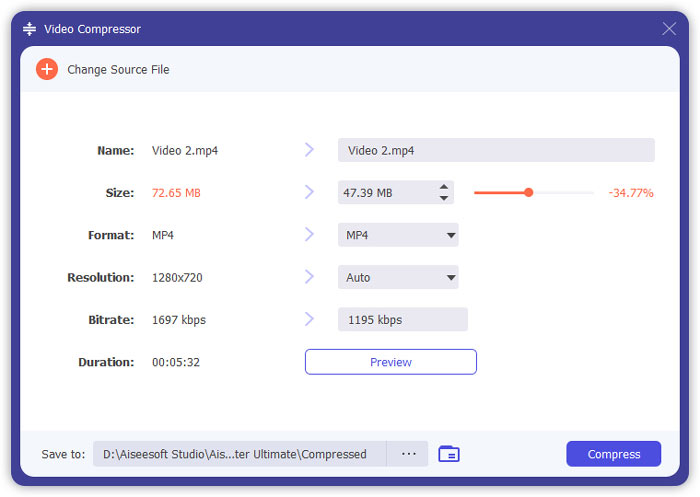
步驟三: 點擊右下角的 Compress 按鈕,開始壓縮用於 Instagram 的影片。
延伸閱讀:
如何線上壓縮影片用於 WhatsApp(100MB/500MB/1GB…)
第4部分:將視頻上傳到Instagram的常見問題解答
Instagram視頻上傳有哪些要求?
格式: MP4
編解碼器: H.264
位元率: 低於 3500 kbps
影格率: 低於每秒 30 影格。
Instagram視頻的最佳長寬比是多少?
最佳縱橫比為9:16,這也是大多數智能手機的標準比例。
我的視頻在上傳Instagram時應使用哪種音頻格式?
AAC音頻。
結論
在本文中,您有兩個方便的工具可以為Instagram壓縮視頻。它們是FVC Free Video Compressor和Video Converter Ultimate。當您為Instagram壓縮視頻時,請不要忘記確保您的視頻是3到60秒且在20 MB以下。
-
 減少Vimeo視頻上傳大小的最佳方法
 在本文中,我們將向您展示如何壓縮視頻文件以將其上傳到Vimeo上,以及視頻和音頻壓縮可能需要的準則。
-
 如何以兩種方式推導YouTube的視頻文件大小
 YouTube視頻太大且上傳速度慢嗎?只需通過在線和計算機兩種方式將視頻文件的大小壓縮為YouTube較小的大小即可。
-
 如何免費和在線為Facebook壓縮視頻
 如果您被禁止在Facebook上上傳大型視頻,請不要擔心。只需使用免費的視頻壓縮器將大視頻大小從GB壓縮到MB。
