


 視頻轉換大師
 屏幕錄影大師
 影片修復
影片修復
 安全下載
安全下載如何使用2個免費視頻壓縮器在線壓縮WebM文件
WebM 是一種視訊與音訊多媒體檔案格式,通常用於網頁上的媒體內容。它相容於所有常見的網路瀏覽器,如 Chrome、IE、Safari、Firefox 等。當你希望影片串流得更流暢、更快速時,就需要對其進行壓縮。那麼問題來了,你知道如何壓縮 WebM,而又不會大幅降低畫面與音質嗎?

你是否正在尋找壓縮 WebM 檔案、減小檔案大小的方法?在這篇文章中,我們將分享 2 種免費方式,幫助你線上壓縮 WebM。
第1部分。如何免費在線壓縮WebM文件
若想在盡量保留原始畫面與音效品質的前提下壓縮 WebM、減少檔案大小,你可以依靠這款相當熱門的 Free Video Compressor。它是專為壓縮各種常見影片格式而設計的免費工具,包括 WebM、AVI、MP4、FLV、MKV、MOV 等。
這種易於使用的WebM文件壓縮器具有減小視頻文件大小的能力,而不會降低質量。它允許您壓縮4K UHD和1080p,720p HD和普通SD視頻。您可以導航到“免費視頻壓縮器”頁面,以輕鬆地直接壓縮WebM。
步驟 1: 在電腦上開啟瀏覽器,前往這款免費線上 WebM 檔案壓縮工具的官方網站。

步驟 2: 進入網站後,點擊Add Files to Compress(新增檔案以壓縮)按鈕,安裝一個小型啟動程式來進行 WebM 壓縮。接著,在跳出的視窗中選取並加入你想要壓縮的 WebM 檔案。

步驟 3: 你可以依照自己的需求,自由調整 WebM 檔案的壓縮程度。此外,你也可以自訂影片解析度、幀率及位元率、影片名稱與輸出格式。完成所有設定後,只要點擊Compress(壓縮)按鈕,即可開始在線上壓縮 WebM。

與許多其他在線WebM視頻壓縮工具不同,此免費視頻壓縮器不會在您的壓縮WebM文件中添加任何水印。
第2部分。如何使用WebM Compressor壓縮WebM
要在線上壓縮 WebM 檔案,你也可以使用 VEED WebM Compressor。不論你的檔案超出電子郵件附件上限、Facebook Messenger 附件限制,或其他上傳限制,都可以利用這款 WebM 壓縮工具,降低 WebM 影片的檔案大小。
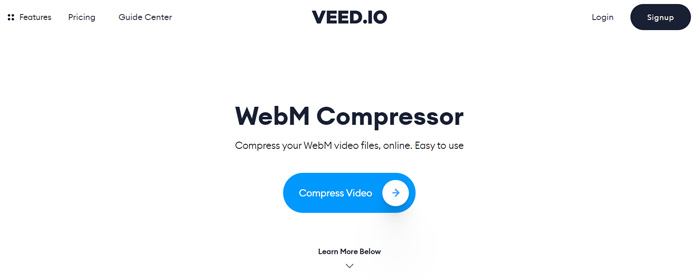
步驟 1: 開啟瀏覽器並前往 VEED WebM Compressor 網站。點擊Compress Video(壓縮影片)按鈕,進入下一個上傳步驟。
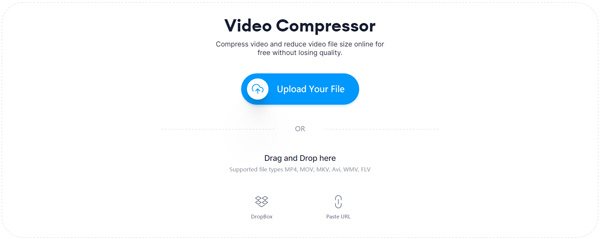
步驟 2: 你可以點擊Upload Your File(上傳檔案)按鈕,上傳你的 WebM 影片。這裡也支援拖曳檔案以上傳 WebM。這款免費的 WebM 影片壓縮工具同時支援從 DropBox 以及網址(URL)匯入影片。
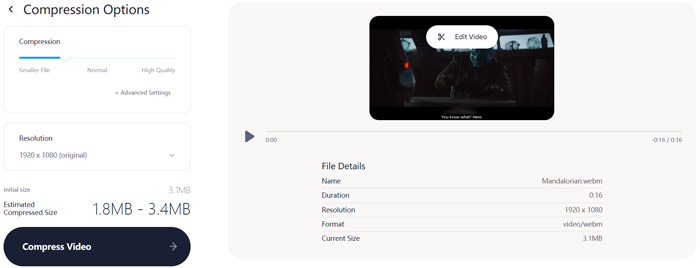
步驟 3: 你可以依需求自由調整影片的壓縮程度。此外,你還可以自訂影片解析度。你也能透過點擊Edit Video(編輯影片)來裁剪 WebM 檔案。系統內建媒體播放器,方便你預覽已載入的影片。
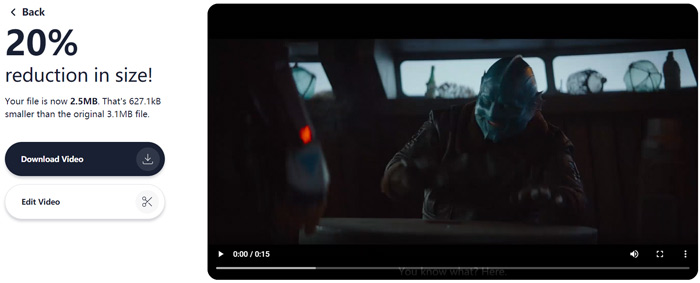
步驟 4: 點擊左下角的Compress Video(壓縮影片)按鈕,開始壓縮 WebM 檔案。完成後,再點擊Download Video(下載影片)按鈕,將壓縮好的 WebM 影片儲存到電腦。
第3部分。壓縮WebM文件的常見問題解答
問題1.什麼是WebM格式?
WebM是一種開放源代碼格式,包含使用VP8或VP9編解碼器壓縮的視頻和使用Vorbis或Opus編解碼器壓縮的音頻。 WebM最初旨在提供可在HTML5視頻和HTML5音頻元素中使用的免版稅替代方案。 WebM文件主要用於網頁上的媒體內容。
問題2.如何將WebM在線免費轉換為MP4?
若想免費將 WebM 檔案轉換成 MP4,你可以使用這款熱門的線上影音轉檔工具:Free Online Video Converter。它能輕鬆完成WebM 轉 MP4 以及其他各種視訊/音訊格式的轉換。
問題3.什麼是高質量的最小視頻格式?
MP4它通常以最小的文件大小提供最佳的視頻質量。
結論
當你打算將 WebM 影片分享到 Facebook、Instagram、Twitter 或其他社群媒體帳號時,最好先對它進行壓縮。在本文中,你可以學到 2 種簡單的方式來免費在線上壓縮 WebM。你可以選擇自己偏好的影片壓縮工具,來減少 WebM 檔案的大小。
-
 在iPhone / Android /在線上為電子郵件壓縮視頻的教程
 無法通過太大的電子郵件發送視頻?如果遇到此問題,您可以在此處找到可行的方法來壓縮視頻以發送電子郵件。本文將詳細介紹如何免費縮小大型視頻文件。
-
 MP4到WebM轉換器–將MP4轉換成WebM的4種最佳方法
 當您想免費將MP4轉換為WebM時,可以從本文中免費了解有關4種最常用方法來免費獲取所需視頻的信息。
-
 3種方法來壓縮和轉換WhatsApp的大視頻文件
 從本文中,您可以獲得3種簡單的方法來在線壓縮WhatsApp的視頻。為什麼您不能在WhatsApp上發送視頻?如何解決WhatsApp視頻大小限制?只是閱讀並檢查。
