


 視頻轉換大師
 屏幕錄影大師
 影片修復
影片修復
 安全下載
安全下載如何在 iPhone 或 Android 上反轉視頻使翻轉變得容易
靜態視頻很無聊,不是嗎?面對這種困境,您希望為您的視頻內容添加新的視角並吸引您的觀眾。如果是這樣,是時候開始在您的 Android 或 iPhone 設備上翻轉您的視頻了。翻轉視頻是轉換內容和創建動態觀看體驗的一種簡單而強大的方式。使用正確的程序和技術,您可以輕鬆地翻轉和旋轉視頻,為您的視頻博客、社交媒體帖子或您想到的任何視頻項目添加獨特的風格。
透過學習如何在 iPhone 或 Android 裝置上鏡像影片,你會驚訝地發現,僅僅將影片翻轉就能徹底改變你的內容表現。話不多說,現在就開始學習如何在行動裝置上專業地翻轉影片吧!

第 1 部分。指導如何在 iPhone 上翻轉視頻
InShot 可免費下載和使用,其許多功能無需任何應用內購買即可使用。更重要的是,該應用程序使您能夠毫不費力地翻轉和旋轉視頻。您可以水平和垂直翻轉或鏡像視頻。此外,使用此程序可以將剪輯旋轉 90 或 180 度。要了解如何在 iPhone 上翻轉視頻,請按照以下步驟操作:
步驟一: 若你尚未安裝,請前往 App Store 下載 InShot 應用程式。
步驟二: 若要翻轉影片,開啟 InShot 應用程式,於主畫面點擊加號(+)圖示。包括「翻轉」工具在內的各種編輯選項便會出現。當你選擇「翻轉」工具時,可以在水平與垂直之間做選擇。
步驟三: 只要選擇你想要的選項,你的影片就會立即被翻轉。你可以透過播放按鈕預覽翻轉後的影片。
第 2 部分。教程如何在 Android 上翻轉視頻
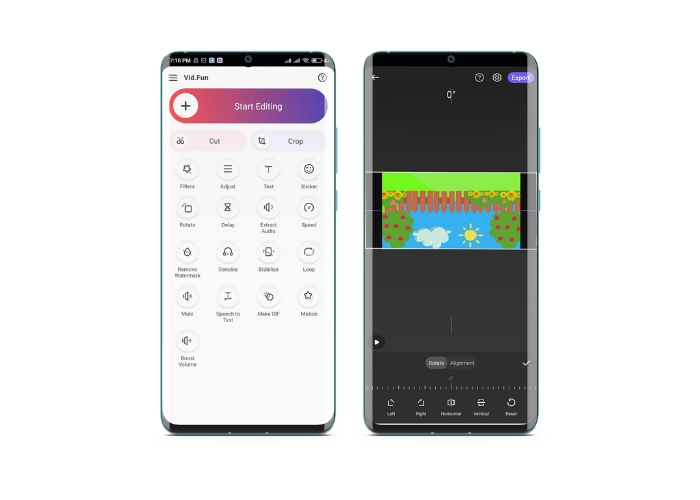
Vid.Fun 是一款專為 Android 裝置設計的強大影片剪輯應用程式。除了能將影片水平與垂直翻轉之外,還提供許多實用的編輯工具,包括裁剪、剪切、合併與分割影片。同時,你也能利用該工具的投影片播放功能展現創意。以下是如何在 Android 裝置上翻轉影片的逐步教學:
步驟一: 啟動應用程式,點選開始編輯按鈕,選擇你想要翻轉的影片。接著在螢幕底部點擊是以確認所選影片。
步驟二: 之後,在右下角點選全部,各種不同的編輯選項便會顯示出來。現在,請點選動作選項。
步驟三: 你會看到一系列的編輯工具出現,其中包含翻轉工具。在水平與垂直之間點選合適的選項。選擇你需要的方向後,影片就會依照設定被翻轉。你可以點擊播放按鈕預覽翻轉後的影片。
步驟四: 若你對翻轉後的影片感到滿意,請點擊匯出按鈕,將影片儲存到裝置中,或直接分享至社群媒體。以上就是使用這款翻轉影片應用程式的方法。
獎勵:如何在計算機上翻轉視頻
如果你正在尋找一種在電腦上輕鬆高效翻轉影片的方式,那麼FVC Video Converter Ultimate絕對值得一試。這款熱門影片剪輯軟體提供多種編輯工具與功能,其中就包含只需幾下滑鼠點擊就能完成的影片翻轉與旋轉功能。它支援水平與垂直翻轉影片,或是旋轉影片。此外,這套程式還附帶一個工具箱,內含多種可滿足你需求的編輯工具。
步驟一: 取得程式
首先,點擊下方的免費下載按鈕取得本程式的安裝檔。請務必選擇與你電腦作業系統相對應的安裝檔,然後進行安裝並啟動程式。
步驟二: 啟動影片旋轉工具
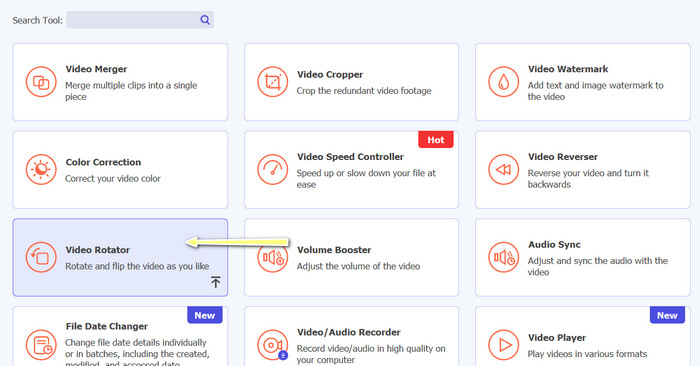
啟動程式後,你會發現主視窗包含四個分頁。請從工具箱選單中選擇影片旋轉器。你也可以使用搜尋框來尋找此工具並快速開啟。
步驟三: 匯入影片檔
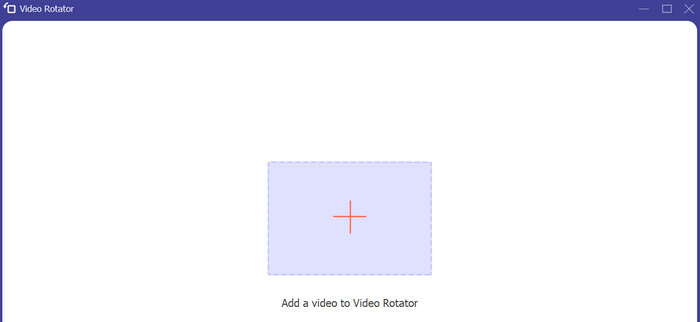
在「影片旋轉器」中有一個+按鈕可用來上傳影片。點擊該按鈕後,翻轉設定的介面便會載入。
步驟四: 翻轉影片
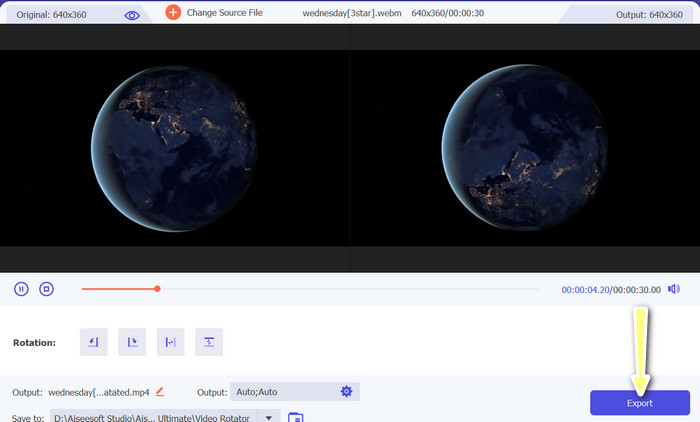
當介面顯示後,你就可以使用其中的翻轉按鈕。你可以選擇將影片水平或垂直翻轉。點擊正確的按鈕完成設定後,再按下匯出按鈕即可完成整個流程。
延伸閱讀:
第 3 部分。有關在 Android 和 iPhone 上翻轉視頻的常見問題解答
我可以將視頻翻轉回原來的方向嗎?
是的,您可以在 Android 或 iPhone 上使用翻轉視頻的應用輕鬆地將視頻翻轉回其原始方向。只需再次應用翻轉效果,它就會恢復到原來的方向。
我可以使用 Android 或 iPhone 設備上的內置相機應用翻轉視頻嗎?
不,內置相機應用程序沒有視頻翻轉功能。您將需要使用視頻編輯應用程序或軟件來翻轉您的視頻。
翻轉視頻會降低其質量嗎?
翻轉視頻不應降低其質量,但可能會影響視頻中任何文本或圖形的方向。如果您擔心質量,最好使用高質量的視頻編輯應用程序或軟件。
結論
那麼,何不現在就下載以上其中一款應用程式,開始翻轉你的影片,為觀眾製作更精彩、更有創意的內容呢?在學會如何在 iPhone 或 Android 裝置上翻轉影片之後,你肯定能獲得更多的觀看次數與按讚數。
-
 教程–將iPhone上的視頻合併到新的4種免費方法
 閱讀並獲取4種在iPhone上合併視頻的簡單方法。支持所有iPhone型號和iOS版本。您可以將iPhone上的2個或更多視頻快速合併為一個新視頻。
-
 如何在 iPhone 上更改視頻元數據的提示
 在 iPhone 設備上更改視頻元數據有困難嗎?幸運的是,本文討論了在 iPhone 上更改視頻元數據的最佳方法。
-
 像專業人士一樣編輯:如何毫不費力地裁剪 iPhone 視頻
 如果您';希望將您的 iPhone 視頻編輯技能提升到一個新的水平,視頻裁剪應用程序將改變遊戲規則。我們'將介紹一些適用於 iPhone 的最佳視頻裁剪應用程序。
