視頻轉換大師 大盒

多合一視訊工具箱,能夠以超快的速度將視訊/音訊轉換為 1000 多種格式。

免費下載

Login Security安全下載

免費下載

Login Security安全下載

如何使專案影片的影片變暗

When it comes to video production, one frequently used technique is to darken specific areas of the footage. This process can be done for several reasons, such as to create a mood or atmosphere, draw focus to a particular part of the screen, or help hide imperfections. One of the primary reasons to darken video is to add drama and tension to a scene. By reducing the exposure and increasing the contrast, shadows are intensified, and highlights are minimized, giving the footage a more ominous and foreboding feel. This process can be particularly effective in horror movies or thrillers, where the audience is meant to feel on edge. For your project video, you must learn this technique with the detailed guides below.

如何使影片變暗

第 1 部分:如何離線使影片變暗

1. Video Converter Ultimate

Video Converter Ultimate is a powerful application and video editing utility that can give you what you need. Need help reducing the brightness of your project video? This tool contains a feasible way to lessen the brightness of the appearance of your video. It comes with an advanced video utility, a Video Enhancer that automatically adjusts the brightness and contrast of the project video. It analyzes the file internally and adjusts the contrast to provide better lighting on the file as if it were captured in a low-light environment or setting. You can check the guidelines below to learn the detailed guide to using this app.

Step 1. Download the App

Begin enhancing and modifying your video file by getting the software on your PC. Click the Free Download presented below this step. Get its file installer and run the file on your computer.

Step 2. Import Video

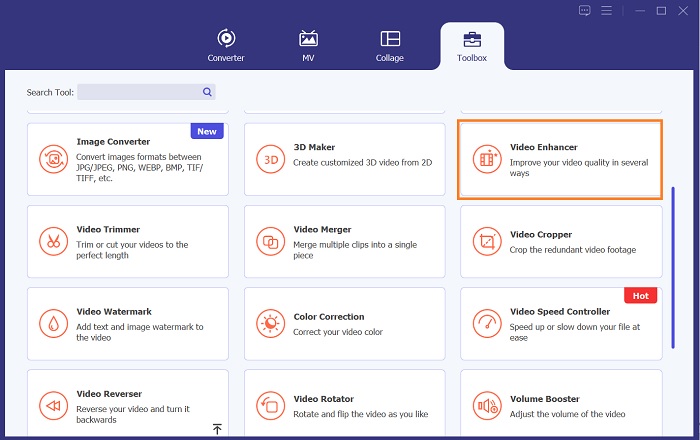
The following step is to launch the app and add the video you need to enhance. Go to the Toolbox option, where all advanced features are located. Select the Video Enhancer feature to access its dialogue box. Import the file by hitting the + icon.

存取視訊增強器

Step 3. Finalize the Process

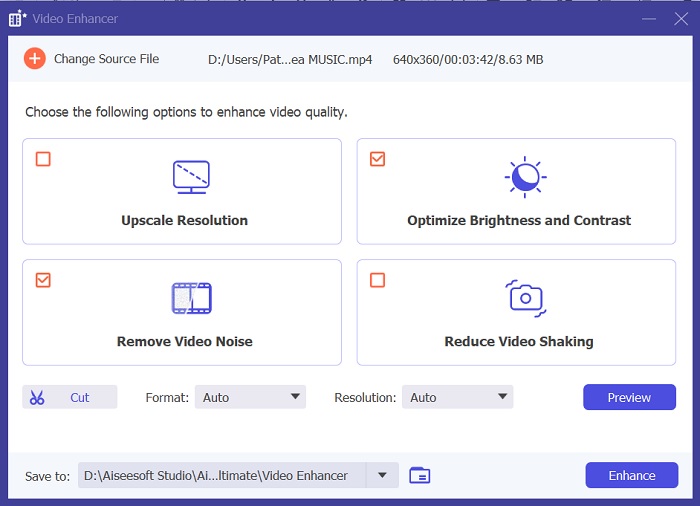
Afterward, once the chosen video is imported, four options will appear on your screen. Select the Optimized Brightness and Contrast menu to process the video automatically. Then, the video will be exported to the designated output folder. Locate the file and play it to check the contrast of the project video.

調整影片對比度

2. Adobe Premiere Pro

Premiere Pro 是一款創新的視訊實用軟體,憑藉其直覺的介面、與其他 Adobe 產品的無縫整合以及強大的功能,已成為許多專業影片編輯器的首選。 Premiere Pro 的關鍵優勢之一是它能夠處理從 SD 到 HD 到 4K 等多種視訊格式。此功能可輕鬆處理來自各種來源(包括攝影機、行動裝置和無人機)的素材。如果需要調整影片的亮度,Adobe Premiere Pro 的 Lumetri Color Panel 功能可以提供很大幫助,該功能可以調整檔案的對比度和亮度。此外,Premiere Pro 也提供進階色彩校正工具、音訊編輯功能、視覺效果等。

Step 1. To edit brightness on Premiere Pro, you must download the app on your PC. You can search its file installer on its main web page and get its firmware to install the app. Launch the tool and import the video file by hitting the Import button.

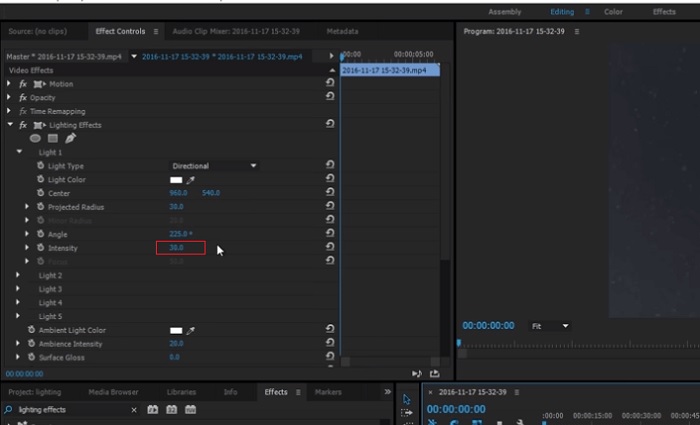
Step 2. Open the Lumetri Color panel by clicking on the Color tab in the top left corner of the screen. In the Lumetri Color panel, you will see various color correction options. To adjust brightness, locate the Basic Correction section. You can use the Exposure slider to change the clip's brightness here. Drag the slider to the right to increase brightness or to the left to decrease brightness.

Step 3. Lastly, hit or click the Export button to save the file. Please wait for the video to render and locate it in the tool's output folder. Play and preview the changes on the project video and see if it fits your liking.

使用 Premiere 調整亮度

3. Adobe After Effects

在 After Effects 中調整亮度時,有幾個功能會派上用場。首先,色階效果可用於調整亮度和對比。此效果可讓您設定黑白點,這有助於確保您的影像不會變得太褪色或太暗。您也可以使用曲線效果來調整特定影片部分的亮度和對比度。此功能可以顯示陰影或高光中的細節。另一個有用的功能是曝光效果,它允許您改變整個影像的亮度和對比度。此效果還包括用於調整伽瑪和偏移的選項,這可以幫助您微調影像的外觀。

Step 1. The initial step to edit video appearance on After Effects is to get the tool's firmware and install it on your PC. You can download or acquire it from Adobe's official website and run its file installer. Then, launch the app and navigate its features.

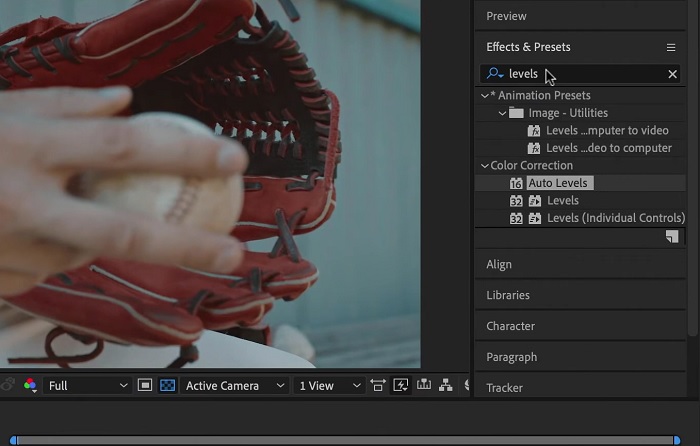
Step 2. Next is to import the video by going to the File option and hitting the Import option. Locate your video and tap it to add it to the video editing. After that, go to the Windows tab and hit Effects and Presets. There will be a tracking box that will appear where you can search for the Levels option.

Step 3. Lastly, hit the Auto Level and drag and drop it to the video you need to lessen the brightness on your project clip. Hit the Export option to save the modifications. You can also use different presets to adjust the brightness of your file. Go to the output folder to preview and check the modified project video.

使用 After Effects 調整亮度

4.達文西決心

在影片修改方面,Davinci Resolve 是一款功能強大的軟體和影片實用程序,提供各種編輯功能來提高素材的品質。最常見的編輯技術之一是使影片變暗,這會極大地影響您的視覺效果。這個影片編輯軟體用戶最喜歡的功能之一是能夠輕鬆對素材進行顏色分級。該軟體具有多種顏色分級工具,可讓使用者修改素材的外觀和感覺以匹配藝術視覺。它還配備了時間軸面板,用戶可以在其中提供更好的編輯過程。 Davinci Resolve 憑藉其先進的工具使這一過程變得簡單且有效率。

Step 1. The initial guide on adjusting the exposure of a video using DaVinci Resolve is to get the tool on your PC. Download the app on its official website and run the file installer to acquire it. Then, launch the video editing app and check its features to familiarize yourself with its editing utilities.

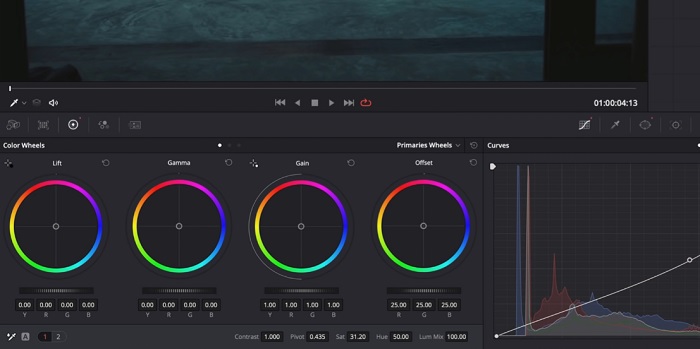
Step 2. To darken a video with Davinci Resolve, import the video to a file by clicking the File option and accessing the Import file button. Then, you can use the software's color grading tools. Select the clip you want to darken in the timeline, then open the Color page.

Step 3. From there, you can use the Lift, Gamma, and Gain controls to adjust the brightness and contrast of the clip. Afterward, hit and select the Export button to save the changes made to the video project. Access the output folder to preview the file.

使用達文西調整亮度

第 2 部分:如何在線調暗視頻

您是否厭倦了在電腦上使用笨重的影片編輯軟體來調整簡單的影片剪輯?嗯,Clideo 作為影片編輯的替代品可以提供很大的幫助,因為它會佔用大量的電腦空間。此線上工具使用戶能夠輕鬆存取其時間軸面板並將影片匯入其 API,而無需安裝或登入帳戶。用戶可以直接上傳需要編輯的影片文件,線上工具將分析並提供編輯功能,以調整和增強項目剪輯的外觀。您可以查看下面的詳細指南,以了解如何徹底使用此線上應用程式。

Step 1. To adjust the brightness on Clideo, access the app on your web browser. Launch the main interface and start uploading your video clip to the platform by hitting the Choose File. Select the video you need to edit and import on the online tool.

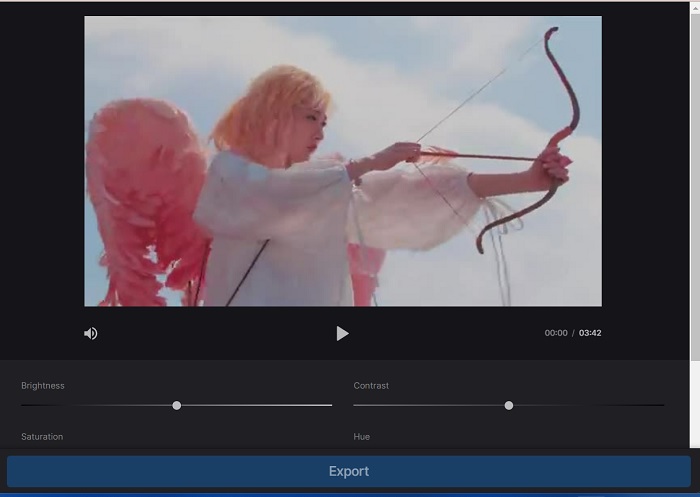
Step 2. Next, select the Adjust option from the menu below the video player. This method will use several editing tools, including an option to adjust brightness. Drag the brightness slider left or right to decrease or increase the brightness, respectively.

Step 3. You can also use the auto-adjust button to adjust the brightness automatically. Once you are satisfied with the brightness level, click the Apply icon or button to save your changes. Finally, download your edited video by clicking the Export option.

使用 Clideo 調整亮度

延伸閱讀:

Video Filter: Enhance Your Video with Filters and Effects on Desktop

5 Amazing YouTube Movie Makers | Create Excellent Movie Contents

第 3 部分:關於變暗影片的常見問題解答

如何使 iPhone 上的影片變暗?

您可以在行動裝置上使用和安裝不同的軟體來調整專案剪輯的曝光度。您還可以使用線上工具來幫助您直接在智慧型手機上調整影片。建議使用 Clideo,因為它可以在 Web 瀏覽器中訪問,包括 Safari 和其他與 Apple 裝置相容的瀏覽器。

如何讓 iMovie 上的影片變暗?

調整亮度和對比度設定以使 iMovie 上的影片變暗。您也可以為影片添加深色疊加層或濾鏡,使其看起來更暗。另一種選擇是調整曝光等級以使影片更暗。嘗試這些設置,直到您獲得所需的視訊外觀。

為什麼要將 iPhone 上的影片調暗?

讓影片變暗在許多情況下很有幫助,例如提高整體影片品質、增強對比度或營造某種情緒或氛圍。

結論

After trying different methods, this article found that darkening a video on a PC can be pretty straightforward. You'll need to use video editing software such as Video Converter Ultimate, Adobe Premiere Pro, Da Vinci Resolve, and After Effects to achieve this. Once you have the software installed, you can easily modify the exposure of your video to achieve the desired darkened effect. However, it's vital to ensure that the video is light to the point where it's difficult to see the details. With these tips on how to fix a video that is too bright, you can successfully darken your video and create a visually appealing final product.

優秀的

評分:4.9 / 5(共 349 票)