


 視頻轉換大師
 屏幕錄影大師
 影片修復
影片修復您可以在網上找到的適用於 Windows 的最佳 iMovie 替代品是什麼
iMovie 是 Mac 上廣為人知的免費影片編輯器,因為它是系統預設編輯器,而且就算你介於新手與專業人士之間,也能輕鬆上手。雖然這款工具在剪輯方面表現出色,但目前仍無法在 Windows 上使用。所以,以下列出了幾款在 Windows 上堪稱 iMovie 替代品 的最佳影片剪輯軟體,並一併附上說明,方便你判斷哪個工具在剪輯功能與輸出品質上表現最佳。

第 1 部分。 帶有比較圖表的 PC 的最佳 iMovie 替代品
| 編輯器功能 | 視頻轉換大師 | VSDC 免費視頻編輯器 | 達芬奇決心 | 熱門電影快車 | 視窗電影製作 |
| 編輯功能/秒 |  | | | | |
| 方便使用的 | |  | | | |
| 總體體驗 | 它提供了全面的先進和專業輸出,而且易於使用。 | 用於編輯具有專業經驗的更詳細視頻的最佳工具。 | 該工具專用於大量編輯 | 提供比 VSDC 免費視頻編輯器更多的編輯功能。 | 它具有基本的編輯功能,僅此而已。 |
| 文件大小 | 2.4 兆字節 | 99.2 兆字節 | 1.5GB | 1.2 GB 或更多 | 15.1 兆字節 |
| 價格範圍 | 1個月:$25.00 一年:$31.20 終身許可證:$55.20 | $19.99 專業版 | 每個特性 $357.01 | $299(無訂閱費) | 免費下載 |
| 系統要求:支持的平台、處理器和 RAM | 支持的操作系統:Windows 10,Windows 8,Windows 7,Windows Vista,Windows XP(SP2或更高版本)macOS 10.7或更高版本 處理器:1GHz Intel / AMD CPU或更高 RAM:1G RAM或更高 | 微軟視窗 2000/XP/2003/Vista/Win7/Win8 處理器:Intel 或 AMD 或兼容處理器,最低 800 MHz 顯示圖形最低分辨率為 800x600x16 位顏色 RAM:128 兆字節 (MB) Microsoft DirectX 8.1b | Windows 10 Creators Update 或 Blackmagic Design Desktop Video 10.4.1 或更高版本 處理器:NVIDIA/AMD/Intel GPU 驅動版本 內存:至少 2GB 的顯存 | Windows:Microsoft Windows 10(64 位) 處理器:第四代英特爾® 酷睿™ 處理器或 AMD 同等處理器。 內存:4GB(推薦 8GB) | Microsoft Windows XP(SP2 或更高版本)、Windows Vista、Windows 7、Windows 8、Windows 8.1、Windows 10 處理器:1GHz Intel/AMD 處理器或以上 內存:256MB內存(推薦512MB或以上) |
1. Video Converter Ultimate
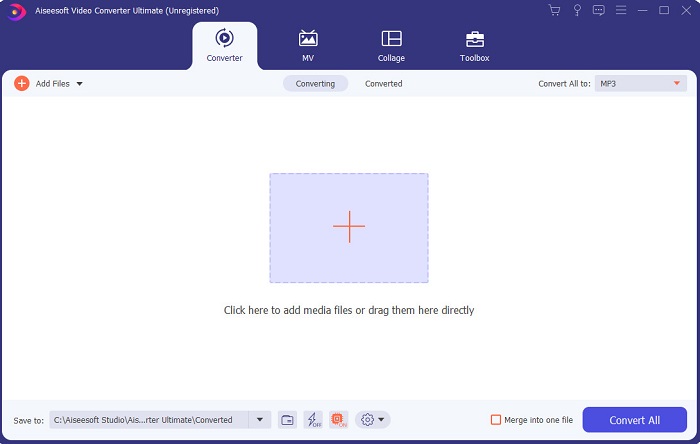
如果剪輯影片對你來說是個難題,那麼 Video Converter Ultimate 可以彌補這個問題。它在剪輯與其他功能上的表現,比 iMovie 或本篇列出的其他工具還要豐富。同時,它也是 Windows 和 Mac 上最好的 iMovie 替代方案 之一。它讓使用者在幾乎不需要太多學習成本的情況下,就能享受高品質的剪輯體驗。也就是說,即使你是影片剪輯的新手或初學者,仍然可以透過這套軟體,輕鬆完成帶有專業感的剪輯。它提供的操作說明也相當淺顯易懂,能幫助使用者完成自己想要的各種剪輯效果。雖然這款工具的介面已經不錯,但仍有升級空間。正如人們所說,永遠都有進步的空間。
2. VSDC 免費視頻編輯器
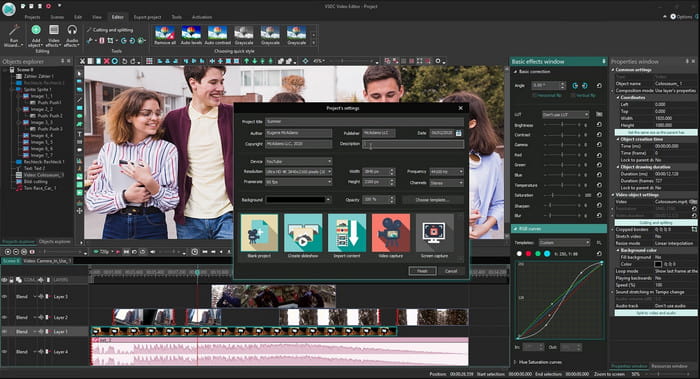
VSDC Free Video Editor 是一款可在 Windows 上免費使用的優秀剪輯器之一。隨著開發者持續更新,這款軟體的使用者介面也變得愈來愈好。不過,他們仍需要再加強,才能變得更出色。此外,這款 iMovie for Windows 10 的部分剪輯功能被藏在工具的子選單裡,因此你在尋找想要使用的剪輯功能時,可能會有些吃力。不過,它的專業版價格相較於本文提到的其他工具便宜許多,而其剪輯功能與價格相比也算合理。不過,在實際使用時,我們也遇到了一些錯誤與程式當機的情況。
3.達芬奇決心
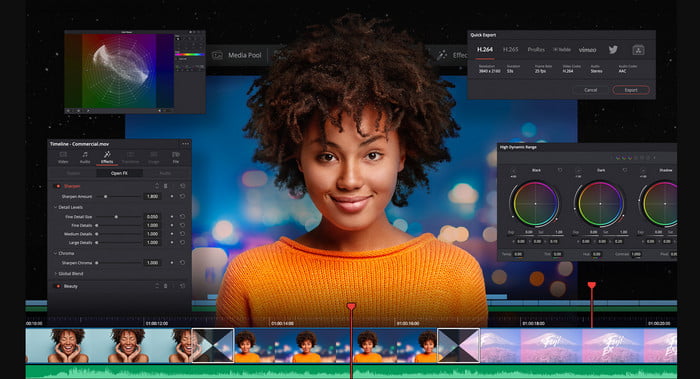
Davinci Resolve 提供了大量你在優化影片時會用到的剪輯功能。據說,它結合了 Adobe Premiere 與 Apple Final Cut 的多種剪輯特性。正因為這種結合,你可以預期會有許多進階功能可用,讓影片比以往更加出色。然而,對所有新手以及部分沒有剪輯經驗的專業人士而言,要學會操作這套工具是件吃力的事。此外,這款 iMovie for PC 是功能最強大的替代方案之一,但卻不太親民於預算,因為它的價格超過 $300,是本篇清單中最昂貴的剪輯工具。
4. HitFilm Express
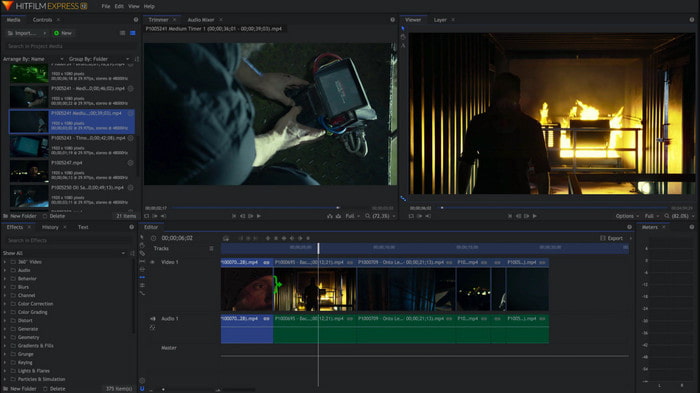
HitFilm Express 因為出色的效能而廣受使用者好評。雖然它也提供了一些教學,但仍不足以完整說明如何使用這套剪輯器。此外,它缺少一些你在打造炫麗影片時可能需要的動畫轉場效果。不過,如果你只想做簡單的剪輯,可以試試這款工具,因為它在 PC 上的使用體驗很像 iMovie。同時,在使用過程中,你要有所心理準備,可能會遇到一些輕微甚至嚴重的錯誤與程式當機問題。
5. Windows 電影製作
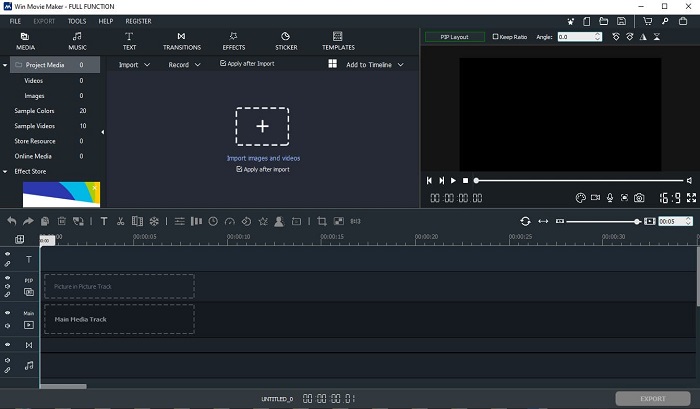
Windows Movie Maker 在 2016 年底曾經非常熱門,因為它提供了一些可用的進階功能。雖然現在已經不再是 Windows 內建的多媒體程式,但仍然是可在 PC 上下載的 iMovie 替代方案 之一。另外,下載這款工具時必須小心,因為許多使用者從網路上的不明來源下載後,反而讓電腦感染了病毒。它主要提供你會用到的基本剪輯功能。所以,如果你想追求非常驚艷的成品,其實不太需要考慮這款工具;但若你只想做些簡單的剪輯,仍可試著下載並使用它。
第 2 部分。 有關 Windows 版 iMovie 的常見問題解答
什麼是編輯 GIF 的最佳工具?
隨著 GIF 成為流行趨勢,許多使用者都喜歡自己製作 GIF。另一方面,GIF 檔案的大小也比其他影片格式小得多。所以現在,如果你點擊這個連結,將會開啟一個新網站,介紹什麼是適用於 PC、Mac、iOS 和 Android 的最佳 GIF 編輯器。
如何在視頻中添加背景音樂?
剪輯影片固然重要,但你知道加入背景音樂也是剪輯流程的一部分嗎?如果想進一步了解如何在影片中加入音樂,請點擊這個連結繼續。
我們為什麼要編輯視頻?
因為它是後期製作的一部分,這將通過合併、剪切不必要的視頻、添加背景音樂等來完善您的視頻。因為有了這個編輯軟件,我們才能夠通過編輯來表達自己。
結論
總結來說,影片剪輯是一個非常重要的階段,我們必須認真對待。即便你沒有一整套完整的專業剪輯工具,也依然能完成剪輯。在文中介紹的 5 款工具當中,它們幾乎都具備與 iMovie 類似的概念與功能。此外,Video Converter Ultimate 是你打造令人驚艷影片時所需的關鍵剪輯工具,成品往往會超乎旁人的預期。所以,你還在等什麼?如果你想用非常實惠的價格,體驗到全面又先進、而且操作簡單的剪輯功能,那就立即在你的 PC 上下載這款終極轉檔暨剪輯軟體吧。
-
 如何在線壓縮MPEG-4文件–沒有下載,沒有水印
 沒有足夠的文件存儲空間來保存所有 MPEG-4 文件?以下是一些可以幫助您縮小視頻文件的解決方案。
-
 如何在線免費壓縮 VOB 文件 [無下載]
 您是否正在尋找壓縮VOB文件的方法?在本文中了解減小VOB文件大小的最佳方法。
-
 如何在不損失質量的情況下壓縮OGV文件
 不能發送大的OGV文件給別人?那麼,本文將向您介紹2種簡單的方法來幫助您輕鬆壓縮OGV文件。
