


 視頻轉換大師
 屏幕錄影大師
 影片修復
影片修復
 安全下載
安全下載在 Windows/Mac 上加入多個 ASF 文件的 2 種最佳方法
我們經常會遇到這種情況:原本應該存成一個完整影片檔的長篇故事,卻被拆散成一段段殘缺不全的影片片段。比如,你剛從某個電影網站下載了一段 UHD 影片,卻發現影片被打散成多個包含 ASF 檔的 ZIP 壓縮包。要如何將這些 ASF 檔重新合併成一部完整影片,並讓播放過程無縫銜接?這篇文章可以幫到你。我們整理了 2 種最佳方法來合併 ASF 影片片段為一個完整檔案。

第 1 部分:免費在線合併多個 ASF 文件
最快速的方式是使用 FVC Free Online Video Merger,這是一款輕量的線上工具,可免費幫你合併 ASF 檔。你不需要下載或安裝任何程式,只要上傳影片檔後,點一下就能開始合併。
主要功能特色
- • 在不降低視頻質量的情況下加入 ASF 視頻文件
- • 在組合視頻中不留水印
- • 將合併的視頻另存為 9 種格式
- • 在 1 秒內添加您的視頻,無需將文件上傳到服務器
步驟一: 在瀏覽器中開啟 FVC Free Online Video Merger。你會在網頁中間看到一個大的 Upload Videos to Merge 按鈕,點擊它。
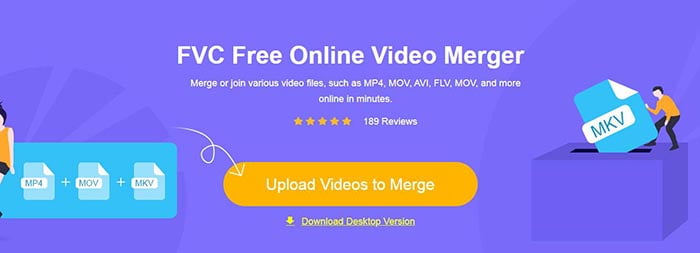
注意: 第一次使用這個工具時,需要先下載並安裝啟動器。
步驟二: 檔案總管視窗會跳出,在裡面你可以選取要上傳的 ASF 檔。若要選擇多個檔案,只需按住鍵盤上的 Ctrl 鍵,再逐一點選那些檔案。
步驟三: 點擊 Open 按鈕加入所選檔案,隨後你會看到 ASF merging 介面。在這裡,你可以透過移除既有檔案或插入新檔案來調整影片的排列順序。
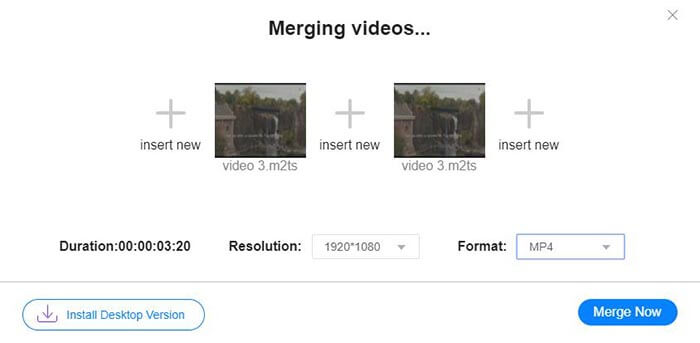
步驟四: 接著你可以選擇輸出格式與解析度。解析度保持原始設定也沒有問題。不過,這個線上 ASF 合併工具無法將合併後的檔案輸出為 ASF 格式,因此你只能從清單中選擇其他格式,順便完成轉檔。
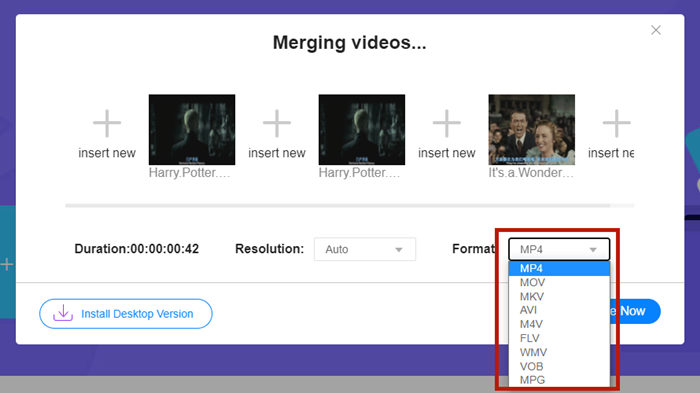
步驟五: 點擊介面右下角的 Merge Now 按鈕開始合併 ASF 檔。工具會要求你指定匯出檔案的儲存位置。
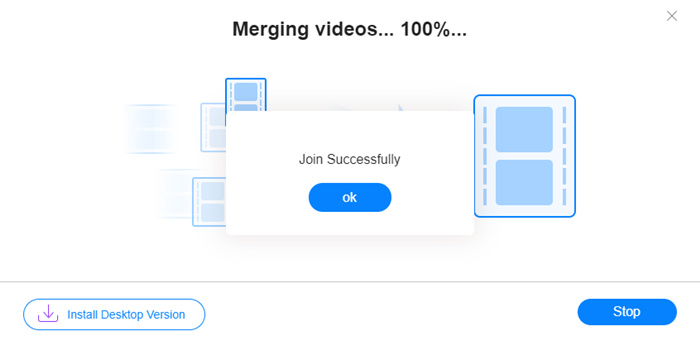
當你看到 Join Successfully 的提示時,就可以前往目標資料夾查看合併完成的檔案。
這種方法確實是加入 ASF 文件的最快方法。整個過程就像你看到的一樣簡單。然而,易於使用和輕便限制了它的功能。您無法方便地安排視頻的順序。您可能無法應用所需的分辨率或輸出格式。最糟糕的是,當你想組合不同分辨率和方向的 ASF 視頻時,這個工具可能會搞砸整個事情。那麼你可能需要另一個工具來做到這一點。
第 2 部分:無縫且更快地合併 ASF 文件
Video Converter Ultimate 可以幫你旋轉、裁切、剪輯影片,更重要的是,它能合併多個 ASF 檔。使用這款工具,你可以將合併後的 ASF 影片儲存為任何格式與任何解析度,而且在 Video Converter Ultimate 中的合併速度極為快速。
主要功能特色
- • 在加入 ASF 文件之前修剪不需要的開頭和結尾。
- • 以不同的方向旋轉視頻。
- • 裁剪使所有視頻剪輯具有相同的分辨率。
- • 壓縮 ASF 文件 縮小到 YouTube、Facebook 等的尺寸。
- • 硬件加速為您帶來 70 倍更快的視頻合併速度。
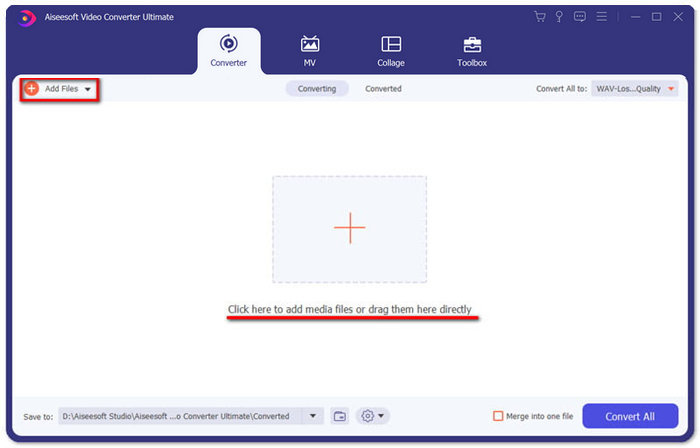
步驟一: 下載、安裝並啟動 Video Converter Ultimate。在主介面中央點擊大的 + 按鈕,加入你想合併的 ASF 檔。加入完成後,你可以拖曳匯入的片段來調整它們的順序。
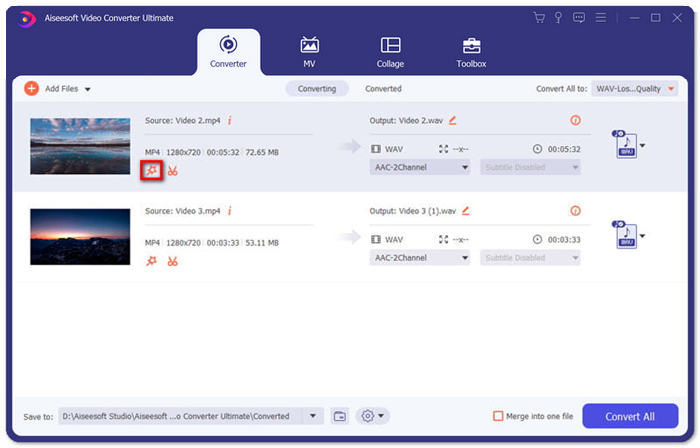
步驟二: 對於想裁切、旋轉或更改長寬比的片段,可以點擊該片段的 Edit 按鈕,隨即會進入 Rotate & Crop 頁面。
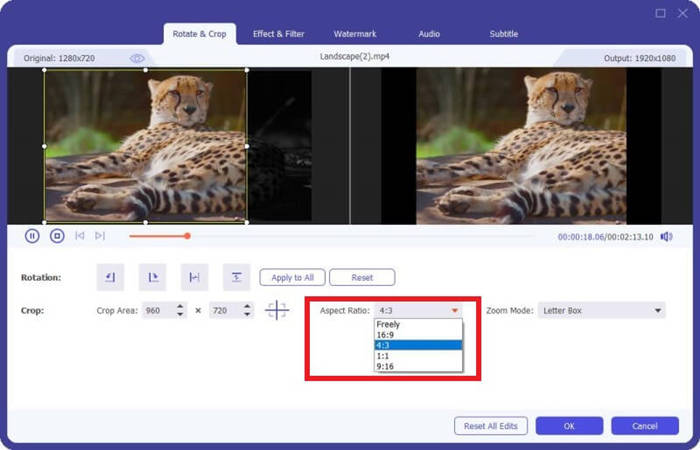
在這裡,你可以在 Aspect Ratio 區塊中調整長寬比。若要更改解析度,可以在左側預覽畫面上自由拖曳邊框。也能在此進行旋轉。別忘了按下 OK 以儲存設定。
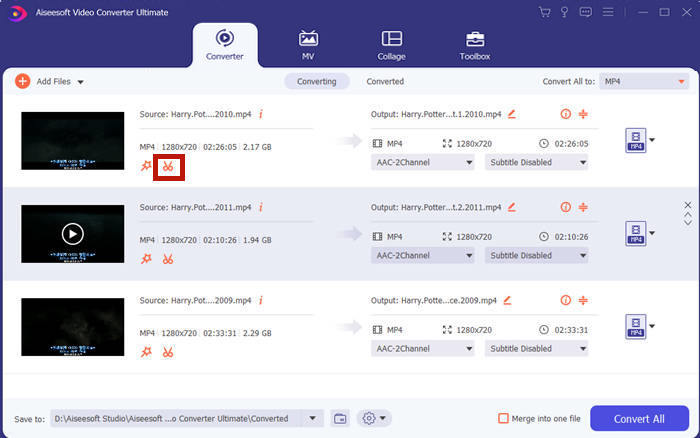
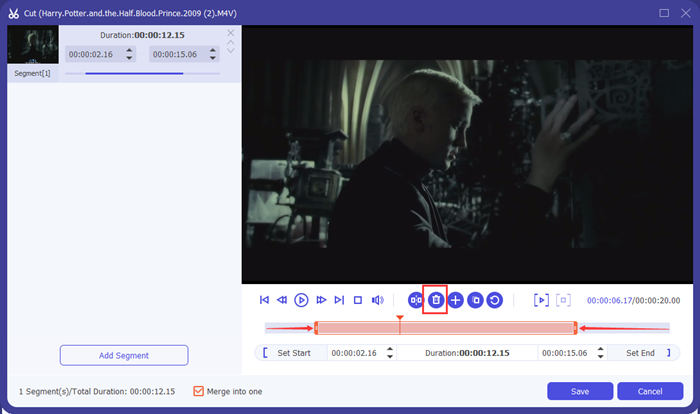
步驟三: 若要剪掉不要的片段,就要用到 Cut 功能。點擊 Cut 按鈕,進入 Cut 頁面。
在這裡你可以選取一段片段後,點擊 Delete 按鈕(垃圾桶圖示)將其刪除。最後,點擊儲存以返回上一頁。
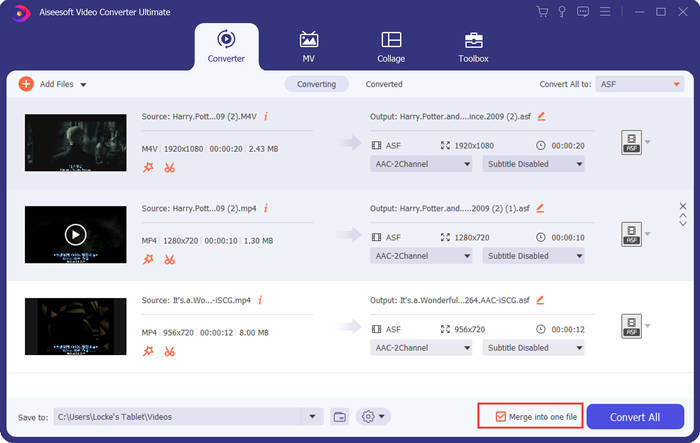
步驟四: 回到主介面,在右下角勾選 Merge into one file 選項。
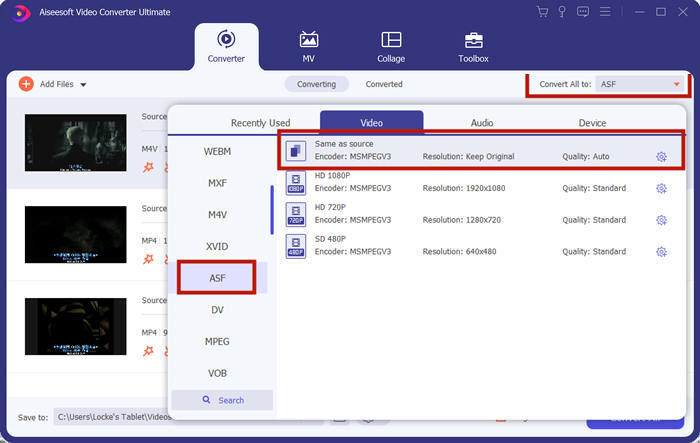
步驟五: 接著你可以在介面右上角透過 Convert All to 選擇輸出格式,找到 ASF 並點擊它。
最後,點擊 Convert All 按鈕開始合併 ASF 檔。完成後,輸出結果會儲存在主介面左下角你所設定的資料夾中。最後,我們整理了 3 個關於合併 ASF 檔的常見問題。
第 3 部分:有關加入 ASF 文件的常見問題解答
為什麼我不能在任何播放器應用程序中播放 ASF 文件?
使用 ASF 擴展名的文件共有三種。它們是高級系統格式、Acclaim Skeleton File 和 Electronic Arts Sound File。也許您的 ASF 根本不是高級系統格式的視頻文件。
為什麼在播放 ASF 文件時看不到任何圖像?
為什麼在播放 ASF 文件時看不到任何圖像?並非每個 ASF 文件都至少包含一個視頻。有時,一個 ASF 只能包含一段 WMA 音頻。將揚聲器或耳機的音量調大,看看是否有播放文件的聲音。
我可以在智能電視上播放 ASF 文件嗎?
要看情況。有些智慧電視支援 ASF 檔,有些則不支援。如果你的智慧電視無法播放 ASF 檔,可以先將檔案轉換成 MP4。
結論
ASF 檔通常內含 WMV 或 WMA 檔案,並受到許多裝置與程式的廣泛支援。本文為你提供兩種最高效的方法,將多個 ASF 檔合併為一個,而不會降低畫質或留下浮水印。FVC Free Online Video Merger 無疑是你最快速的解決方案。但如果你想在合併前修剪或旋轉影片,讓銜接更加自然流暢,使用 Video Converter Ultimate 會更合適。你在合併 ASF 檔時有遇到任何問題嗎?歡迎在留言中告訴我們。
-
 如何在有或沒有iMovie的iPhone上合併視頻(免費使用)
 教程–將iPhone上的視頻合併到新的4種免費方法
-
 2 加入 MKV 文件以不斷觀看電影的最佳方法
 MKV電影文件合併:如何將多個MKV文件合併為一個
-
 如何在線加入 WMV Clips?這裡有 3 種經過驗證的方法
 免費在線加入WMV文件的3種最佳方法(2021更新)
