


 視頻轉換大師
 屏幕錄影大師
 影片修復
影片修復
 安全下載
安全下載如何合併 M4V 文件?這是2個最快的解決方案
M4V 檔案也被稱為 MPEG-4 視訊檔案,通常是從 iTunes 下載而來。它們與 MP4 檔案非常相似,因為兩者都採用 MPEG-4 容器格式。很有可能你從 iTunes 下載了一些尚未完整的 M4V 格式影片片段,之後想要將這些M4V 檔案合併成一個連貫完整的故事影片。要如何合併 M4V 檔案呢?本文將為你介紹兩種能有效完成此操作且不會降低畫質的方法。

第 1 部分:最快的解決方案 - 在線使用免費的 M4V 合併
若想採用最快速的方式,你可以使用 FVC 免費線上影片合併工具,幾乎不需要花時間學習操作步驟與設定。只要在瀏覽器中開啟該工具,加入你的 M4V 檔案,然後一鍵就能將 M4V 檔案合併。
主要功能特色
- • 免費將任意數量和大小的 M4V 文件合併為一個文件。
- • 易於使用的界面和直觀的預合併過程。
- • 您可以將合併的 M4V 文件保存為 9 種其他主要格式。
- • 在組合的 M4V 視頻中不留水印。
- • 只需 1 秒即可上傳任何大小的文件。
免費在線合併 M4V 檔案的步驟
步驟一: 點擊這裡載入 FVC 免費線上影片合併工具。在線上工具的網頁中,點擊畫面中央的 Upload Videos to Merge(上傳影片以進行合併) 按鈕。

注意: 若你是第一次使用此工具,系統會提示你下載並安裝啟動器。安裝完成後,再次點擊 Upload Videos to Merge(上傳影片以進行合併) 按鈕。
步驟二: 此時會跳出 開啟 視窗。你需要在此選取要合併的 M4V 檔案,然後點擊視窗底部的 開啟 按鈕。
步驟三: 上傳 M4V 檔案後,你可以透過刪除現有檔案並在指定位置插入新檔案,來調整 M4V 檔案的排列順序。
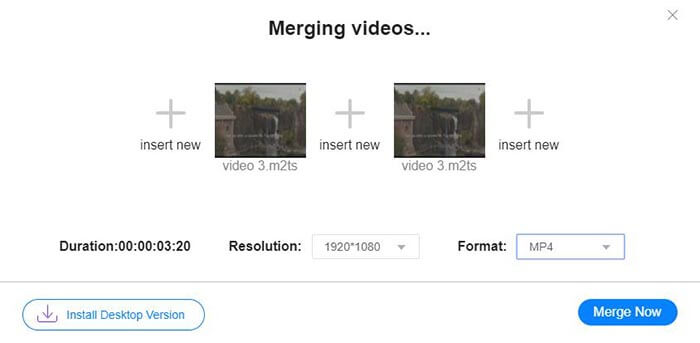
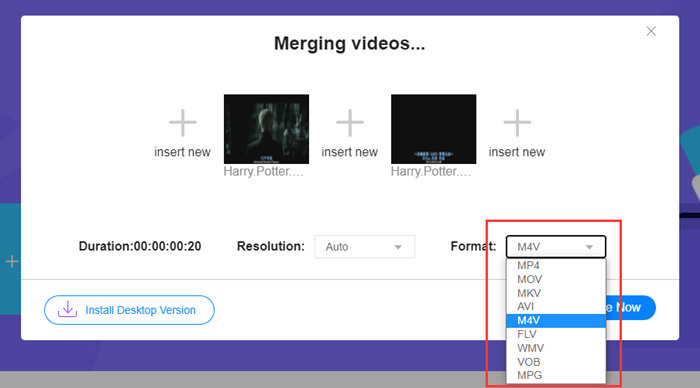
步驟四: 若想讓合併後的檔案仍然保持 M4V 格式,需要在 格式 清單中選擇 M4V。你也可以選擇清單中的其他格式,將合併後的 M4V 影片轉換為該格式。
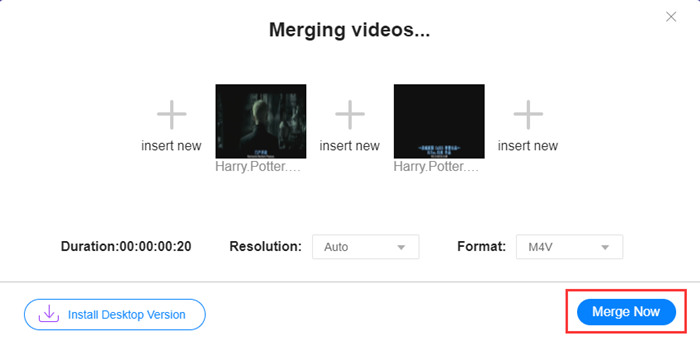
步驟五: 點擊 Merge Now(立即合併) 按鈕開始合併 M4V 檔案。接著工具會要求你指定輸出檔案的儲存位置。
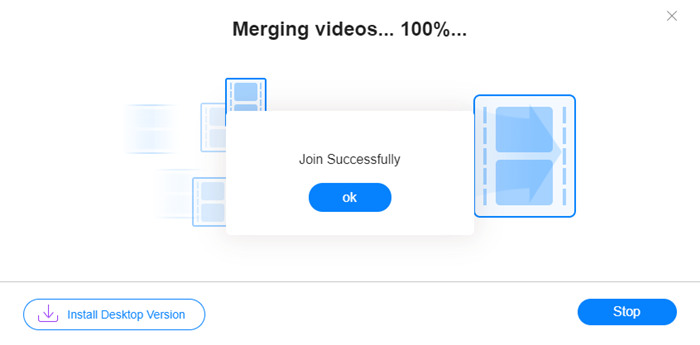
當您看到下面的成功通知時,合併的視頻已保存在您的計算機上。
你已經了解了最快速合併 M4V 檔案的方法。不過,此方法只能將影片首尾相接,無法幫你裁掉不需要的片頭片尾,可能會導致影片中出現一段段黑畫面。因此,你也許還需要下一種方法,不僅能將 M4V 檔案接在一起,還能將它們無縫裁剪。你也可以在此壓縮 M4V 檔案。
第 2 部分:無縫合併 M4V 文件的方法
若要得到完整、無縫的影片,只是把 M4V 檔案首尾相接還不夠,還需要把開頭和結尾中不需要的片段裁掉。這就需要使用影片剪輯工具了。你有非常多工具可以選擇,而我們在此推薦 Video Converter Ultimate。原因很簡單:它操作容易,功能卻十分強大。
主要功能特色
- • 對 M4V 視頻進行合併、修剪、旋轉、裁剪和添加效果。
- • 硬件加速技術有助於將 M4V 文件的加入速度提高 70 倍。
- • 豐富的濾鏡和效果集合來美化您的視頻
- • 使用內置視頻增強器提高視頻質量
- • 將您的視頻轉換為 3D 並戴上 3D 眼鏡欣賞它們
無縫合併 M4V 檔案的步驟
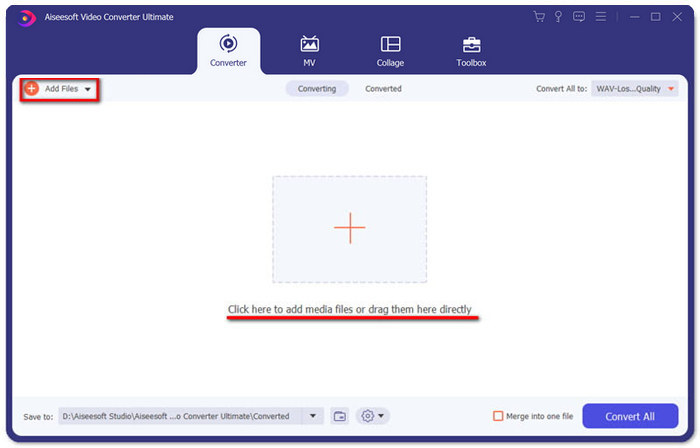
步驟一: 安裝並啟動 Video Converter Ultimate。點擊 Add Files(新增檔案) 按鈕或將檔案拖曳到介面中以加入影片。
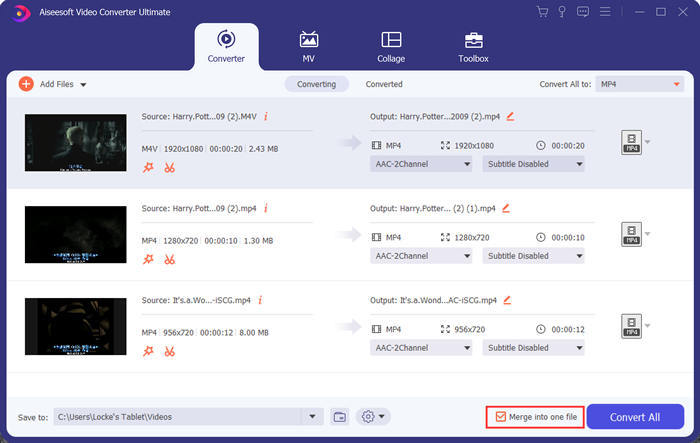
加入影片後,你可以上下拖曳檔案來調整它們的先後順序。同時,需要勾選 Merge into one file(合併為單一檔案) 的選項,避免程式將加入的影片分別轉檔。
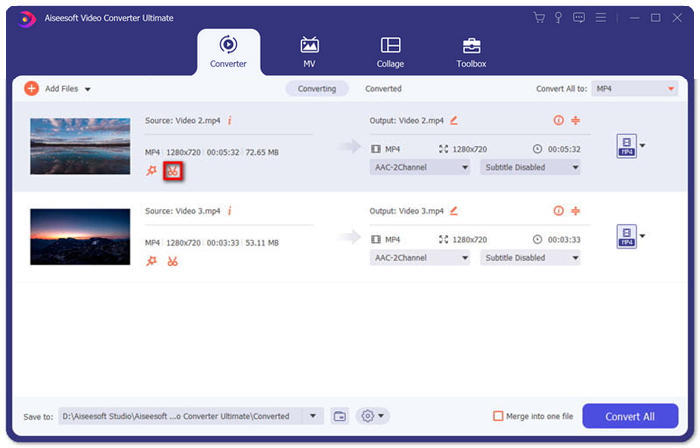
步驟二: 若要使用剪輯功能,只需在已加入的影片上點擊 Cut(剪輯) 圖示。
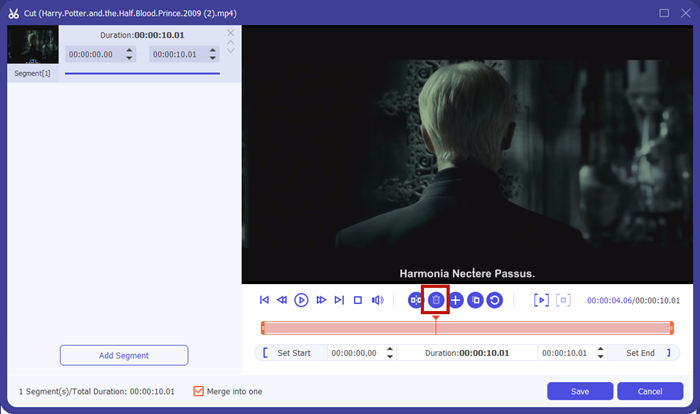
在 Cut(剪輯) 介面中,你可以輕鬆剪掉影片中不需要的部分。只要設定片段的開始與結束時間以選取區段,然後點擊垃圾桶圖示將其刪除即可。
步驟三: 回到主介面後,你可以選擇輸出檔案格式。點擊 Convert All to(全部轉換為) 旁邊的下拉箭頭,然後選擇 M4V 或其他格式作為輸出格式。
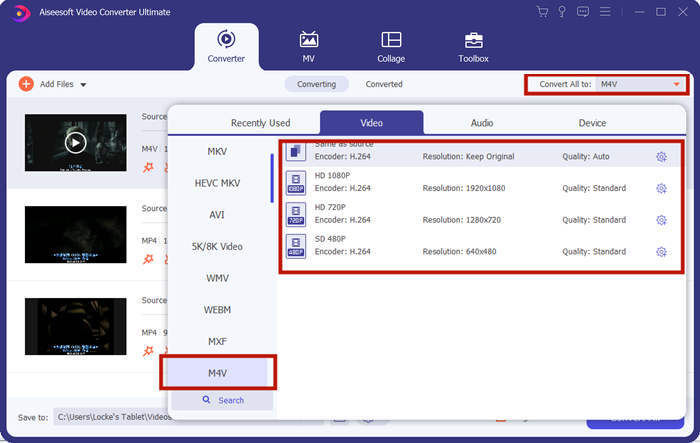
步驟四: 點擊程式右下角的 Convert All(全部轉換) 按鈕,接著等待程式完成 M4V 檔案的合併作業。
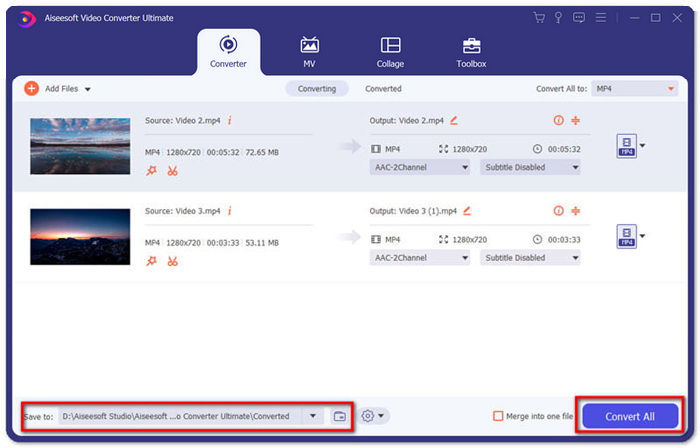
合併完成後,您將看到成功通知。然後您可以在目標文件夾中找到合併的 M4V 文件。以上是兩種加入M4V視頻文件的方法。我們還在下面總結了幾個最常見的問題。
第 3 部分:有關加入 M4V 文件的常見問題解答
什麼是 M4V 文件?
M4V 由 Apple 設計,有時也稱為 iTunes 視頻文件。它類似於 MP4,因為它們都基於 MPEG-4。 M4V 最特別的功能是 iTunes 可以在其中添加 DRM 保護,以防止未經授權的 iTunes 視頻分發。
如何打開 .M4V 文件?
如果 M4V 檔案沒有受到 DRM 保護,它可以在 VLC、QuickTime、Windows Media Player 等多種播放器中播放。有時候只要把副檔名 .M4V 改成 .MP4 也能順利開啟。不過,若 M4V 檔案有 DRM 保護,則只能在已授權的裝置上播放。
我可以從 M4V 文件中刪除 DRM 保護嗎?
是的你可以。您可以在市場上找到無數的 DRM 清除程序。以下是其中一些:TunesKit DRM M4V 轉換器、Aimersoft DRM 媒體轉換器、Requiem DRM Remover、Ondesoft iTunes Convertert、Apple Music 轉換器。
結論
本文介紹了兩種將多個 M4V 影片檔合併為一個的高效方法。若追求最快速的解決方案,FVC 免費線上影片合併工具是你的最佳選擇,你無需下載任何程式,上傳過程也能迅速完成。但如果你更重視畫質,或是希望不只合併 M4V 檔案,還能順便裁剪片段,那就可以改用 Video Converter Ultimate。它提供強大的編輯功能,同時介面也很適合新手使用。如果你找到更好的解決方案,也歡迎告訴我們,請在下方留下你的留言。
-
 如何在有/沒有DRM的情況下將M4V轉換為MP4
 6種免費將M4V轉換為MP4的方法(包括刪除DRM)
-
 5 款最佳 M4V 播放器,可在計算機/手機上輕鬆播放 M4V 文件
 您應該知道的Windows / Mac / Android / iOS最佳5 M4V播放器
-
 如何通過4種您應該知道的出色方法從M4V提取MP3
 M4V到MP3轉換器–從M4V文件提取MP3的4種最佳方法
