


 視頻轉換大師
 屏幕錄影大師
 影片修復
影片修復
 安全下載
安全下載2 加入 MKV 文件以不斷觀看電影的最佳方法
通常,您從 Internet 下載的電影被分成 2 或 3 個 MKV 文件,因為電影文件總是很大,尤其是高質量的電影。而從 DVD 光盤複製的電視劇總是分成幾個 MKV 文件。如果您是電影愛好者,那麼您一定很好奇學習如何加入 MKV 文件。你可能已經嘗試過按照FFmpeg的指令改變原始編碼加入MKV文件,但是它太複雜了,我們很難學習。在這種情況下,以下 2 個專業工具將幫助您輕鬆高效地加入 MKV 文件。

第 1 部分:如何免費在線加入 MKV 文件
FVC 免費線上影片合併工具 是最高效的影片合併器,能幫你在線免費合併 MKV 檔案。只要 3 個步驟,你就能得到一個字幕順序正常、完整的 MKV 電影檔。
- 1. 在線免費將兩個或多個 MKV 文件合二為一,只需簡單三步。
- 2. 無需下載任何軟件,即可使用包括加入MKV文件在內的所有功能。
- 3.支持包括MKV電影文件在內的各種輸入和輸出格式。
- 4. 上傳的文件將在 24 小時內刪除,以保護您的隱私。
步驟 1: 開啟 FVC 免費線上影片合併工具,點擊 上傳要合併的檔案 按鈕啟動外掛,然後再點一次該按鈕選擇你想要合併的 MKV 檔案。

步驟 2: 點擊 插入新檔 按鈕選擇其他 MKV 檔案。接著選擇 1920x1080 的解析度以保持高畫質,並選擇原始 MKV 格式以保留原始編碼,這樣可以確保字幕正常播放。

步驟 3: 點擊 立即合併 按鈕,並選擇希望儲存的資料夾。

第 2 部分:使用視頻轉換器加入 MKV 文件
免費線上合併工具只需簡單幾下點擊,就能滿足你的需求,無需下載軟體。不過,如果你同樣遇到字幕順序錯亂或畫質不佳等問題,FVC 影片轉檔大師 比線上工具更專業,能以高畫質影像與音效合併 MKV 檔案。此外,它還支援更高解析度,包括 HD 1080P、4K,甚至 8K。
- 1. 將多個 MKV 文件合二為一而不會損失質量,以保持觀看體驗。
- 2. 將 MKV 文件加入任何編碼的原始 MKV 格式,包括 H.264、HEVC 和 XVID。
- 3.選擇適合您的不同字幕和音頻頻道。
- 4. 支持通過添加效果、濾鏡、水印和裁剪區域來編輯 MKV 視頻。
步驟 1: 下載並啟動適用於 Windows/Mac 的 FVC 影片轉檔大師。然後在轉檔工具中點擊 新增檔案 按鈕,依照正確順序選擇所有要合併的 MKV 檔案。

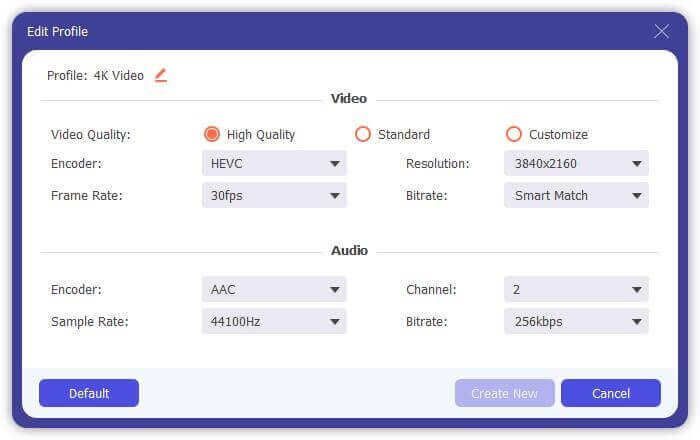
步驟 2: 點擊 全部轉換為 旁邊的箭頭,在影片清單中選擇 MKV 格式。接著選擇 與來源相同 的設定,以保留原始的畫面與音訊品質。如果你想在其他裝置上播放 MKV 影片,也可以選擇其他相容格式,例如 MP4、AVI 等。
編碼器:建議在設定中選擇 H.264/HEVC 編碼器,以確保影片在電腦或電視上順暢播放。
字幕與音軌:如果原始 MKV 電影檔有多條字幕與音軌,你也可以在每個檔案下方選擇想要的語言,或從 MKV 中移除字幕。
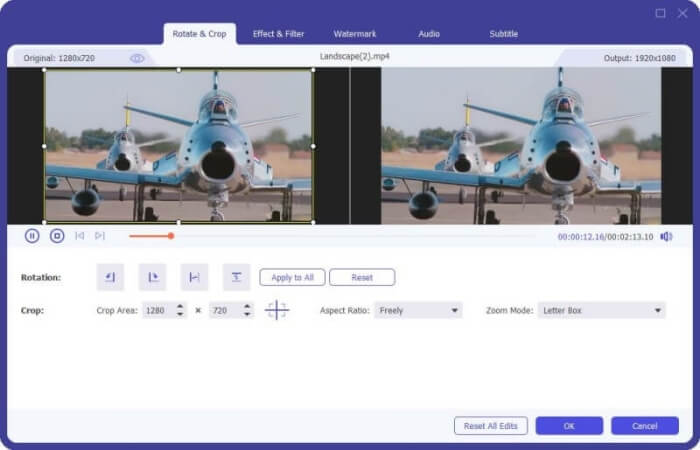
步驟 3: 點擊檔案下方的編輯按鈕,你可以找到 5 種編輯工具,包括旋轉或裁剪影片,以及新增效果與濾鏡。透過這些功能,你可以製作出具有特殊效果的更佳影片。工具箱還能壓縮 MKV、編輯 MKV 的中繼資料資訊、將 MKV 從 2D 轉成 3D 等。
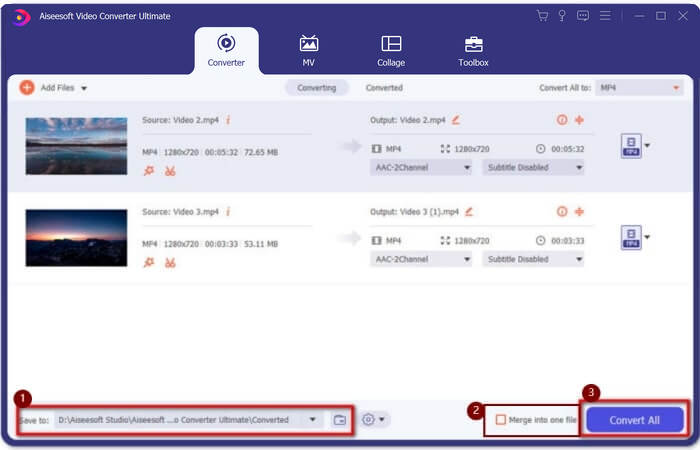
步驟 4: 在把所有 MKV 影片合併在一起之前,你可以將影片檔案上下拖曳,調整到正確的位置以改變順序。然後勾選 合併成一個檔案 方框,並點擊 全部轉換 按鈕,以合併 MKV 檔案並將其儲存在預先設定的存放路徑中。
第 3 部分:如何加入 MKV 文件的常見問題解答
1.什麼是MKV?
通常說MKV是一種視頻格式,但實際上,MKV是一種多媒體容器格式,可以將不同編碼的音頻、視頻和字幕文件合併到一個文件中。因此,幾乎所有的電影都保存在 MKV 格式的文件中。
2.我可以使用Handbrake加入MKV文件嗎?
不,你不能。 Handbrake 只是一種用於視頻轉換以轉換 MKV 文件的軟件。如果您想加入 MKV 文件,您可以嘗試使用免費的在線視頻加入者或其他視頻轉換器來解決您的問題。
3. 哪個視頻播放器支持 MKV 電影文件?
MKV 格式的電影不需要專門的視頻播放器來播放。但是需要安裝相應的MKV解碼插件。這樣,幾乎所有的視頻播放器,包括您電腦上的原版視頻播放器,都可以播放 MKV 電影文件。
結論
當您下載電影進行觀看但發現那些 MKV 電影文件被分成幾個文件時。為了不間斷地觀看它,您可以使用視頻木匠在線免費組合MKV文件。此外,使用視頻轉換器還可以幫助加入具有高圖像和音頻質量的 MKV 文件。歡迎在下方留下您關於合併 MKV 文件的問題。
-
 如何在計算機上無損地將 WebM 文件合併為一個文件
 當您要合併WebM視頻文件以連續觀看視頻或要根據WebM文件創建新視頻時,有兩種有效的方法可以在不損失質量的情況下加入WebM文件。
-
 頂級8 MKV播放器以所需的字幕播放MKV文件
 當您想要以所需的字幕播放MKV視頻時,可以了解有關PC / Mac排名前8位的MKV文件播放器的更多信息,並根據需要選擇所需的播放器。
-
 MKV到MOV-如何將MKV轉換成MOV
 如何在Mac上將MKV轉換為MOV? iMovie可以讀取MKV嗎? MOV格式是什麼意思?這篇文章介紹了2種簡單的方法來幫助您使用免費的在線和專業視頻轉換器將MKV轉換為MOV。
