


 視頻轉換大師
 屏幕錄影大師
 影片修復
影片修復
 安全下載
安全下載2種在不損失質量的情況下合併WebM文件的有效方法
如何合併WebM文件?當您在線下載從他人上傳的一系列視頻並想要連續回放以獲取更好的觀看體驗時,您可以考慮將這些WebM視頻合併為一個。但是,由於它的高質量和小尺寸,最好將WebM文件加入MKV,以在相對較小的尺寸內保持高質量。因此,有兩種有效的方法可以幫助您將WebM合併為MKV文件。

第1部分:如何無損在線免費合併WebM文件
FVC 免費線上影片合併工具 是一款功能多樣的合併程式,可用來合併各種格式的檔案,包括免費線上合併 WebM 檔案。你無需下載軟體,只要在瀏覽器中上傳 WebM 檔案,點幾下滑鼠即可完成合併。
- 1.單擊即可將任意數量的WebM視頻文件合併到一個完全免費的在線環境中。
- 2.支持導出大多數流行的視頻格式,包括高質量的MKV格式。
- 3.沒有水印可直接將視頻上傳到YouTube,Facebook或其他平台。
- 4.在24小時內永久刪除上傳的文件,以保護您的隱私。
步驟 1: 前往 FVC 免費線上合併工具,並依照指示在數秒內安裝外掛。接著點擊 上傳要合併的影片 按鈕,選擇其中一個想要合併的 WebM 影片檔。

步驟 2: 點擊加號圖示,新增其他想要合併的 WebM 影片檔。而且你應該依照想要的順序加入這些影片。然後選擇 MKV 格式 與 1920*1080 解析度,以維持影片的高畫質。

步驟 3: 點擊 立即合併 按鈕,選擇本機資料夾後,程式就會自動開始合併 WebM 影片檔。
第2部分:加入WebM文件以創建新文件的最專業方法
這款免費線上合併工具能輕鬆幫你合併 WebM 影片。但如果你想只合併 WebM 檔案中的部分片段來製作新影片,就應該使用專業工具——Video Converter Ultimate。它不僅能合併 WebM 檔案,還能在合併前先編輯影片。
- 1.將WebM視頻文件合併為多種格式,包括MKV。
- 2.能夠保留WebM視頻的原始質量,包括1080p HD和4K。
- 3.易於使用的編輯工具,可剪輯視頻,添加濾鏡,調整視頻效果和分割視頻。
- 4.快速合併速度,可在幾分鐘內合併多個WebM視頻文件。
步驟 1: 下載並啟動 Video Converter Ultimate。點擊左上角的 新增檔案 按鈕,選擇所有想要合併的 WebM 檔案。

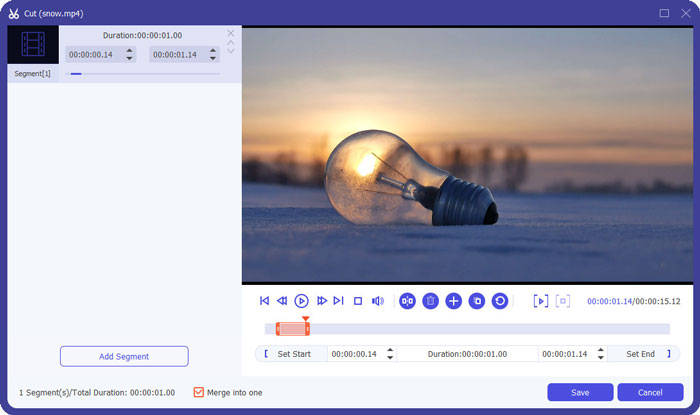
步驟 2: 點擊 剪輯 按鈕,逐一裁切每支影片。拖曳時間軸或輸入精確時間點來選取所需片段,然後點擊 儲存 按鈕保留設定。
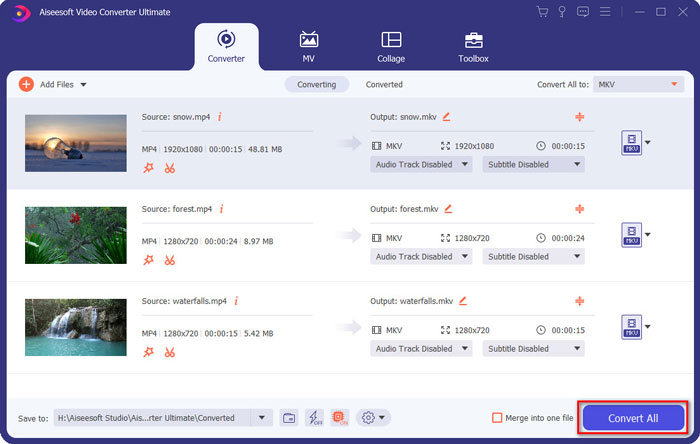
步驟 3: 點擊 全部轉換為 > 視訊 > MKV 按鈕,並選擇 與來源相同。雖然 WebM 檔案的大小會略微增加,但畫質將與原始影片相同。

步驟 4: 選擇儲存路徑後,勾選 合併成一個檔案,再點擊 全部轉換 按鈕進行儲存。
你可能也想了解:如何在 iPhone 上合併影片。
第3部分:加入WebM文件的常見問題解答
1.什麼是WebM?
WebM是Google提出的一種視頻格式。 WebM視頻始終在網站上使用,因為它們可以在幾乎所有瀏覽器(包括Google Chrome,Firefox等)上以高質量和小尺寸流暢地播放。
2.合併WebM文件會降低視頻質量嗎?
是的,它將,尤其是當您將多個WebM文件合併為一個WebM文件時。保持原始質量的最佳方法是將WebM視頻文件作為MKV文件連接在一起。
3.合併WebM視頻文件後可以保留WebM格式嗎?
可以,但建議先將格式轉換成 MKV,因為 MKV 是 WebM 的原始容器。這是因為雖然 WebM 能在小容量下保持高畫質,MKV 格式的使用頻率仍高於 WebM。不過如果你願意,也可以將 WebM 轉成 MP4。
結論
如果您希望合併從網站上下載的WebM視頻文件以獲得更流暢的觀看體驗,最簡單的方法是使用免費的在線視頻連接器來幫助您。但是,如果要通過合併WebM視頻文件來創建新視頻,則需要在加入之前剪輯所需的部分。在這種情況下,請下載專業視頻轉換器-Video Converter Ultimate以同時剪輯和合併WebM文件。
-
 適用於Android / iPhone / Windows / Mac的前5名最佳WebM播放器
 如果要在設備上成功播放WebM,則應從本文中了解有關適用於Android,iPhone,Windows和Mac的前5名最佳WebM播放器的更多信息。
-
 壓縮WebM-如何在線壓縮WebM文件
 如何在線壓縮WebM文件?壓縮大文件的最快方法是什麼?這篇文章介紹了兩種免費的WebM壓縮方法。
-
 MP4到WebM轉換器–將MP4轉換成WebM的4種最佳方法
 當您想免費將MP4轉換為WebM時,可以從本文中免費了解有關4種最常用方法來免費獲取所需視頻的信息。
