


 視頻轉換大師
 屏幕錄影大師
 影片修復
影片修復
 安全下載
安全下載如何將 MPEG 視頻文件合二為一 – 您應該知道的 2 種終極方法
如何合併 MPEG 檔案? 你剛下載了一部以 MPEG 格式保存的老電視影集,例如 8 集短篇,每一集都有重複的片頭和片尾。要怎麼把這些 MPEG 檔合併成像電影一樣的一支影片?無論你只是想單純把影片接在一起,還是希望用進階功能來合併 MPEG 檔案,下面這 2 種高效方法都不容錯過。

第 1 部分:如何免費在線合併 MPEG 文件
FVC Free Online Video Merger 是一款免費的線上 MPEG 合併工具,能讓你合併 MPEG、MP4、AVI 等多種影片格式,而且沒有檔案大小限制。你可以將多個 MPEG 檔合併成效果出色的影片,且不會加入浮水印。此外,上傳的檔案會在 24 小時內刪除,以保護你的隱私。
步驟 1: 使用任一網頁瀏覽器前往 FVC Free Online Video Merger。點擊網頁中間的 Upload Videos to Merge 按鈕下載安裝程式。完成後,再次點擊該按鈕,上傳你想要在此線上程式中合併的 MPEG 檔案。

步驟 2: 進入 Merging videos 介面後,你可以調整要合併的 MPEG 影片順序。你可以管理影片的位置、刪除檔案,或是點擊適當位置的 insert new 按鈕加入更多 MPEG 檔案。
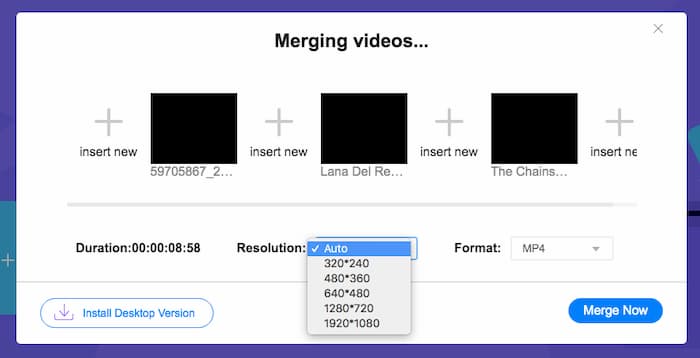
步驟 3: 接著,你可以設定輸出影片的解析度與格式。你可以先將多個 MPEG 檔合併為一個 MP4 檔,再點擊 Merge now 按鈕開始處理。這能讓你在短時間內獲得想要的影片。

在線視頻組合器易於使用。但是,如果你想剪掉劇集多餘的開場和結尾,就幫不上忙了。您需要使用更強大的 MPEG 合併。
延伸閱讀:
第 2 部分:合併 MPEG 視頻的通用方法
Aiseesoft Video Converter Ultimate 是一款專業的 MPEG 合併工具,能讓你把 MPEG 檔案中想要的片段結合成一部電影。它可以剪輯 MPEG 檔中的指定部分、調整影片品質、自訂浮水印,甚至利用不同主題來製作電影。
- 1、將MPEG文件合併成MPEG、MP4等300多種視頻格式。
- 2. 調整視頻分辨率,甚至提高視頻質量以進行文件合併。
- 3. 修剪 MPEG 文件的所需部分並將它們組合成一個視頻。
- 4. 在MPEG 視頻中添加效果和過濾器並自定義水印。
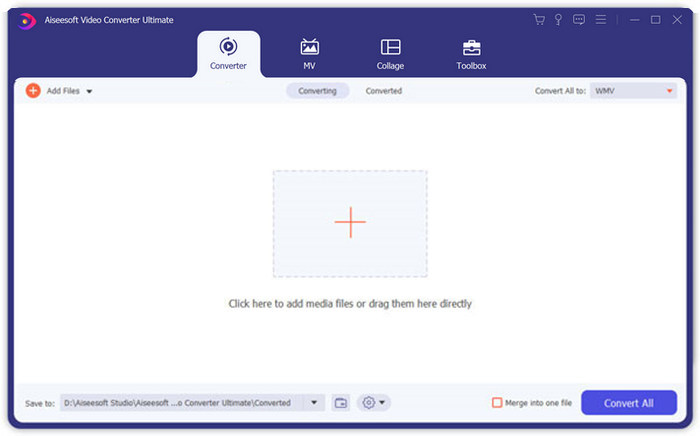
步驟 1: 在電腦上啟動 Aiseesoft Video Converter Ultimate。前往 Converter(轉換)選單,點擊主介面中央的大「+」按鈕加入你想合併的 MPEG 檔案。也可以點擊 Add Files 按鈕匯入所有要合併的檔案。
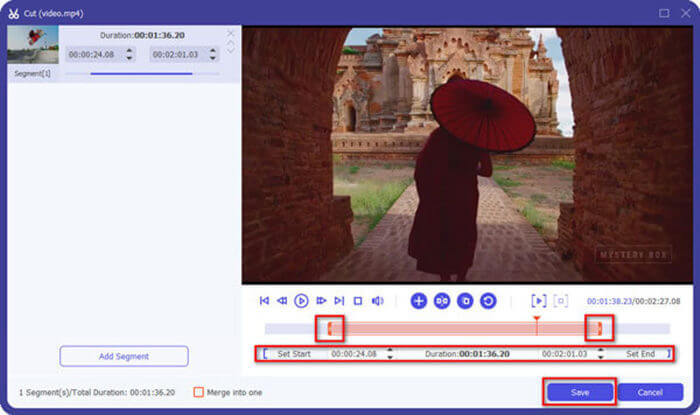
步驟 2: 對於需要裁剪的 MPEG 片段,點擊影片旁邊的 Cut 按鈕。你可以設定起點與終點,刪除 MPEG 影片中的片頭和片尾。完成後,點擊底部的 Save 按鈕儲存該檔案。
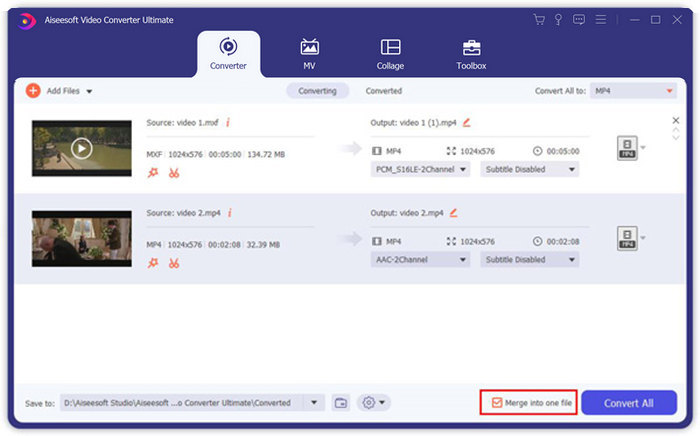
步驟 3: 接著,將已裁剪好的影片拖入程式中,調整 MPEG 影片的排列順序。全部設定完成後,在 Convert All 旁邊勾選 Merge into one file 選項。最後點擊 Convert All 按鈕,開始合併 MPEG 檔案。
第 3 部分:有關加入 MPEG 文件的常見問題解答
如何以最佳質量合併 MPEG 文件?
當你想合併類似質量的MPEG文件時,你可以選擇參數作為原始視頻。但是如果MPEG文件的視頻質量不同,你必須事先用專業的視頻合成器對一些質量低的MPEG文件進行升級。
我可以將 MPEG 文件與 iPhone 或 Android 手機結合使用嗎?
是的。在下載用於加入 MPEG 文件的視頻組合器應用程序之前,您應該確保該應用程序與 MPEG 或您想要組合的其他視頻兼容。 Adobe Premiere Clip、Viva Video 和 Splice Video 是您可以考慮的推薦視頻。
什麼是 MPEG 文件格式?
MPEG 是一種使用 MPEG-1 或 MPEG-2 文件壓縮的視頻文件格式。它是一種流行的電影格式,用於在 Internet 上分發的電影,與其他流行的視頻格式相比,它使流式傳輸和下載速度更快。
結論
本文介紹了 2 種合併 MPEG 視頻文件的有效方法,尤其是在您需要修剪額外部分時。 FVC 免費在線視頻合併是一種在線合併 MPEG 文件的簡單方法,但您不能編輯視頻剪輯。因此,如果您想修剪和編輯 MPEG 視頻,Aiseesoft Video Converter Ultimate 應該是最終的解決方案。
-
 免費組合MP4視頻的6大最佳MP4視頻連接器
 有許多MP4連接器可用於連接不同的MP4剪輯。在本文中,我們為Windows 10/8/7和Mac選擇了一些免費的MP4連接器。
-
 如何合併 M4V 文件?這是2個最快的解決方案
 如果您正在尋找一種將 M4V 視頻文件合併為一個的解決方案,請不要錯過這篇文章。在這裡,我們將討論合併 M4V 視頻文件的兩種最佳方法。
-
 如何將手機中的 3GP 視頻合併為一個文件
 當您想將 BlackBerry 中的一些 3GP 視頻合併為一個視頻時,您可以從文章中詳細了解 2 種合併 3GP 文件的有效方法。
