


 視頻轉換大師
 屏幕錄影大師
 影片修復
影片修復在 Windows/Mac/Linux 上使用 Pentaho 元數據編輯器開始
Pentaho 元數據編輯器不是您在市場上編輯文件標籤的典型元數據編輯器。這個工具與其他工具有很大不同,尤其是它的功能。如果這引起了您的注意,那麼這就是您應該閱讀本文的原因。由於我們對軟件進行了公正的審查,我們稍後將教您如何使用它。因此,在我們現在探索該軟件時,請係好安全帶。

第 1 部分 Pentaho 元數據編輯器概述
與其他元數據編輯器不同,Pentaho 元數據編輯器不像您可以在網絡上找到的其他元數據編輯器那樣流行。它的功能也與它們大不相同。要使用此軟件,您必須具備 DBA 技能或數據庫管理員技能,這些技能對導入表、連接表、分配和添加聚合、類別和安全性具有足夠的知識,並具有數據庫的高級知識。在開始使用它之前,您將需要這些技能來構建元數據模型和域。複雜吧?您需要這些高級技能,因為該工具有助於模型上的特定業務數據以便更好地理解。
此外,要使用它,您將需要創建並分配一個數據庫以將其連接到包含有關文件的詳細信息的數據模型。此外,您需要先運行軟件和服務器,然後才能開始使用 Pentaho 編輯元數據。儘管該工具設置和使用起來很麻煩,但它仍然可以有效地完成任務。如果你正在尋找 Pentaho 元數據編輯器教程,你必須繼續下面的下一部分。
優點
- 您可以創建連接到您製作的原始模型的數據庫。
- 非常適合數據集成等業務目的。
- 它可以豐富來自不同資源的元數據。
- 對於 ETL 和數據集成,該工具無疑在這方面佔上風,因為它很簡單。
缺點
- 它需要 DBA 技能才能使用它。
- 使用它並不像你想像的那麼容易。
- 對於與業務數據不相關的用戶來說,這不是最佳選擇。
Part 2. 如何使用 Pentaho 元數據編輯器編輯元數據的簡單指南
並非您閱讀的所有文章都有步驟,因為此元數據編輯器是您可以在網絡上免費下載的最複雜的工具之一。如果您將此用於非業務相關,您可能希望使用其他工具而不是此工具,這對每個人來說都簡單得多。但是,如果您要使用該工具,則可以按照以下指示的步驟進行操作。
Step 1. Download the Pentaho Metadata Editor on your desktop, then launch the tool. Ensure that you open the editor and the Pentaho server before you proceed. After you've opened the software, click File then Import from XMI file.
Step 2. Find the location of the Pentaho Server, then open the steel-wheel and click the .xmi file you've imported.
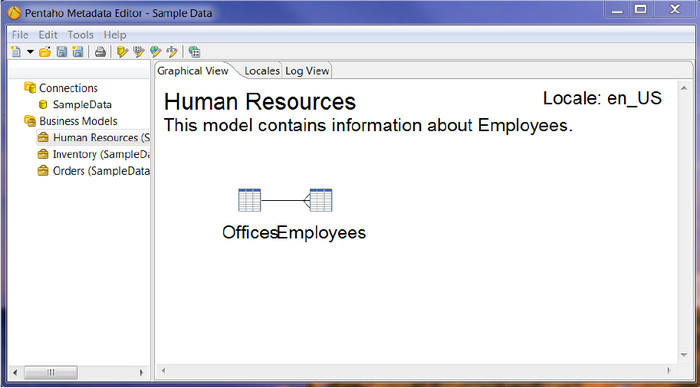
Step 3. On the Save Model dialog box, you must type Sample Data. Then log in to the User Console, and click New Report. Now the data on the file is saved.
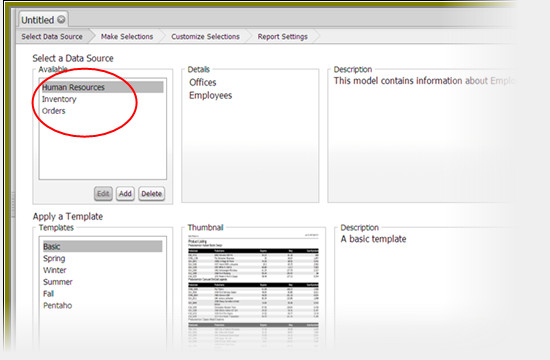
提示:如果您只單獨啟動軟件,該工具將無法正常工作。為避免這種情況,您必須同時啟動軟件和工具的服務器。
處理起來太複雜?起初,我們給您的想法是,該工具的使用具有挑戰性,並不適合所有人。假設您想要一個像 Pentaho 一樣工作但以更直接的方式工作的替代軟件,那麼毫無疑問,最好的替代軟件適合您。繼續閱讀下面的詳細信息,以對我們正在談論的工具有一個廣泛的了解。
相關閱讀:
第 3 部分。桌面上 Pentaho 元數據編輯器的最佳替代軟件
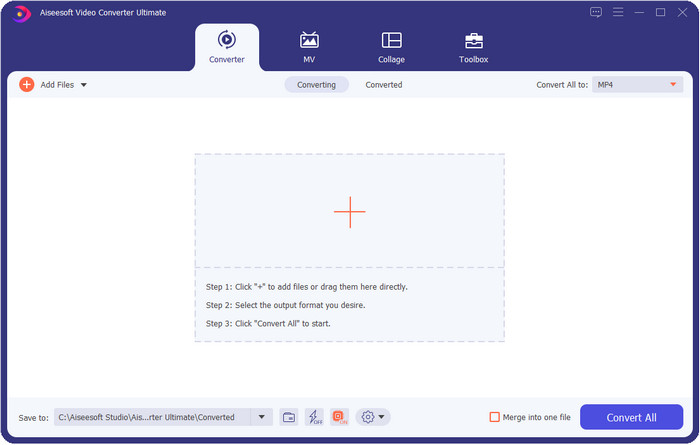
Using Pentaho is challenging to finish this task, especially if you don't have the abovementioned skills. So what should you do? Is it still possible to edit metadata like Pentaho but in an easier way? Fortunately, FVC Video Converter Ultimate is one of the best alternatives for the converter mentioned above. With a few simple clicks, you can add the metadata to your video or audio files without DBA skills. Thanks to the ultimate converter and its simplicity, it became possible to add metadata that performs the same as the first-mentioned tool but in a lot simpler aspects.
這個軟件有什麼讓我們驚訝的地方?它可以進行大量高級和基本的編輯,使您的視頻或音頻看起來和聽起來都令人驚訝,即使是 Pentaho 也無法提供。每個用戶都依賴於具有簡單功能的軟件,無論是專家還是初學者。下面列出的功能是該軟件為您提供的一些功能;閱讀下面的詳細信息以了解更多信息。

視頻轉換大師
5,689,200+ 次下載- 它可以編輯 MP4、MOV、AVI、WMV、TS 和其他 1000 多種格式的元數據。
- 一個優秀的工具箱可以幫助你進行很多高級和基本的編輯。
- GUI 呈現出它的美麗和最好的一面,就像一個專業工具。
- 適用於所有桌面平台,例如 Windows 和 macOS。
Part 4. 關於 Pentaho 元數據編輯器的常見問題
Pentaho 元數據編輯器有多大?
由於其與業務相關的功能和特性,Pentaho Metadata Editor 的文件大小為 1.7GB。它包括 ETL 和數據訪問、報告、數據分析、儀表板、可視化等等。
Pentaho 元數據編輯器可以在 Mac 和 Linux 上使用嗎?
是的,它可以在另一個不同的系統上使用。雖然它支持 Windows 以外的其他系統,但我們仍然可以看到該工具在其他操作系統上的特性、功能和整體外觀沒有任何差異。
為什麼我不能下載 Pentaho?
我們發現您無法在驅動器上下載元數據編輯器的兩個原因。第一個原因是你的連接太慢了;當然,如果您的互聯網連接不佳並且需要重試,則無法立即下載該軟件。最後,無法連接到服務器,所以需要使用鏡像下載軟件。如果您成功下載了該軟件,則需要安裝它。
結論
Now that we have an idea about Pentaho Metadata Editor and how to use it, it is time to try it yourself. Moreover, the tool is too professional to be used by the consumers who need to add simple metadata on their media file, whether it is a video or audio. However, it can still finish the task if you use it, but it is too difficult to handle. Luckily, we found the best alternative for the Pentaho. The FVC Video Converter Ultimate is the only tool that is easy to use but has a professional output. Because of its great features and functions, everyone has been using the tool that the other metadata editor can't provide, even the Pentaho.
儘管如此,該工具對於任何用戶來說都是完美的,它肯定會達到您在編輯視頻和音頻方面設定的標準。你還在等什麼?立即在您的 Windows 或 Mac 上下載它,讓該工具幫助您有效地完成任務。
-
 桌面上最受歡迎的 4 款 WMV 標籤編輯器 [更新 2025]
 需要可靠的 WMV 標籤編輯器來編輯 WMV 標籤?好吧,這篇文章提供了關於支持 WMV 的工具的足夠知識。
-
 不容錯過的 WMA 元資料編輯器精選 [2025]
 為什麼我無法編輯 WMA 標籤?該問題在用戶查詢中很常見。但今天我們將為您提供可以在 2025 年使用的 WMA 元編輯器。
-
 3 Windows/Mac/Online 上最好的 WAV 元數據編輯器
 想在 Windows 上擁有 WAV 元數據編輯器嗎?蘋果?在線的?如果是這樣,請繼續閱讀本文,因為我們回顧了 WAV 的最佳元編輯器。
