


 視頻轉換大師
 屏幕錄影大師
 影片修復
影片修復
 安全下載
安全下載回顧 Windows、Mac、在線和手機上的 Pitch Changer
通常只要有變調器,我們就能快速提高或降低原本的音高。多數製作人會使用音高轉換器來加入旋律效果,讓歌曲比原始版本更好聽。另一方面,購買一整套變調工具可能要花上不少金錢,而且還得花時間學習如何使用——既昂貴又難以上手。與其花錢買一堆工具,不如試試能幫你調整影片或音訊音高的軟體。
通過這篇評論,我們收集了四個最好的應用程序和程序,您可以使用它們來改變音頻音調,而無需花費大量資金。繼續閱讀本文以了解我們在說什麼。

第 1 部分。桌面、在線和移動設備上可用的 4 大音高變換器
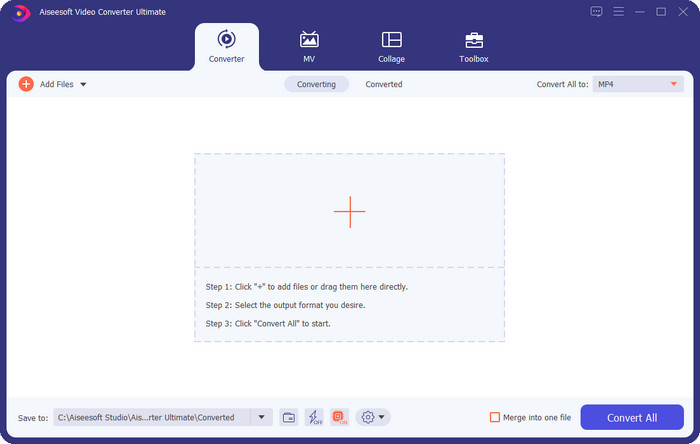
Video Converter Ultimate – Windows 和 Mac 上的最佳視頻音高轉換器
適用程式:Windows 與 Mac
我們清單上第一個,是可在 Windows 和 Mac 作業系統上使用的最佳影片變調工具。Video Converter Ultimate 是一款功能強大的工具,你可以用它透過調整影片播放速度來操控音訊的音高,不論是提高或降低都行。和其他可下載到桌面的同類軟體不同,這款工具非常直觀,幾乎不需要花很多時間學習。你可以在不到一分鐘之內就改善音訊音高,讓聲音比你錄製的原始版本更好聽。
除了改變音高的能力外,您還可以使用工具箱下的音量助推器將音量擴展至最大潛力。在此功能中,您可以使用滑塊快速增加或減少視頻中音頻的幅度或增益。即使您不是想要做這類事情的製作人,在 Windows 和 macOS 上可用的這個終極工具的幫助下,它仍然很有趣並且可以快速完成。因此,如果您想使用這個終極工具,我們將在第二部分展示如何使用這個工具,並提供詳細的步驟,您可以按照這些步驟在不到一分鐘的時間內完成它。
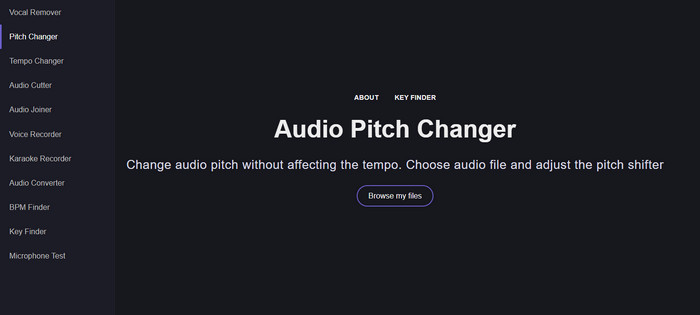
人聲去除器.org
適用程式:線上
如果你需要線上的變調器,那麼毫無疑問,Vocal Remover.org 就是完成這項任務的完美工具。和第一款工具不同,它在提升音訊品質方面的表現更佳。透過這個工具,你可以輕鬆更改音訊音高,並判斷歌曲所使用的調性。它還提供指示器,幫助你選擇音訊的半音階。不論你是想手動微調,或只想在拖曳滑桿時一步步調整,都能辦得到。大多數已經使用過的使用者都很喜歡這個工具,對於所得到的變調效果也非常滿意。
該工具可以正常工作,但您只能在此處上傳有限的音頻格式文件,並且不支持視頻格式。上傳文件對工具來說可能有點僵硬,因為它只支持幾種音頻格式。儘管這對每個人來說都是一個問題,但我們仍然認為這是您可以在網絡上訪問的最佳在線工具之一。但請確保您訪問正確的網站以避免並發症和其他問題。另外,請記住要有穩定的互聯網連接,因為如果您的互聯網很強大,該工具效果最好。
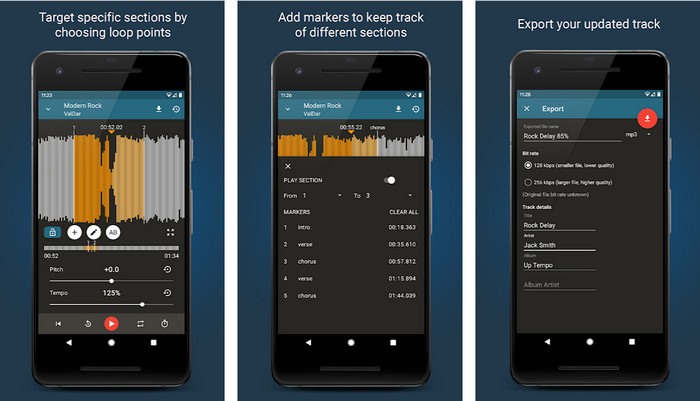
Up Tempo:音高、變速
適用程式:Android
Android 使用者即使手邊沒有電腦,也可以下載這款音訊變調器來完成任務。有了 Up Tempo: Pitch, Speed Changer,調整播放速度與音高的工作變得快速、而且人人都能輕鬆上手。它的圖形介面支援波形顯示,可幫助你判斷想要加強或修改的片段。和線上工具一樣,這款 App 能處理音樂檔案,在你需要的時候會非常好用。
儘管該應用程序可以免費下載,但如果您想使用此應用程序,您必須考慮一些事項。大多數用戶體驗到該應用無法檢測到您手機上下載的新音頻文件。如果您遇到此問題,則可能不支持此應用中的音頻文件,或者可能會出現錯誤。不過,如果您手頭有 Android 手機,請下載此應用程序以嘗試查看它是否是解決問題的應用程序。
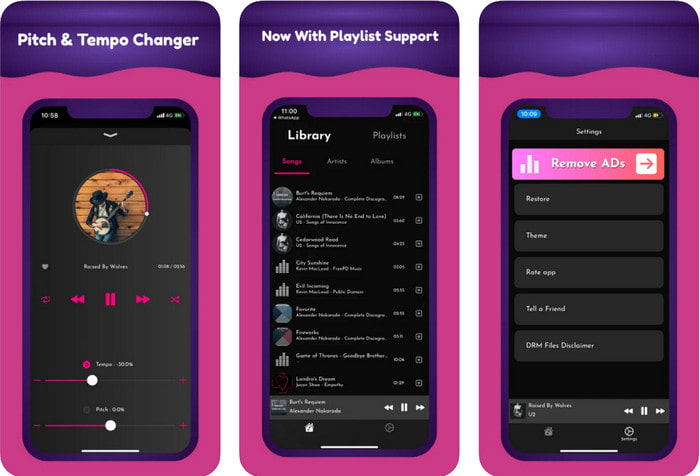
TimePitch-Pitch,速度變換器 4+
適用程式:iOS
如果你是 iOS 使用者,那你一定要知道,這款變調 App 能替你解決相關問題。TimePitch-Pitch, Speed Changer 4+ 是一款可在 iOS 裝置上使用的音樂播放器、媒體庫與變調工具。有別於其他工具,它可以即時變更你正在聆聽的音訊音高,也就是說,當你調整音高時,變更並不會被儲存。不過這反而可能是它的優點,因為你不必等待處理時間,只要調整控制項,就能立刻依照你的喜好改變音高。
然而,這也可能是它的弱點;如果您在其他設備上傳輸文件,您使用此應用更改的音高將不適用於接收器。此外,您需要記住,如果您在 iTunes 或 Apple Music 上購買音樂,則無法使用此應用更改音高。為什麼?因為受保護的文件將不允許任何像這樣的第三方應用程序訪問該文件。不管上傳音樂文件,我們仍然在本文中包含這個應用程序,因為它在每台 iOS 設備上都運行得最好。
第 2 部分。如何使用 Ultimate Pitch Changer 軟件更改視頻的音高
請按照以下步驟了解如何使用桌面上的音樂音高和速度轉換器。因此,如果您需要有關使用終極軟件的簡單而有效的教程,請繼續閱讀以下詳細信息。
步驟 1. 請先按下下載按鈕,將這款終極軟體下載到桌面,並選擇你使用的是 Windows 還是 Mac 系統。等待下載完成後,點擊你下載的檔案並進行安裝。當完成所有安裝與設定流程後,啟動軟體,就可以開始使用這款終極工具。
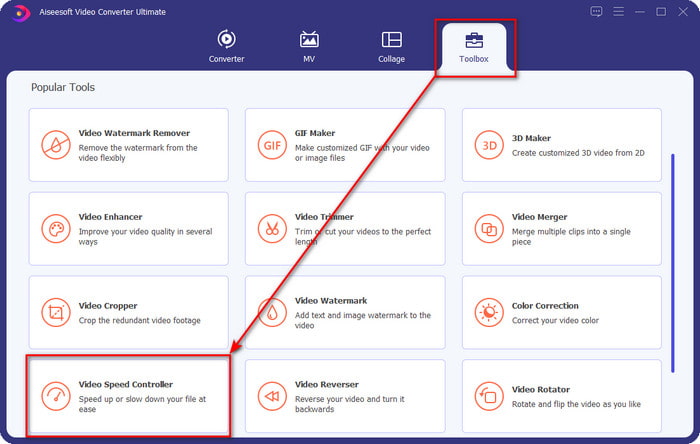
步驟 2. 開啟 工具箱(Toolbox) 選單,在其下方找到 影片加速控制(Video Speed Controller),點擊即可開啟。往下捲動,可以在接近底部的位置看到這項功能。
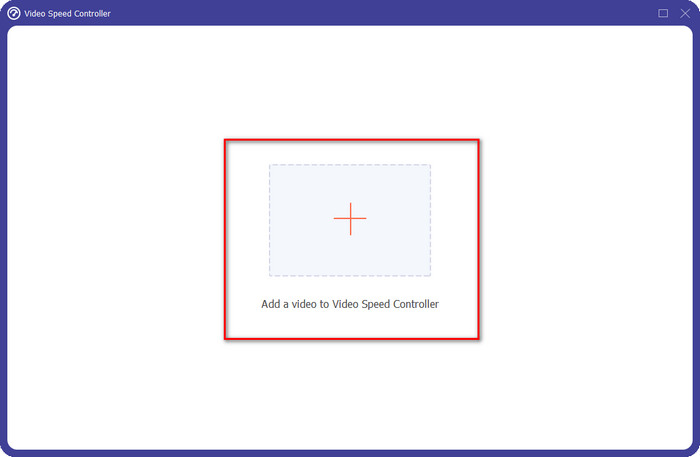
步驟 3. 螢幕上會跳出一個新的小視窗,點擊 + 按鈕,找到你想要變更音高的影片檔,然後按 開啟(Open) 上傳該影片。
步驟 4. 在這一步,你就可以開始變更音訊的速度。你會注意到,當速度改變時,音高也會跟著變化。你可以在預覽畫面中自動聽見並看到預覽效果。
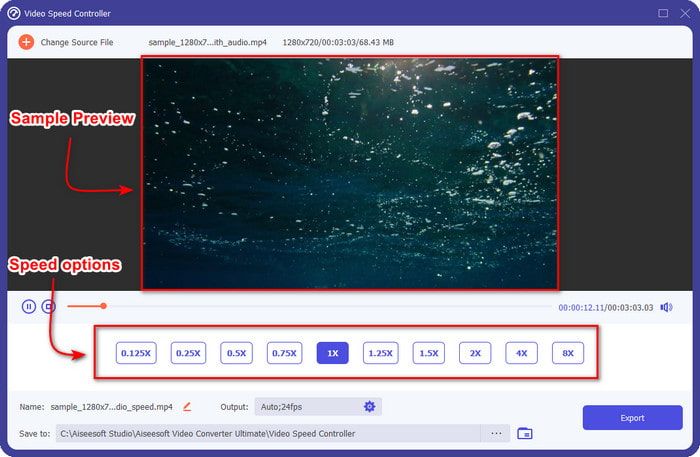
您只能在 2 倍速下播放視頻的預覽;您會注意到 4x 和 8x 不允許您預覽視頻以避免衝突,但不會降低視頻和音頻的質量。
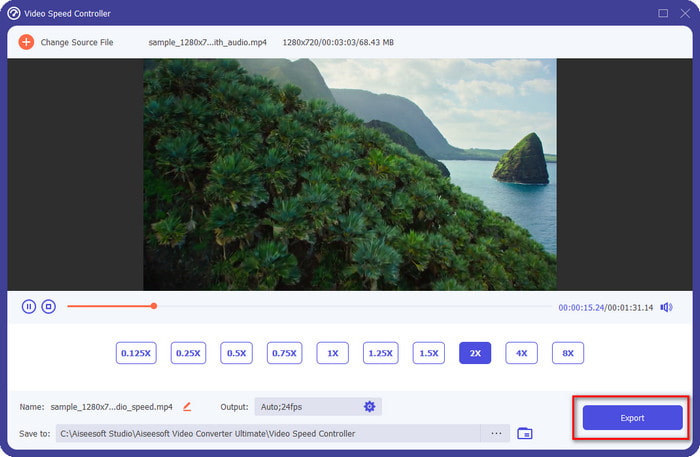
步驟 5. 如果你對目前的音高已經滿意,就點擊 匯出(Export) 按鈕。是不是很簡單?藉由這類軟體的幫助,你可以在幾分鐘內輕鬆處理各種影片與音訊問題。
相關閱讀:
第 3 部分。關於變音器的常見問題解答
什麼是音高?
它通過在範圍內測量它們來評估與您的聲音產生共鳴的質量,無論它們是更高還是更低。它是一種類似於頻率的聲波,但它們並不相同。
人類的音高能聽到多高?
赫茲越低,你仍然可以有意識地聽到它,但只有少數人在赫茲變高時才聽到它。根據研究人員的說法,每個人都能聽到 8000 赫茲,如果你能聽到 12000 赫茲,那麼你的耳朵和 50 歲以下的人一樣好。40 歲以下你仍然可以聽到 15000 赫茲,但 30 歲以下歲,16,000赫茲,你仍然可以聽。對於每 25 歲及以下的人,您仍然可以聽到 17,000 赫茲,而對於 20 歲以下,您可以聽到 20,000 赫茲。隨著年齡的增長,我們聽到的音調有時會變得不那麼有效。所以,如果你聽不到我們提到的頻率,你必須去看醫生檢查是否有問題。
我們如何計算音高範圍?
音高範圍使用八度音階來計算,這允許歌手和樂器確定這是否是歌曲的正確音高。通過振動,您可以注意到聲波形成的高頻和低頻。
結論
有了以上介紹的影片與人聲變調工具,我們現在可以輕鬆調整手邊聲音的音高。與其購買專門的硬體設備來完成這項工作,不如直接使用上述軟體。儘管它們在功能與特色上各有不同,但我們仍能看出各自的優點。不過,如果你是使用電腦,那就一定要在桌面下載 Video Converter Ultimate,因為這款工具不僅能幫你變更音高,還能做出其他神奇的效果,讓你的影片與音訊更上一層樓。想知道這款工具還能做出哪些「魔法」嗎?那就馬上點擊上方的下載按鈕下載試試吧!
-
 在 iPhone 上加速視頻的 3 種方法 [已證明]
 因使用 iPhone 而無法調整視頻的播放速度?這是一篇很好的文章,可以幫助您解決問題。
-
 視窗媒體播放器 |了解如何加速視頻 [已證明]
 您想使用 Windows Media Player 減慢視頻剪輯的速度,但在如何操作時遇到問題?本文非常適合閱讀,並且可以啟發您對如何使用 Windows Media Player 加速視頻的觀點。
-
 如何將慢動作視頻更改為正常速度 [簡單步驟]
 想知道如何還原從互聯網下載或意外以慢動作錄製的慢動作視頻?了解如何在 Mac、Windows、iOS 和 Android 上將慢動作視頻轉換為正常速度。
