


 視頻轉換大師
 屏幕錄影大師
 影片修復
影片修復
 安全下載
安全下載頂級水印去除器,可輕鬆從視頻中去除 Adobe Stock 水印
Did you know that Adobe has a photography stock site? Introducing Adobe Stock, one of the largest websites that provide any graphic design you might need without occur in unintended consequences, for it is royalty-free licensing. You can download HD videos free but with a watermark or stamp if you haven't purchased a credit or subscription. Maybe you’ll wonder if it is possible to remove the Adobe Stock watermark from the video, and it is! Let’s use the best watermark remover you will ever need in the next part; read this article to know it better!

第 1 部分。 如何通過裁剪從視頻中刪除 Adobe Stock 水印
FVC Video Converter Ultimate is a complete and simplistic image editor that supports Windows and Mac versions. This software develops a powerful cropping feature that allows you to save video from Adobe Stock without the watermark. Also, it can crop anything on your videos, such as an object, stamp, watermark, date, and time.
即使您在裁剪方面沒有經驗,一旦按照我們在下面添加的教程完成,您仍然可以設法做到這一點。但是,如果水印位於視頻中間,則此步驟並不理想,因為您正在調整尺寸並剪切不必要的實際素材。
How to Crop Video Watermark with FVC Video Converter Ultimate:
Step 1. Click the appropriate download button below to have the correct version of this video editor on your desktop. Follow the installation and set-up process, then click Start Now to open the editor on your system.
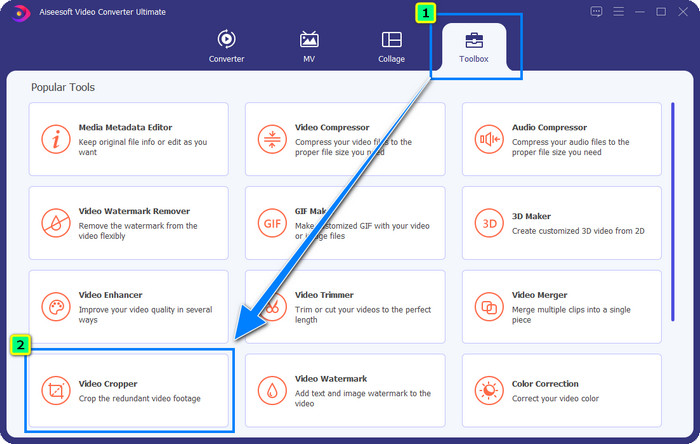
Step 2. Now that the tool is open proceed to the Toolbox and select the Video Cropper.
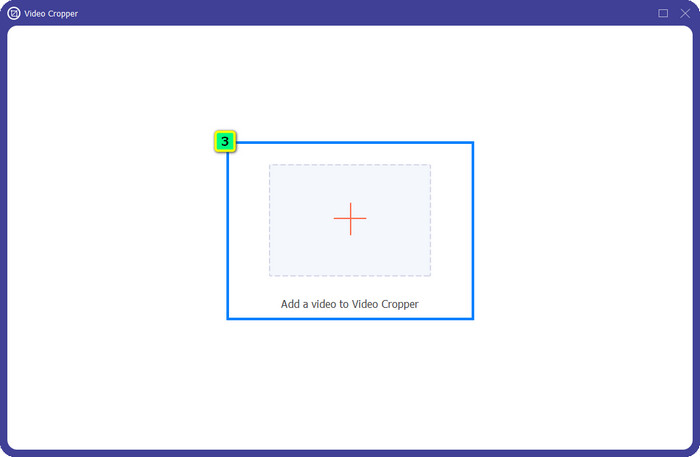
Step 3. A new tool window will appear on your screen; tap the + button to upload the video you want to crop.
Step 4. Adjust the crop area based on your preference; ensure that the watermark isn’t inside the frame so that it will include no watermark when you save it.
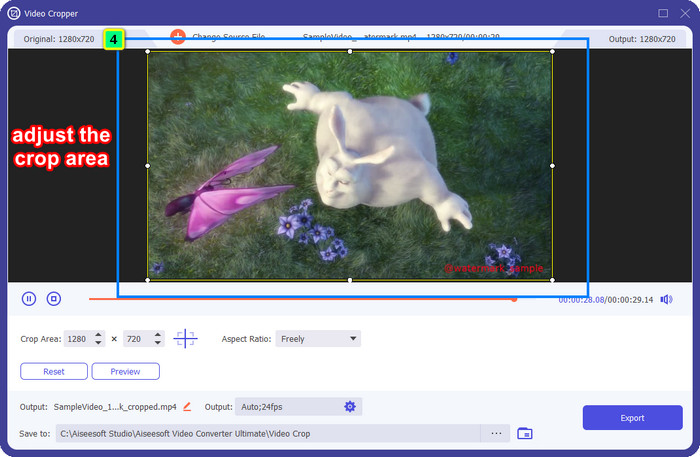
Step 5. After editing the image, it is time for you to export the final output. Press the Save to and select the destination where it will save the file after saving it, then click Export to download the final output on your local drive.
第 2 部分。 如何在不裁剪的情況下從視頻中刪除 Adobe Stock 水印
Doesn’t like how to get rid of Adobe Stock watermark using the cropping feature? Well, you can use this ultimate converter's watermark remover; it is powerful and will not leave any traces of the watermark when done. FVC Video Converter Ultimate is a dependable app that supports various features and functions you can freely use without downloading additional extensions. The recent update has a video watermark remover, allowing anyone with a video watermark problem to solve this easily and effectively.
與裁剪功能不同,水印去除功能確實會去除視頻上的水印,而不會留下最終輸出的污點。它不會改變任何外觀,因為它不會剪切和改變視頻的尺寸和質量。因此,如果您對如何從視頻中刪除 Adobe Stock 水印感興趣,您可以按照我們接下來包含的步驟進行操作。
Step 1. If you have downloaded the software, you can proceed to the next step, but if not, you can click this download button, install it, and launch the editor.
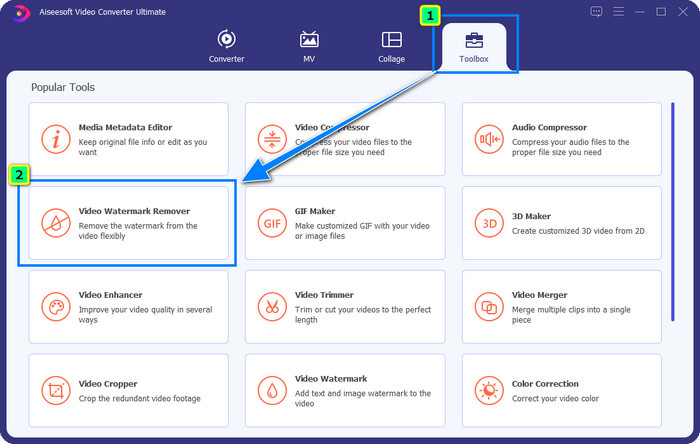
Step 2. Now that the tool is running on your desktop click the Toolbox and select the Video Watermark Remover feature that this software supports.
Step 3. Hit the plus button then a folder will show on your screen, upload the Adobe Stock video you downloaded, and press Open.
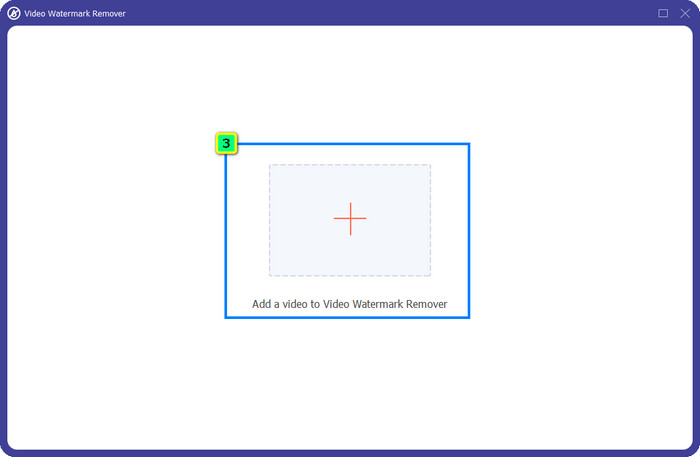
Step 4. Press the Add Watermark Removing Area to remove the watermark in your video.
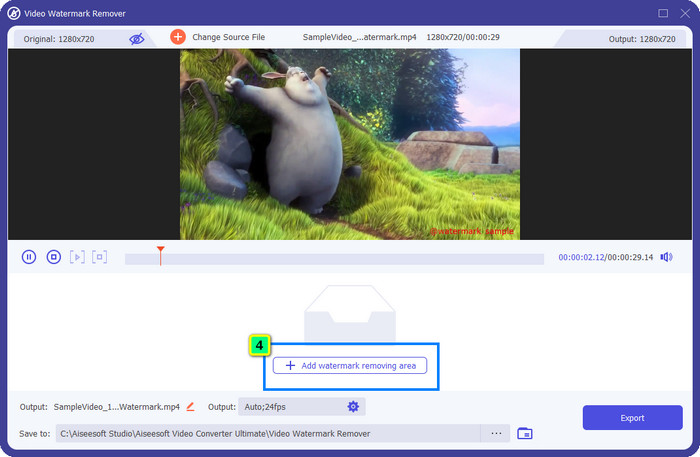
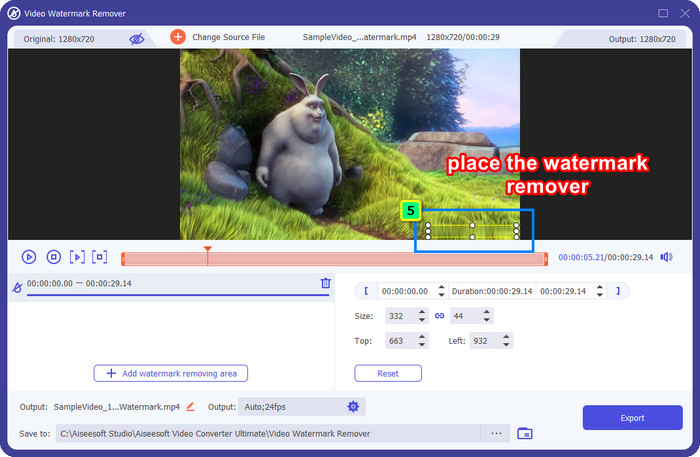
Step 5. Place the frame on the area of the watermark, and you can freely adjust it to make it fit in the watermark attached to your video.
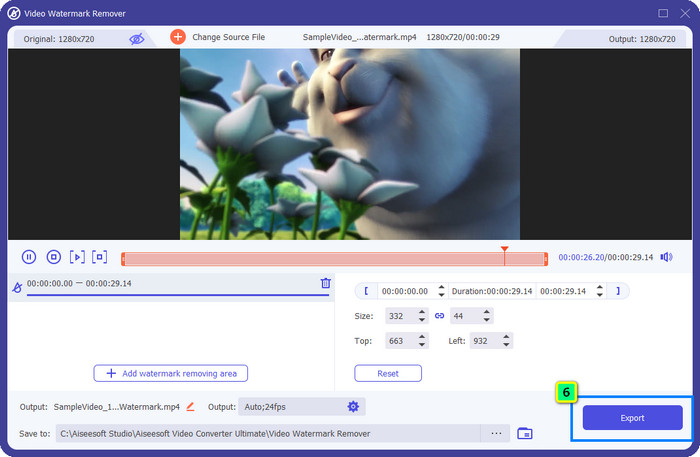
Step 6. After all, click Export, and you can enjoy using the video without the watermark as easily as that.
獎勵:如何免費在線刪除圖像上的 Adobe Stock 水印
FVC Free Watermark Remover is a capable watermark remover you can use for an image accessible on the web. So, if you have a watermark problem on the image you downloaded or saved on your device, you can start using this software. Next, you can follow the tutorial we added below to remove the Adobe Stock watermark on images online.
Step 1. To open this watermark remover online, you can click this link.
Step 2. Press Upload Image to add the image with the watermark you want to edit here.
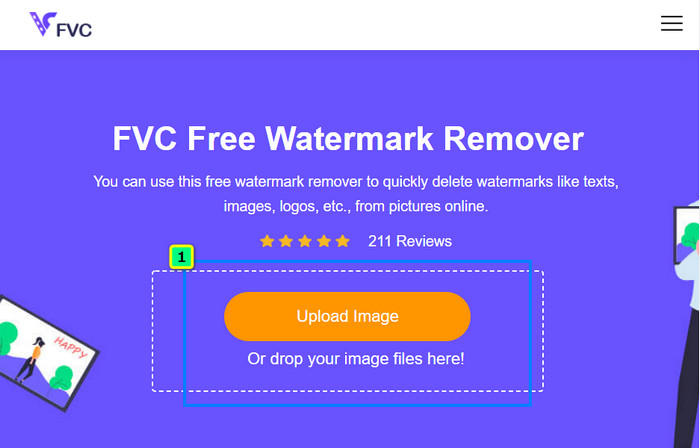
Step 3. Using the polygonal, trace the watermark one point at a time by tapping your mouse's left-click button. Then press Remove after you have traced it, and the AI will process the watermark removal for you.
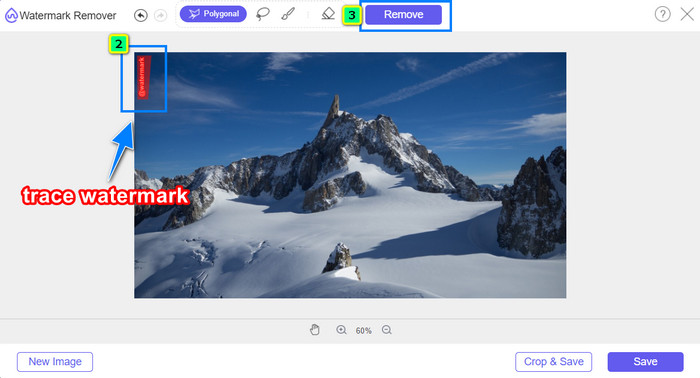
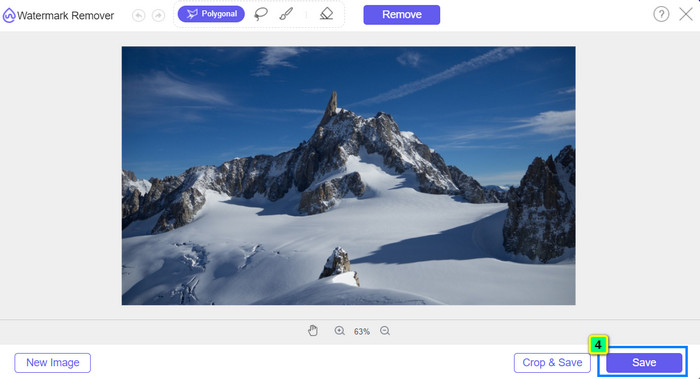
Step 4. When you are satisfied with the result and ready to download the image, click the Save button to save it directly on your desktop.
延伸閱讀:
Latest Way to Remove the Object from Photo [6 Methods]
How to Sharpen the Image in Photo Using 3 Ways [Quick Tutorial]
第 3 部分。有關如何從視頻中刪除 Adobe Stock 水印的常見問題解答
從視頻中刪除 Adobe Stock 水印會降低質量嗎?
有時,當您刪除了視頻上的水印後,您使用的工具會使視頻輸出變得更糟。但是,如果您使用 FVC Video Converter Ultimate,則不會遇到此問題。實際上,您可以將視頻質量設置調整為更高的設置以提高質量。
在哪裡可以購買 Adobe Stock 積分?
打開 Adobe Stock 的官方網站,然後轉到定價。在計劃和定價下,您將看到可以購買的不同信用包。信用越多,它可能就越貴。單擊您想要的數量,按立即購買,添加付款信息,然後單擊下擔保訂單。
為什麼 Adobe Stock 的計劃非常昂貴?
由於 Adobe Stock 上每種可用產品的價格,它可能看起來非常昂貴。除了價格,增加的是開發商 Adobe 建立的聲譽。您正在使用它的名稱購買產品。
結論
With the ultimate watermark remover in this article, you can now finish removing the Adobe Stock watermark from the video you have downloaded on its official site of it. But which way do you think will do the trick? Is it cropping or watermark removal? Well, they are both functional and provide excellent results. But if your dimension is being cut off or resized, you better use the Video Watermark Remover features of the FVC Video Converter Ultimate. In addition, FVC also offers watermark removal on images you have with the help of an online tool accessible on any web browser you have on your desktop. We hope you enjoy reading the information we bring to you. If you want to know more, read the other articles below.
-
 如何使用 Final Cut Pro 從視頻中刪除水印 [完整指南]
 視頻上的水印有問題嗎?不多說了,因為我們提供了有關如何使用 Final Cut Pro 從視頻中刪除水印的教程。
-
 使用完整教程刪除導出視頻上的 DaVinci Resolve 水印
 要刪除 Davinci Resolve 水印,您需要使用工具或購買它的官方版本,請繼續閱讀以了解更多信息。
-
 如何去除 Lunapic 中的水印,包括步驟 [3 種方式]
 了解如何使用我們在此博客中添加的方式刪除 Lunapic 上的水印。繼續閱讀信息以更好地了解它。
