


 視頻轉換大師
 屏幕錄影大師
 影片修復
影片修復
 安全下載
安全下載使用前 3 種水印去除劑去除 Bandicam 水印
Bandicam 是一款人人都愛用的工具,特別適合錄製遊戲過程中每一個動作、線上會議、觀看影片時的畫面等。與其他螢幕錄影軟體競品不同的是,這款錄影工具支援 DirectX/OpenGL/UWP/Vulkan 掛勾以及其他先進加速技術,最高可錄製 480 FPS 的影片。即使你沒有購買其付費版,也一樣可以使用它錄製 60 或 120 FPS 的高幀率影片,只是畫面上會帶有浮水印。若想在 Bandicam 錄影畫面中移除浮水印,唯一的方法就是購買它的完整版本。
幸運的是,我們在本文中包含的工具可以去除 Bandicam 添加到導出視頻中的水印。想知道這些是什麼嗎?那麼你必須繼續閱讀這篇文章來掌握這個想法!

第 1 部分。如何使用 3 種最有效的水印去除劑去除 Bandicam 水印
FVC Video Converter Ultimate
移除 Bandicam 浮水印最有效的方法之一,是使用輔助工具,例如 FVC Video Converter Ultimate。這個工具可以透過在浮水印位置放置選取框,自動偵測影片中的浮水印,接著一下子就把它去除。效果幾乎像魔術一樣,匯出檔案後,影片上不會留下任何浮水印痕跡。這樣你就能無障礙地欣賞自己用 Bandicam 錄製的影片,不再被 Logo 擋住視線。
該工具最有可能的功能是 Toolbox 上的轉換器、增強器、編輯器等。如果您使用此工具並立即將其下載到桌面上,您就可以擁有所有這些特性和功能。要教您如何使用這款終極軟件去除 Bandicam 水印,您可以按照我們在下面添加的完整書面教程進行操作。
步驟 1. 首先,你必須在桌面上下載此官方軟體,點擊我們在此提供的下載按鈕即可。你不必擔心安全問題,因為這個下載連結對 Windows 與 Mac 使用者都很安全。下載檔案完成後,點擊它進行安裝,依照 WinRAR 的安裝精靈步驟操作,最後按「Start Now」啟動工具。
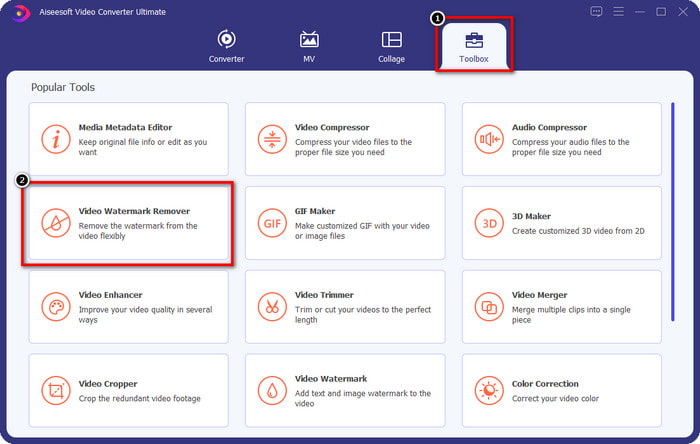
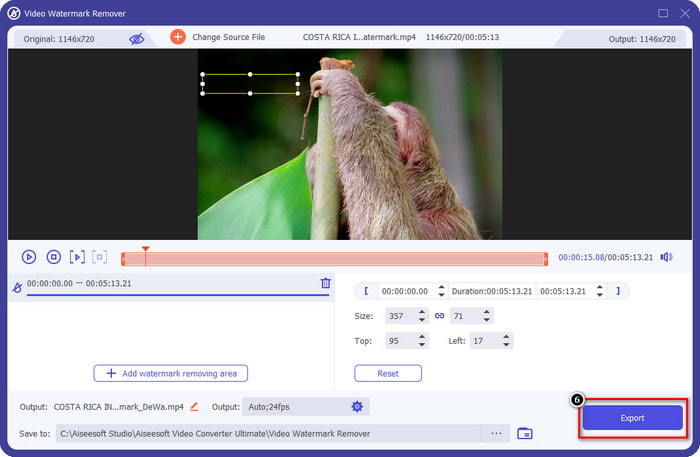
步驟 2. 在工具的主介面上,先前往 Toolbox(工具箱),在其下方找到 Video Watermark Remover(影片浮水印去除器),點擊開啟此功能。
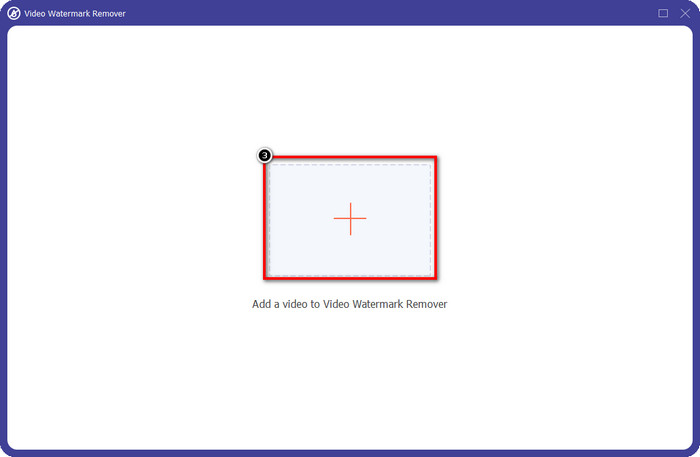
步驟 3. 螢幕上會彈出新視窗,點擊 + 圖示,上傳含有浮水印的影片檔。於本機硬碟中找到該影片檔後,點擊 Open 開啟。
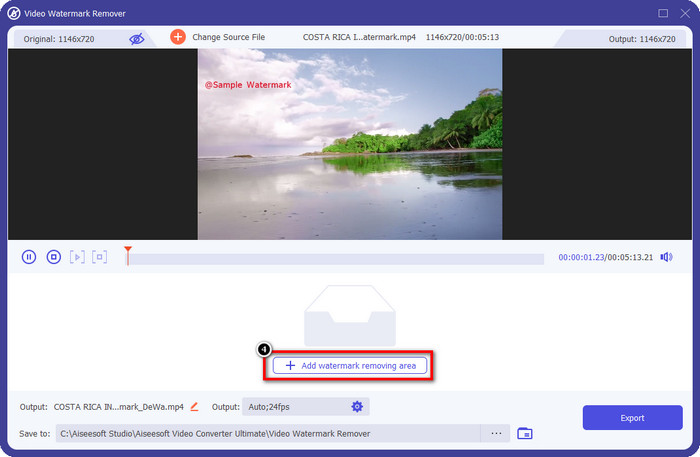
步驟 4. 完成上述操作後,點擊 Add Watermark Removing Area(新增去除浮水印區域),即可開始使用,將 Bandicam 錄製的影片處理成無浮水印版本。
步驟 5. 在預覽畫面中,把選取框移動到浮水印位置上,你可以調整選取框大小,讓框線恰好覆蓋住浮水印。
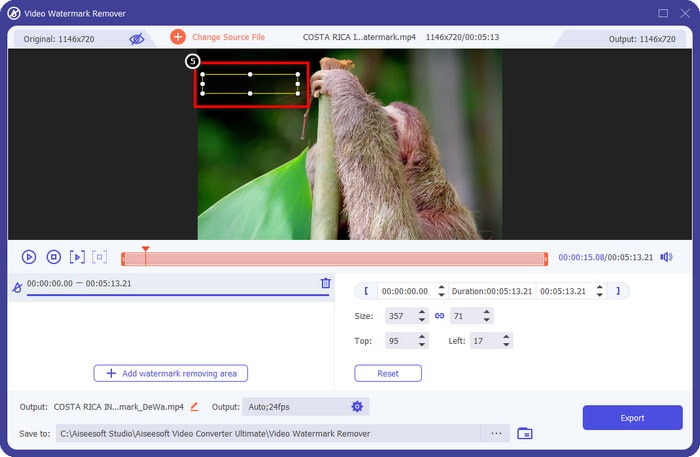
步驟 6. 將選取框正確放在浮水印上後,點擊 Export 匯出影片,即可下載已移除 Bandicam 浮水印的影片。
立即刪除徽標!
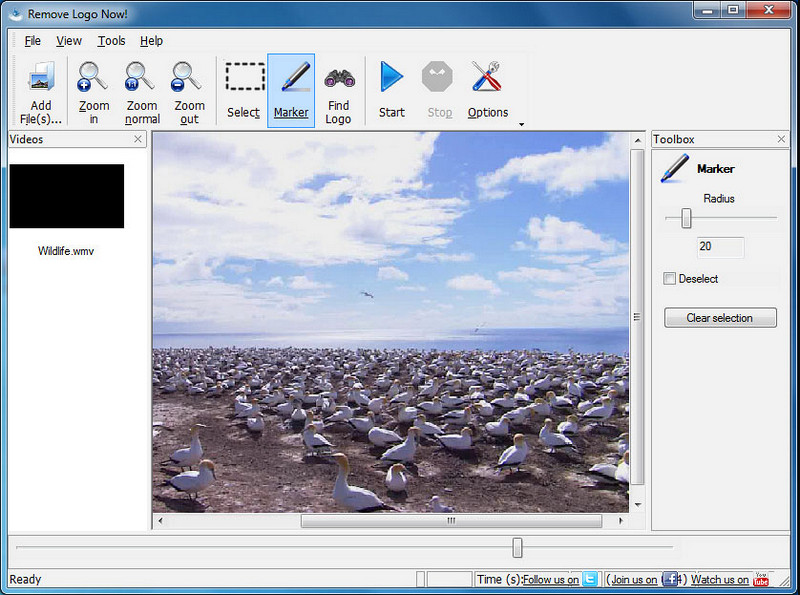
Remove Logo Now! 是一款完整的浮水印移除工具,你可以用它來去除固定在影片上的各種 Logo。這款工具能在演算法的輔助下,自動偵測影片中的浮水印,同時也支援手動描繪浮水印區域。無論是哪一種類型的浮水印,你都可以輕鬆移除,幾乎不費力。不過,此軟體僅支援 Windows 使用者,而且介面設計較為老舊。如果你仍想在 Windows 電腦上試用它,下面會示範如何免費移除 Bandicam 的浮水印。
步驟 1. 先前往其官方網站下載 Remove Logo Now!。請務必確認網站的安全性,確認是該工具的官方頁面後再下載。
步驟 2. 開啟你已安裝好的軟體,接著點擊 File,上傳帶有浮水印的 Bandicam 錄影檔。
步驟 3. 影片上傳完成後,點擊 Find Logo 選項,讓程式自動偵測影片中的浮水印。
選用步驟: 若「Find Logo」未能成功透過演算法偵測出影片中的浮水印,你可以改用 Marker 工具手動標註浮水印範圍,然後點擊 Clear Selection 將其移除。
步驟 4. 點擊 Start 選項輸出影片,如此便能得到一個不含 Bandicam 浮水印的錄影版本。
Apowersoft 在線水印去除器
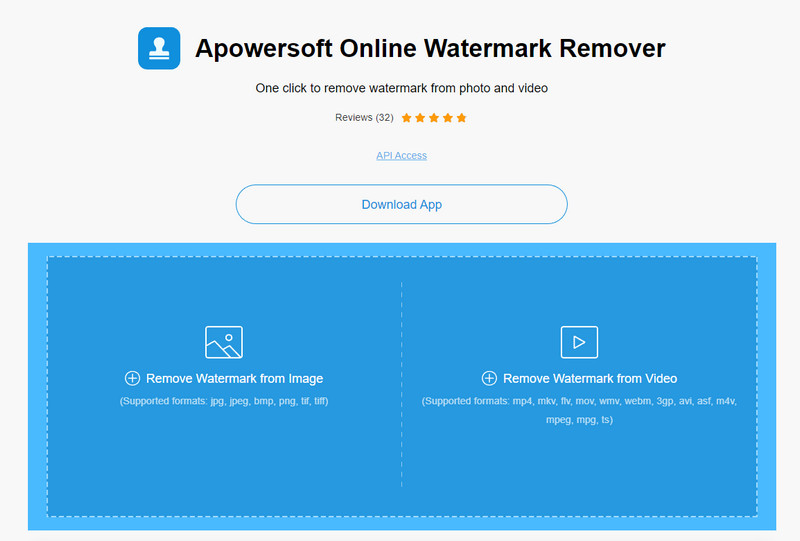
Apowersoft Online Watermark Remover 是一款可靠且免安裝的線上工具,可有效去除圖片與影片上的浮水印。由於其去除浮水印的效果出色,在匯出影片後幾乎不會留下任何殘影,因此相當知名。即便它是線上工具,你在匯出後也不會明顯感覺到影片品質下降。與其購買沒有浮水印的 Bandicam 完整版授權,你也可以直接依照下列步驟在線上移除浮水印。
步驟 1. 打開常用的網頁瀏覽器,在搜尋列輸入這款線上浮水印去除工具的名稱。
步驟 2. 在網站中會看到兩個選項,請點擊 Remove Watermark from Video(從影片移除浮水印)。接著選取本機中含有 Bandicam 浮水印 Logo 的影片,按下「Open」。上傳過程可能需要一些時間,影片越長所需時間就越久。
步驟 3. 在影片上繪製一個選取框,並確認 Bandicam 的浮水印完整落在這個長方形範圍內。
步驟 4. 點擊 Erase 以下載影片檔案,此時影片中的浮水印已被成功移除。
相關閱讀:
第 2 部分。有關如何刪除 Bandicam 水印的常見問題解答
Bandicam 有水印嗎?
對於使用免費試用版的用戶,導出後會有水印。為了避免這個問題,您可以在 Bandicam 的官方網站上購買該工具。
使用免費版 Bandicam 有限制嗎?
如果您使用的是免費版 Bandicam,10 分鐘錄製、添加水印、支持 60 到 120 FPS、文件格式和處理速度,會有很多限制。儘管這對大多數人來說可能是個問題,但它仍然被認為是您可以在 Windows 上使用的最佳屏幕錄像機之一。
Bandicam如何去除水印?
沒有其他方法可以去除 Bandicam 上的水印,購買專業版即可。打開Bandicam官網,點擊Get Full Version,選擇需要的license,點擊Buy Now。
結論
事實上,Bandicam 是一款一流的屏幕錄像機,您可以免費使用。但有一件事是肯定的;使用免費版本將在導出的視頻上添加水印。通過我們在本文中添加的方式,您可以使用理想的水印去除劑成功去除水印,這可能是您的選擇。如果不想使用工具去除水印怎麼辦?那麼我們建議您購買 Bandicam 來去除視頻上的水印。這將花費您,但專業版值得使用。我們希望本文能提供您在 Bandicam 上刪除水印所需的信息。
-
 有效的 PlaceIt 水印去除劑的完整審查 [2022]
 我們在此處查看的 PlaceIt 水印去除器是有效的工具,可用於去除您在 PlaceIt 上導出的視頻上的水印。
-
 使用最佳工具去除 B612 水印的 5 種方法
 想知道如何去除照片中的 B612 水印嗎?您可以使用這些出色的工具輕鬆地從圖像中刪除 B612 水印。
-
 如何刪除 WOW 滑塊水印的簡單步驟 [已解決]
 WOW Slider 是一款用於創建精彩幻燈片的應用程序。但是,它會在其輸出中嵌入水印。閱讀以下內容以了解如何刪除 WOW Slider 水印。
