


 視頻轉換大師
 屏幕錄影大師
 影片修復
影片修復
 安全下載
安全下載如何刪除設備上的 ManyCam 徽標的最簡單方法
你想學習在 Windows 和 Mac 上如何移除 ManyCam 標誌嗎?如果是這樣,本文將提供多種你一定要嘗試的移除影片標誌方法。播放帶有浮水印或標誌的喜愛影片會讓人有點煩躁,你無法好好欣賞影片,還會造成干擾。有時甚至因為浮水印、圖片、文字或標誌而看不清楚畫面的某些部分。所幸,你可以使用內建浮水印移除功能的優秀軟體,來將這些不必要的物件從影片中移除。
在這些應用程序的幫助下,您將永遠不會再失望。如果您有興趣了解刪除 ManyCam 徽標的最佳方法,您最好的選擇是閱讀本文。

第 1 部分:如何通過激活訂閱來刪除 ManyCam 徽標
如果你想學習如何從 ManyCam 移除浮水印,那你來對地方了。ManyCam 是一款可在 Windows 與 Mac 上使用的直播串流軟體。這款應用程式可以讓你在各平台上建立獨特的直播內容、製作教學影片、商業簡報、遊戲實況等等。此外,它還具備許多實用功能,可以讓你盡情享受,例如加入音樂、螢幕錄製、加入綠幕、遊戲直播等。對內容創作者而言,ManyCam 非常有價值也很實用,它擁有他們所需的重要工具,如螢幕投放與螢幕錄影,使用起來十分方便。
但是,每次創建或編輯視頻時,視頻的下部都會出現一個 manycam 標誌,這很令人不安。幸運的是,您可以通過激活對 ManyCam 的訂閱來刪除此徽標。請按照以下步驟了解如何通過激活訂閱來刪除 manycam 徽標。
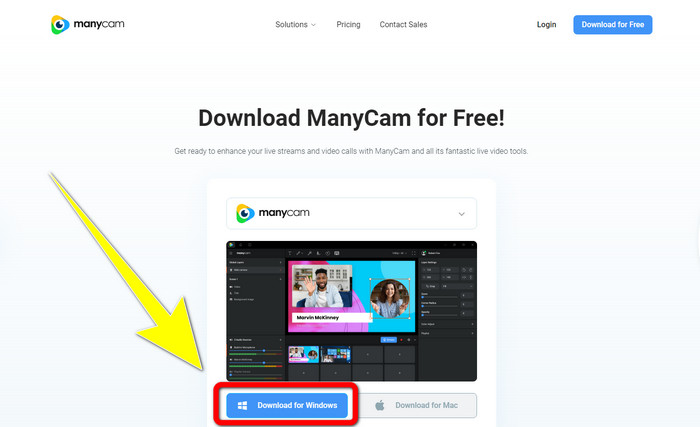
步驟 1: 若要下載 ManyCam,請點擊Download for Windows按鈕,然後進行安裝流程。
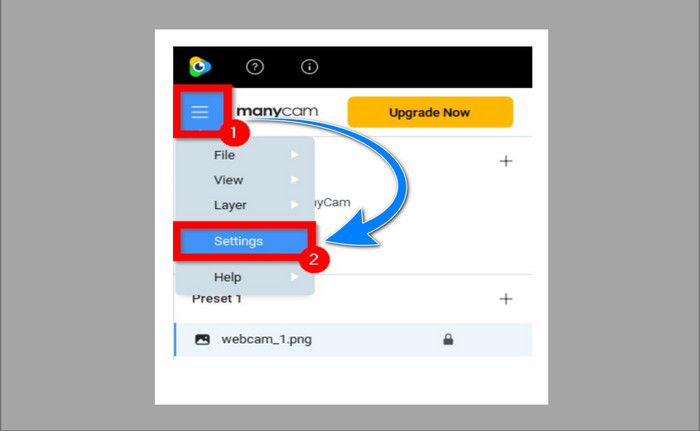
步驟 2: 在電腦上啟動程式,點擊 ManyCam 的三線選單圖示,接著前往Settings > Account(設定 > 帳號),並登入你在購買訂閱後所建立的帳號。
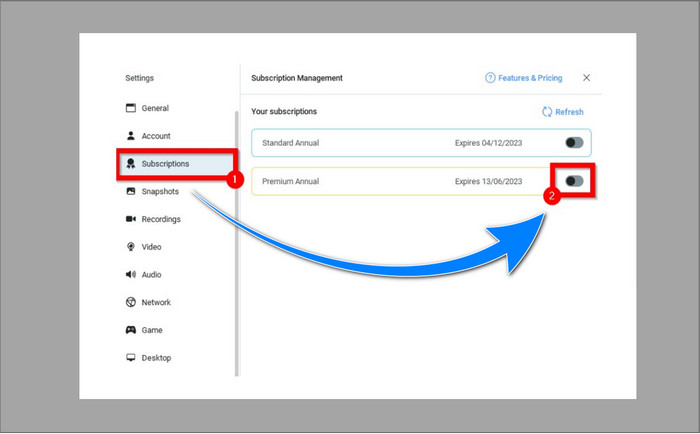
步驟 3: 前往Subscription(訂閱)分頁,以確定訂閱已啟用。
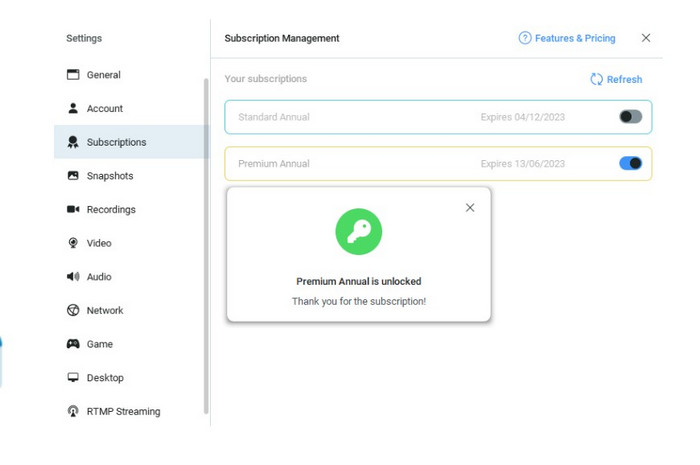
步驟 4: 若訂閱已經啟用,將會出現彈出式視窗提示訊息,這樣就完成了。
如果您的 ManyCam 應用程序已激活,則視頻上的水印或徽標將自動刪除。您可以欣賞自己喜歡的視頻,而不會遇到水印。
第 2 部分:如何在沒有訂閱的情況下刪除 ManyCam 徽標
你想免費移除 ManyCam 的浮水印嗎?除了 ManyCam 本身之外,你也可以使用其他應用程式來移除 ManyCam 的標誌。你可以運用的最佳應用程式就是Video Converter Ultimate。此程式能移除影片中不必要的物件,例如文字、浮水印、標誌等。此外,Video Converter Ultimate 還擁有許多實用的剪輯工具可供使用,如影片倍速控制、影片增強、加入與移除浮水印、顏色校正、音量增強等等。當你使用 Video Converter Ultimate 來移除浮水印時,最好用的工具就是「Video Watermark Remover(影片浮水印移除器)」。
該工具將幫助您輕鬆消除水印。此外,此應用程序可在 Windows 和 Mac 上使用。此外,您不會很難使用此應用程序。它還支持多種音頻和視頻文件格式,如 MP4、FLV、MOV、MKV、MP3、AAC 等。如果您想使用 Video Converter Ultimate 刪除 ManyCam 徽標,本文將向您展示兩種方法。這些方法是使用視頻裁剪器和視頻水印去除器。
1. 使用視頻裁剪器
步驟 1: 下載FVC Video Converter Ultimate,並進行安裝流程。
步驟 2: 安裝完成後啟動程式,點擊Toolbox > Video Cropper(工具箱 > 影片裁切)。
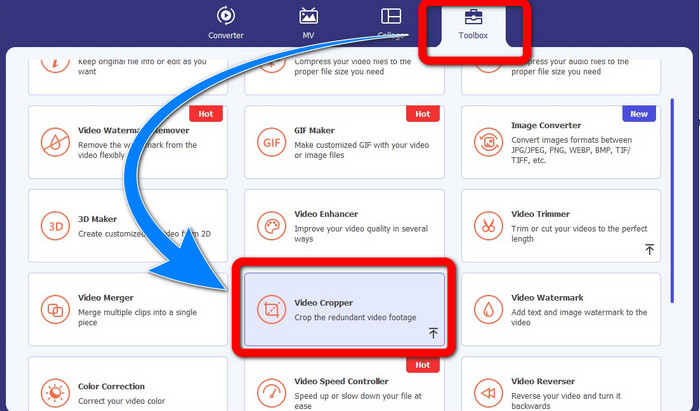
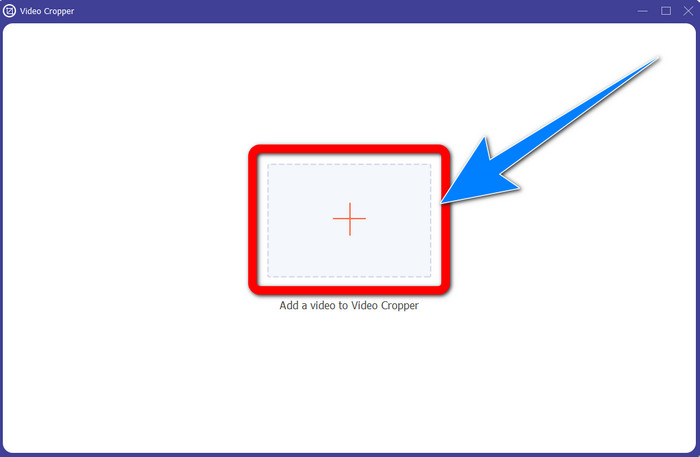
步驟 3: 點擊Video Cropper(影片裁切)後,會跳出另一個介面。點擊「+」按鈕,加入從 ManyCam 匯出的、帶有浮水印的影片。
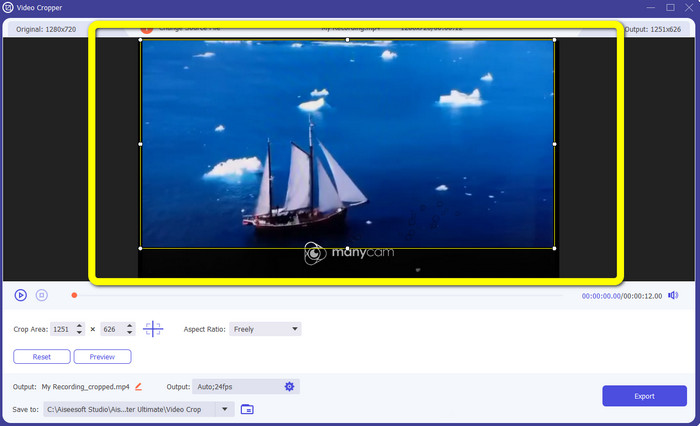
步驟 4: 當檔案加入後,你即可裁切影片,以移除浮水印。
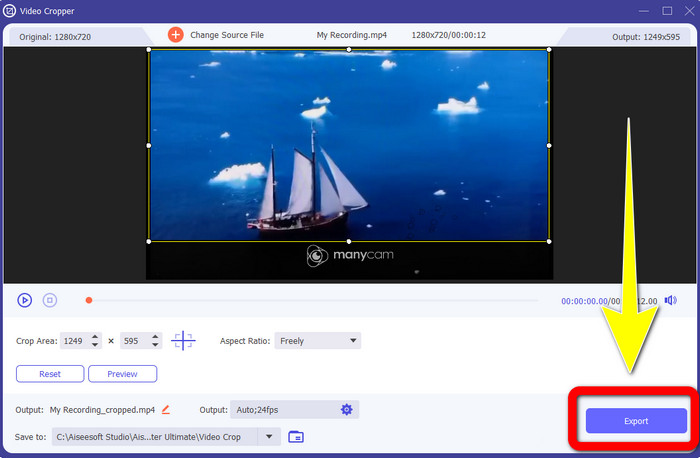
步驟 5: 移除浮水印後,點擊Export(匯出)按鈕以儲存最後成品。之後你就可以播放沒有浮水印的喜愛影片了。
2.使用視頻水印去除器
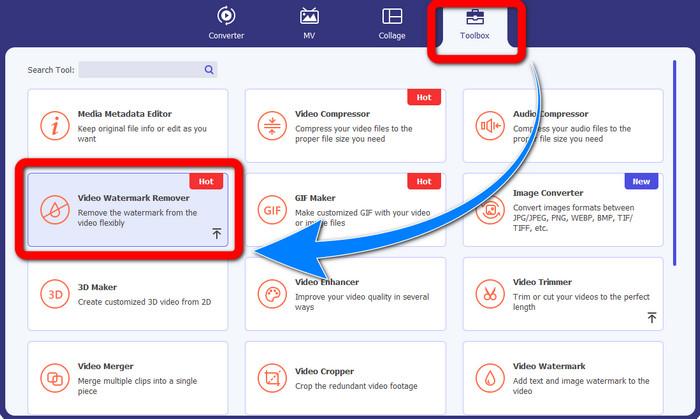
步驟 1: 開啟程式,前往Toolbox > Video Watermark Remover(工具箱 > 影片浮水印移除器)。
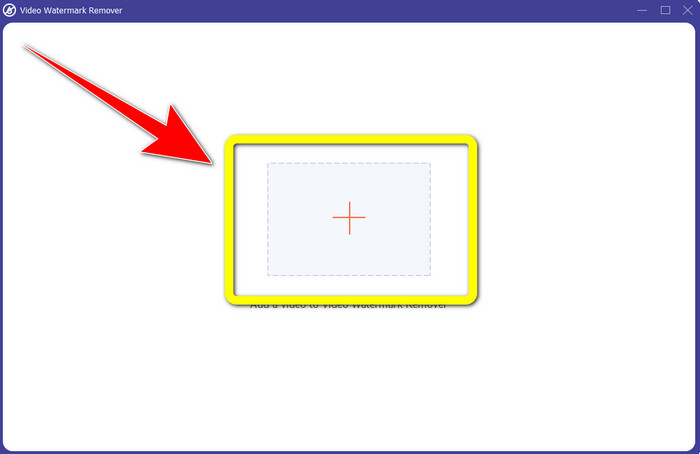
步驟 2: 點擊Video Watermark Remover(影片浮水印移除器)後,會跳出另一個介面。點擊「+」按鈕,匯入帶有 ManyCam 浮水印的影片。
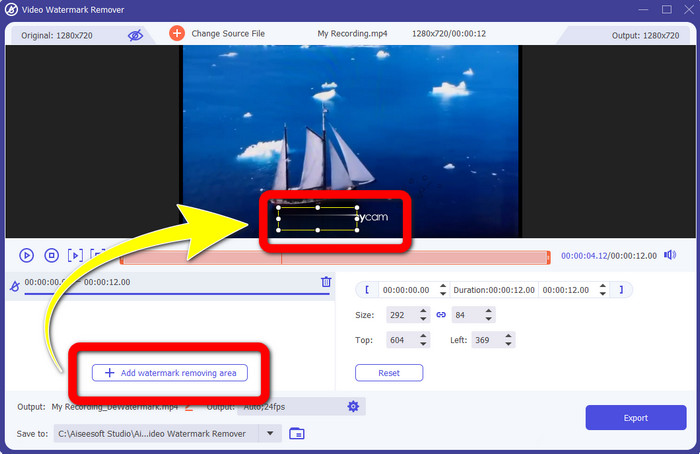
步驟 3: 匯入影片後,點擊Add Watermark Removing Area(新增浮水印移除區域),接著影片中會出現一個方框。將方框拖曳到浮水印位置並加以覆蓋。
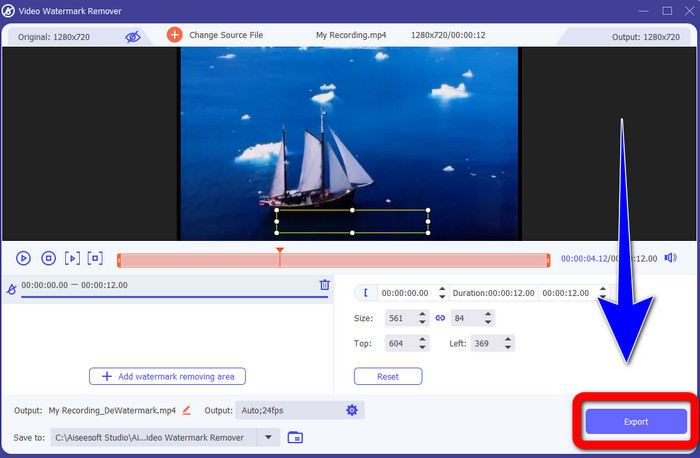
步驟 4: 當你完成移除影片上的浮水印後,點擊Export(匯出)來儲存成品。這是免費移除 ManyCam 標誌的最佳方法。
第 3 部分:有關刪除 ManyCam 徽標的常見問題解答
去除標誌需要多長時間?
您不必等待更長時間,因為徽標或任何不必要的對象的刪除過程只需幾秒鐘。
我可以刪除手機上的 ManyCam 標誌嗎?
是的!您可以使用帶有水印去除器的不同軟件應用程序去除 Android 或 iPhone 上的 ManyCam 徽標。在您的 Play 商店或應用商店中查找該應用程序,並嘗試使用您可以在頂部結果中看到的那些應用程序。
有沒有最好的方法來去除我的 Mac 上的水印?
當然可以!你可以使用內建浮水印移除功能的優秀應用程式,在 Mac 上移除浮水印。這款應用程式就是Video Converter Ultimate。它在 Windows 與 Mac 上都相當適用。此軟體可協助你移除影片中的不必要物件,如標誌、浮水印、圖片與文字。
我可以使用 ManyCam 應用程序中的裁剪工具來刪除 ManyCam 徽標嗎?
很遺憾,無法!使用裁切工具來移除 ManyCam 的標誌並不奏效。即使你嘗試透過裁切影片來移除標誌,它仍然會出現。唯一能真正移除標誌的方式,就是在 ManyCam 中啟用訂閱。
除了 ManyCam,還有其他方法可以去除視頻上的水印嗎?
就在這裡!除了 ManyCam,還有更多帶有水印去除器的應用程序,您無需購買即可使用。 Video Converter Ultimate 是可用於刪除視頻水印的最佳應用程序之一。它簡單易用,適合初學者。
結論
根據上述資訊,你已可以在 Windows 與 Mac 上學會如何移除 ManyCam 標誌。你可以在啟用訂閱後,直接透過 ManyCam 應用程式輕鬆移除標誌。此外,如果你想免費使用具備浮水印移除功能的應用程式,那就一定要試試Video Converter Ultimate。在清除影片中不必要物件這方面,它將會是你的得力助手。
-
 關於如何從照片中刪除水印的最簡單方法
 您是否對照片上的水印感到惱火?不用擔心!本文將提供簡單易行的方法來去除照片中的水印。
-
 如何使用 4 種有效方法去除 Powtoon 水印
 閱讀本文以了解如何使用我們在此處提供的最佳工具和教程來刪除 Powtoon 水印。
-
 Apowersoft Watermark Remover 評測 – 功能、優缺點和價格
 Apowersoft Watermark Remover是最好的水印去除器之一,支持在線和離線,點擊了解更多!
