


 視頻轉換大師
 屏幕錄影大師
 影片修復
影片修復
 安全下載
安全下載在不同平台上刪除 VideoShop 水印的主要方法 [免費]
Videoshop 是一款可以在移動設備上使用的一體式視頻編輯器,到目前為止,該應用程序已定期收到更新。由於該應用程序會定期更新並在收到更新後添加新功能,因此移動用戶傾向於選擇它作為他們的視頻編輯器。儘管該應用程序提供了幾乎完整的視頻編輯功能,但許多用戶仍然遇到了一些缺點,例如它的界面混亂以及導出的視頻上添加了水印。因此,在今天的文章中,我們將向您解釋可用於刪除可在 iOS 和 Android 上下載的 Videoshop 水印的不同方法,以及可在桌面上使用的終極軟件。

第 1 部分。如何使用平台上最有效的工具刪除 VideoShop 水印
FVC Video Converter Ultimate - 在 Windows 和 Mac 上刪除水印的終極解決方案
FVC Video Converter Ultimate 是我們在本文中選用的工具,因為它在移除影片中不想要的浮水印方面效率極高。這款工具內建多種去除浮水印的功能,你只需嘗試一次就能輕鬆上手。若你選擇使用它,在移除浮水印的過程中完全不會感到迷惘,得益於其直覺化的介面以及輕量化的程式設計。透過此工具,你還可以完成許多實用操作,例如新增浮水印、調整尺寸、壓縮、剪切、裁剪等等。
水印的終極解決方案就在這裡;如果您需要有關如何刪除 Videoshop 水印的教程,請按照以下指示的步驟操作,並使用終極工具來消除水印。
步驟 1. 在開始之前,你需要先依照自己所使用的作業系統版本下載此工具到桌面。完成安裝流程後,啟動軟體即可開始使用。
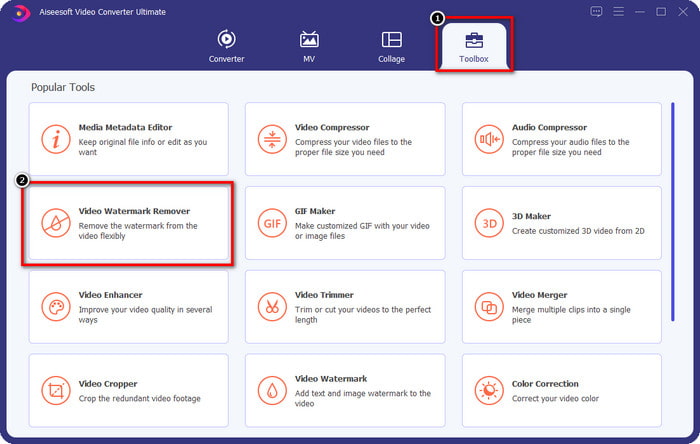
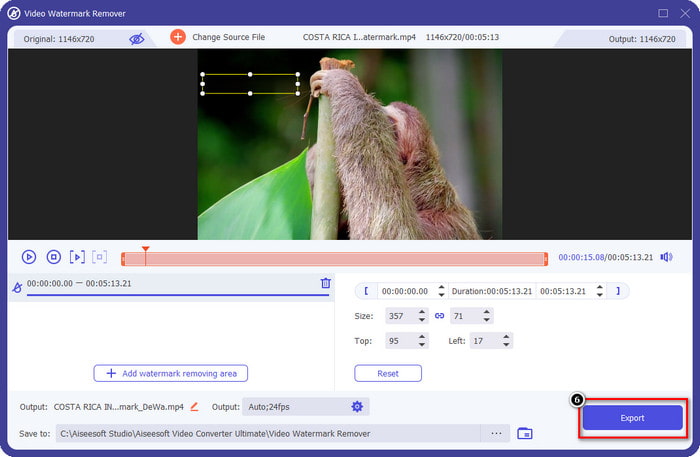
步驟 2. 點擊開啟 工具箱,然後在螢幕上顯示的功能列表中找到 影片浮水印移除工具。
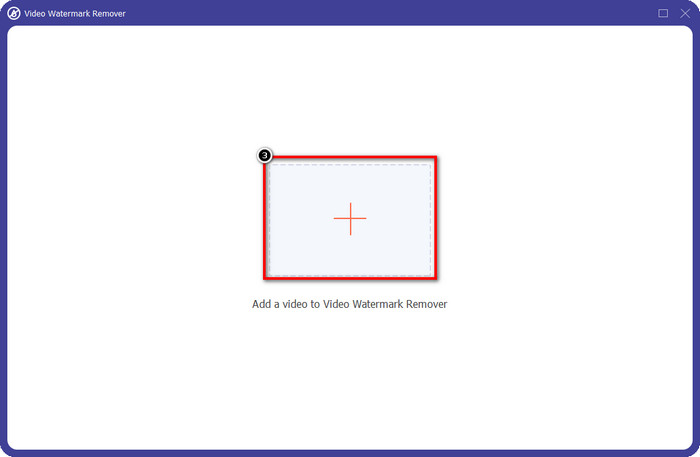
步驟 3. 接著點擊 + 以加入帶有 Videoshop 浮水印的影片檔。在檔案管理器中找到該影片檔,點選一次後再按下 開啟 以上傳。
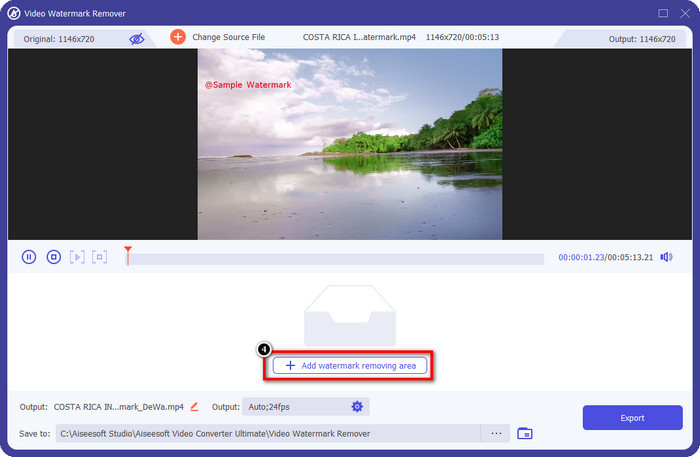
步驟 4. 檔案上傳完成後,在跳出的下一個視窗中點選 新增浮水印去除區域。
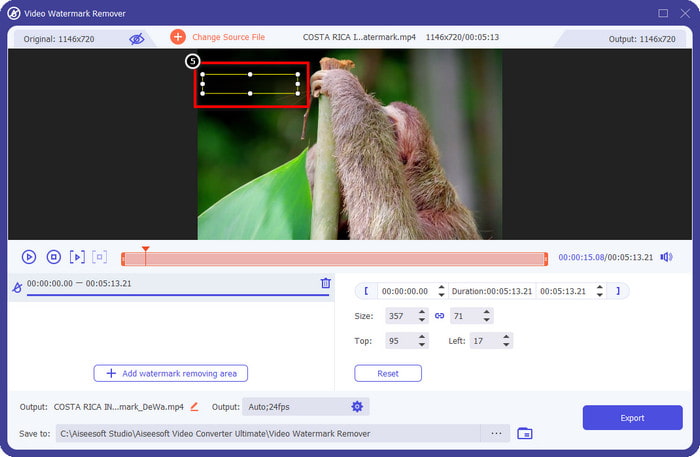
步驟 5. 將長方形框放置在浮水印的位置上以將其遮住。請確保在預覽畫面中的長方形能完整覆蓋影片上的浮水印,如此在下載檔案時,畫面中就不會再出現浮水印。
步驟 6. 按下 匯出,即可將已去除浮水印的 Videoshop 影片存到你的電腦桌面;匯出完成後,系統會自動開啟檔案所在的資料夾,你可以在那裡查看影片。
相關閱讀:
Photo Retouch [iOS] - iOS 設備上最好的水印去除器
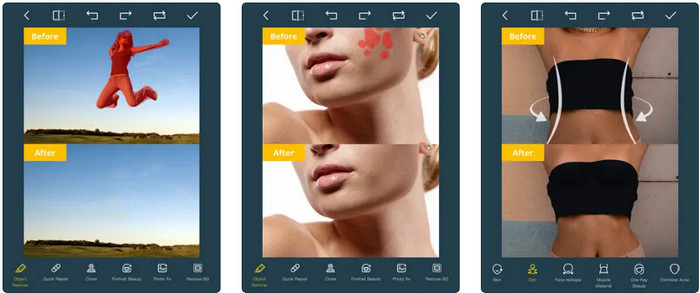
Photo Retouch 是一款 iOS 平台上的應用程式,可在你匯出影片後,乾淨地移除影片中的浮水印而不留下任何殘影。此應用程式可在 App Store 免費下載,你可以自行前往查看。儘管工具名稱中帶有「Photo(照片)」一詞,你仍可善用它來移除影片浮水印,藉此刪除影片中任何你不想保留的物體。若你想試用此應用程式,可以依照下方教學來去除 Videoshop 的浮水印。
步驟 1. 在 App Store 中搜尋此應用程式並點選「取得」,將其下載到你的裝置。
步驟 2. 接著開啟應用程式,點擊 + 圖示,選擇「Video Eraser」。然後選取含有浮水印的影片檔。
步驟 3. 使用下方工具描繪浮水印區域;你可以利用本工具所支援的標記形狀,將影片中的浮水印區域框選出來。
步驟 4. 當你在影片上標記好浮水印區域後,匯出程序會自動開始進行;請勿關閉你的 iOS 裝置,以避免中斷處理,並耐心等候處理達到 100%。
刪除和添加水印 [Android] - 適用於 Android 設備的頂級水印去除器
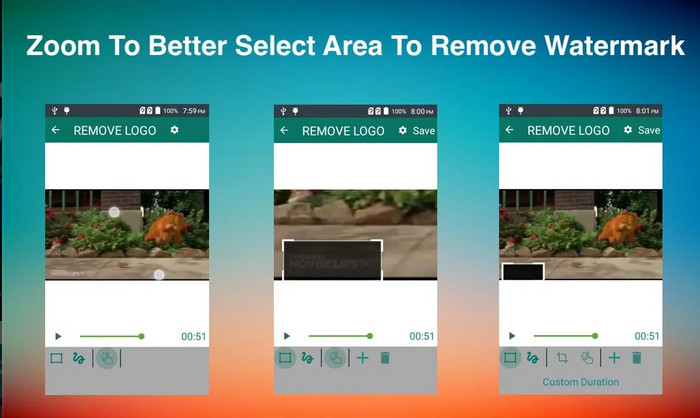
如何在 Android 上刪除 Videoshop 水印? Android 用戶無需擔心,因為您可以在設備上下載刪除和添加水印。此應用程序可免費下載;如果您想在您的設備上下載該應用程序,您可以稍後前往 Playstore。是什麼讓這個應用程序與眾不同?這是因為它在圖像和視頻上提供了有效的水印去除功能。使用此應用程序,您還可以根據需要在您擁有的視覺媒體上添加您的個性化水印。如果您想使用此應用程序刪除 Videoshop 在您的視頻上留下的水印,請按照以下指南操作。
步驟 1. 若要使用此應用程式,你必須先到 Play 商店下載,在搜尋框輸入名稱後進行搜尋並安裝。
步驟 2. 開啟應用程式,點擊「選擇影片」,接著會出現兩個選項,請點選「移除浮水印」。從相簿中上傳你想處理的影片。
步驟 3. 使用長方形選取區或套索工具來標記影片中的浮水印位置。
步驟 4. 點擊「儲存」,即可下載在此處上傳且已去除浮水印的影片。
第 2 部分。有關如何刪除 Videoshop 水印的常見問題解答
視頻商店多少錢?
Videoshop Pro版的價格是$2.99。憑藉這種低成本的價格,您可以通過 Videoshop 在您的設備上擁有最好的視頻編輯器之一。
Videoshop 可以在 Android 和 iOS 上下載嗎?
是的,Videoshop 可以在 Android 和 iOS 上下載。因此,無需擔心多平台用戶,因為此視頻編輯器可在具有相同特性和功能的兩個不同操作系統上使用。
如何在 Videoshop 應用上付款?
對於 iOS 用戶,您可以加載您的 iTunes 帳戶以便更輕鬆地進行交易,它會根據您選擇的訂閱計劃自動向您的帳戶收費,但會提前一天。對於 Android 用戶,您可以使用 Google Pay 使用其專業版。
結論
本文適用於尋找有關在不同平台上有效刪除 Videoshop 水印的教程的用戶。使用我們在此處包含的應用程序,如果按照本文中包含的步驟進行操作,則可以刪除沒有任何痕蹟的水印。不用擔心使用它們,因為我們首先嘗試了它們並且對我們收到的結果感到滿意,所以我們今天分享它們。即使您不熟悉水印去除,您仍然可以嘗試使用我們提供的水印去除器。我們希望這篇文章對您有所幫助;如果您願意,可以閱讀下面的其他有用文章。
-
 如何輕鬆地從 Wondershare DVD Creator 中刪除水印
 本文涵蓋有關如何從 Wondershare DVD Creator 中刪除水印的信息。要獲得您需要的所有信息,必須閱讀此內容。
-
 使用簡單的步驟輕鬆從 PDF 中刪除水印
 按照這些簡單的步驟從 PDF 中刪除水印。了解如何使用這些神奇的工具輕鬆地從 PDF 文件中刪除水印。
-
 如何通過簡單的步驟去除 Coub 水印
 了解如何使用這些流行的水印去除器去除視頻上的 coub 水印。閱讀本文以了解這些神奇的工具以及如何使用它們。
