


 視頻轉換大師
 屏幕錄影大師
 影片修復
影片修復
 安全下載
安全下載2025 年你必須使用的 3 款最佳 PlaceIt 水印去除器 [更新]
PlaceIt 是一個混合設計生成器,可用於品牌推廣和營銷。它提升了不同資產的品牌設計,例如模型、設計、徽標、視頻,甚至遊戲。您可以在不下載軟件的情況下創建所有提到的設計,並且可以在 Windows 和 Mac 等不同平台上訪問。留下深刻印象?嗯,你一定是。
雖然看起來設計產生器可以免費存取,但若未購買月費訂閱方案,你將無法下載完成的作品。不過,你可以在此登入帳號並使用可用的免費範本,匯出後會自動嵌入浮水印。先別慌張,深呼吸一下,因為其實有辦法去除浮水印。透過Placeit 浮水印去除工具,你可以將範本上殘留的浮水印去除。繼續閱讀本文來深入了解,我們會為你逐一評測說明。

第 1 部分。如何使用最好的水印去除劑從 PlaceIt 中去除水印
第一種方式。使用 FVC Video Converter Ultimate - 去除水印的終極解決方案
FVC Video Converter Ultimate 是一款值得信賴的視頻水印去除器,您可以使用它來去除嵌入在視頻中的 Placeit 水印。此工具可在 Windows 和 Mac 上免費下載。儘管它有 Windows 和 Mac 版本,但與有兩個版本的工具相比,它在去除兩個系統上的水印方面的效果無疑是非常棒的。它可以去除視頻中的污點,這樣您就可以觀看視頻,而不會出現干擾視頻的徽標、印章、日期、時間和對象。無論您是專業的還是初學者的視頻編輯器,您都可以設法使用此軟件並在導出後獲得最佳輸出。
你對它感到驚訝嗎?嗯,這個工具支持其他功能,如視頻編輯,轉換,創建MV,以及工具箱上的其他有用功能。因此,如果您選擇下載此軟件,您可以在桌面上使用最終性能優於其他工具的多用途解決方案。仍然不相信我們在這裡指出?要教您如何刪除 Placeit 水印,請按照以下步驟操作。
了解如何使用 Ultimate Watermark Remover 去除 PlaceIt 水印
步驟 1. 下載並安裝軟體,選擇正確版本的工具後啟動它。
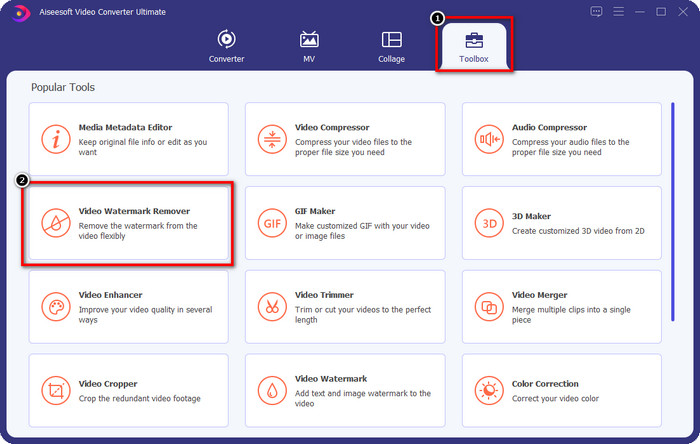
步驟 2. 打開工具箱(Toolbox),在下方清單中找到Video Watermark Remover(影片浮水印去除),點擊即可啟動本工具的去浮水印功能。
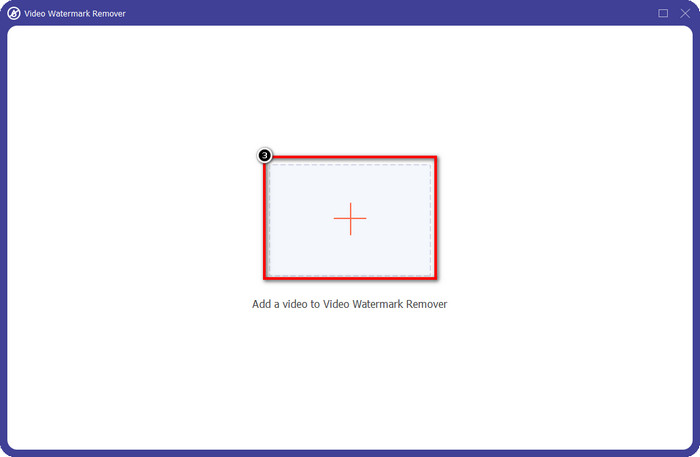
步驟 3. 按下+以上傳帶有浮水印的範本。在資料夾中找到該範本,點擊一次後按開啟。
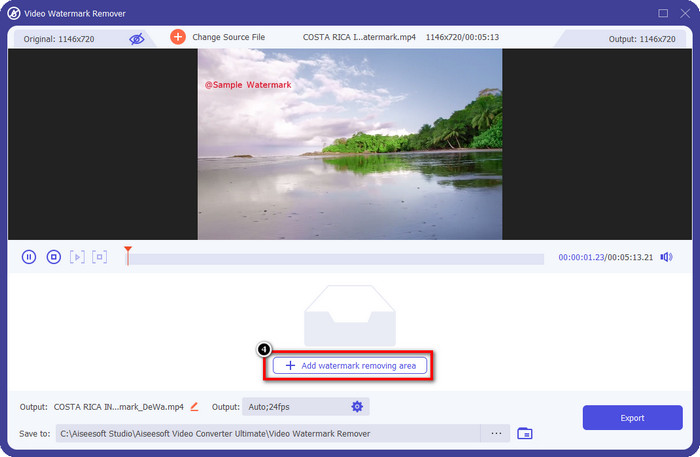
步驟 4. 在螢幕上顯示的視窗中,點擊新增移除浮水印區域。
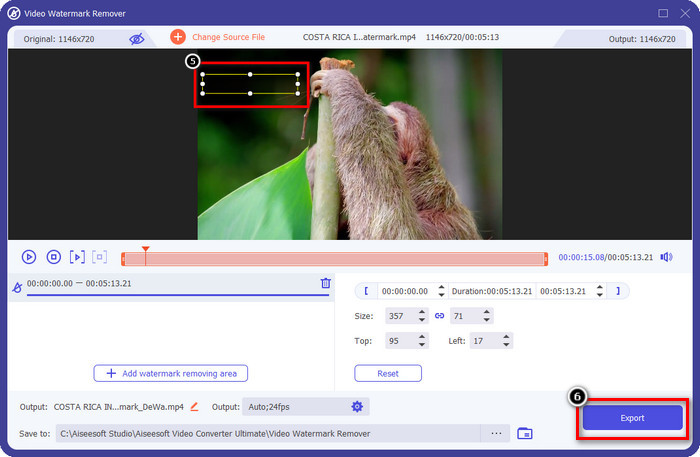
步驟 5. 將選取框放在浮水印位置上,你也可以調整其大小。點擊匯出,即可儲存不含嵌入浮水印的範本。
第二種方式。使用免費視頻裁剪器刪除水印 - VLC 播放器
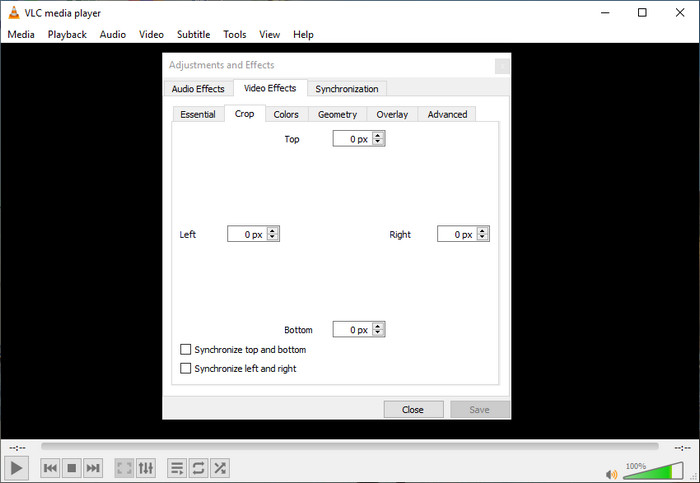
如何免費去除 Placeit 視頻中的水印?您可以使用 VLC 播放器裁剪出您在 Placeit 上導出的視頻中的水印。儘管該軟件是一個專用的媒體播放器,但它仍然能夠執行除播放視頻之外的多項任務,其中之一就是剪切它。您可以使用此應用設置精確的數字以裁剪視頻上的水印。自信地說,這個工具很容易使用,也可以在其他設備上訪問。
儘管該軟件是免費使用的,並且可以裁剪視頻中的水印,但一旦使用此工具,您將需要犧牲視頻的尺寸來去除水印。一旦導出您在此處裁剪的文件,這是不可逆轉的,因此您需要小心裁剪視頻上的水印。但是,一旦您使用此工具裁剪水印,您將看不到視頻中出現的水印痕跡。
第三種方式。在 Mac 上使用專業視頻編輯器 - iMovie
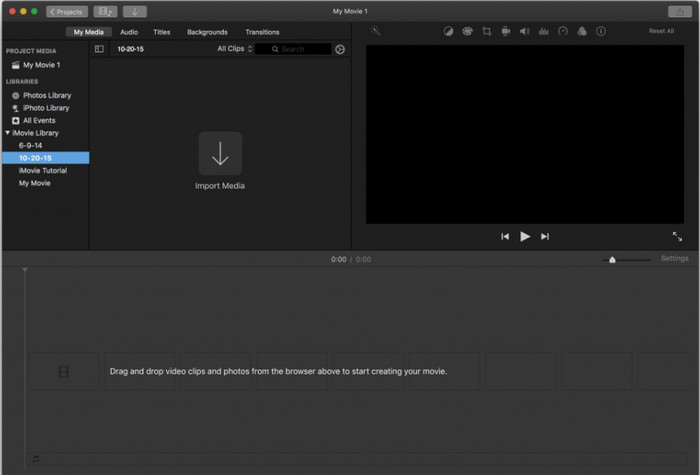
如何在 Mac 上移除從 Placeit 下載的視覺媒體浮水印?你可以不必額外下載浮水印去除程式,而是使用iMovie來剪裁掉已下載視覺媒體上的浮水印。這個 App 無需再安裝,因為所有 Mac 裝置(包含較新的 macOS 版本)都已預先內建。與 VLC 類似,這個工具也是透過裁切畫面來移除影片中的浮水印。但這款工具在裁切影片方面更有效也更容易使用,因為你不需要手動設定尺寸,只需調整畫面框架,直到影片中看不到浮水印為止。
儘管該工具在裁剪視頻上的水印方面效果很好,但它無法在 Windows 和其他設備上訪問,因為它是在 Apple 設備上本地下載的。如果您要使用此軟件,則需要小心裁剪水印,因為您還消除了圖像大小。儘管如此,該工具性能出色,並且具有精心設計的界面。
第 2 部分。有關如何刪除 PlaceIt 水印的常見問題解答
為什麼我不能下載 PlaceIt 上的其他模板?
如果您使用的是 PlaceIt 的可訪問版本,您將無法使用此工具提供的所有其他模板和設計,因為它們是高級可用的。雖然登錄後可以使用免費模板,但選項有限。
如何去除 Placeit 上的水印?
如果您每月購買訂閱費,您可以在此處導出設計,而設計上沒有 Placeit 的標誌。您可以訪問其官方網站,查看此工具為想要使用其高級版本的用戶提供的價格。
我可以使用 Final Cut Pro 去除視頻上的水印嗎?
是的,你可以使用 Final Cut Pro 來移除影片中的浮水印。如果你正在尋找一篇完整的使用 Final Cut Pro 去除浮水印教學,請點擊此連結並依照裡面的步驟操作,即可順利完成。
結論
如果您使用我們上面提到的工具,如何去除 Placeit 徽標的水印就解決了。 VLC 和 iMovie 提供了一種裁剪功能,您可以使用它來刪除在 PlaceIt 上導出的視頻中的水印。這些工具最適合用來裁剪視頻邊緣的水印。但是,一旦使用它,您就放棄了視頻的尺寸,尤其是在水印很大的情況下。但是如果你想掩蓋它,你可以使用終極工具,因為它不會犧牲視頻的尺寸,但它會去除水印。因此,如果您不想犧牲縱橫比,那麼終極工具就是您的首選。
-
 如何使用即時效果刪除 WeVideo 水印的 3 種方法
 您在解決 WeVideo 留下的水印問題時遇到問題嗎?不用擔心,因為我們添加了您必須知道的信息。
-
 如何使用終極工具去除 Pond5 水印
 按照以下簡單步驟了解如何刪除 Pond5 水印。您可以使用這些令人印象深刻的工具輕鬆刪除圖像上的 Pond5 水印。
-
 2 如何刪除 Dxtory 水印的強大方法
 通過以下兩種最佳方法了解如何刪除 Dxtory 水印。如果您正在尋找最合適的工具來刪除 Dxtory 水印,請閱讀此處。
