


 視頻轉換大師
 屏幕錄影大師
 影片修復
影片修復
 安全下載
安全下載如何輕鬆有效地刪除視頻上的 Viva 視頻水印
Viva Video 是一款視頻編輯和視頻製作應用程序,您可以將其下載到移動設備上,以創建其他視頻編輯器無法實現的出色視頻。有了這個,您可以使用它的免費版本或高級視頻編輯來發揮您的優勢。因此,用戶在使用免費版時會遇到問題,因為它會留下水印,並且其他編輯功能與專業版不同。視頻中嵌入的水印可能會妨礙視覺效果,最好將其去除。
不過,你可以在 Play 商店和 App Store 找到幾款用來去除浮水印的工具,但哪一款最好用呢?繼續閱讀本文,我們會介紹可用來移除浮水印的工具,並提供影片如何移除 Viva Video 浮水印的教學。

第 1 部分。如何使用最佳水印去除應用程序刪除 Viva 視頻水印
視頻橡皮擦 - 從視頻中刪除水印/徽標 [Android]
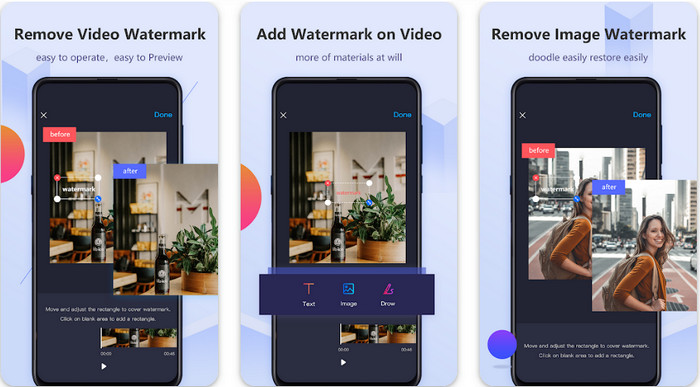
Video Eraser - Remove Watermark/Logo from Video 是一款功能強大的去浮水印工具,你可以在 Android 裝置上下載,用來移除嵌入影片中的浮水印。此應用程式可以幫你去除影片中的各種浮水印,例如標誌、文字、印章等。如果你想新增個人化浮水印、裁剪、剪輯、倒放、壓縮以及調整影片速度,它也同樣能派上用場。即使功能豐富,你仍可免費下載這款工具。因此,要在 Android 上移除 Viva Video 的浮水印,你可以按照下面的步驟操作。
步驟 1. 先到 Play 商店下載此應用程式,然後點擊「下載」。
步驟 2. 開啟去浮水印工具,點選Remove Watermark from Video(從影片移除浮水印),允許工具存取你的影片,然後上傳帶有浮水印的影片。
步驟 3. 將矩形框放在浮水印上,把它完整遮住。
步驟 4. 按下「Done」以儲存已去除浮水印的影片。
相關閱讀:
視頻橡皮擦 - 潤飾去除 [iOS]
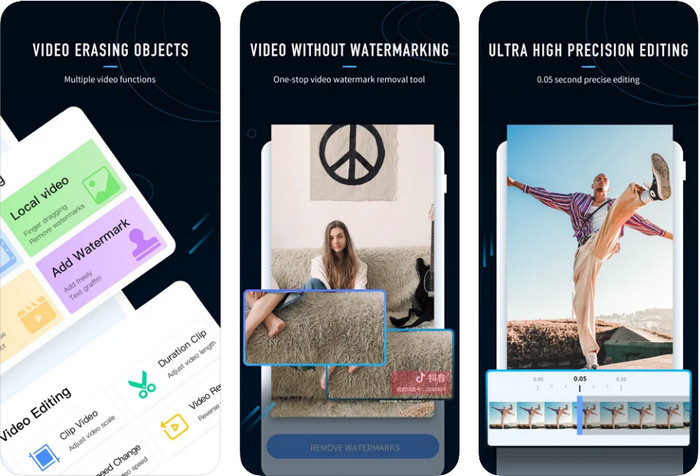
在 iOS 上,你可以到 App Store 下載 Video Eraser- Retouch Removal。它是可免費下載的 Viva Video 浮水印去除工具之一,能有效幫你去除影片上的浮水印。和這裡介紹的 Android 去浮水印工具一樣,它也支援其他編輯功能可供使用,例如影片升階(upscale)、新增浮水印、剪裁、剪輯、壓縮與翻轉等,通通都包含在裡面。雖然它與 Android 版應用程式的功能相似,但實際操作上仍有差異,並且在使用本工具移除浮水印前,需要先付費購買。你可以依照下方步驟學習如何移除從 Viva Video 匯出的浮水印,請按照標示的步驟進行。
步驟 1. 在 App Store 下載此應用程式,下載完成後開啟它。
步驟 2. 開啟軟體後,點選 Local Video/GIF(本機影片/GIF)以上傳帶有浮水印的影片。請務必允許應用程式存取你的「照片」。
步驟 3. 點選影片中帶有浮水印的部分,螢幕上就會顯示一個矩形框。
步驟 4. 點選「Eliminate Watermark」(消除浮水印)來匯出影片,並儲存成沒有浮水印干擾的版本。
第 2 部分。如何在 Windows 和 Mac 上刪除 Viva 視頻水印 [終極軟件]
如果你是 Windows 和 Mac 使用者,就需要一款高效的軟體,能徹底移除影片上的浮水印而不留下任何痕跡。FVC Video Converter Ultimate 可以教你如何免費移除 Viva Video 的浮水印,並在最後輸出專業成品。和你在 Android 與 iOS 上可下載的去浮水印應用程式一樣,這款工具也支援更多你可以善加利用的功能與特性。它所提供的功能遠超過前面提到的兩款去浮水印應用程式。
是什麼讓這個工具令人印象深刻?此工具支持的刪除功能比您可以在視頻上使用的其他水印去除器更好。因此,如果您使用它,您可以在此處將其刪除後觀看沒有水印的視頻。需要有關如何使用它的教程嗎?接下來的詳細信息將讓您知道如何像 1-2-3 一樣輕鬆使用此工具。
步驟 1. 要下載這款終極軟體,你可以點擊下方的下載按鈕,然後在裝置上安裝軟體。依照 WinRAR 安裝精靈的指示操作,接著點擊「Start Now」(立即開始)。
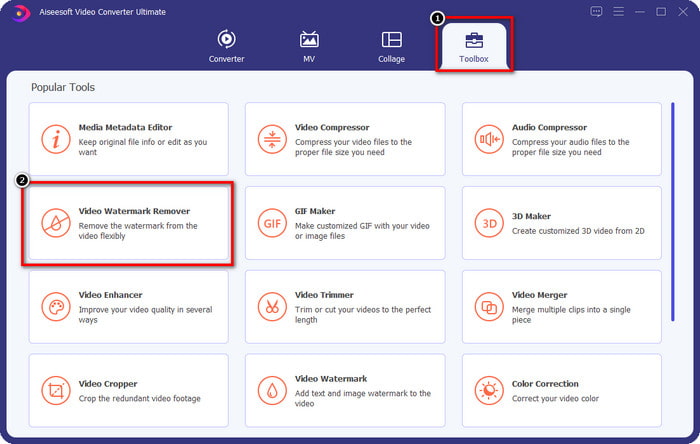
步驟 2. 前往Toolbox(工具箱),然後點選Video Watermark Remover(影片去浮水印)以開始使用此工具高效的去浮水印功能。
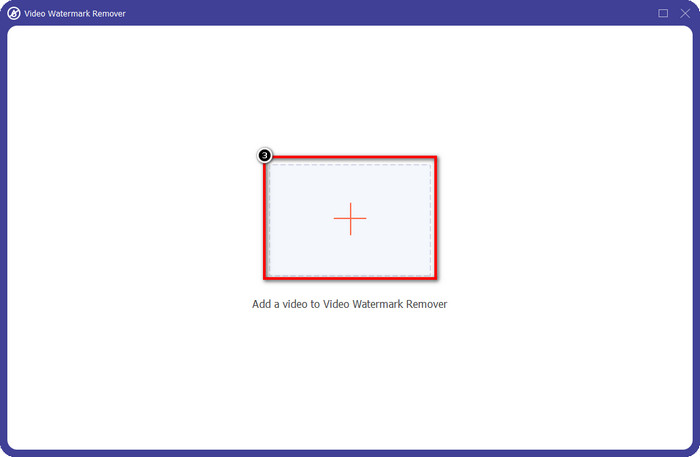
步驟 3. 點擊 + 圖示,將儲存在桌面、帶有浮水印的 Viva Video 影片上傳。於螢幕上出現的資料夾中尋找影片檔案,然後點選Open(開啟)以成功上傳。
步驟 4. 點選Add Watermark Removing Area(新增去浮水印區域)以開始使用去浮水印功能。
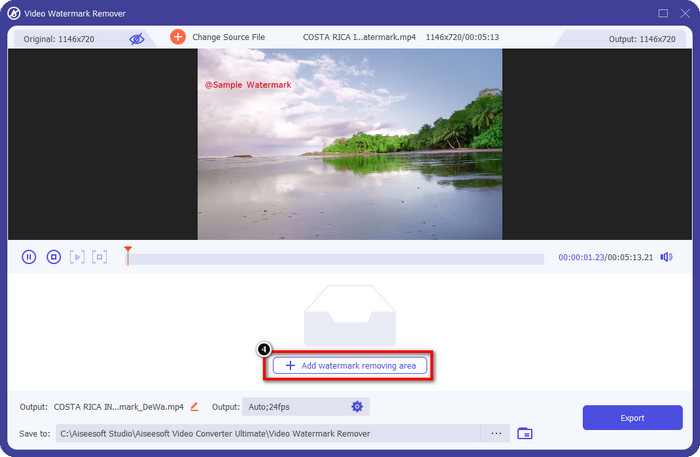
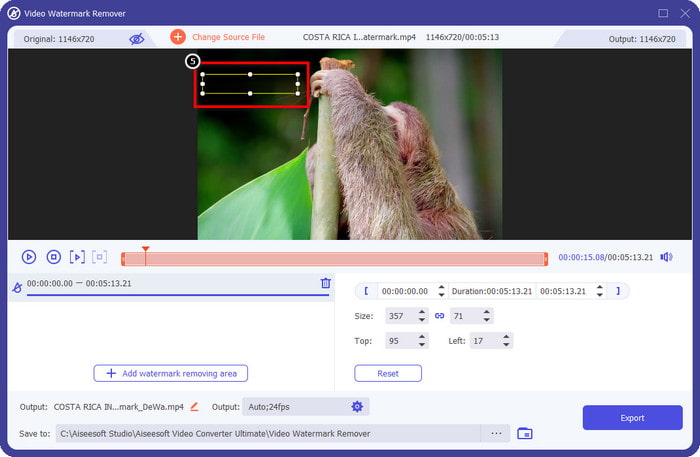
步驟 5. 拖曳並放置矩形框到影片上的浮水印位置,將其完全遮住。一定要完整覆蓋,否則會殘留浮水印痕跡,你也可以依需求調整矩形框大小。
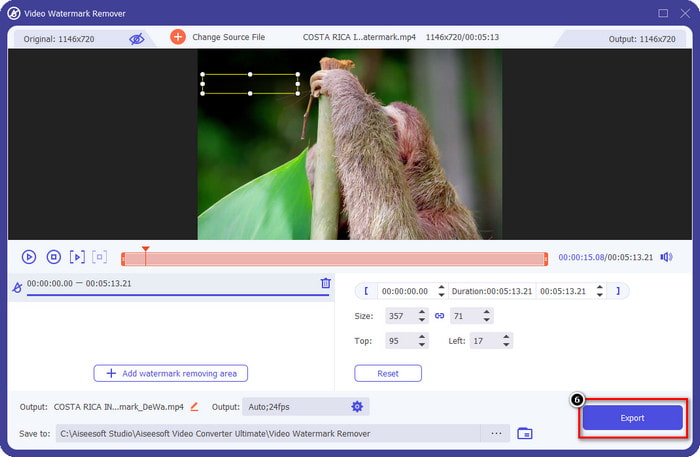
步驟 6. 完成後,點選Export(匯出)即可儲存沒有浮水印的影片。很簡單吧?這正是這款終極工具的設計宗旨:操作簡單,卻在各方面都非常有效。
第 3 部分。有關如何刪除 Viva 視頻水印的常見問題解答
我可以下載沒有水印的 Viva Video 嗎?
是的,您可以購買此工具的專業版,以便在導出您在此處編輯的視頻時不會在視頻上留下水印。此外,在您購買此工具的專業版後,您將使用此工具具有的其他高級功能,這些功能不是免費提供的。
Viva Video 有桌面版嗎?
您只能在 Android 和 iOS 上下載 Viva Video 版本。因此,如果您想下載桌面版本,您將找不到任何版本,但您可以搜索視頻編輯的最佳替代方案,例如 Viva Video 提供的。
Viva Video 有間諜軟件嗎?
2017 年,有關此應用的報導後來證實它存在惡意軟件。因此,下載此軟件的人在其設備上強行刪除了此應用程序以避免進一步的後果。
結論
使用本文的 Viva Video 水印去除器,您可以消除 Viva Video 在導出的視頻中嵌入的水印。您可以嘗試使用上述應用程序並按照我們包含的有關如何刪除水印的說明進行操作。但對於有 Viva Video 水印的 Windows 和 Mac 用戶,最好使用終極軟件快速有效地去除水印,並獲得專業的效果。你在等什麼?單擊下載按鈕立即在您的設備上刪除最終水印,並按照上述步驟使用它。
-
 如何使用這些很棒的工具刪除 Lomotif 水印
 您想了解如何從視頻中刪除 Lomotif 水印嗎?閱讀本文以了解在線和離線刪除它的最出色方法。
-
 如何使用水印去除劑從照片中去除遊客
 如何從照片中刪除遊客?如果您想了解如何從照片中刪除不需要的東西,這些工具將為您提供幫助。閱讀本文以了解更多信息。
-
 123rf 水印去除器 – 徹底審查終極工具
 如果您想知道最出色的 123rf 水印去除器是什麼,請仔細閱讀本文。本文對這些工具進行了深入的回顧。
