


 視頻轉換大師
 屏幕錄影大師
 影片修復
影片修復
 安全下載
安全下載如何輕鬆刪除導出項目/視頻上的 Filmora 水印
Wondershare Filmora 被認為是一個中級視頻編輯器,您可以使用它來對您正在處理的項目進行微調。儘管是中級編輯器,但它具有您喜歡使用的綜合功能,例如效果、模板、插件等。如果您是初學者並且想體驗無憂的視頻編輯但產生狂熱的輸出毫無疑問,這可能是您的選擇。
Due to its user-friendliness, many users have tried and produced a video using it, and the result is terrific, but there is a product watermark. One way to remove the watermark is by purchasing a plan monthly, annually, or per perpetual; what if you don’t have money to buy it? Here, we will teach you how to remove the Filmora watermark on every exported video.

第 1 部分。如何在不調整視頻大小的情況下刪除 Filmora 水印
FVC Video Converter Ultimate is the ultimate video editor you can download that can edit videos' watermarks even if they are in 4k resolution. Windows and Mac users can enjoy using this editor not because it is available on their OS but because of its features and functions. It might not be at the rank 1 video editor, but its power in removing the watermark on video is surprisingly impressive.
儘管您需要購買該軟件,但我們認為它的價格比 Filmora 便宜。您需要 Filmora 水印去除劑嗎?這是您的首選,以下是在去除視頻上的水印或圖章時有效去除此水印去除器的步驟。
Step 1. Download the official version of this editor by clicking the download button we added below. Install it, open the software, and an attractive GUI will appear on your screen.
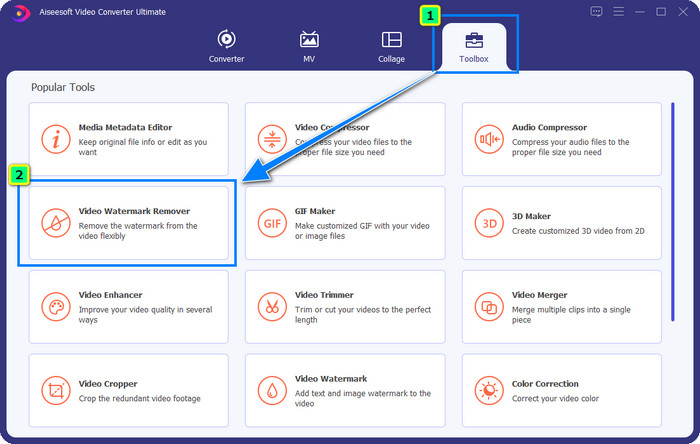
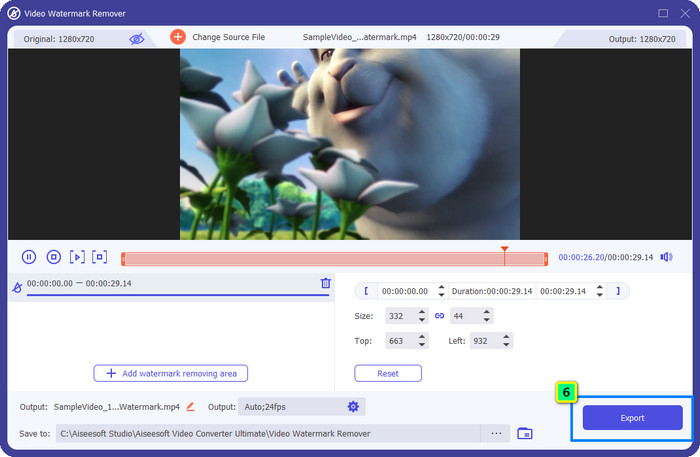
Step 2. Now that the editor is opened, four options are available in this software. To be able to remove the watermark, open the Toolbox. Select the Video Watermark Remover that is under the Toolbox menu.
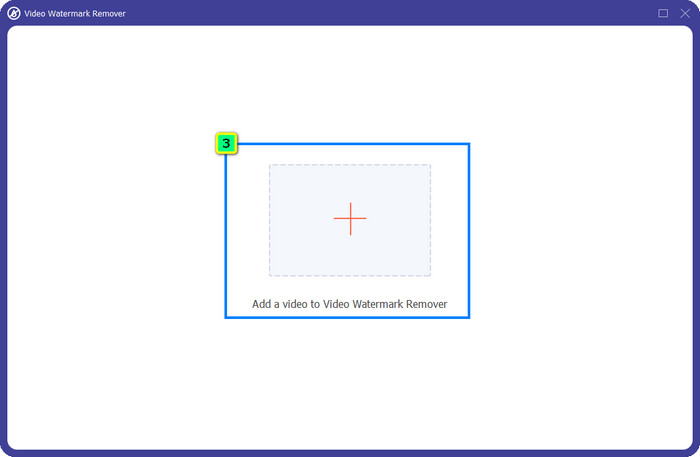
Step 3. After you’ve clicked it, a new window will show on your screen. At the center, click the plus icon to add the file you want to remove the Wondershare Filmora watermark.
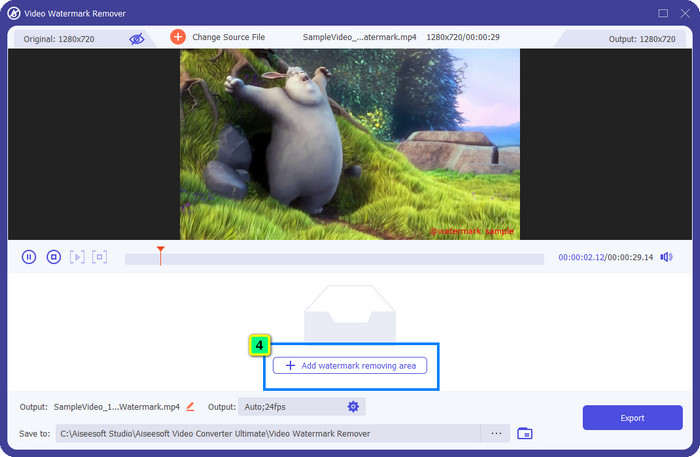
Step 4. Next, click the Add Watermark Removing Area to start using this tool's watermark removal feature.
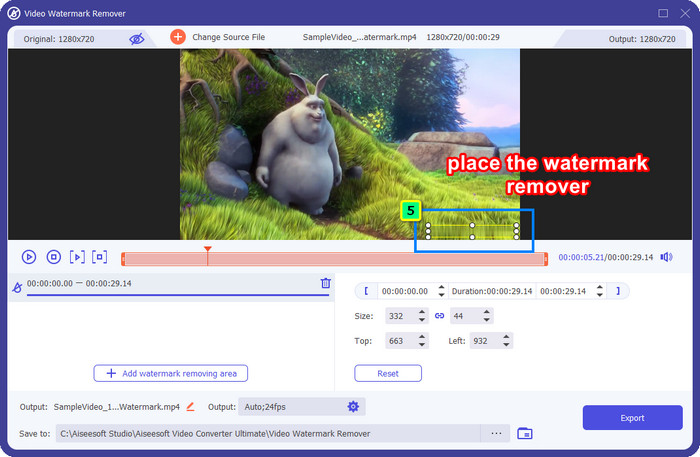
Step 5. Now, all you need to do is place the box on the watermark and make sure that the watermark you want to remove is inside the box. If not, you can adjust the box by dragging the dots from the edges to resize it.
Step 6. To start taking off the watermark bound on your video, click Export, and the final output will be ready in a matter of seconds, as easy as that.
第 2 部分。如何通過裁剪水印來刪除 Filmora 水印
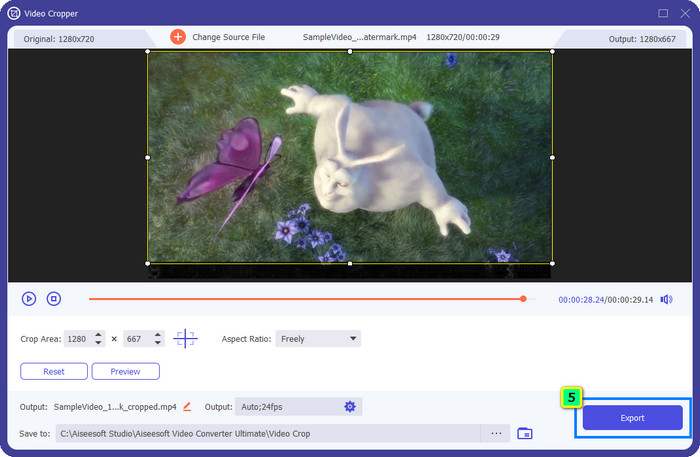
Since the watermark remover that we introduce first is effective, you might as well need a different approach with this Filmora video editor watermark remover, and that is by cropping. FVC Video Converter Ultimate supports an AI-powered video cropper that you can use to resize the video and remove the attached watermark. Though this way provides fewer steps compared to the watermark remover, it is still considered an option and not the first choice. Why? Because it's cutting the dimension of the image and some parts of the video.
不過,如果您想嘗試使用它,一旦您的設備上擁有終極工具,您就可以擁有它。
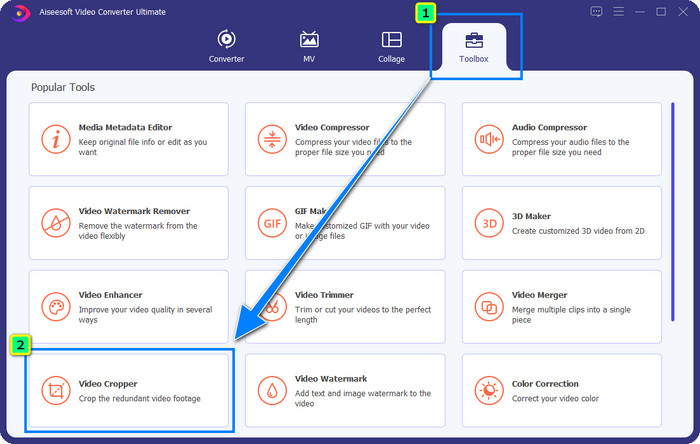
Step 1. After downloading the software, click Toolbox and locate the Video Cropper.
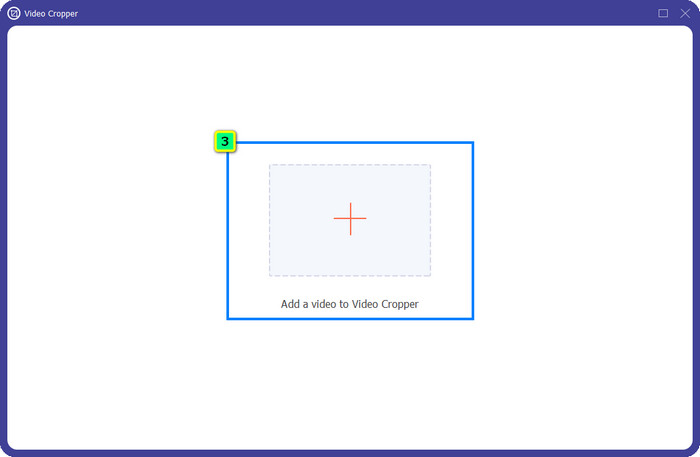
Step 2. Add the video you want to crop here by clicking the plus sign.
Step 3. You can change the frame by dragging the dots based on your preferences.
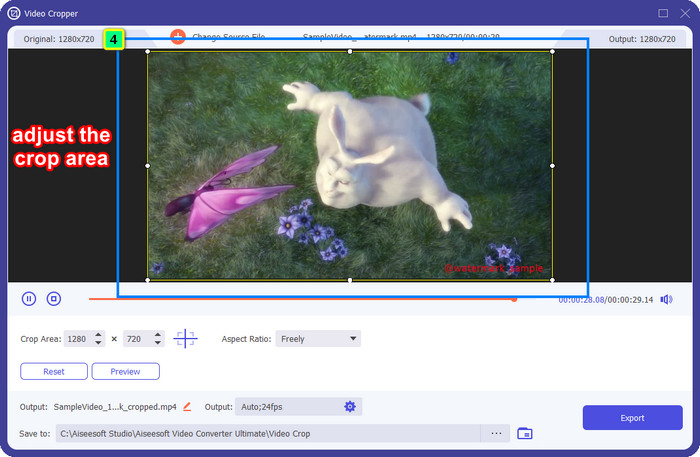
Step 4. If satisfied with the cropped version, click Export, and the AI will crop the video automatically.
部分 3。 如何免費在線刪除 Filmora 水印
How to remove the Filmora logo without downloading software? You can try using the Video Watermark Remover Online. It is an online solution for those who need to do a quick watermark removal on the video without downloading any software. Flexible, we add this watermark remover in this article because you can access it on different web browsers you have on your device.
因為是在線工具,所以有一定的限制,比如可以去除多少次水印,視頻輸入格式範圍小,處理速度等。但是,如果您不介意這些,則可以開始執行這些步驟。

Step 1. Open your favorite web browser, search its name, and click the result's name to directly lead you to the main domain of this watermark remover.
Step 2. Click the upload icon, or you can drag and drop the video file with a watermark.
Step 3. Wait for the tool to process the video because it traces the watermark. Then press Remove Watermark.
第 4 部分。有關如何刪除 Filmora 徽標的常見問題解答
如何去除 Filmora 的水印?
從 Filmora 中刪除水印的官方方法是購買月度、年度或永久計劃。這樣每次導出您在此處創建的項目時,都不會在最終輸出上留下水印。如果您不想購買計劃,可以使用網絡上提供的不同免費註冊碼。
下載 Wondershare Filmora 破解版是否安全?
不,不是!我們不建議在第三方網站上下載此軟件,因為某些網站的訪問不安全,而且其破解版本可能會將惡意軟件帶入您的計算機。避免訪問惡意的第三方網站並從中下載,以防止任何無法修復的損壞。
Filmora 的最佳替代視頻編輯器是什麼?
For Windows users, you better read the information we add in this article, as we include top 5 Windows video editor you can download or use on your OS that works better or similarly with Filmora. But if you are using a Mac device, then you can know what are the best Mac video editor alternatives for Wondershare Filmora that work best on macOS.
結論
全部包括在內!本文添加了有關如何刪除 Filmora 水印的信息。那麼您如何看待我們添加的工具?即使您沒有去除水印的經驗,您也可以按照我們添加的每個工具的教程進行操作。今天,您無需購買計劃即可開始享受在 Filmora 上觀看您創建的項目的樂趣。與其他人分享這篇文章,以便我們可以幫助他們!分享就是關懷!
-
 如何輕鬆地從 Wondershare DVD Creator 中刪除水印
 本文涵蓋有關如何從 Wondershare DVD Creator 中刪除水印的信息。要獲得您需要的所有信息,必須閱讀此內容。
-
 了解如何免費刪除 Movavi 水印 [必須擁有!]
 在 Movavi 上導出視頻或圖像會留下水印,但是否可以將其刪除?要教如何免費刪除水印,請閱讀此內容。
-
 在 Windows 和 Mac 上刪除 Fiverr 水印的 3 種簡單方法
 如果您正在尋找可以刪除 Fiverr 水印的應用程序,那麼您就在正確的頁面上。閱讀這篇文章,了解如何輕鬆刪除 Fiverr 水印。
