


 視頻轉換大師
 屏幕錄影大師
 影片修復
影片修復您應該考慮的關於慢動作相機的大量選擇
市面上有各種應用程式、軟體與線上工具可以用來製作慢動作影片。不過,如果你能直接用相機錄製慢動作影片呢?現在為你介紹 Slow Motion Camera,這類相機能在不借助剪輯軟體的情況下,直接錄製慢動作影片。如果你還拿不定主意該買哪一款相機,請繼續閱讀本文,了解你在選購時應該考慮的具體細節。

第 1 部分。什麼是慢動作相機?
慢動作相機基本上是一種以比最終回放速度快得多的速度拍照的相機。時間似乎在緩慢移動,因為它需要每秒捕捉許多靜止幀。當我們談論慢動作時,我們指的是一種頻繁的電影製作效果,其中視頻的移動速度比平時慢。它以前只用於電影、廣告和電視。然而,由於智能手機技術的巨大發展,現在即使是智能手機也可以拍攝慢動作。
以 Phantom HD 高速攝像機為例。該相機在高清拍攝時的最大幀速率為每秒 1,455 幀(而普通膠片通常以每秒 24 幀顯示)。通過以每秒 24 幀的速度拍攝照片並以每秒 24 幀的速度回放它們,可以看到正常運動。如果您以高於該值的幀速率拍攝,例如每秒 1,455 幀,然後以每秒 24 幀的速度播放它們(慢動作效果),您會注意到動作會變慢。
第 2 部分。 3 最佳慢動作相機
1. 索尼 ZV-1 相機
用於 4K 慢動作視頻的最出色的相機之一是 Sony ZV-1。這款索尼設備非常適合視頻博客,因為它可以在不同模式之間切換而不會失去焦點。如果您認為它是攝影的絕佳主題,請再考慮一下。索尼 ZV-1 可以做很多事情,但視頻博客才是它的亮點。聚焦和散焦由系統處理。這是它採用的主要策略。在黑暗中使用它可能會導致您的工作出錯。索尼 ZV-1 的自動對焦和圖像穩定性優於同類攝像機。對於 YouTube 用戶來說,這就是相機。但事情並不完美。該設備的價格令人望而卻步。因為它的成本為 $700,您可能想知道它是否真的值得。索尼 ZV-1 的尺寸為 4.15 x 2.36 x 1.7 英寸,以 21MP 捕獲圖像,並以 2160p 錄製視頻。擁有像 Sony ZV-1 這樣的相機的原因之一是出於上述所有原因。
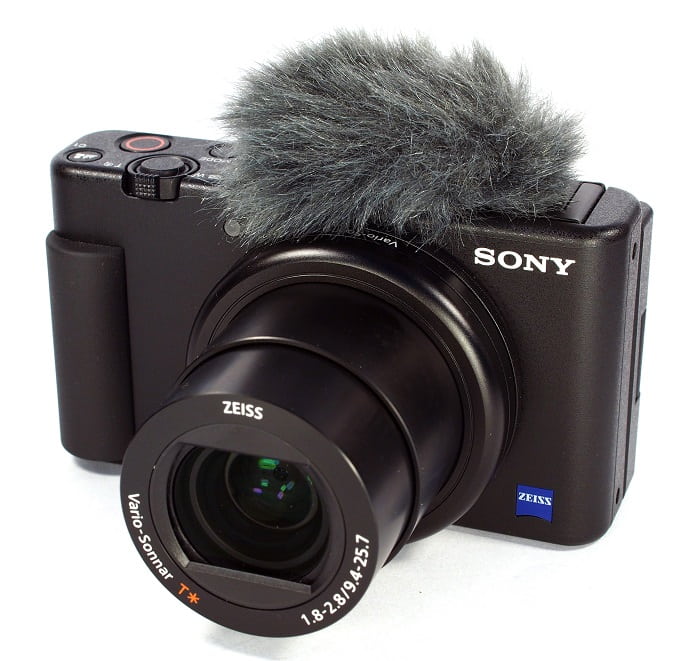
2. 佳能 PowerShot G7 X Mark III
與索尼 ZV-1 相比,佳能 PowerShot G7 X Mark III 是直播的絕佳選擇。它對在室內製作視頻的人很有用,比如在 YouTube 上製作視頻的人。由於其未剪輯的 4K 視頻質量和用於進行藝術自拍的出色 LCD,它被包含在本綜述中。佳能 PowerShot G7 X Mark III 的照片和 4K 30p 視頻的最大分辨率為 20.1 兆像素,但沒有 4K 60p 選項。必須考慮到這一點。自拍相機擁有 180 度視野,快門速度範圍為 1/25600 至 30 秒,以及光學圖像穩定係統。更有可能的是,這款佳能 PowerShot G7 X Mark III 的成本約為 $750。
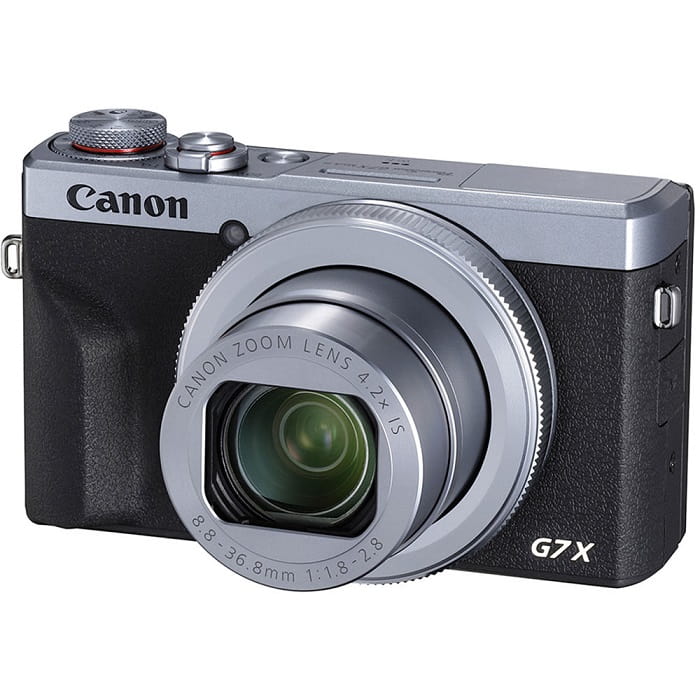
3.索尼A6400
另一方面,索尼 A6400 比以前的型號功能更強大。該設備的吸引力在於其卓越的多功能性,可用於專業攝像、個人視頻博客和攝影。此外,索尼 A6400 可以慢動作和延時拍攝,讓您可以選擇在電影中使用這些效果。由於相機的 24 MP 分辨率,圖像質量非常好,照片清晰、清晰且沒有顏色拖尾。不過這款相機在三者中的價格實在是太貴了,大概要$1299。
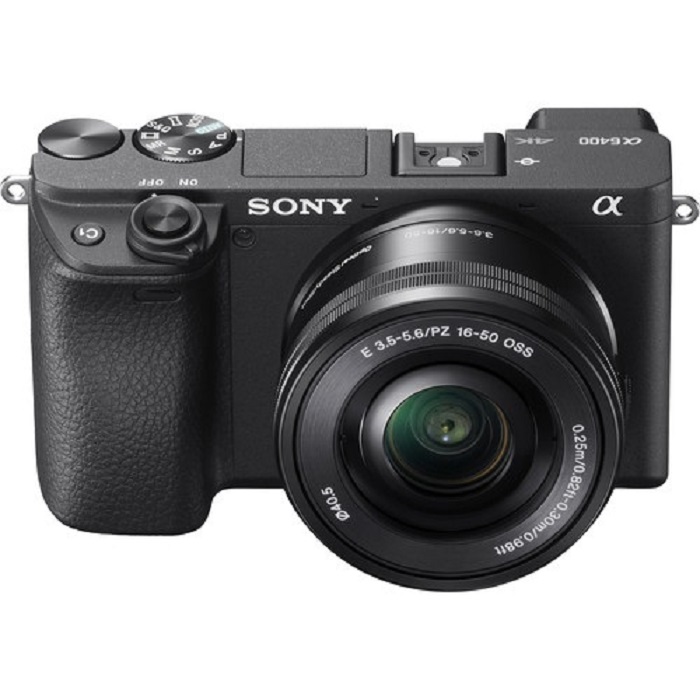
第 3 部分。如果我沒有慢動作相機怎麼辦?
上面列出的所有相機,在慢動作影片輸出方面都能提供極為優秀、出色的效果,因為慢動作功能是內建的,而且相機本身就是為拍攝慢動作影片而設計。唯一的缺點是,慢動作相機價格昂貴,而且操作較為複雜,要完成一支慢動作影片並不容易。如果你沒有慢動作相機,我們推薦使用 Video Converter Ultimate 作為最佳替代方案。與慢動作相機不同的是,這款軟體可免費下載,而且所有使用者都能輕鬆上手。
它的特色工具之一 Video Speed Controller,可以把一般速度的影片變成你理想中的高品質慢動作影片。只要每一步輕鬆點擊一下,你就能在不使用昂貴相機的情況下,享受觀看慢動作影片的樂趣。若想進一步了解此軟體的詳細功能,請依照以下步驟操作:
步驟 1: 必須先下載軟體才能開始使用。為此,請點擊「包含」按鈕下方的 Free Download 連結。安裝方式相當簡單,只要將安裝檔下載到桌面後,再點擊 Start Now 按鈕即可開始安裝。
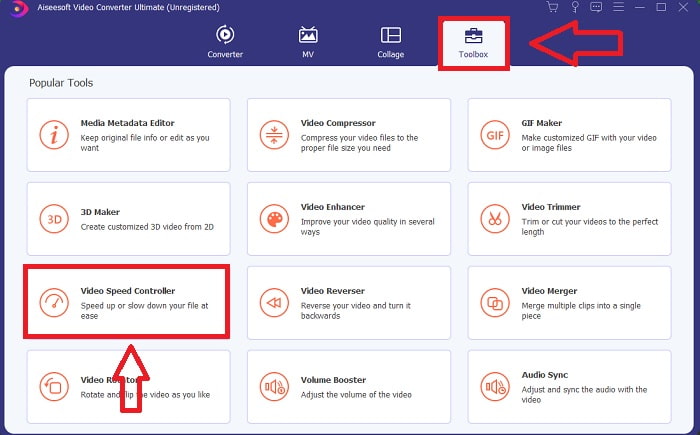
步驟 2: 完成程式安裝後,你就能在主介面上看到轉檔處理流程。接著,透過 Toolbox 工具箱功能,你可以精準找到製作慢動作影片所需的工具。在檢視可用工具列表時,如果你想調整影片速度,或只是單純讓影片變成慢動作,請選擇 Video Speed Controller。
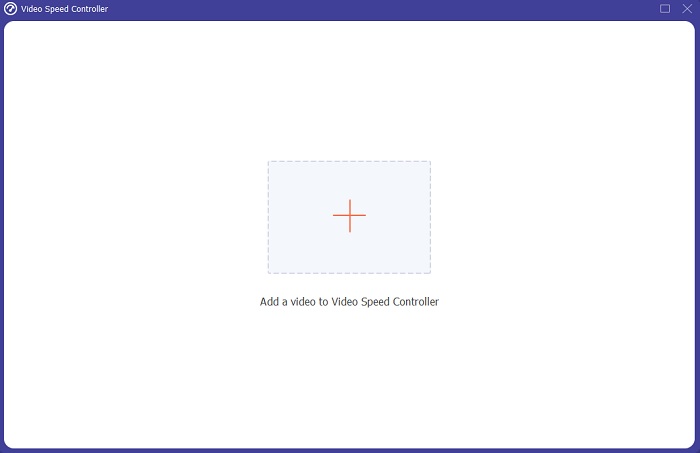
步驟 3: 若你選擇繼續,電腦螢幕上會出現另一個視窗。點擊加號 +,即可開始進行調整與編輯。
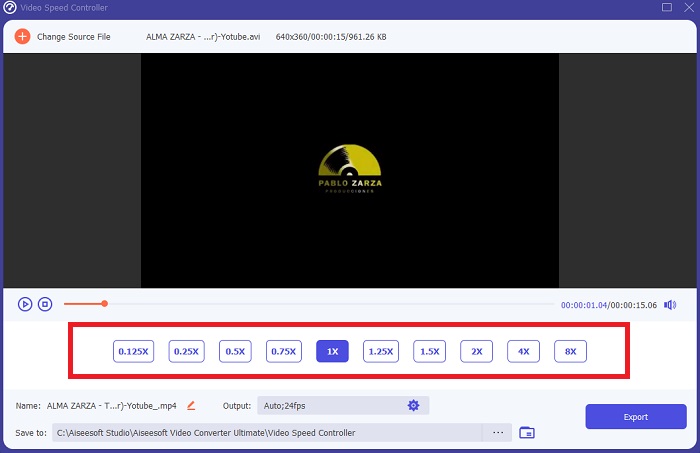
步驟 4: 先從影片的幀率開始,選擇播放時要加快或減慢幾倍,以決定影片的快慢速度,這也會決定你要加入多少慢動作效果。由於你要打造一個替代慢動作相機的方案,因此會需要降低影片速度,選擇低於一般速度的播放倍率;如此一來,慢動作效果就會套用到你的影片上。
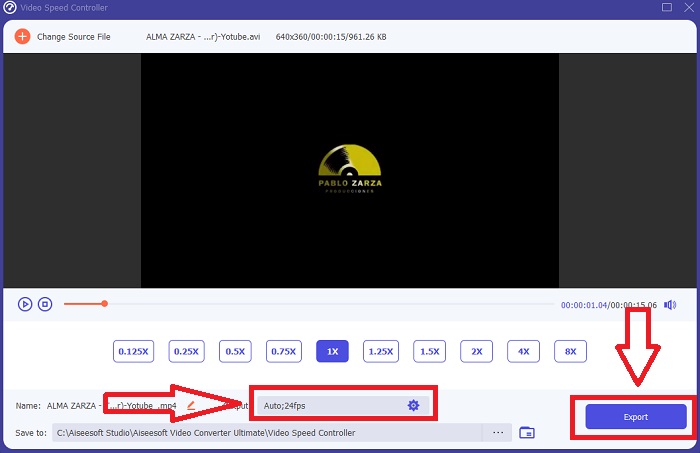
步驟 5: 當你對影片速度感到滿意後,就可以進一步微調影片品質,包括格式、解析度、幀率及其他參數。你也可以重新命名輸出的影片檔案。最後,點擊 Export 匯出,並選擇要儲存到電腦上的資料夾位置,即可完成。
相關推薦
如何在 Windows Media Player 中加快影片速度
第 4 部分。 關於慢動作相機的常見問題解答
慢動作相機的成本是多少?
如果您想要高質量的慢動作效果,請選擇具有高幀率的相機。它給我們的印像是,如果相機具有高幀率或中幀率,則沒有視頻會生澀或卡頓。要考慮的另一件事是您的預算。慢動作鏡頭不需要購買昂貴的裝備。此類相機的起步約為 $350,最高可達 $4,000。僅使用具有這兩個功能的相機即可拍攝令人驚嘆的自由幀素材。
什麼是幀率?
通常以每秒幀數定義,幀速率是指連續圖像在屏幕上顯示的頻率 (fps)。無論是用於描述電影或攝像機、計算機圖形還是運動捕捉系統,短語幀速率都是指同一事物。 SMPTE(電影電視編輯協會)為電影和電視幀速率 (SMPTE) 設定了行業標準。
有沒有慢動作相機應用程序?
是的,Android 和 iOS 操作系統中有很多慢動作應用程序可用。 iOS版有iMotion、SloPro、SlowCam等,安卓版有Slow Motion Video FX、Efectum、Coach's Eye等。
結論
總結來說,慢動作相機在技術層面與專業層面都偏向進階,主要是因為價格高昂,而且需要相當豐富的拍攝經驗才能駕馭這類相機。多虧了新的軟體 Video Converter Ultimate,它能模擬慢動作相機的用途,其中一項工具可以將普通速度的影片免費轉換成慢動作影片。
-
 [簡單] 如何修復不同步的音頻和視頻
 假設您'要安排明天的流,但是當您檢查設置時,音頻和視頻不同步。閱讀這篇文章,您可以了解更多有關此問題的信息。
-
 解決 OBS 音頻延遲問題的 7 個簡單步驟 [已解決]
 使用 OBS Studio 時,您是否因為音頻延遲而在錄製後難以觀看視頻片段?閱讀下面的文章,了解如何有效修復不同步的音頻。
-
 可能的好方法|如何修復 VLC 音頻延遲 [2021]
 由於音頻不確定性,您是否很難在 VLC 媒體播放器上觀看您最喜愛的電影?繼續閱讀本文以了解修復 VLC 音頻延遲的所有可能方法。
