


 視頻轉換大師
 屏幕錄影大師
 影片修復
影片修復
 安全下載
安全下載關於如何在計算機上進行加速的演練指南
你正在尋找加速變速的方式嗎?許多人都在尋找能幫助他們逐步改變影片或電影播放速度的工具。對許多影片剪輯師來說,對影片進行速度漸變(Speed Ramping)非常受歡迎,因為它能大幅改變影片的視覺效果。不過,並不是很多應用程式都提供可直接使用的速度漸變功能。但別擔心,有一款知名的影片剪輯軟體可以用來製作速度漸變。請持續閱讀這篇教學文章來學習如何進行速度漸變(Speed Ramping)。

第 1 部分。什麼是速度斜坡
視頻速度斜坡在許多視頻編輯器中很受歡迎,尤其是在製作電影時。但是到底什麼是加速?
速度斜坡正在逐漸調整視頻的速度,以對您的視頻產生出色的電影效果。此外,您可以將其作為視頻的加速和減速。想像一個反派試圖拍攝電影中的英雄的場景。您可以在子彈被射出時進行速度斜坡,這樣它會產生顯著的電影效果。
簡而言之,速度斜坡可以通過更好地控制關鍵幀來改變視頻的速度,從而創造出強大的效果。此外,它是您可以對視頻執行的標準視頻編輯功能。因此,如果您想了解如何對視頻進行加速,請全面閱讀下一部分。
第 2 部分。如何在 Premiere 中進行加速
Adobe Premiere 是最優秀的視頻編輯軟件之一,如果您想加快視頻速度,可以使用它。 Adobe Premiere 具有許多可用於編輯或增強視頻文件的編輯功能。此外,它可以產生具有高分辨率和質量的強大輸出。更重要的是,它提供了無限的多機位角度,如果您加快視頻速度,這將是有益的。並且由於最新更新,將視頻導入和導出到您的設備更易於管理。
此外,如果您想要一個具有響應速度的程序,Adobe Premiere 是一個很棒的應用程序。許多專業人士更喜歡使用 Adobe Premiere 來編輯視頻或電影,因為它具有許多視頻編輯所需的組織工具。此外,該程序可以在所有跨媒體平台上下載,包括 Windows 和 Mac。
如何在 Adobe Premiere 中進行加速:
步驟 1. 在電腦上下載並安裝 Adobe Premiere。安裝完成後,在你的裝置上開啟它。你首先要做的事情是匯入想要做速度漸變的影片檔。你可以從資料夾中點擊並拖曳影片到專案視窗中來匯入。
步驟 2. 接著,將剪輯拖曳到時間軸(Timeline)上,以建立一個序列。然後,Adobe Premiere 會自動建立一個具備速度漸變所需設定的序列。
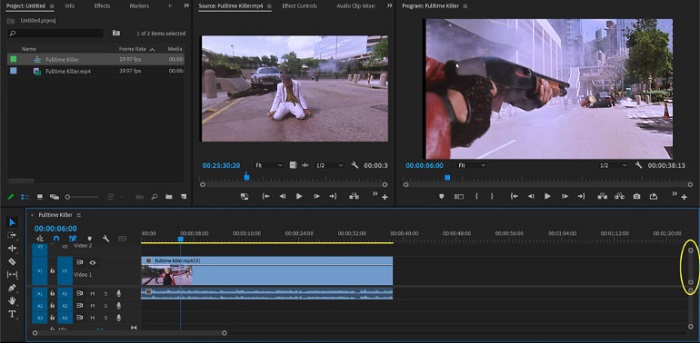
步驟 3. 接下來,選擇你想要進行速度漸變的片段。要將欲做速度漸變的部分分離出來,其中一種方法是設定入點與出點。按下 Command + K 來切開該畫面。另一種方法是使用刀片工具(razor blade tool)將剪輯分割成多個片段。
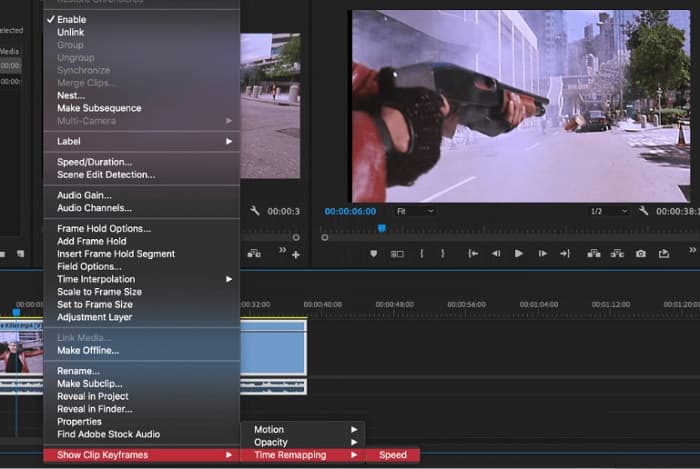
步驟 4. 下一步,我們要建立關鍵影格。但在設定關鍵影格之前,需要先確保關鍵影格是可見的。右鍵點擊你的影片剪輯,選擇 Show Clip Keyframes > Time Remapping > Speed(顯示剪輯關鍵影格 > 時間重對應 > 速度)。
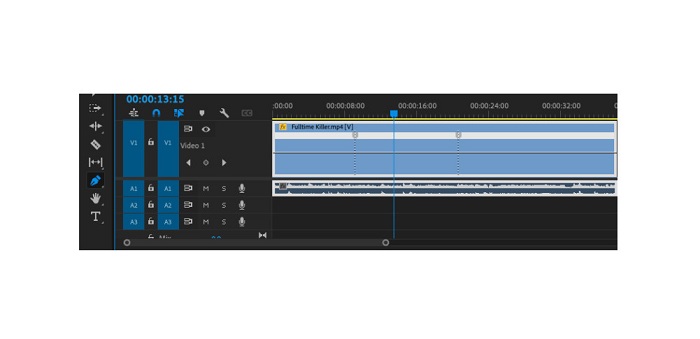
步驟 5. 然後,在工具列(Toolbar)上選擇鋼筆(Pen)工具。接著,點擊穿過影片剪輯的白線來建立關鍵影格。你需要兩個關鍵影格來在影片上執行速度漸變。將第一個關鍵影格放在你想開始變速的位置,另一個則放在你想結束變速的位置。
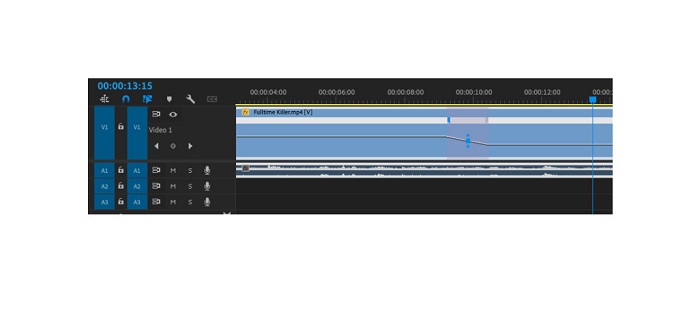
步驟 6. 現在,我們要調整你想做速度漸變部分的速度。點擊你所設置的關鍵影格之間的白線,再將白線向上或向下拖曳。向上拖曳可加快速度,向下拖曳則可放慢影片速度。
如果您想在 Adobe Premiere 中加速視頻,這就是您需要了解的教程。
第 3 部分。 更簡單的加速方法
儘管 Adobe Premiere 可以產生令人驚嘆的高質量輸出,但它並不是一個適合初學者的工具。因此,如果您不熟悉速度斜坡,最好尋找另一種方法。幸運的是,我們發現了這個很棒的應用程序,您可以使用它來加速視頻。要了解有關此應用程序的更多信息,請閱讀以下說明。
Video Converter Ultimate 是一款擁有許多進階剪輯功能的優秀軟體。如果你想替影片做速度漸變,也可以使用這個軟體。此外,它具備易於使用的介面,非常適合初學者操作。同時,它支援所有影片格式,例如 MP4、AVI、MOV、MKV、VOB、WMV、M4V、WebM,以及超過 1000 種以上的格式。它在工具箱(Toolbox)中還包含許多編輯功能,如影片變速控制器、影片合併、影片浮水印去除、色彩校正等。
此外,當使用其視頻速度控制器來加速視頻時,您可以在其速度預設中進行選擇。 Video Converter Ultimate 的優勢在於其快速的處理界面,方便許多用戶使用。您可以在所有平台上下載此應用程序,包括 Windows、Mac 和 Linux。如果您想使用 Video Converter Ultimate 的視頻速度控制器,請按照下面的簡單指南進行操作。
如何使用 Video Converter Ultimate 加速視頻:
步驟 1. 首先,點擊下方的下載(Download)按鈕,在電腦上下載此應用程式。下載並安裝完成後,在你的裝置上啟動它。
步驟 2. 然後,在應用程式的主介面中,前往工具箱(Toolbox)面板,選擇影片變速控制器(Video Speed Controller)功能。
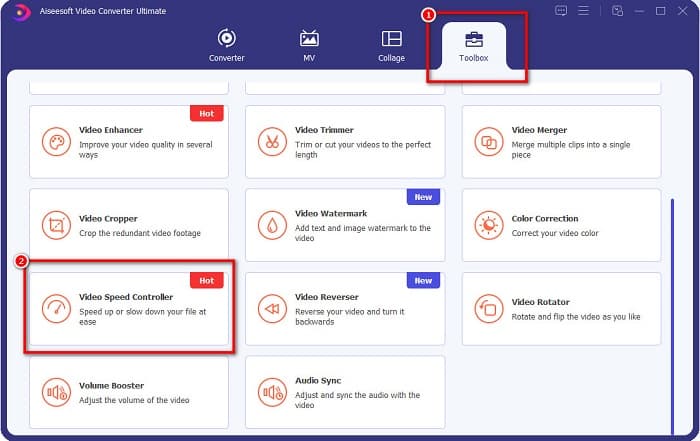
步驟 3. 若要上傳你想做速度漸變的影片,請點擊加號(+)按鈕,或將檔案拖曳到加號框中。

步驟 4. 在接下來的介面中,選擇你想套用在影片上的播放速度。你可以從0.125x、0.25x、0.5x、0.75x、1x、1.25x、1.5x、2x、4x、8x中進行選擇。
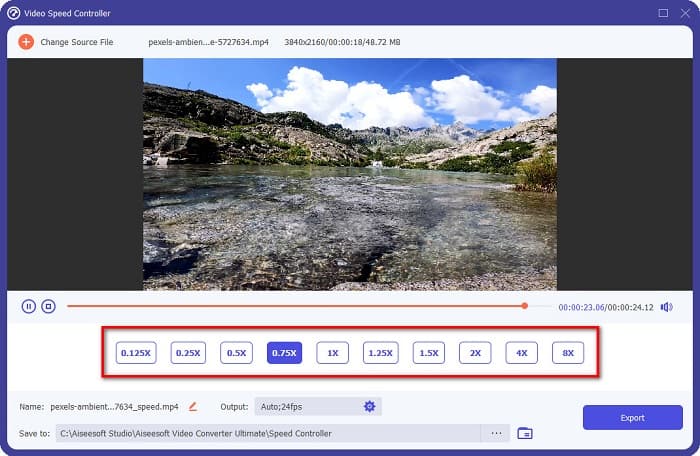
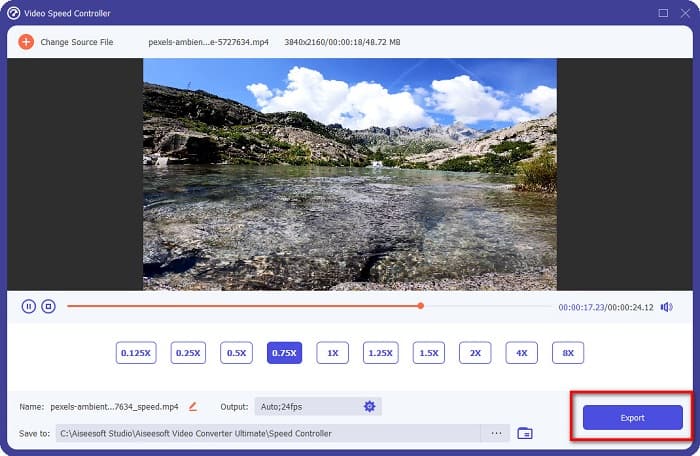
步驟 5. 最後,當你完成影片速度的編輯後,點擊匯出(Export)按鈕,將成果儲存到你的裝置中。
相關:
如何在 After Effects 中加速影片【最佳加速工具】
第 4 部分。關於速度斜坡的常見問題解答
您可以加快 iPhone 上的拍攝速度嗎?
是的。如果您想在 iPhone 上進行加速,您可以使用 iMovie 應用程序。 iMovie 是一款知名的 iPhone 視頻編輯應用程序,可讓您加速或減慢具有多個範圍的視頻。
Adobe Premiere 是免費的嗎?
不可以。Adobe Premiere 不是免費應用程序。如果您想使用它,您必須每月購買 US$20.99 的應用程序。但是,您可以通過 7 天的免費試用免費下載它。
我可以在 CapCut 中加速斜坡嗎?
CapCut 是一個視頻編輯應用程序,您可以在其中加速視頻。使用它的速度曲線工具,您可以通過加速或減速來編輯視頻的速度。
結論
速度漸變(Speed Ramping)是為影片營造獨特電影感效果的絕佳方式。此外,如果你是專業的影片剪輯人員,Adobe Premiere 是進行速度漸變的最佳工具。不過,若你想下載免費程式來為影片做速度漸變,那麼Video Converter Ultimate就是適合你的應用程式。
-
 如何在 Premiere Pro 及其替代方案中加速視頻
 您想知道如何使用 Premiere Pro 來加速視頻嗎?那麼您是在正確的文章中,因為我們提供了步驟和其他負擔得起的替代品。
-
 在 Windows Movie Maker 中製作慢動作視頻的簡單方法
 您想在您的視頻上添加戲劇效果以強調或至少通過慢動作使剪輯從其餘部分中脫穎而出,而您不知道如何做?繼續閱讀本文以了解更多信息。
-
 關於如何在 TikTok 上加速視頻的 2 種輕鬆方法
 你想知道抖音視頻加速的秘訣嗎?然後閱讀這篇文章,了解如何做到這一點,並了解其他 2 個可以幫助您的工具。
