


 視頻轉換大師
 屏幕錄影大師
 影片修復
影片修復
 安全下載
安全下載如何在 After Effects 中輕鬆加快視頻速度
如果你想讓影片播放得更快,就必須使用加速工具。然而,並不是所有工具都提供相同的功能。你在網路上能找到、或許是最好的,能在 Adobe After Effects 中調整影片播放速度的工具。許多專業人士在需要使用加速工具時,第一選擇就是它。透過這篇文章,你將了解最好的影片加速工具,並學會如何在 After Effects 中加快影片速度。

第 1 部分。如何在 After Effects 中加快或減慢視頻的速度
Adobe After Effects 大概是市面上使用最廣泛的影片加速工具之一。許多專業人士使用這款工具,是因為它具備進階功能,例如加入特效、自製範本、文字動畫等。這個工具令人驚豔之處在於,它可以製作出極佳的動態圖形與視覺特效。如果你是專業電影製作人,很可能會因為它的多種功能與工具而選擇使用它。此外,它同時支援 Windows 和 Mac 系統。
即使它可以創建專業的輸出,它的用戶界面也很難理解。你需要一個指南來掌握它的界面。儘管如此,許多電影製作人和專業編輯都使用此工具,並認為它是最好的視頻加速工具。如果您對使用 After Effects 加速視頻工具感興趣,請按照以下步驟操作。
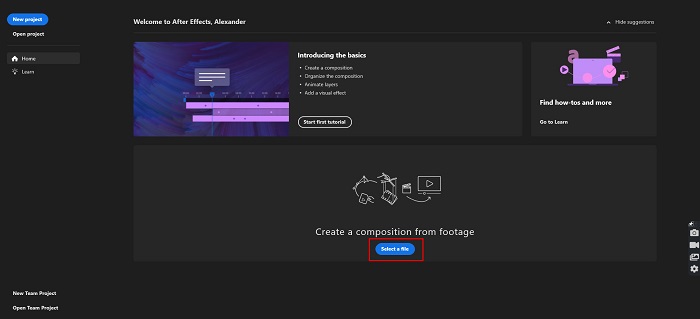
步驟 1. 先在你的電腦上下載 Adobe After Effects,然後開啟程式。在軟體的主介面上,點擊Select a File按鈕,上傳你想要加速的影片。接著會開啟電腦檔案視窗,讓你選擇並上傳影片。
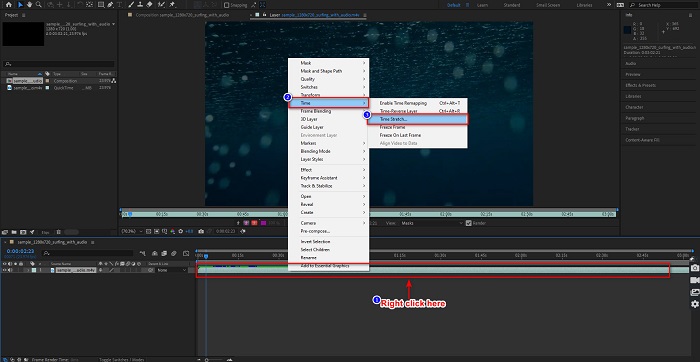
步驟 2. 接著,在影片時間軸上按一下滑鼠右鍵。彈出選單後,點選Time > Time Stretch。
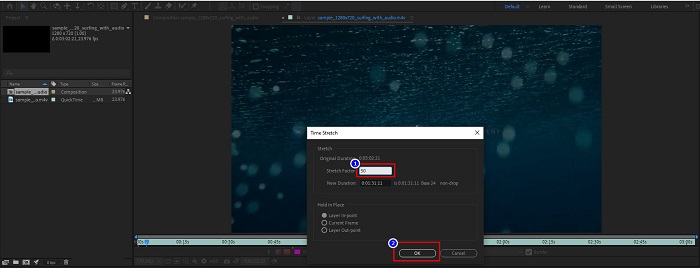
步驟 3. 然後輸入你想要的 Stretch Factor(時間伸縮係數)百分比,並點擊OK按鈕。之後,你就會看到影片播放速度的變化。
優點
- 該工具正用於電影製作行業和電影製作事業
- 它具有許多高級功能,例如製作 3D、虛擬現實、添加效果等等
- 它適用於幾乎所有媒體平台,包括 Windows 和 Mac
缺點
- 您需要支付訂閱費才能長時間使用該工具。
- 它有一個難以使用的軟件界面。
第 2 部分。 加快視頻速度的更簡單方法
但如果你正在尋找介面更簡單易用的工具,這款就是你要找的。FVC Video Converter Ultimate 也是一款相當熱門的工具,可以讓影片加速或減速。它擁有簡潔的使用者介面,許多人都用它來調整影片速度。此外,你可以將影片播放速度調整為 0.125x、0.25x、0.5x、0.75x、1.25x、1.5x、2x、4x 和 8x。
此外,此工具提供了更多您可以使用的功能,例如視頻修剪器、GIF 製作器、3D 製作器等。該工具更令人印象深刻的是,您可以更改視頻的分辨率和幀速率。閱讀下面的說明以了解有關此工具的更多信息。

FVC Video Converter Ultimate
5,689,200+ 次下載- 在 Windows 和 Mac 上加速視頻。
- 它具有視頻反轉器、視頻水印、音量增強器等高級功能。
- 它支持多種文件格式,包括 MP4、WMV、AVI、M4V、FLV 等。
- 允許您調整視頻的比特率和分辨率。
以下是使用 FVC Video Converter Ultimate 來加快影片速度的方法
步驟 1. 點擊Download按鈕,下載適用於 Windows 或 Mac 的 FVC Video Converter Ultimate。依照安裝流程完成安裝,然後啟動程式。
步驟 2. 在主介面上方的選單中,點擊Toolbox選項。接著,點選Video Speed Controller功能。
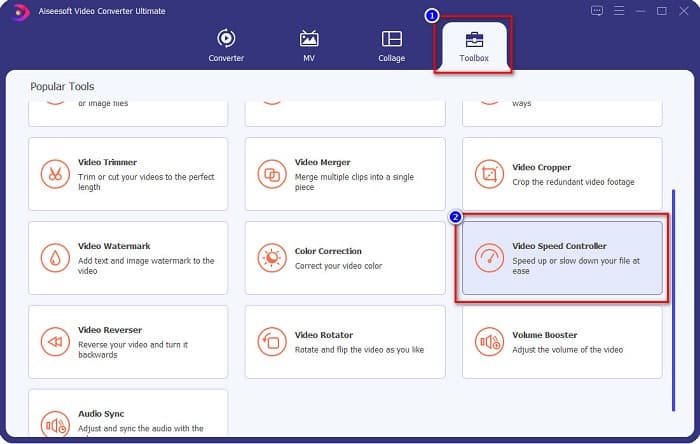
步驟 3. 點擊 Video Speed Controller 之後,你會被導向另一個介面。點擊+號按鈕,或是拖曳並放開你的影片到 + 號區域來匯入影片。
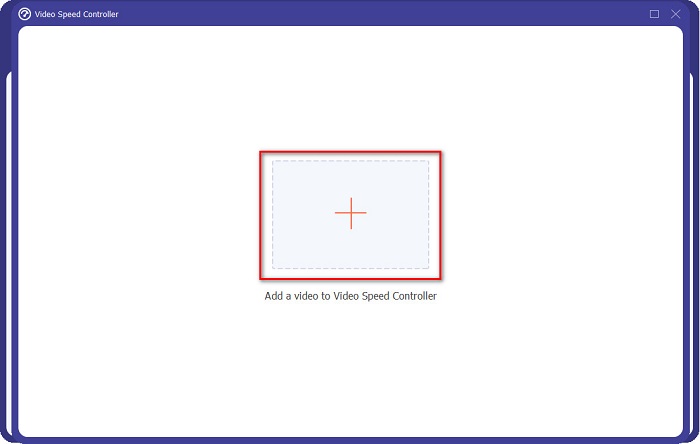
步驟 4. 接下來,在影片預覽下方的選項中,選擇你想要的播放速度,然後點擊Export按鈕。
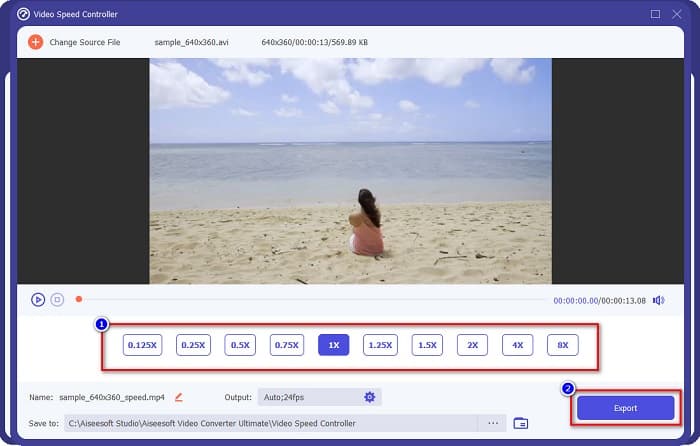
完成後,它將自動保存在您的桌面文件中。
第 3 部分。 Adobe After Effects 與 FVC Video Converter Ultimate
很難選擇要使用的最佳加速視頻工具?那麼請不要擔心,因為我們將為您提供對上述工具的更詳細和更清晰的見解。儘管如此,這兩個工具的用戶評價很高,可以加快或減慢您的視頻速度。
| 對比 | Adobe After Effects | FVC Video Converter Ultimate |
| 兼容性 | Windows 和 Mac | 幾乎所有媒體平台,包括 Windows 和 Mac |
| 便於使用 |  |  |
| 有其他功能可以使用 | | |
| 價錢 | 價格從 $20.99/月開始 | 它的 1 個月版本價格是 $23.30 |
| 最適合用於 | 電影製作 | 轉換和編輯視頻 |
既然您知道了區別和相似之處,那麼您將使用什麼加速視頻工具就在您手中。
第 4 部分。有關如何在 After Effects 中加速視頻的常見問題解答
使用視頻加速在線工具更好嗎?
是的。您可以在互聯網上找到許多在線加速視頻工具。但是,加速在線工具依賴於互聯網,這意味著當互聯網連接速度較慢時,加載過程可能會很慢。
您可以使用 After Effects 創建 GIF 嗎?
不可以。Adobe After Effects 沒有 GIF 製作工具。但是,如果您想要一個可以創建動畫 GIF 的工具,請使用 FVC Video Converter Ultimate。它有一個易於使用的內置 GIF 製作工具。
Adobe After Effects 是否支持所有文件格式?
Adobe After Effects 支持多種視頻/圖像文件格式,包括 MPEG、WAV、WMV、SWF、FLV、MP4、M4V 等等。
結論
綜上所述,本文證明 Adobe After Effects 加速影片的功能,確實是相當獨特且出色的工具。它所具備的功能以及能產出專業級成果的能力,表現十分亮眼。現在你應該已經很清楚,為什麼許多專業電影製片與影片剪輯師會為各種目的而選擇這款工具。不過,如果你是初學者,並且正在尋找介面更簡單易上手的影片加速工具,那麼 FVC Video Converter Ultimate 就是最適合你的影片變速控制器。那麼,你還在等什麼?立刻下載,親自體驗它所提供的強大功能吧。
-
 如何在 Premiere Pro 及其替代方案中加速視頻
 您想知道如何使用 Premiere Pro 來加速視頻嗎?那麼您是在正確的文章中,因為我們提供了步驟和其他負擔得起的替代品。
-
 關於如何在 TikTok 上加速視頻的 2 種輕鬆方法
 你想知道抖音視頻加速的秘訣嗎?然後閱讀這篇文章,了解如何做到這一點,並了解其他 2 個可以幫助您的工具。
-
 2021 年的優秀提示:如何在 iMovie 上加速視頻
 您的朋友建議 iMovie 來幫助您解決如何使用 iOS 操作系統加速視頻的問題,但您不知道該怎麼做?當您閱讀本文的更多內容時,請查看更多相關信息。
