


 視頻轉換大師
 屏幕錄影大師
 影片修復
影片修復適用於 Windows/Mac/Android/iOS 的 6 個最佳視頻速度控制器
如果你已經用膩了各種特效,透過加快或放慢影片速度也能創造出令人驚豔的視覺效果。這種影片剪輯技巧簡單卻非常實用。上網搜尋時,你會發現市面上有許多不同的影片倍速控制工具,我們也知道要做出選擇並不容易。不過,如果你讀完這篇文章,我們將會評測多款可以用來調整播放速度的倍速控制 App。對最好用的影片倍速控制 App 有興趣嗎?那就繼續往下看,了解更多在各種平台上可用的影片倍速控制工具。

第 1 部分。適用於 Windows、Mac、Chrome、iOS 和 Android 的 6 大視頻速度控制器
頂部 1. Video Converter Ultimate (Windows & Mac)
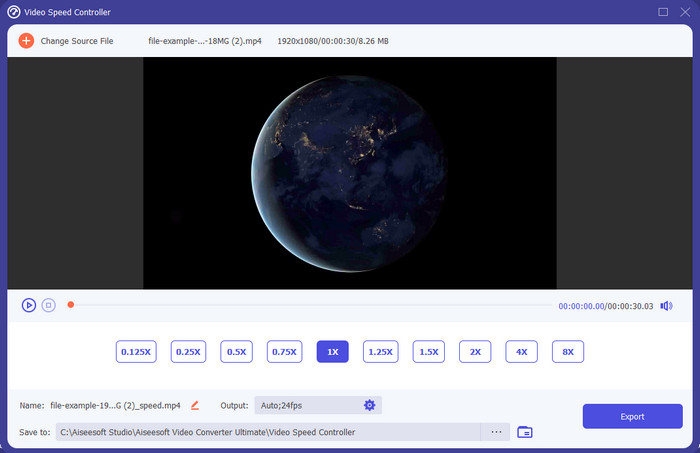
你需要一款在影片加速與減速上都非常有效又高效的倍速控制器嗎?那麼,Video Converter Ultimate 就是解決這類問題的好幫手。這是最容易上手的工具之一,無論你要把影片調成高速播放還是慢動作,都能輕鬆改變影片速度。即使你變更了播放速度,原始影片的畫質仍會維持不變,只是因為更動了速度,所以影像的動作節奏會跟著改變。
除此之外,你還可以做很多事情,比如轉換、合併、剪切等等;基本上,它是一個多合一的工具。想知道這個加速視頻應用程序可以提供的其他優惠嗎?如果是這樣,請閱讀該工具的功能以了解更多信息,或者您可以立即在桌面上下載該軟件進行測試。

視頻轉換大師
5,689,200+ 次下載- 它可以精確地快速改變任何視頻格式的視頻幀,例如 MP4。
- 提供豐富的視頻編輯功能和效果。
- 它在 Windows 或 macOS 等所有平台上都很靈活。
- 超快的過程使您在眨眼之間完成下載或導出過程。
- 導出或下載您編輯的視頻不會有水印。
優點
- 即使您是專業人士,也可以更改視頻的每幀幀數。
- 易於理解的視頻播放選項。
- 出色的社交媒體分享能力。
- 它可以免費下載,但它提供應用內購買。
缺點
- 如果您想擁有該工具的全部功能,則需要購買。
頂部 2. Clipchamp (Windows)
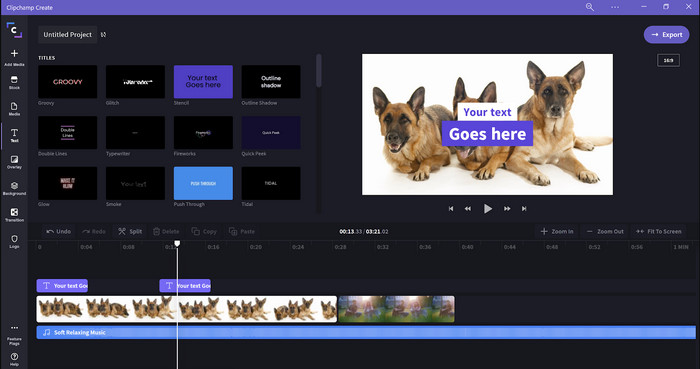
Clipchamp 是一款可在 Windows 上使用的影片倍速編輯器。這個工具的學習門檻不高,如果你是剪輯新手,可以考慮試試看。它也支援多種你可能會用到的功能。不過,它的一大缺點是輸出畫質不佳:免費版只能匯出 480 畫質影片,相較於其他免費工具來說偏低。如果你需要匯出 720 或 1080 畫質,就必須付費訂閱。總體來說這個工具表現不錯,但仍不及第一款編輯器那麼全面。
優點
- 簡單的 GUI 和易於使用。
- 它提供了額外的編輯功能。
- 輕鬆控制視頻播放。
缺點
- 對於免費版,最終輸出為 480。
- 有時,該工具在執行任務時變得不靈活。
頂部 3. 視頻速度控制器 (Chrome)

想在 Chrome 上使用影片倍速控制外掛嗎?那你可以安裝 Video Speed Controller。這個工具能在任何 Chrome 瀏覽器上使用,用來加快或放慢你正在觀看的影片。操作對所有人都相當簡單,而且作為 Chrome 擴充功能也相對安全。不過,即使你在上面調整了速度,把影片下載或匯出後,原檔的播放速度仍會維持不變。因為這個工具只對你目前在 Chrome 中播放的影片生效,離開 Chrome 就無效。補充說明:一旦你用這個擴充功能加快影片速度,你在 Chrome 上播放的所有影片都會以同樣的速度播放。
優點
- 您可以在 Chrome 上使用的點速度控制器。
- 能夠輕鬆地倒帶或重置 Chrome 上的視頻播放速度。
- 它支持快捷鍵命令。
缺點
- 視頻控制器面板不可見。
- 您無法在 Chrome 之外更改視頻的速度。
頂部 4. Safari(iOS 和 Mac)加速
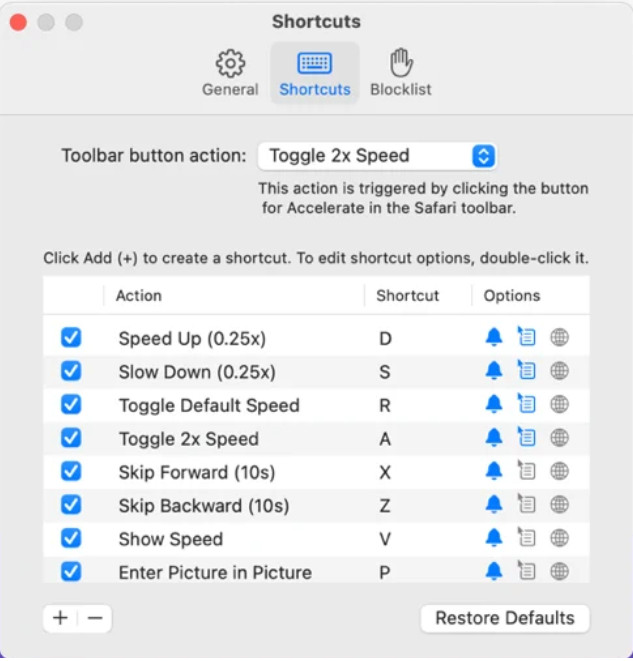
需要一款Safari 的影片倍速控制工具嗎?Accelerate for Safari 可在所有 Apple 裝置上的 Safari 使用。這個工具能調整 Safari 中每個 HTML5 影片的播放速度。和上面提到的 Chrome 擴充一樣,它僅限於在 Apple 裝置上使用。所以,如果你是 Apple 用戶,或許會喜歡用這款倍速控制擴充功能來加快或放慢影片。另外,你也可以利用鍵盤快捷鍵來控制工具、變更影片的播放速度。
優點
- 在所有 Safari 中使用都是安全的。
- 它還支持畫中畫和AirPlay。
- 快捷鍵可用於控制該工具。
缺點
- 它不支持除 Safari 之外的其他網絡瀏覽器。
- 僅限於 HTML 5 視頻。
Top 5. 慢 快 慢 - 控制視頻的速度 (iOS)
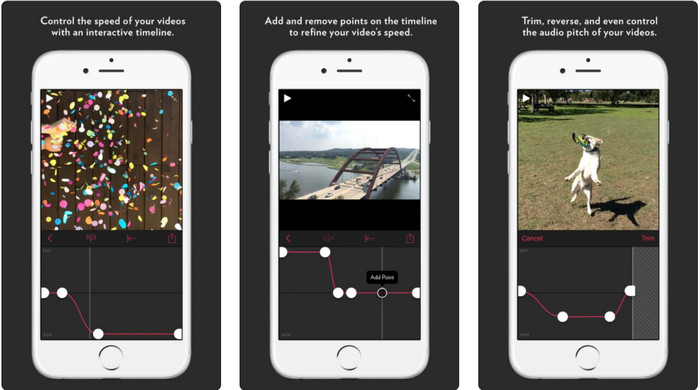
如果你想在iPhone 上使用影片倍速控制工具,可以試試 Slow Fast Slow。這款工具能讓 iOS 使用者立即調整影片的播放速度,特別適合做慢動作效果。此外,它內建非常直覺的時間軸介面,方便你精準控制速度,也支援例如音高變化、片段反轉等其他功能。不過,這個工具需要 iOS 10 系統,若你的系統版本低於 10 就無法使用。
優點
- 它支持您的視頻的其他功能。
- 方便使用的。
- 可以將視頻減慢到 1/16 速度。
缺點
- 它不支持 4k 輸出和選擇 FPS。
- 它不適用於某些新的 iOS 設備。
Top 6. Video Speed Controller Pro (Android)
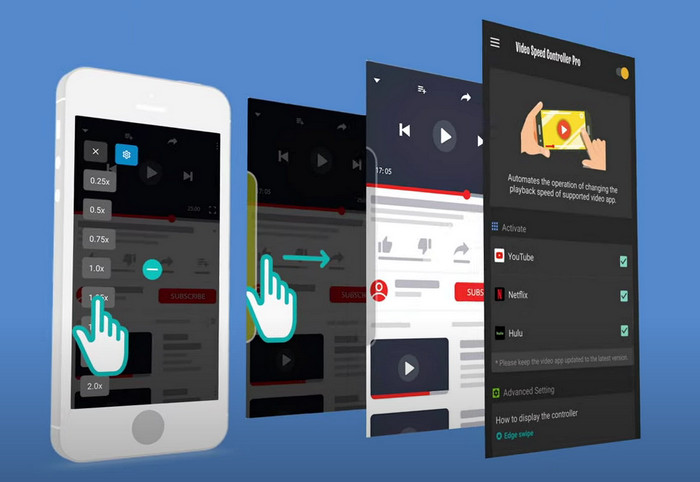
如果你需要在Android 上使用影片倍速控制工具,那麼你可以在 Play 商店安裝 Video Speed Controller Pro。透過這個工具,你可以輕鬆加快在 Android 上播放的任何影片。此外,這款工具的概念就像是 Android 版的倍速控制擴充功能。雖然它可以幫你加速影片,但最高只能到 2 倍速。不過,如果你只是想加快看影片的速度,它可以用在 YouTube、Netflix 以及 Android 上的其他影音平台。
優點
- 使用簡單。
- 該工具本身很重要。
- 菜單欄可用於顯示播放選項。
缺點
- 播放速度的選項是有限的。
- 有時它不能很好地工作。
第 2 部分。 比較圖表
| 特徵 | Video Converter Ultimate (Windows & Mac) | Clipchamp (Windows) | 視頻速度控制器(Chrome) | 為 Safari 加速(iOS 和 Mac) | 慢 快 慢 - 控制視頻的速度 (iOS) | 視頻速度控制器專業版 (Android) |
| 速度控制 |  | | | | | |
| 高質量視頻輸出 | |  | | | | |
| 編輯功能 | | | | | | |
| 超快速的導出過程 | | | | | | |
第 3 部分。有關視頻速度控制器的常見問題解答
為什麼我需要使用速度控制器?
在某些情況下,您需要以高速或慢速觀看視頻。觀看加速視頻的一個很好的例子是立即完成您正在觀看的視頻,等等。加速視頻對這些用戶有很大幫助。雖然是慢動作,但通常用於快速回放快節奏運動,如賽車、籃球、排球等。無論是兩者,您都需要一個有效的速度控制器來手動覆蓋正常速度以滿足您的需求。
我可以加速 Tiktok 上的視頻嗎?
在 Tiktok 上,你當然可以直接拍攝加速影片。不過,你沒辦法在 Tiktok 裡以更高倍速觀看影片。所以,如果你需要一款好用的加速工具,請點擊並閱讀這篇文章,了解如何在 Tiktok 上加速影片。
如何減慢視頻速度?
和加速影片相反,你也可以利用市面上的剪輯工具替影片製作慢動作效果。應該用哪一款工具呢?別擔心,我們整理出多款最佳慢動作影片軟體,幫助你輕鬆打造慢動作特效。如果你想了解更多,可以點擊這個連結。
結論
現在,你已經充分了解在不同平台上用來加速影片的付費與免費 App。這些倍速控制工具各有特色,能協助不同需求的使用者調整影片速度。仔細比較後,可以看出 FVC Video Converter Ultimate 幾乎提供了使用者所需的一切功能。如果你想在桌上型電腦下載這款終極工具,只要按一下下載按鈕,就能盡情體驗它的完整功能。
-
 如何使用可用的 5 大軟件加速視頻播放 [Windows/Mac/Linux]
 您想知道如何輕鬆加快視頻速度嗎?然後在我們解釋如何在 Windows、Mac 和 Linux 上有效加速時閱讀這篇文章。
-
 如何在 Android 設備上加速視頻的最簡單方法 [2021]
 您知道可以在 Android 上加速視頻嗎?因此,如果您想知道如何在 Android 手機上加快視頻播放速度,請閱讀這篇文章。
-
 2021 年的優秀提示:如何在 iMovie 上加速視頻
 您的朋友建議 iMovie 來幫助您解決如何使用 iOS 操作系統加速視頻的問題,但您不知道該怎麼做?當您閱讀本文的更多內容時,請查看更多相關信息。
