


 محول الفيديو النهائي
 مسجل الشاشة
 إصلاح الفيديو
5 مقاسات GIF يمكنك استخدامها لتغيير حجم صور GIF المتحركة عبر الإنترنت وغير متصل
تغيير حجم ملف GIF مهمة سهلة في أي محرر تقريبًا، لكن ليس كل المحررات تدعم هذا النوع من الصيغ. بدلًا من تجربة أدوات مختلفة وإضاعة الكثير من الوقت، لماذا لا تتابع قراءة هذه المقالة؟ لماذا؟ لأننا نوفر لك أدوات تغيير الحجم التي يمكنك استخدامها، ولن نذكر إلا الحقائق عن هذه الأدوات الخمس. إذن، هل أنت مستعد للتعرّف إلى أدوات تصغير وتكبير ملفات GIF المتحركة المتوفرة على منصاتك؟ إذا كان الأمر كذلك، فيجب أن نتابع الآن مراجعة تفصيلية لهذه الأدوات الخمسة لتغيير حجم ملفات GIF أدناه ونتعرّف إلى الفروقات بين كل أداة.

الجزء 1. أفضل 5 مقاسمات GIF عبر الإنترنت وغير متصل
1. FVC Video Converter Ultimate [مستحسن]
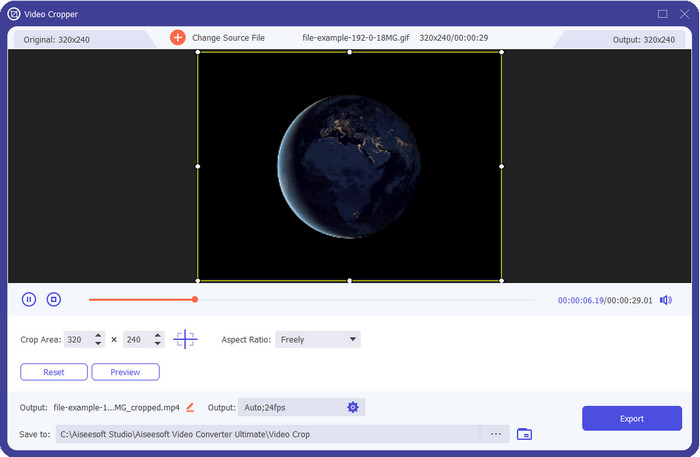
كل الأدوات هنا لا تملك ما يمكن أن يقدمه FVC Video Converter Ultimate لملفات GIF الخاصة بك. ربما تتساءل ما الذي يجعل هذه الأداة مميزة؟ هذه الأداة المتكاملة توفر لك تغيير حجم GIF بجودة عالية وتكلفة منخفضة ستستمتع باستخدامه. هذه الأداة ممتازة للحصول على نتائج احترافية شبيهة بما يقدمه لك Photoshop، ولكنها أسرع بكثير للمبتدئين والمحترفين على حد سواء. علاوة على ذلك، لا تقتصر هذه الأداة على تغيير حجم GIF فحسب، بل يمكنك أيضًا تحويل ملفات GIF إلى MP4 وMOV وAVI وMKV وأكثر من 200 صيغة أخرى لجعلها متوافقة مع مختلف الأجهزة. لنفترض أنك تحتاج إلى إنشاء ملف GIF وتريد تعيينه كخلفية، عندها ستكون محظوظًا بامتلاك هذه الأداة المتكاملة لأنها تحتوي على صانع GIF سيساعدك في ذلك. إذا كنت تريد معرفة كيفية إنشاء ملفات GIF وتعيينها كخلفية، انقر على هذا الرابط. ومع ذلك، تُعد هذه الأداة مُوصى بها لجميع المستخدمين لتعلّم كيفية تغيير حجم GIF بسهولة ودون الحاجة إلى قراءة دليل استخدام طويل.
تحميل مجانيلنظام Windows 7 أو أحدثتنزيل آمن
تحميل مجانيلنظام MacOS 10.7 أو أحدثتنزيل آمن
الايجابيات
- قم بتغيير حجم GIF وفقًا للحجم الذي تريده بحرية عن طريق سحب النقاط بحرية.
- يحتوي على معاينة يمكنك البحث عنها للتأكد من أنها بالحجم الدقيق الذي تحتاجه على صور GIF الخاصة بك.
- يحتوي على عرض فائق السرعة مدمج لعملية تصدير صاعقة.
- متوفر في أي نظام تشغيل سطح مكتب مثل Windows و Mac.
سلبيات
- يجب شراؤها.
2. أدوبي فوتوشوب
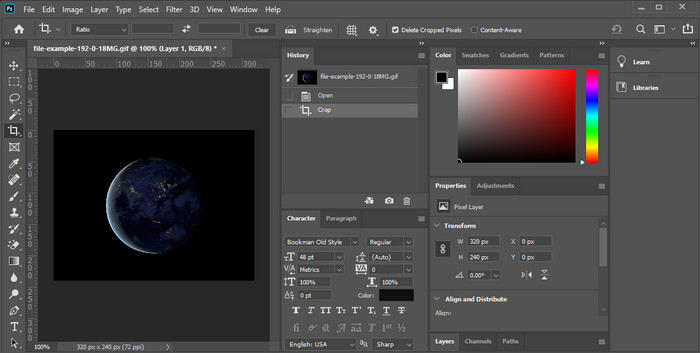
ماذا لو كنت ترغب في أداة احترافية لتغيير الحجم؟ إذن فإن Adobe Photoshop هو خيارك. هذه الأداة القابلة للتنزيل تساعدك على تغيير حجم أي ملف GIF بسهولة خلال دقائق قليلة. وبالتفصيل، تُعد هذه الأداة خيار كل مستخدم محترف يريد تحرير صوره، مثل GIF، لتبدو أفضل وأكثر جاذبية. على الرغم من أن الأداة احترافية، فإنها لا تزال صعبة على من لا يملكون خبرة تقنية. وأيضًا، إذا كان كل ما تحتاجه هو تغيير حجم GIF، فإن هذه الأداة باهظة الثمن لهذه المهمة فقط. لكن إن كنت تريد استخدام PhotoShop لتغيير حجم ملفات GIF وإضافة بعض التفاصيل الدقيقة، فهذه الأداة ستساعدك؛ غير أن تعلم استخدامها سيستغرق وقتًا أطول مقارنةً بالأدوات الأخرى.
الايجابيات
- إنه الخيار الأفضل لتحرير الصور الاحترافي.
- أداة احترافية للاستخدام المهني.
- ميزات التحرير المتقدمة لملفات GIF.
سلبيات
- مكلفة.
- يصعب استخدامها إذا كنت جديدًا في مجال التحرير.
3. GIFGIFs
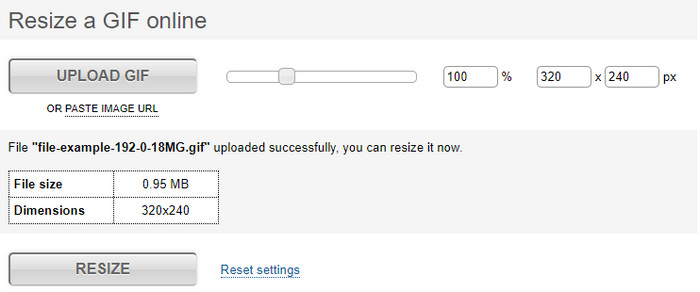
يملك GIFGIFs واحدة من أوسع مكتبات ملفات GIF التي يمكنك استخدامها لحفظ ملفات GIF جاهزة في جهازك، كما يوفّر محررًا بسيطًا لتغيير حجم ملفات GIF الكبيرة. وُجدت هذه الأداة لمساعدة المستخدمين على ضبط ملفات GIF الخاصة بهم عند الحاجة من خلال خدماتها عبر الإنترنت. ورغم أن أداة تغيير الحجم هذه مجانية وعلى الويب، فإن واجهتها خالية من الإعلانات المزعجة، وهذا أمر ممتاز. لكن المشكلة الرئيسية في أداة تغيير الحجم هنا أنك ستحتاج إلى تحديد المقاس الدقيق أو نسبة أبعاد الصورة التي تريدها. هذه المشكلة أكثر إزعاجًا من الإعلانات، لأنك ستضطر إلى المحاولة مرارًا للتأكد من الوصول إلى الحجم الدقيق الذي تريده. ومع ذلك، إذا كانت لديك فكرة عن نسبة العرض إلى الارتفاع التي تحتاجها، فهذه الأداة خيار مناسب لتغيير حجم ملفات GIF لديك.
الايجابيات
- مكتبة مدمجة لصور GIF.
- لا يحتوي على إعلانات على الويب يمكن أن تزعجك أو تزعجك أثناء تغيير حجم GIF.
- سهل ومجاني للاستخدام.
سلبيات
- هناك حاجة إلى الإنترنت لإنهاء مهمة تغيير حجم ملفات GIF.
- من الصعب معرفة ما إذا كان هذا هو الحجم الدقيق الذي تحتاجه.
4.RedKetchup.io
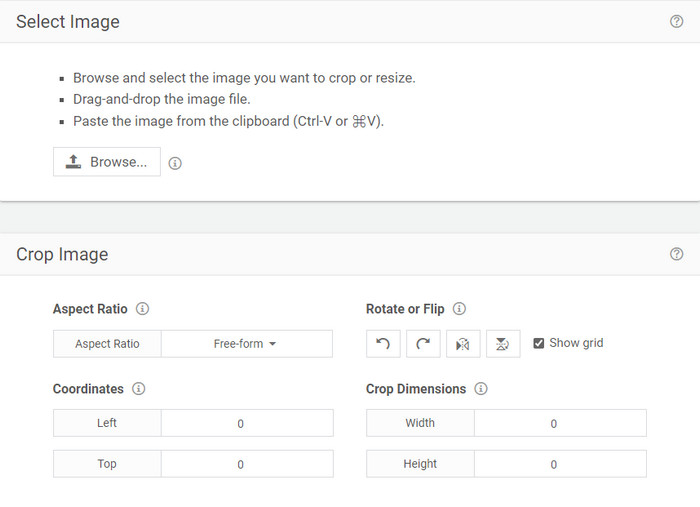
يوفّر RedKetchup.io طريقة بسيطة وتفاعلية لتغيير حجم ملفات GIF المتحركة ضمن حدود معيّنة تحددها أنت. هذه الأداة على الويب تمكّن مستخدمي الإنترنت من تحسين مظهر ملفات GIF بفضل خصائص التحرير التي توفّرها. بالإضافة إلى ذلك، يمكنك إجراء تغيير حجم أكثر تفصيلاً هنا مما يمكن أن يقدمه لك موقع Ezgif. وعلى الرغم من أن هذه الأداة أبسط في الاستخدام من الأداة الأولى، فإن واجهتها تفتقر إلى الألوان التي تمنحها مظهرًا احترافيًا. فاللون الوحيد الذي ستراه عند الدخول إلى الأداة هو لون اسمها، وهو بالأحمر. ومع ذلك، فالأداة مجانية الاستخدام؛ لكن توجد بعض الإعلانات على الواجهة قد تصبح مزعجة بعض الشيء عند النظر إليها.
الايجابيات
- متاح للوصول إليه من قبل أي شخص لديه اتصال بالإنترنت.
- الكثير من مغير حجم GIF التفصيلي.
- مجاني حتى الآن ، إنه سهل الاستخدام.
سلبيات
- يحتوي على إعلانات مزعجة على الواجهة.
- تعتمد على الإنترنت.
5. Ezgif
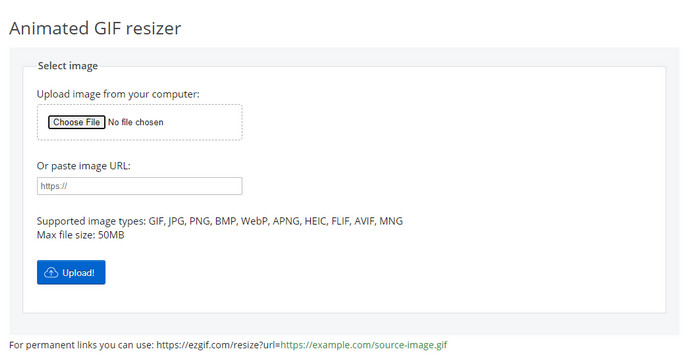
يُعرف بأنه واحد من أفضل صانعي ملفات GIF، ويمكنه أيضًا تغيير حجم ملفات GIF أونلاين عند الحاجة. يوفّر Ezgif واجهة سهلة الاستخدام لتحسين ملف GIF دون بذل الكثير من الجهد. بالإضافة إلى ذلك، إذا لم تكن متمرسًا في التقنية، فهذه الأداة خيار ممتاز لهذا النوع من المستخدمين. ومع ذلك، إذا لم يكن لديك اتصال بالإنترنت، فلن يكون هذا الموقع خيارًا لتغيير حجم GIF، لأنه يعتمد على الإنترنت مثل باقي الأدوات على الويب أدناه. كما أن الإعلانات في الواجهة قد تزعجك أثناء تغيير حجم ملفات GIF. إذا استخدمت هذا المحرر، تأكد من معرفة قيم العرض والارتفاع التي تريد ضبطها، لأنه لا توجد معاينة للتحقق مما إذا كان حجم GIF بعد التغيير يناسب احتياجاتك، ولا يمكنك سحب النسبة لتعيينها يدويًا حسب ما تريد.
الايجابيات
- أفضل صانع GIF على الإنترنت.
- يحتوي على ميزات تحرير GIF بسيطة ستحتاج إليها.
- الوصول إليه مجانًا.
سلبيات
- لا يحتوي على معاينة للتحقق مما إذا كان حجم GIF صحيحًا.
- توجد إعلانات على الواجهة يمكن أن تزعجك.
الجزء 2. مخطط مقارنة حول 5 Resizers
| ميزات | محول الفيديو النهائي [موصى به] | محل تصوير | GIFGIFs | RedKetchup.io | إزجيف |
| تحرير الميزات |  | | | | |
| خالية من الإعلانات | | |  | | |
| سهل الاستخدام | | | | | |
| المعتمد على الإنترنت | | | | | |
| غير مكلفة أو خالية من التكلفة | | | | | |
| جزء المعاينة | | | | | |
الجزء 3. أسئلة وأجوبة حول GIF Resizer
بعد تغيير الحجم ، هل تتغير جودة GIF؟
من ناحية الجودة ، لا ينبغي تغيير GIF بشكل جذري إلى صورة ضبابية ، لكن الجودة ستتغير بعد تغيير حجم GIF ، لكن لا ينبغي أن تكون بعيدة عن GIF الأصلية. لذلك ، إذا واجهت هذه المشكلة ، فهذا يعني أن الجودة قد تغيرت أثناء التصدير وليس أثناء تغيير حجم GIF.
هل يصبح حجم ملف GIF صغيرا؟
بعد مقارنة صورتي GIF ، الأصلية والتي تم تغيير حجمها ، رأينا تغييرًا كبيرًا في حجم الملف. على الرغم من أنه تغيير بسيط ، يمكننا القول أن حجمه أصبح أصغر من الحجم الأصلي.
هل يمكنني إعادته إلى GIF الأصلي بعد تغيير الحجم؟
بعد تغيير حجم ملف GIF ، يمكنك تحويله إلى حالته الأصلية إذا لم تقم بتصديره بعد. ومع ذلك ، إذا قمت بتصدير ملف GIF ولم تكن راضيًا عن النتيجة ، فلا يمكنك إعادته إلى حجم GIF الأصلي. لتجنب هذه المشكلة ، يجب عليك استخدام مغير حجم GIF يحتوي على معاينة لفحص الإخراج قبل تصديره.
بعد تحويل JPG إلى GIF ، هل ستتحرك؟
لا، لن يحدث ذلك، لأن ملفات JPEG ليست متحركة مثل ملفات GIF المتحركة. لكن يمكنك تحويل عدة صور JPEG إلى ملف GIF إذا قمت بتحويلها إلى GIF صور. هل تريد تعلم كيفية القيام بذلك؟ في هذه الحالة، ستساعدك هذه المقالة كثيرًا في تحويل مجموعة صور JPEG إلى GIF.
خاتمة
الآن بعد أن عرفنا ما هي أدوات تغيير حجم GIF التي يمكنك استخدامها، حان وقت الاختيار. كل الأدوات المتصلة بالإنترنت وغير المتصلة جرى اختبارها بشكل فردي لتقديم معلومات دقيقة عن الأدوات وقدراتها. لكننا توصلنا إلى أن Video Converter Ultimate يقدّم أفضل نتيجة عندما يتعلق الأمر بتغيير حجم ملفات GIF. ورغم أن الأداة مدفوعة، يمكننا القول بثقة إن أموالك لن تذهب سدى بعد الحصول على هذه الأداة المتكاملة. لذا، إذا كنت لا تزال تشك في ما نتحدث عنه، فعليك تجربة وتنزيل هذه الأداة من خلال النقر على زر التنزيل.
تحميل مجانيلنظام Windows 7 أو أحدثتنزيل آمن
تحميل مجانيلنظام MacOS 10.7 أو أحدثتنزيل آمن
-
 كيف تصنع صورة GIF على iPhone من صور متعددة التقطتها وحفظتها
 هل تريد معرفة كيفية عمل صور GIF على iPhone من صورك؟ يشارك هذا المنشور 3 برامج يمكنك استخدامها لإنشاء صور GIF على جهاز iPhone الخاص بك.
-
 أهم 3 محولات يجب ألا تفوتها لتحويل PNG إلى GIF متحركة
 هل تريد إحياء ملف PNG الخاص بك؟ ثم حاول تحويل تنسيق PNG إلى GIF المتحرك باستخدام الأدوات المفيدة المتاحة والخطوات الخاصة بكيفية القيام بذلك.
-
 أفضل 4 طرق لتحويل GIF المتحرك إلى FLV على جهاز الكمبيوتر / Mac / عبر الإنترنت / Android / iOS
 هل تريد تحويل GIF إلى FLV ومشاركتها عبر الإنترنت؟ إذا كان الأمر كذلك ، فلنلقِ نظرة على أفضل محولات GIF إلى FLV التي يمكنك استخدامها على الكمبيوتر الشخصي و Mac و Online و Android و iOS.
