


 محول الفيديو النهائي
 مسجل الشاشة
 إصلاح الفيديو
محرر البيانات الوصفية MP4 الأكثر موثوقية لإضافة وتحرير وإزالة بيانات تعريف MP4 بسهولة
MP4 tags can help you organize and manage the files by sorting them according to the metadata. And for that reason, many users are looking for a perfect metadata editor to handle this task easily. Luckily, today we sifted out the best choice of tag editors you can use on your MP4 files on the market. With the help of deep research, let's see which MP4 metadata editor you should use to arrange the files accordingly.

الجزء 1. 4 أفضل برامج تحرير علامات MP4 المجانية المتوفرة على الويب وغير متصل
مشغل الميديا VLC
Available on: Windows, Mac, and Linux
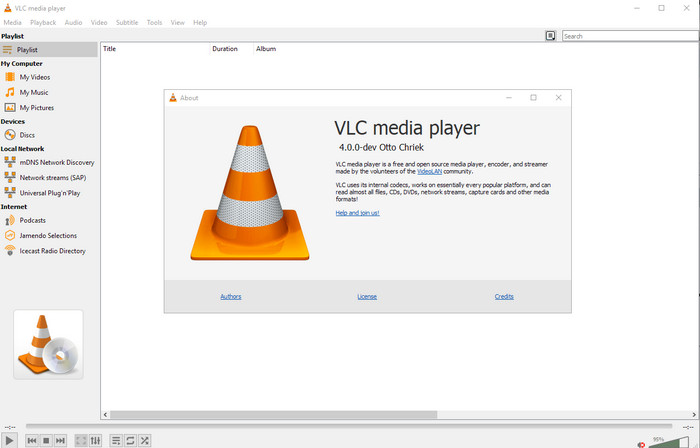
First on our list is the best video player, but if you want to have an mp4 metadata editor freeware, you might need this one. VLC Media Player gives you a free experience of editing or removing the tags bound into your MP4 files. With this tool, you can easily manipulate the metadata on the file like title, copyright, genre, artist, date, time, and more. Although many users said it is easy to edit the metadata here, some contradict this comment. They find it confusing and ineffective, unlike the other tag editor. Nonetheless, if you want a safe tool to download that has already proven a lot to the users, then try to use the tool.
Amvidia Tag Editor
Available on: Mac
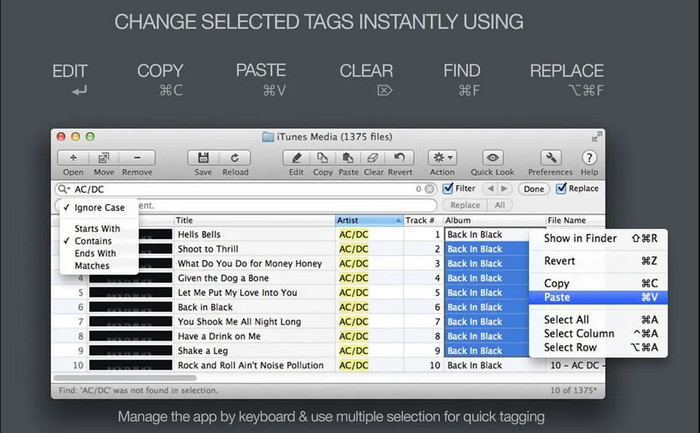
Another MP4 metadata editor on Mac is the Amvidia Tag Editor. If you need to add metadata, the image covers, tags on iTunes, or change the file's name, you can all do that here; if you need batch tagging, then this tool will help you. In addition to that, this free-to-download software supports a significant amount of media formats to upload on the tool, but you'll need to download it. Because of the in-detailed features it supports, beginners might take time to use the tools as you need to do many steps before adding the metadata. Also, the interface of it is outdated, like the VLC.
تيجوتاجو
Available on: Windows
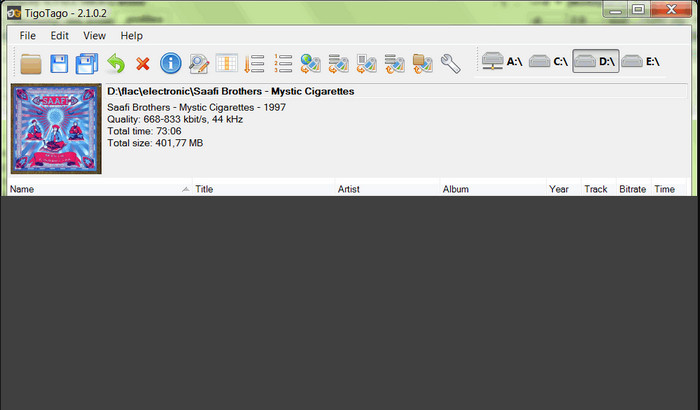
TigoTago is another MP4 metadata tagger you can use for free on Windows. So if you need to edit the specific data or tags of your MP4 file, download the tool and modify the MP4 tags easily one at a time. With this tool, you can fill the basic tags that a file has, such as a title, album, tracks, and artist, but you can also add some advanced tags like lyrics, comments, etc. If we compare this tool to VLC, we can say that this is much better because it prioritizes editing the tags. Although It offers better than the media player, it still needs improvement, including its GUI and other features.
InstantD3 - محرر علامة ID3 مجاني على الإنترنت
Available on: Web
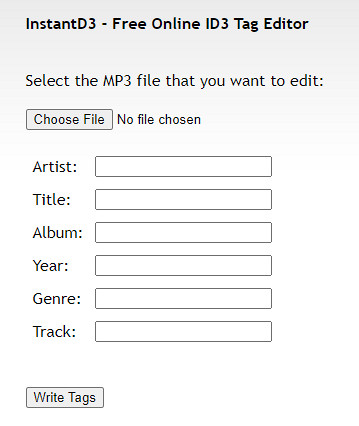
إذا كنت لا ترغب في تنزيل البرنامج ، فيمكنك الوصول إلى محرر علامات الفيديو MP4 عبر الإنترنت ، InstantD3 - Free Online ID3 Tag Editor. على الرغم من توفر الأداة على الويب ، إلا أنها لا تستطيع البحث في البيانات الوصفية عبر الإنترنت لتطبيق العلامات التي تحتاجها على MP4 تلقائيًا. توفر الأداة واجهة سهلة الاستخدام للسماح للمستخدمين بتجربة طريقة سهلة لإضافة العلامات إلى ملفات الصوت الخاصة بهم. نظرًا لأن الأداة مجانية ، يتم عرض الإعلانات على موقع الويب ، ولكن يجب أن نحذرك من أن الإعلانات الموجودة على موقعها الإلكتروني غير مناسبة لعمر 18 أدناه. أيضًا ، قم بالوصول إلى الأداة على مسؤوليتك الخاصة ؛ بمجرد وصولك إلى موقع الويب الخاص بالأداة ، لن يتم تأمين اتصالك بالإنترنت.
الجزء 2. أفضل اختيار محرر فيديو لإضافة البيانات الوصفية وتحريرها وإزالتها على نظامي التشغيل Windows و Mac
Available on: Windows, Mac & Linux
The MP4 metadata editors mentioned above are best, but the FVC Video Converter Ultimate is the powerful metadata editor you will need in editing or removing the metadata. This tool offers the best editing features you can easily use but has a professional output. Unlike the tools mentioned above, which support limited media formats, with this tool, you can upload MP4, MOV, MKV, FLV, AVI, and other 1000+ formats and quickly change the metadata of all of this. Isn't it amazing what this tool can do? If you see the amazing tool, you can easily follow the step-by-step tutorial we provide to edit, add, and remove the tags on your MP4 files.
Step 1. Press the download button first to download the MP4 tag editor on Mac or Windows. Follow the installation process after clicking the file, and open it.
تحميل مجانيلنظام Windows 7 أو أحدثتنزيل آمن
تحميل مجانيلنظام MacOS 10.7 أو أحدثتنزيل آمن
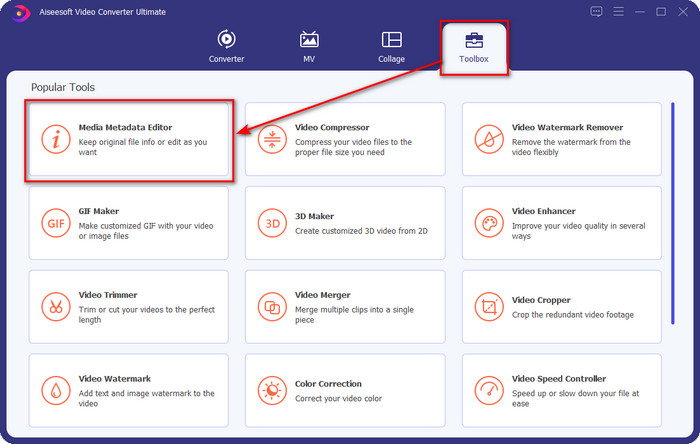
Step 2. Now that you've opened the editor choose the Toolbox at the three sections available; under it, click the Media Metadata Editor.
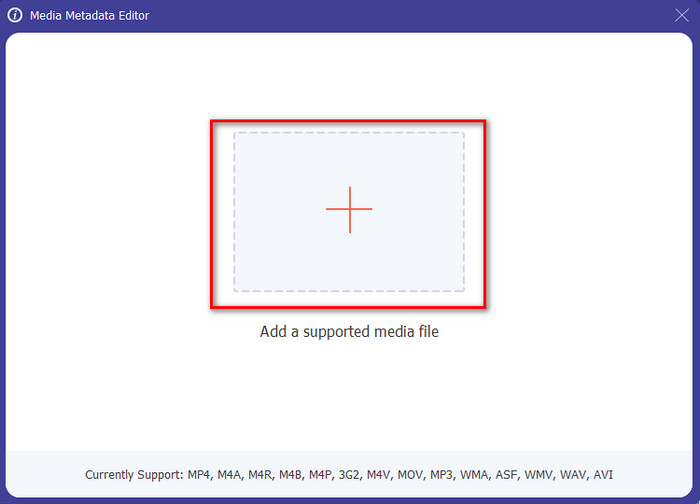
Step 3. To upload the MP4 file, click the + button, find the .mp4 on the folder that will show, and hit Open to insert it successfully.
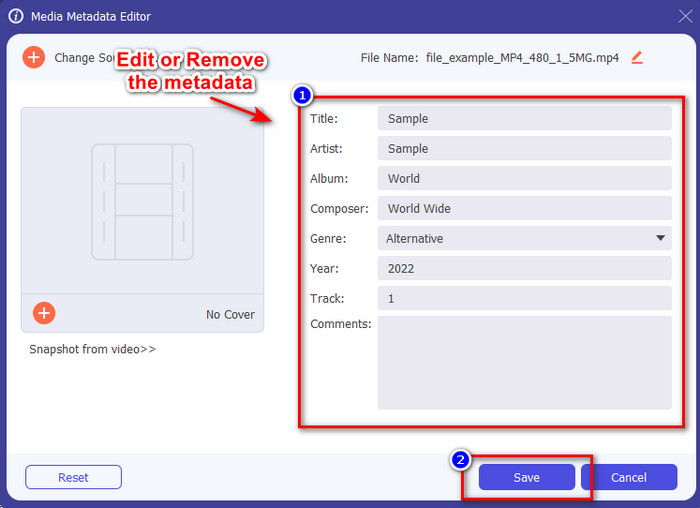
Step 4. Add, remove, and edit the information on the textbox that will show on your screen; fill them in according to your wants. And to save the changes you've made on the MP4 tag, click the Save button. You can easily say that it is an easy-peasy task if you choose the ultimate editor.
ذات صلة:
الجزء 3. أسئلة وأجوبة حول محرر العلامات MP4
كيف تتحقق من بيانات MP4 الوصفية على نظام Windows؟
إذا كنت تريد التحقق من البيانات الوصفية لملف MP4 ، فاتبع هذه الخطوات. أولاً ، ابحث عن ملف .mp4 ، وانقر فوق زر النقر بزر الماوس الأيمن ، وانتقل إلى "خصائص" ، وأخيرًا ، انقر فوق "التفاصيل". كل المعلومات التي ستحتاجها حول البيانات الوصفية موجودة في هذه القائمة. لذلك إذا كنت ترغب في تعديلها وفقًا لرغباتك ، فاختر الأداة التي يجب أن تستخدمها أعلاه.
أين يمكنني مشاهدة ملفات MP4؟
Most media players support MP4 files because it is the standard video file format. But the question is, where can you watch high-resolution MP4 videos? In that case, you must click this link. All you need to know is in this article.
كيف تختار أفضل محرر علامات MP4؟
ستحتاج إلى تذكر بعض الأشياء قبل اختيار محرر البيانات الوصفية MP4 الذي ستستخدمه ؛ إذا كنت لا تعرف ما هذه ، يمكنك الاعتماد على هذه المعايير. أولاً ، تأكد من أن محرر البيانات الوصفية يدعم التنسيق الذي لديك ؛ لا يدعم جميع المحررين نطاق تنسيق واسع. سيكون استخدام محرر البيانات الوصفية الذي لا يدعم التنسيق الخاص بك عديم الفائدة. ثانيًا ، تأكد من أن الأداة سهلة الاستخدام ؛ إذا كنت حديث العهد بتحرير البيانات الوصفية ، فتأكد من أن الأداة التي تختارها ليست صعبة التعلم. أخيرًا ، تأكد من أنه آمن للاستخدام ؛ إذا كان قابلاً للتنزيل أو عبر الإنترنت ، فستحتاج إلى معرفة ما إذا كان آمنًا للاستخدام. تأكد من أنه قبل استخدام المحرر ، ستحتاج إلى اتباع كل هذه المعايير البسيطة للحصول على الأفضل فقط.
خاتمة
The MP4 metadata editors we added in this article can help you quickly edit, add, or remove the metadata on your MP4 files. With the relevant reviews we've written about the tools, we can now compare them and see which suits our needs regarding editing the MP4 tags. If you still haven't decided which you should use, we offer you the best on the list: the FVC Video Converter Ultimate. This fantastic tool will fit your needs; downloading the tool is the only way to have this. So, click the download button, follow the steps we provided for you, and enjoy editing the tags without breaking a sweat.
-
 5 أسهل طرق لإزالة البيانات الوصفية في أي ملفات وسائط
 كيفية إزالة البيانات الوصفية؟ هل من الصعب القيام بذلك؟ هل أحتاج إلى شراء أو استخدام أداة مجانية لإزالة العلامات؟ كل هذه الأسئلة لديها إجابات في هذه المقالة.
-
 أفضل 5 برامج استخراج البيانات الوصفية المتاحة عبر الإنترنت وخارجها [2025]
 يمكنك العثور على العديد من أدوات استخراج البيانات الوصفية في السوق ، ولكننا اليوم نختار فقط أكثر خمسة أدوات لاستخراج العلامات وفقًا للجمهور.
-
 أفضل 5 برامج لتحرير بيانات الفيديو لعام 2025 [مراجعة موضوعية]
 هل تريد عرض البيانات الوصفية للفيديو الخاص بك؟ إذا كان الأمر كذلك ، فاقرأ التفاصيل أدناه لفهم الموضوع بالكامل ومعرفة الأداة التي تناسبك بشكل أفضل.
