


 Video Converter Ultimate
 Gravadora de pantalla
 Reparació de vídeo
Obteniu més informació sobre els 5 millors editors de vídeo per a PC i compareu
Avui en dia, molta gent estima gravar vídeos per guardar moments inoblidables i la majoria els fa servir per guanyar diners. Com els vloggers i influencers, que sempre es graven a ells mateixos mostrant què fan per als seus fans i, a més, per aconseguir més popularitat que altres influencers o vloggers. Així doncs, si ets un vlogger o influencer en potència a qui li agrada gravar-se, has de plantejar-te tenir el millor editor de vídeo per a Windows 10 per millorar i crear vídeos impressionants, aconseguir més “m’agrada”, visualitzacions, subscriptors i també beneficis a llarg termini. Abans de començar, volem felicitar-te perquè ja has fet el primer pas per convertir-te en un vlogger o influencer d’èxit. Però triar l’eina adequada que has d’utilitzar és una de les parts més crucials que trobaràs. Per això, hem reunit diferents editors de vídeo tan efectius com sempre perquè en puguis triar un a continuació.

Part 1. Els 5 millors editors de vídeo de Windows en línia i fora de línia
Top 1. Video Converter Ultimate
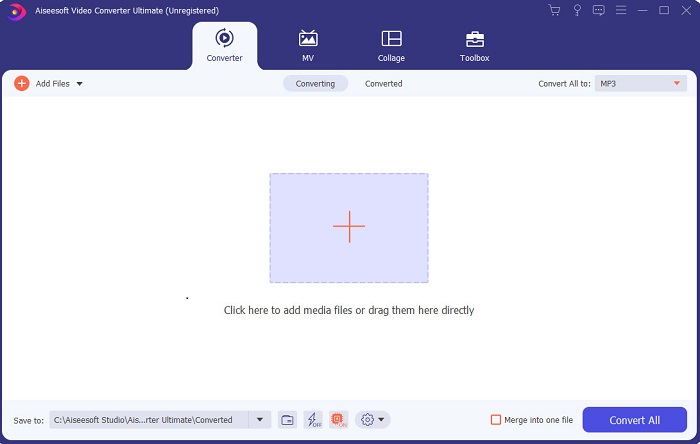
Si vols tenir avantatge i aconseguir els millors vídeos com els teus ídols, fes servir el FVC Video Converter Ultimate. Aquest conversor i editor de vídeo per a Windows ja ha ajudat molts clients a fer-se populars arreu del món i potser tu seràs el següent. La majoria d’influencers, vloggers i editors de vídeo coneguts el fan servir com a editor, potenciador, optimitzador i molt més. Per tant, si vols aconseguir un resultat professional com el dels teus ídols i guanyar-hi diners de veritat, has de descarregar aquest programari immediatament per convertir-te en la nova sensació d’internet i també en la millor versió de tu mateix. A més, t’hem indicat avantatges i inconvenients perquè entenguis millor aquesta eina.
Descàrrega gratuïtaPer a Windows 7 o posteriorDescàrrega segura
Descàrrega gratuïtaPer a macOS 10.7 o posteriorDescàrrega segura
Pros
- Per als principiants, aquesta eina és l'opció correcta per a ells. Ja que proporciona instruccions senzilles per seguir i més fàcils d'entendre. Bàsicament, és puntual.
- Per a professionals, com cap altre editor de vídeo per a PC aquesta eina té moltes característiques futuristes. Per exemple, si voleu augmentar la qualitat de l'àudio i millorar el vídeo, podeu utilitzar aquesta eina. A més, si el vostre àudio no està sincronitzat amb el vídeo, té una funció de sincronització d'àudio per solucionar-ho.
- En general, aquest és el convertidor i editor fenomenal del qual podeu confiar. Sobretot si vols fer una entrada sorprenent al món dels vloggers i influencers.
- El programari d'editor es pot descarregar i no hi ha eines d'editor que tinguin les mateixes característiques com aquesta.
Contres
- Aquesta eina no és gratuïta però té un preu baix. En altres paraules, és barat i produeix una producció d'alta qualitat.
Top 2. Windows Movie Maker
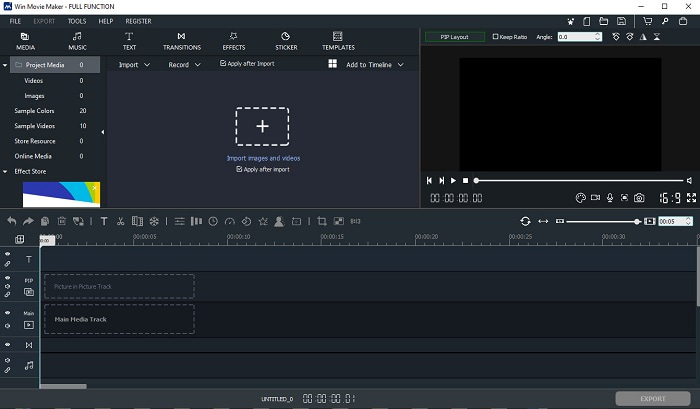
Aquest editor de vídeo per a Windows 7, 8, 10 i XP és un dels millors per crear i editar. El Windows Movie Maker ja ha estat descarregat per molts usuaris per editar els seus propis vídeos, ja que ofereix funcions d’edició complexes. Però l’eina pot resultar massa aclaparadora per als qui s’inicien en la creació i edició. En canvi, si ets professional o, dit d’una altra manera, ja tens experiència en edició, aleshores has de provar aquesta eina. Aquest programa té una versió de pagament, molt similar a la versió gratuïta que ofereix, però en aquest cas el resultat exportat no porta marca d’aigua.
Pros
- Per als principiants, aquesta eina no és ideal, però és fantàstic per fer edició complicada.
- Per als professionals, les característiques que es presenten aquí són factibles si teniu experiència.
- Proporciona transicions, efectes i adhesius, etc.
Contres
- L'eina és una mica inquietant a causa de les funcions de l'eina que podeu fer aquí. A més, és aclaparador i no té instruccions sobre com utilitzar-lo.
- Si utilitzeu la versió gratuïta d'aquesta eina, espereu tenir una marca d'aigua al propi vídeo després d'exportar-lo.
Top 3. OpenShot
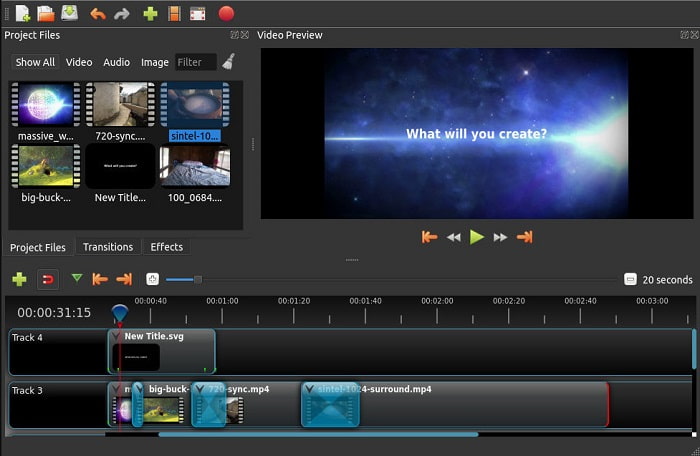
Un altre programa gratuït d’edició de vídeo sense marca d’aigua és Openshot. Ofereix funcions més fàcils d’entendre que el Windows Movie Maker. A més, després d’instal·lar l’eina es mostra una petita visita guiada per les funcions. Tot i això, només s’hi expliquen les funcions bàsiques. Aquest programa només inclou eines bàsiques d’edició, cosa que vol dir que no et permet ser gaire creatiu. A més, un cop instal·lat, l’aspecte pot resultar una mica avorrit a causa del color monocrom de la interfície.
Pros
- Per als principiants, aquesta és una versió més senzilla de Windows Movie Maker. Podeu afegir efectes, transicions i molt més.
- Per als professionals, està bé que l'utilitzin, però no és el millor.
- El programari està bé si inclou una edició senzilla.
Contres
- No es pot canviar l'avorrida interfície i és menys interactiva.
- Alguns errors importants i menors encara estan presents aquí fins i tot després de l'actualització.
Top 4. Lightworks
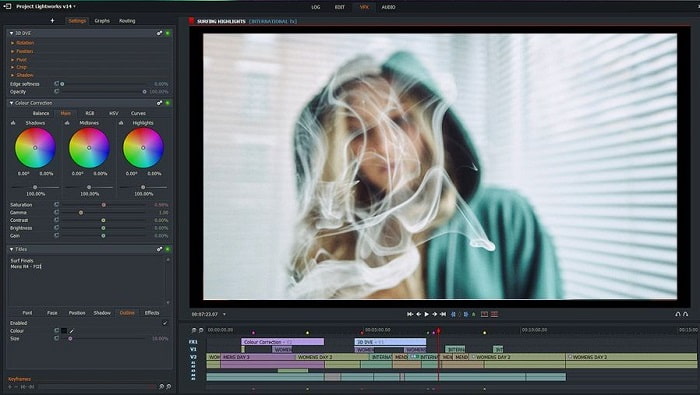
Lightworks és un editor de vídeo gratuït per a Windows, però també té versió de pagament. Quan vam intentar descarregar el programa, va aparèixer un avís que deia que el fitxer .exe podia perjudicar l’ordinador. Per això no el vam instal·lar i vam fer una recerca més profunda sobre aquesta eina. Si l’instal·les al teu disc, t’hauràs de registrar abans de poder-lo utilitzar. Les funcions d’edició que ofereix són moltes i poden aclaparar si ets principiant, però fins i tot per als professionals pot ser una mica complicat. Tot i així, no t’amoïnis, perquè el pots aprendre a utilitzar practicant.
Pros
- Per als principiants, l'eina és massa complicada i pot ser massa de manejar. Sobretot si voleu provar de fer una edició senzilla.
- Per als professionals, podeu utilitzar les funcions d'edició en temps real que ofereix aquesta eina. Tot i que algunes de les funcions són noves i la majoria són de pagament.
- El rendiment global de l'eina es classifica com a classe A en l'edició i creació de vídeos.
Contres
- Si voleu tenir una sortida de 1080 píxels, heu de comprar l'eina. I fins i tot abans de poder utilitzar-lo, caldrà registrar-se.
- El programari té un fitxer .exe nociu, així que descarregueu-lo sota el vostre propi risc.
Top 5. ClipChamp
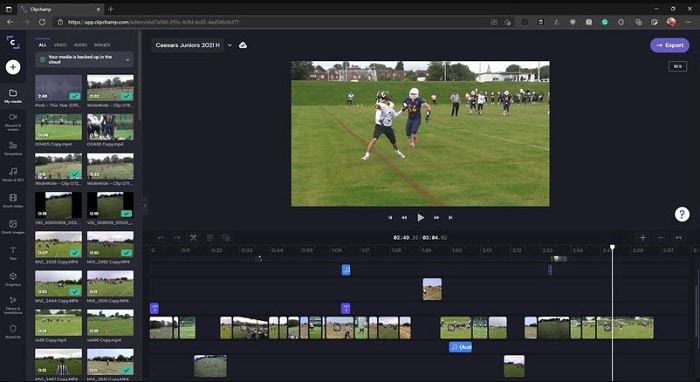
Aquesta eina en línia disposa de més funcions si n’amplies el pla. A més, és una de les eines més fàcils d’accedir que pots utilitzar per editar vídeos sense haver de descarregar cap programari específic. Clipchamp és una gran eina, però t’hi has de registrar abans de poder-hi accedir. Aquest editor de vídeo per a Windows 10 en línia té funcions semblants a les de Lightworks, però funciona al navegador. Tot i així, si hi importes fitxers de vídeo per editar-los, has de preveure que el procés d’importació serà lent. L’avantatge és que no cal descarregar el programa perquè funcioni.
Pros
- Per als principiants, aquesta eina és imprescindible per provar, però el procés d'edició i inserció de vídeo aquí és una mica més lent.
- Per als professionals, està bé utilitzar i editar vídeos senzills amb recursos limitats.
- En general, l'eina és més fàcil d'entendre que Windows Movie Maker.
Contres
- Depenent d'Internet, el que significa que si teniu una Internet lenta, espereu un procés inestable.
- Necessiteu un formulari de registre abans de poder utilitzar l'eina web.
Part 2. Quadre de comparació dels 5 editors de vídeo per a Windows
| Característiques | Video Converter Ultimate | Windows Movie Maker | OpenShot | Obres de llum | ClipChamp |
| Edició de vídeo com retallar, tallar, fusionar, etc. |  | | | | |
| Potenciador de vídeo | |  | | | |
| Filigrana | | | | | |
| Programa recolzat | Eina basada en escriptori | Eina basada en escriptori | Eina basada en escriptori | Eina basada en web | Eina basada en web |
| Gamma de preus | Durant 1 mes: $25.00 Durant un any: $31.20 | $39.95 Pagament únic | Gratuït però pots fer una donació | QScan Pro QScan Pro - Activacions de subscripció mensual $59.99 | Creador: $9/mensual Negocis- $19/ mensual |
| Per a llicència de per vida: $55.20 | QScan Max QScan Max - Activacions de subscripció mensual $119.99 | Business Platinum – $39/ mensual |
Part 3. Preguntes freqüents sobre Windows Video Editor
Quin és el millor Mac Video Editor que puc utilitzar?
Tot i que les eines presentades aquí són totes per a Windows, excepte el Video Converter Ultimate. Per conèixer altres editors de vídeo per a Mac, has de fer clic en aquest enllaç i triar de la llista.
Per què els meus vídeos no es poden reproduir a Android?
Hi ha molts motius pels quals els vídeos no es poden reproduir al teu Android. Per saber quines en poden ser les causes, és imprescindible informar-se’n de seguida i solucionar el problema llegint Com reparar vídeos que no es reprodueixen als telèfons Android.
Com comprimir els meus vídeos llargs i compartir-los a YouTube?
Actualment pots pujar fitxers de fins a 256 de mida màxima, així que la millor manera de solucionar-ho és comprimir-los. Si vols compartir els teus vídeos a YouTube, aprenem com reduir la mida del fitxer i publicar-lo a YouTube.
Conclusió
Abans de convertir-te en un dels vloggers o influencers que sempre admires, hauràs de tenir la capacitat de fer la teva pròpia edició. Ara tens l’oportunitat d’utilitzar l’editor fenomenal que ofereix funcions i qualitat d’edició de nivell Hollywood. D’aquesta manera impressionaràs els teus espectadors, seguidors i fins i tot a tu mateix. Així doncs, brilla amb llum pròpia i deixa que aquest raig de llum obri el camí cap a l’èxit amb l’ajuda de FVC Video Converter Ultimate.
-
 El millor editor MP4 per a Windows i Mac el 2025
 Tant si utilitzeu l'ordinador per editar vídeos MP4 com si només treballeu al telèfon, aquí podreu trobar algunes opcions fantàstiques, inclòs el millor editor de MP4 per a Windows i Mac.
-
 Com afegir àudio i música al vídeo de forma gratuïta al vostre ordinador / telèfon
 En aquest article es mostren 4 maneres senzilles d'afegir àudio al vídeo de forma gratuïta. Independentment de la pista d'àudio que vulgueu afegir al vídeo, aquí podeu obtenir resultats satisfactoris.
-
 Com tallar i combinar cançons en línia: 4 millors maneres que heu de conèixer
 Quan vulgueu retallar i combinar cançons en línia per crear una peça musical, podeu obtenir més informació sobre les 4 millors eines en línia per retallar les cançons i combinar fitxers de l'article.
