


 Video Converter Ultimate
 Gravadora de pantalla
 Reparació de vídeo
[Resolt] Com utilitzar els filtres de vídeo per millorar el vostre vídeo perfectament
Fes que els teus mitjans visuals destaquin més que la resta utilitzant un filtre de vídeo. Aquests filtres poden intensificar el to, donar coherència, afegir ambient i molt més. Tot i que hi ha moltes aplicacions de filtres al mercat, sempre desitgem poder editar vídeo al Video Converter Ultimate, com ara afegir-hi filtres. Però abans d’oferir un tutorial sobre com utilitzar aquesta eina definitiva, donem primer una ullada a què és un filtre de vídeo i als tipus que pots fer servir per ajudar-te a crear un vídeo perfecte. Revisa’ls primer per tenir-ne una idea general.

Part 1. Què és el filtre de vídeo
El filtre de vídeo és popular a tota la xarxa i ajuda els usuaris a crear mitjans visuals més detallats sense afegir efectes especials. Aquests filtres són integrats, cosa que vol dir que apliquen dissenys diferents a les imatges millorant-ne el to, la brillantor, la profunditat, la temperatura, etc. Encara que els filtres poden ajudar-te a millorar el vídeo, la seva funció no sempre és la mateixa. Per exemple, si intentes gravar un retrat, necessitaràs un filtre adequat. Els detalls següents t’indicaran els criteris que has de tenir en compte per aconseguir la millor aplicació de filtres de vídeo que puguis descarregar o utilitzar.
La llista aquí no és els diferents filtres, sinó que parlarà dels processos, avantatges i estàndards dels filtres.
1. Correcció de color ajustable
La correcció del color és un procés de control de la quantitat de llum que passarà a la pel·lícula. Com a fotògraf, el vostre objectiu és tenir les imatges perfectes equilibrant tot ordenant-ho. Tanmateix, no sempre tindreu la combinació ideal de tot allò que pot millorar la vostra fotografia. Però amb el filtre de correcció de color per equilibrar la vostra videografia filtrant l'escena il·luminada en negre, la brillantor i el contrast.
2. Filtres per al treball perfecte
Hi ha molts filtres facials de vídeo diferents al mercat, però alguns no són tan bons com d'altres. Tot i que els editors de vídeo tenen un conjunt de filtres, pot ser difícil d'entendre cercar el filtre perfecte, sobretot si no teniu una idea àmplia sobre aquests filtres. Tot i que podeu provar-los tots, us caldrà una mica de temps si ho feu alguna vegada. Per tant, si voleu tenir més idea sobre els filtres més escollits a l'editor de vídeo, podeu anar a la segona part.
3. Millor editor de vídeo on the go
L'eina que heu de seleccionar hauria de tenir funcions d'edició de vídeo per ajudar-vos a tallar, combinar, retallar i fer més coses. Tanmateix, si trieu una eina per editar, heu de tenir en compte les coses següents. Si ets un professional o un principiant, has de mirar els teus estàndards per tenir el millor editor de vídeo.
Per a professionals:
◆ Un editor de vídeo realitza una edició de vídeo avançada per ajudar-vos a fer una tasca complexa d'una vegada.
◆ Admet diferents tipus de fitxers per importar i exportar.
◆ Admet la importació de fitxers de vídeo en brut des de càmeres, telèfons mòbils o DSLR.
Per a principiants:
◆ Ha de ser fàcil d'utilitzar per realitzar l'edició de vídeo de manera eficient.
◆ Encara que no és bo com a eina professional, hauria de tenir les millors eines d'edició que necessita un principiant.
◆ La GUI ha de ser menys pesada per evitar confusions sobre les característiques de l'eina.
Part 2. Quins són els millors filtres de vídeo que podeu utilitzar
Els detalls que s'enumeren aquí són els filtres que podeu utilitzar per ajudar-vos a actualitzar el vídeo. Tingues en compte que els filtres no poden canviar la qualitat del vídeo, però poden fer que el teu vídeo tingui un aspecte excel·lent.
1. Filtre de cara d'animals
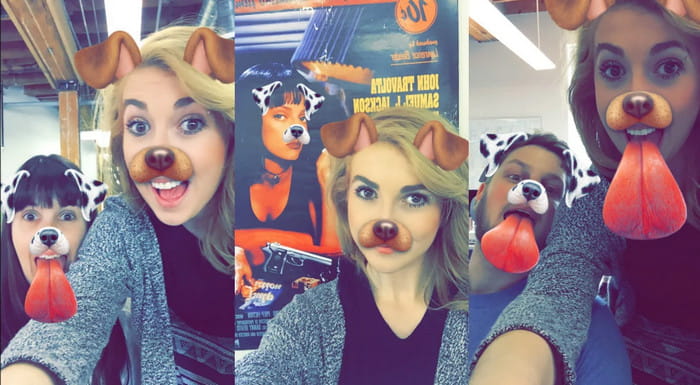
A la majoria d'usuaris els encanta utilitzar filtres de gossos o gats al vídeo perquè són únics i ens fan riure. Aquest filtre anima un animal diferent i altres coses divertides, a diferència d'altres filtres. Tot i que no millora la vostra fotografia, encara podeu utilitzar-ho si voleu tenir un filtre animat per a un propòsit diferent. A més, l'aplicació de filtratge superior que podeu descarregar ja ha afegit filtres animats per als seus usuaris.
2. Filtre gris
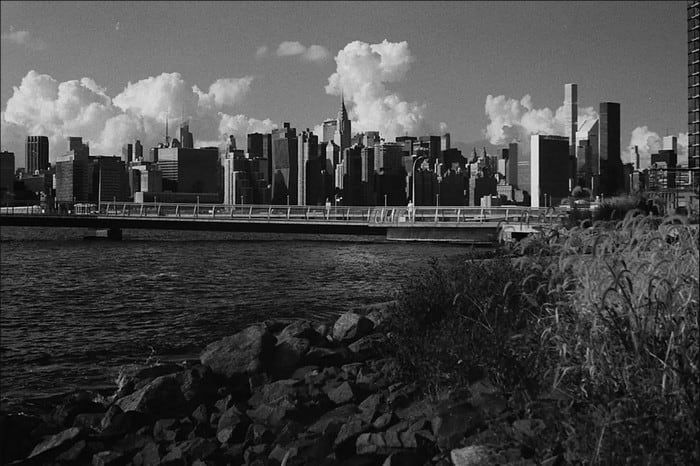
Trobes a faltar els anys 90 i vols gravar un vídeo en blanc i negre? Doncs el filtre gris et pot ajudar a obtenir un vídeo amb l’estètica dels 90. Aquest filtre no és com d’altres que utilitzen alt contrast i colors, perquè fa servir una combinació de blanc i negre per crear un ambient dels anys 90.
3. Filtre de bellesa
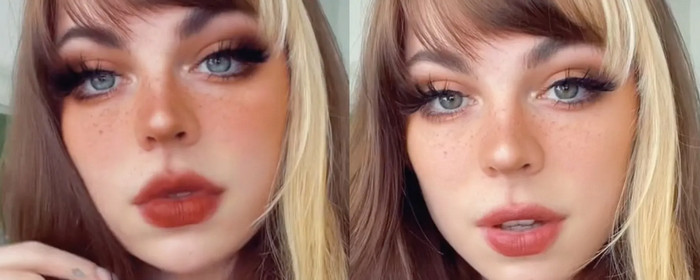
Vols filmar vídeos i tenir un filtre de vídeo per suavitzar la pell? Bé, un filtre de bellesa us pot ajudar a millorar la vostra foto. Amb aquest filtre, podeu veure moltes diferències entre la fotografia original i la millorada. Alguns influencers i artistes trien aquest filtre per millorar les seves pel·lícules i imatges.
4. Filtre càlid
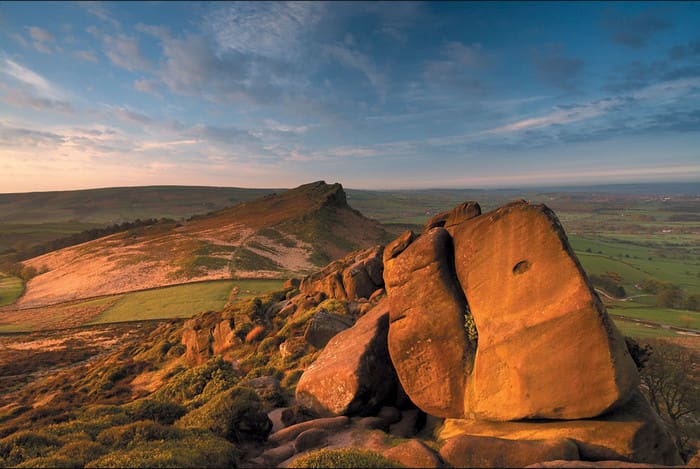
Un altre filtre pot donar calidesa al teu metratge, suavitzar un aspecte pàl·lid i reduir una dominant blavosa. El filtre càlid porta el teu vídeo a un nivell on els tons de pell milloren, tant amb il·luminació electrònica com a l’exterior a l’ombra. Tot i que redueix la dominant blava, algunes dominants blaves molt intenses no es poden corregir del tot amb aquest filtre. Però és el millor filtre si vols gravar un vídeo amb el cel com a protagonista.
5. Filtre normal

El filtre suau et pot oferir un efecte delicat per al vídeo que has gravat. Aquest filtre proporciona vores suaus i més llum en el color que no pas el vídeo original. Encara que és un filtre, no té gaire efecte sobre el vídeo perquè en conserva gairebé l’aspecte original, només lleugerament millorat. Funciona molt bé si no vols afegir massa filtre al teu vídeo i prefereixes ressaltar-ne la presa original.
Tot i que no hem esmentat tots els filtres, aquests són els filtres més utilitzats en qualsevol aplicació de filtratge de vídeo. Tanmateix, el seu nom pot variar en diferents eines, però l'aspecte del seu filtre seria el mateix.
Part 3. Millor programa per descarregar per afegir filtres de vídeo a qualsevol vídeo o clip a Windows i Mac
Pots obtenir aquests quatre filtres i molts més, com els que hem esmentat abans, si et descarregues el Video Converter Ultimate. Aquest programari ofereix la manera més eficient d’afegir filtres a qualsevol vídeo que hagis gravat amb qualsevol dispositiu, com càmeres i telèfons; fins i tot si utilitzes una DSLR, pots fer servir aquesta eina per importar el clip i afegir-hi un filtre. A diferència d’altres aplicacions de filtres, aquesta no és només ideal per a principiants; encara que siguis professional, també pots confiar en aquesta eina.
A més, si voleu tenir el millor editor de vídeo a Windows i Mac, per sort, podeu utilitzar-lo. Per tant, ara, si voleu afegir un filtre de vídeo, seguiu el tutorial fàcil de seguir a continuació per afegir un filtre a qualsevol vídeo amb èxit.
Pas 1. Descarrega l’editor de vídeo a l’ordinador fent clic al botó de descàrrega de més avall. Després de descarregar l’eina, l’has d’instal·lar seguint el procés d’instal·lació i obrir-la.
Descàrrega gratuïtaPer a Windows 7 o posteriorDescàrrega segura
Descàrrega gratuïtaPer a macOS 10.7 o posteriorDescàrrega segura
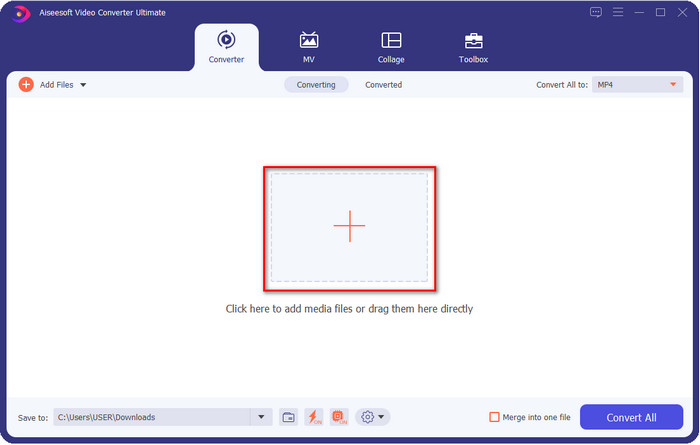
Pas 2. Per afegir l’arxiu a l’editor de vídeo, fes clic al botó +. Selecciona el fitxer de vídeo a la carpeta que apareixerà a la pantalla i prem Obre per afegir-lo a la cua de filtratge.
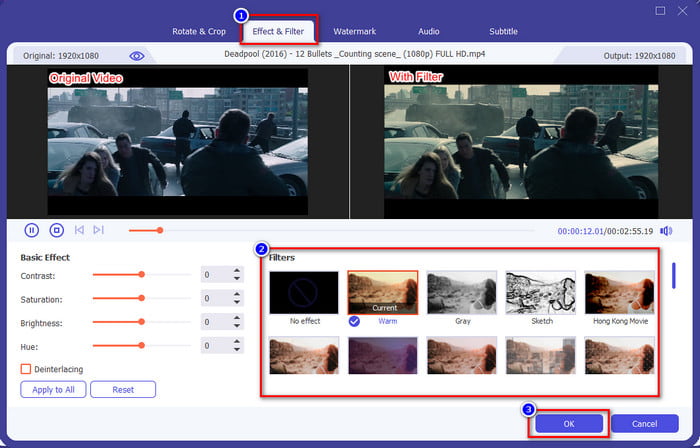
Pas 3. Es mostrarà a la pantalla una finestra nova d’edició si fas clic al botó de la vareta màgica. Fes clic a Efectes i filtres a la part superior, tria el filtre que vulguis utilitzar, prova’ls tots si vols, i fes clic a D’acord quan estiguis satisfet amb el filtre seleccionat.
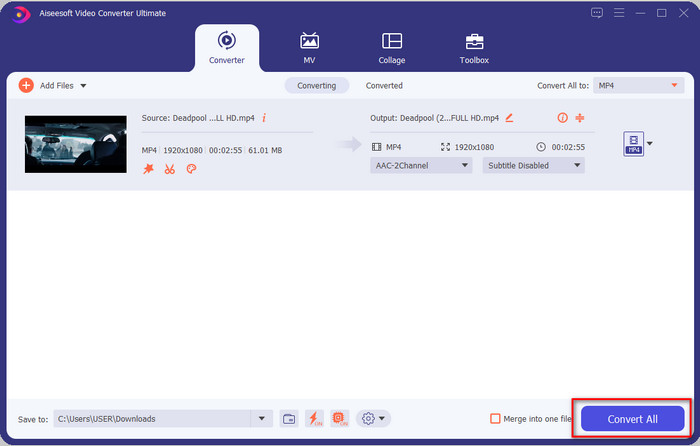
Pas 4. Exporta el vídeo de l’editor fent clic a Converteix-ho tot. Espera uns segons perquè el fitxer de vídeo es descarregui a l’ordinador i, voilà, ja tens el millor vídeo filtrat amb l’ajuda del millor editor de vídeo per a Windows i Mac.
Relacionat:
Part 4. Preguntes freqüents sobre els filtres de vídeo
És segur descarregar una aplicació de filtre de vídeo?
Depèn del lloc web on el descarregueu. Tot i que és segur descarregar un editor de vídeo al web, cal que us assegureu que el lloc web que visiteu sigui segur. O bé, alguns poden obtenir les vostres dades i informació privada sobre vosaltres.
Els filtres degraden la qualitat del vídeo?
La qualitat del vídeo pot canviar a causa dels efectes del filtre que afegiu. Per tant, si voleu mantenir una resolució d'alta qualitat, heu de pensar quin filtre feu servir perquè canviarà la qualitat del vídeo. Però si utilitzeu un filtre pixelat, afectarà la qualitat del vídeo.
Per què ha canviat el format després d'afegir el filtre?
El format establert a l’eina que utilitzes és el format estàndard des del principi. Per evitar que això passi, amb el Video Converter Ultimate has de seguir aquests passos al Video Converter Ultimate. Després d’afegir el filtre, ves a Converteix-ho tot a i busca el format original, fes-hi clic. Completa l’últim pas i ara el teu format es mantindrà igual, amb el filtre aplicat al vídeo.
Conclusió
Ara ja tenim una idea clara sobre els filtres de vídeo i els filtres més escollits. Un cop hem explicat què són i quins filtres pots utilitzar, és el moment de descarregar el Video Converter Ultimate per afegir un filtre al teu vídeo i fer que tingui un aspecte increïble. Aquesta eina no només t’ajuda a afegir filtres al teu vídeo, sinó també a editar-lo d’una manera senzilla. Pots aconseguir aquesta magnífica eina fent clic al botó de descàrrega i comprant-la per gaudir de totes les funcions que ofereix.
-
 Com afegir àudio i música al vídeo de forma gratuïta al vostre ordinador / telèfon
 En aquest article es mostren 4 maneres senzilles d'afegir àudio al vídeo de forma gratuïta. Independentment de la pista d'àudio que vulgueu afegir al vídeo, aquí podeu obtenir resultats satisfactoris.
-
 Converteix GIF en format de vídeo: Converteix memes GIF en vídeo [2021]
 Determineu com transformar GIF en format de vídeo amb l'ajuda de les eines que s'enumeren a continuació. Trieu quin i apreneu a fer-ho, ja que reunim prou proves sobre ells.
-
 GIF meravellós per a aplicacions de vídeo per a dispositius Android i iOS
 Sabíeu que podeu convertir GIF a qualsevol format de vídeo que us agradi amb el vostre telèfon? Trieu les millors aplicacions al vostre Android o iOS.
