


 Video Converter Ultimate
 Gravadora de pantalla
 Reparació de vídeo
 Baixada segura
Top 4 maneres gratuïtes de convertir MTS a MOV
He capturat alguns vídeos amb la meva càmera de vídeo Sony que exportava fitxers MTS. Observo que el reproductor multimèdia i l’iMovie no poden admetre MTS. Estic fent servir un Mac i vull editar aquests vídeos MTS capturats. Alguna ajuda? Hi ha alguna manera senzilla, especialment gratuïta, de convertir MTS a MOV?
MTS és un format de vídeo d’alta definició àmpliament utilitzat per les videocàmeres Sony i Panasonic, com a extensió de fitxer d’AVCHD (Advanced Video Coding High Definition). Després d’enregistrar vídeo amb la teva càmera digital, és molt probable que obtinguis un fitxer MTS. Suporta HD 720p/1080i i pot oferir una qualitat de vídeo superior. No obstant això, MTS no és un format popular que la majoria de reproductors multimèdia o editors puguin llegir.

Quan necessitis editar MTS a iMovie o reproduir-lo amb un reproductor multimèdia, has de convertir MTS a MOV o MP4 per obtenir una millor compatibilitat. En aquesta publicació, et mostrarem 4 conversors MTS gratuïts per ajudar-te a convertir MTS a MOV fàcilment.
Part 1. La millor manera gratuïta de convertir MTS a MOV sense pèrdua de qualitat
Hi ha una gran quantitat d’eines de conversió MTS disponibles a internet que et poden ajudar a convertir MTS a MOV amb alta qualitat. En aquesta primera part, volem recomanar-te el millor programari gratuït de conversió de MTS a MOV, Free MTS Converter.
Està especialment dissenyat per fer front a tot tipus de conversions. És compatible amb gairebé tots els formats de vídeo i àudio com MP4, MOV, MKV, MTS, AVI, FLV, WMV, MP3, AAC, FLAC i molt més. Podeu descarregar-lo gratuïtament i seguir la següent guia per convertir MTS a MOV gratuïtament.
Descàrrega gratuïtaPer a Windows 7 o posteriorDescàrrega segura
Descàrrega gratuïtaPer a MacOS 10.7 o posteriorDescàrrega segura
Pas 1. Primer, heu d’instal·lar i executar aquest convertidor gratuït de MTS a MOV a l’ordinador. Ofereix versions de Windows i de Mac per descarregar-les.
Pas 2. Fes clic a Add File(s) per importar el(s) fitxer(s) MTS que vols convertir. Pots convertir un o diversos fitxers MTS alhora.
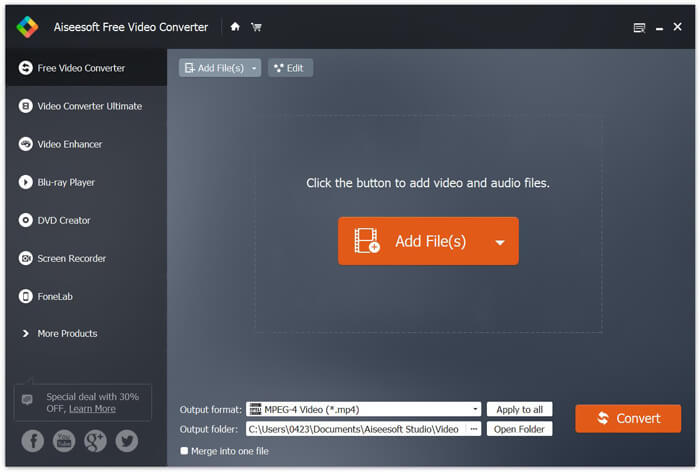
Pas 3. Selecciona MOV com a format de sortida des de la llista de Output format. A continuació, fes clic al botó Convert per iniciar la conversió de MTS a MOV.
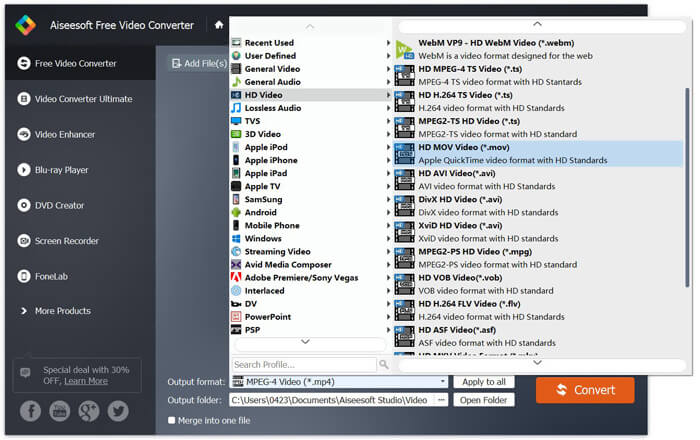
Com podeu veure des de dalt, aquest convertidor gratuït de MTS a MOV també inclou algunes funcions bàsiques d’edició. Abans de la conversió final, podeu utilitzar-los per personalitzar el fitxer MTS. En comparació amb els convertidors en línia, aquest convertidor de vídeo gratuït us pot proporcionar una velocitat de conversió més ràpida i una qualitat de vídeo de sortida superior. Per això la convertim en la nostra primera recomanació.
Part 2. El convertidor en línia gratuït us ajuda a convertir vídeos fàcilment
Quan busques a Google com convertir MTS a MOV, pots trobar molts resultats de conversors en línia gratuïts. Aquí et presentem un conversor MTS a MOV en línia, gratuït i fàcil d’utilitzar, FVC Free Online Video Converter. Sense instal·lar cap programari, pots convertir gratuïtament qualsevol format de vídeo popular a MP4, AVI, MOV, etc. I no cal que et preocupis per res perquè la conversió és segura i estable. No es perdran dades durant el procés de conversió.
Pas 1. Obre l’enllaç anterior i fes clic al botó Add Files to Convert. Abans de convertir, si us plau, descarrega el FVC launcher i instal·la’l. Només et portarà uns segons.

Pas 2. Després d’instal·lar i actualitzar el llançador, només cal que triïs el vídeo que vols convertir. Després, escull el format que necessites i prem Convert.

Pas 3. Obre l’enllaç anterior i fes clic al botó Add Files to Convert. Abans de convertir, si us plau, descarrega el FVC launcher i instal·la’l. Només et portarà uns segons.
Part 3. Com convertir MTS a MOV gratis en línia amb ZAMZAR
ZAMZAR és un dels programes de conversió de vídeo en línia més populars que us poden ajudar a convertir MTS a MOV gratuïtament. Està dissenyat amb una interfície concisa i una funció de conversió senzilla. Podeu seguir la següent guia per fer la conversió de vídeo MTS.
Pas 1. Obriu el navegador i aneu al lloc oficial de ZAMZAR. Aquí podeu anar directament a la pàgina https://www.zamzar.com/convert/mts-to-mov/. Aquí se li permet convertir directament MTS a MOV sense fer cap altra configuració.
Pas 2. Feu clic al botó Afegeix fitxers per carregar el fitxer MTS que voleu convertir. Podeu arrossegar i deixar anar la càrrega del fitxer MTS. Una cosa que heu de saber és que aquest convertidor MTS en línia gratuït només us permet convertir un fitxer MTS inferior a 150 MB.
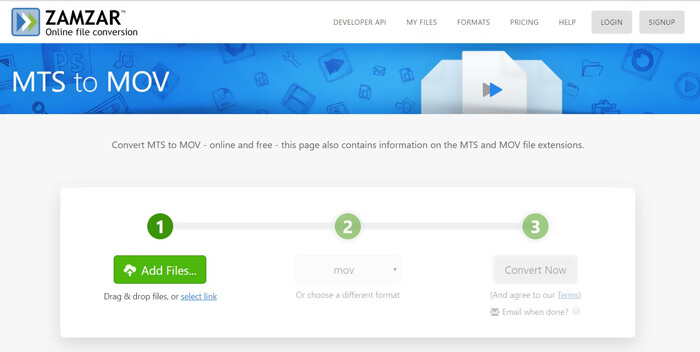
Pas 3. Després de la càrrega, pots fer clic al botó Convert Now per començar a convertir MTS a MOV gratuïtament en línia.
Part 4. Manera en línia de convertir MTS a MOV amb FreeConvert
FreeConvert és un altre convertidor de vídeo en línia popular que pot fer la conversió de vídeo MTS a MOV de manera gratuïta. Aquest convertidor gratuït de MTS a MOV és altament compatible amb MTS i M2TS. Et permet pujar un fitxer MTS de fins a 1 GB. A més, et permet pujar 20 fitxers MTS alhora per convertir-los. Ara pots seguir els passos següents per convertir el teu MTS a MOV.
Pas 1. Primer, has d’anar a FreeConvert.com amb el navegador. Aquí pots anar directament a https://www.freeconvert.com/mts-to-mov per fer la conversió.
Pas 2. Fes clic al gran botó blau Choose MTS Files per pujar el fitxer MTS que vols convertir a MOV. Com s’ha esmentat abans, aquí pots pujar un o més fitxers MTS per a la conversió.
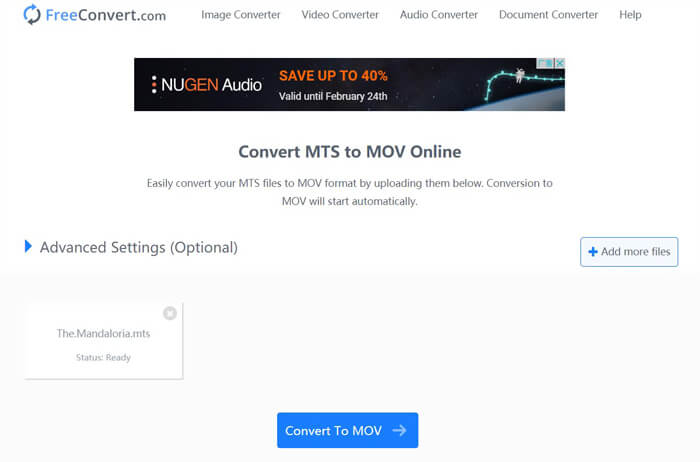
Pas 3. Fes clic al botó Convert To MOV per iniciar el procés de pujada i conversió. Després, hauràs de fer clic al botó Download per desar el fitxer convertit a l’ordinador.
Quan triïs conversors en línia gratuïts per convertir MTS a MOV, necessitaràs força temps per a la pujada i la conversió. Per tant, és millor convertir un fitxer MTS de mida reduïda amb programari de conversió en línia. Si vols convertir un vídeo MTS o M2TS de gran mida, has de recórrer al molt recomanat Free Video Converter.
-
 6 maneres fàcils de convertir TS a AVI / MKV / MOV / WMV a Windows / Mac
 Voleu convertir fitxers TS a AVI / MKV / MOV / WMV ràpidament? En aquest article es mostren els convertidors de vídeo en línia i fora de línia amb una guia completa. Potser podeu obtenir el millor convertidor gratuït de TS aquí.
-
 MOV VS MP4: quin és millor
 MOV VS MP4, quin és millor? Aquesta publicació explica la diferència entre MP4 i MOV, de manera que podeu obtenir la millor opció per fer servir els vostres fitxers de vídeo.
-
 Com unir fitxers MOV (QuickTime) de forma gratuïta
 Pot ser difícil per als principiants unir-se a diversos videoclips MOV. Per tant, hi ha una manera senzilla i ràpida de combinar fitxers MOV? Si n’hi ha, com s’utilitza? Aquesta publicació us ajudarà a obtenir aquestes respostes.
