


 Video Converter Ultimate
 Gravadora de pantalla
 Reparació de vídeo
Millor convertidor de MPG a GIF per convertir MPG a GIF [Sense cost i versió Premium]
La millor manera d'expressar els vostres sentiments als vostres éssers estimats és crear un missatge significatiu. Però vols saber què és molt millor expressar d'una altra manera? Podeu utilitzar un GIF. També conegut com a format d'intercanvi de gràfics, aquestes són les imatges que envieu però s'actualitzen. Aquestes imatges en moviment es creen per expressar els vostres sentiments cap a algú directament o indirectament. Sabíeu que la majoria de les aplicacions de missatgeria admeten GIF i també el nostre missatger integrat? Però en algunes versions antigues del telèfon, no ofereix aquest format. Tot i que GIF és divertit, no tot el temps us proporcionarà l'emoció que voleu expressar.
Així doncs, ets aquí per saber quina és la millor manera de canviar el teu format MPG a GIF. No és emocionant crear el teu propi GIF? En lloc de buscar què hauries d’utilitzar, per què no proves de crear el teu propi GIF afegint-hi el teu toc personal? La millor manera de saber com fer-ho és llegir aquest article, perquè t’ofereix prou informació, passos i eines per a la tasca. Per tant, sense més preàmbuls, anem directament als detalls importants d’aquest article. Continua llegint per saber-ne més sobre aquesta llista de convertidors.

Part 1. 4 Millor eina per convertir MPG a format GIF PC o Mac
1. FVC Video Converter Ultimate
Si vols compartir un missatge humorístic sense escriure massa detalls, aquesta eina t’ajudarà. Aquesta eina et permet convertir mpg a gif animat; a més, ha estat desenvolupada per FVC. FVC Video Converter Ultimate permet a l’usuari convertir qualsevol tipus de format en un format reproduïble que vulgui utilitzar. Potser et preguntes per què hauries d’escollir aquesta eina. Té res d’especial? Sí, és una eina multifunció. Pot ser el teu extractor de confiança, creador de MV, creador de collatges i molt més. Això vol dir que aquesta eina pot fer més del que ofereixen moltes altres. Una altra funció sorprenent és la seva conversió ultraràpida, que et permet convertir el teu vídeo en un no res amb l’ajuda d’aquesta eina. Per saber com utilitzar-la, segueix aquests passos amb atenció perquè puguis obtenir una conversió satisfactòria amb la qualitat de format que vols.
Pas 1. Instal·la l’eina al teu PC o Mac. Segueix les instruccions després de la instal·lació i fes clic a Finalitza per iniciar l’eina.
Descàrrega gratuïtaPer a Windows 7 o posteriorDescàrrega segura
Descàrrega gratuïtaPer a macOS 10.7 o posteriorDescàrrega segura
Pas 2. Després de tot el procés d’instal·lació, apareixerà a la teva pantalla una miniinterfície com aquesta.
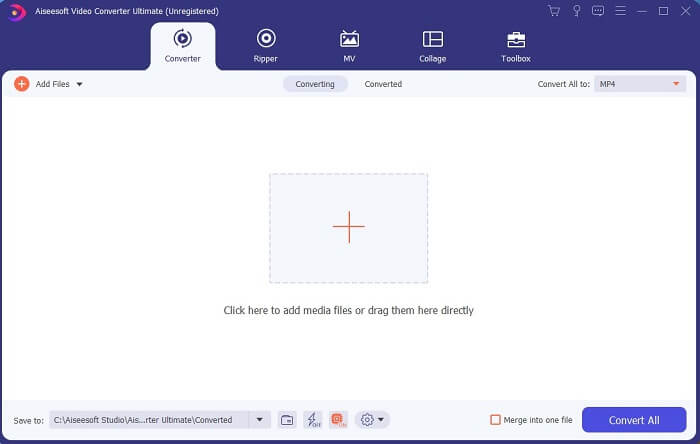
Pas 3. Fes clic al signe de més per afegir el fitxer i fes clic a Obre per començar la conversió, o bé simplement arrossega i deixa anar el fitxer de vídeo a l’eina. La mida o la durada del vídeo no importen gens.
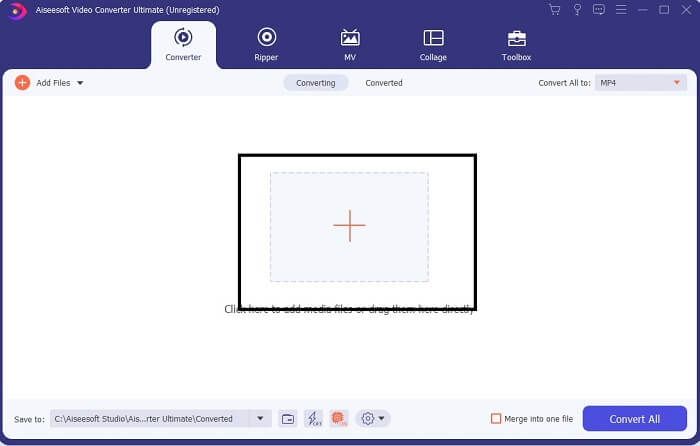
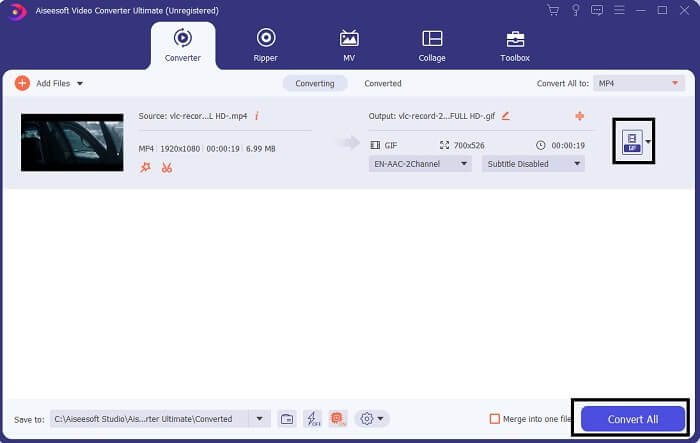
Pas 4. Fes clic al botó desplegable a la part superior dreta de la interfície, desplaça’t cap avall i tria el format GIF. Escull la resolució que vulguis: pot ser Gran, Mitjà o Petit. Si ja està tot a punt, fes clic a Converteix-ho tot per començar la conversió.
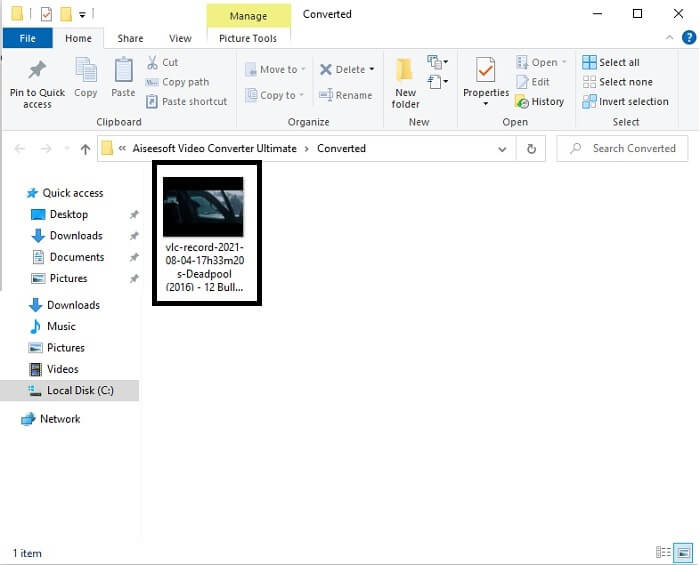
Pas 5. Un cop acabada la conversió, se t’obrirà el gestor de fitxers i hi veuràs el resultat final; ara ja pots gaudir del teu GIF. Però també pots convertir un fitxer .gif a .mpg seguint el mateix procediment, només canviant el format.
2. Convertidor de vídeo en línia gratuït FVC
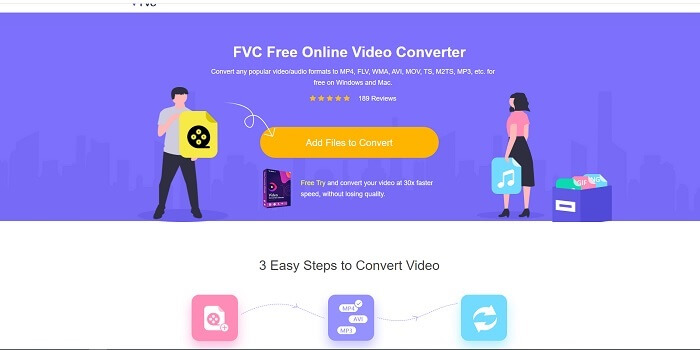
Potser estàs pensant, què passa si no tens diners, encara puc experimentar la mateixa conversió que la primera? La resposta és un gran SÍ. FVC sempre ofereix la millor experiència als seus clients que no tenen diners i també a aquells que volen provar la seva eina. Tot i que, aquesta eina només fa una conversió senzilla, així que no espereu massa, ja que la versió premium pot proporcionar. I no pot convertir diversos formats de vídeo i àudio d'una manera més ràpida.
Però el procés de conversió que ofereix és molt millor que el d’altres convertidors de pagament i gratuïts. FVC Free Online Video Converter és aquí per salvar-te el dia. Com indica el seu nom, és una eina en línia gratuïta que et permet convertir al màxim nivell. A diferència d’altres convertidors, aquesta eina no té anuncis ni programari maliciós, ni requereix registre, inici de sessió ni dades personals abans d’utilitzar-la. Si estàs buscant un convertidor senzill, aquesta és l’eina adequada per a tu. Segueix aquests passos per saber com funciona aquesta eina com a convertidor.
Pas 1. Ves al lloc web oficial fent clic en aquest enllaç.
Pas 2. La pàgina web hauria de semblar-se a aquesta. A continuació, fes clic a Add Files to Convert per llançar aquesta eina en línia.
Baixa la versió d’escriptori per convertir fitxers per lots.
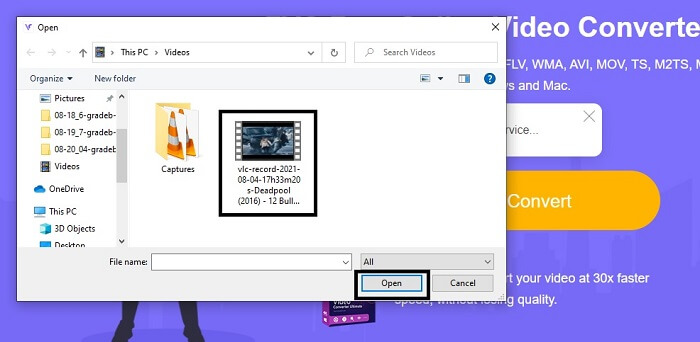
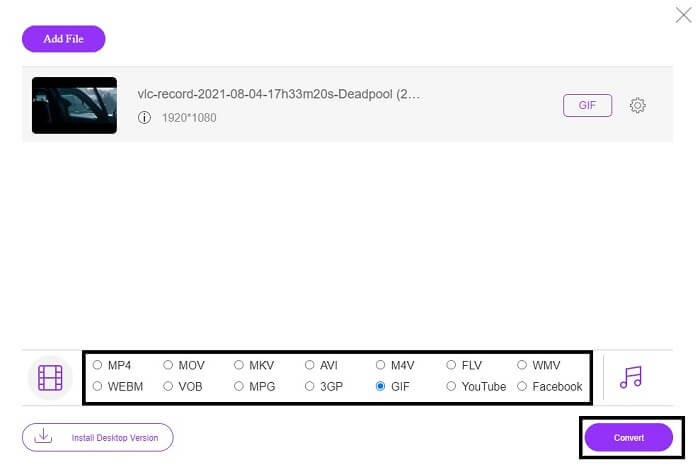
Pas 3. Tria el vídeo que vols convertir. Després de seleccionar el vídeo, selecciona el format de fitxer GIF. Com a informació addicional, també pots triar altres formats de vídeo i d’àudio; els pots consultar més endavant si vols.
Pas 4. Tria on vols desar el resultat final. Quan ho tinguis tot llest, fes clic a Convert per començar la conversió. Només trigarà uns segons a completar-la.
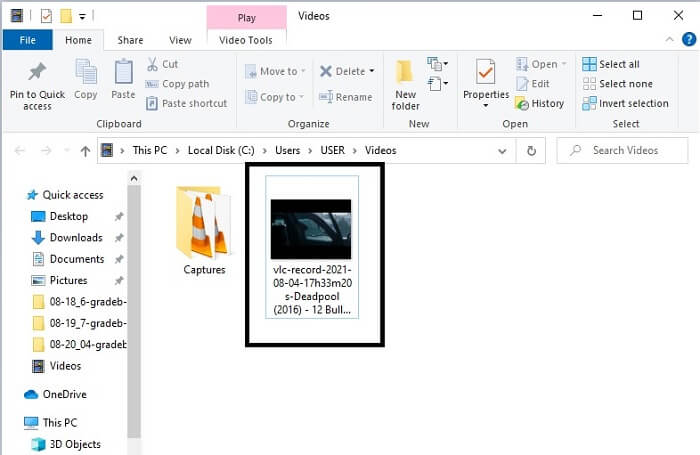
Pas 5. Per comprovar que la conversió s’ha fet correctament, pots localitzar el teu fitxer GIF convertit al teu gestor o explorador de fitxers. Fes-hi clic i gaudeix-ne.
3. Reproductor multimèdia VLC
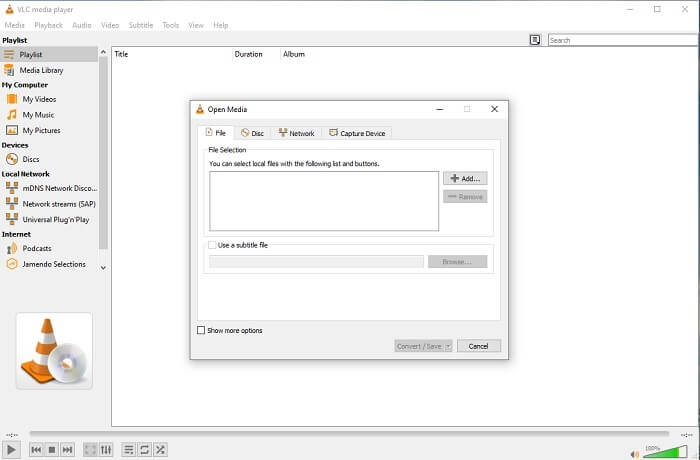
Aquesta eina és coneguda per ser un dels reproductors multimèdia més potents. Però sabies que els reproductors VLC també poden convertir MPG a GIF? Tot i això, el nombre de formats que ofereix és molt limitat, només admet formats coneguts. Malgrat que és considerat un dels millors reproductors multimèdia, la seva funció de conversió no és la millor opció per a tu. Així que, si vols un convertidor millor, és preferible que escullis l'eina en línia anterior en lloc d’aquesta. Ara bé, si el que vols és mirar vídeos, el VLC Media Player ha de ser la teva opció, perquè l’altra eina no pot fer de reproductor, ja que el seu objectiu principal és la conversió.
4. Zamzar
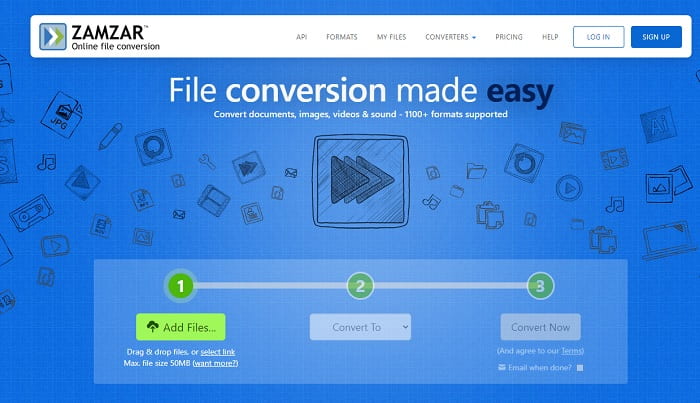
Una altra eina en línia que proporciona una gran conversió és Zamzar. Com qualsevol altre convertidor en línia, comparteixen la mateixa interfície i també ofereix instruccions puntuals sobre com convertir-lo. Però el procés de conversió i descàrrega és diferent. Tot i que la versió gratuïta, només podeu convertir un màxim de 50 MB de mida de fitxer. Perquè després de convertir el vídeo, heu d'anar a la fase de descàrrega. És una gran molèstia per a aquells que abandonen la seva conversió i només esperen que es reprodueixi el producte.
Part 2. Quadre de comparació
| Característiques de l'eina | FVC Video Converter Ultimate | Convertidor en línia gratuït de FVC | Reproductor multimèdia VLC | Zamzar |
| Convertidor |  | | | |
| Eina d’edició | |  | | |
| Potent convertidor | | | | |
| Cal inscripció | | | | |
| Plataformes | Aplicació basada en escriptori | Aplicació basada en web | Aplicació basada en escriptori | Aplicació basada en web |
| Gamma de preus | $25,00 1 mes/1 PC $55.20 Compra única per a 1 PC $119.00 Vida útil 5 PC | És una eina en línia gratuïta | És una eina en línia gratuïta | Eina gratuïta en línia Però també ofereix una prima mensual. Per al bàsic: $9 Per als professionals: $16 Per a negocis: $25 |
MPG vs. GIF
Creat pel Moving Picture Experts Group (MPEG), MPG és un format de vídeo digital comú per emmagatzemar informació de vídeo, àudio i metadades. És molt útil a l'hora de crear pel·lícules per compartir a Internet. Aquests fitxers en MPG solen contenir compressió de vídeo/àudio MPEG-1 o MPEG-2.
GIF és un format d'imatge comú per a gràfics web. A més de desar imatges petites i imatges que contenen text, GIF també pot contenir i mostrar animacions bàsiques als llocs web. És un format sense pèrdues i la compressió GIF no degrada la claredat de la imatge.
Part 3. Preguntes freqüents sobre MPG a GIF
Hi ha alguna manera d'utilitzar Photoshop i convertir el vídeo en un GIF?
Sí, pots convertir MPG a GIF amb Photoshop. Però no només el format MPG: també pots escollir un altre format i convertir-lo en GIF. Una altra funció especial és que també pots millorar el GIF perquè es vegi millor. Fes clic aquí per saber com convertir MP4 a GIF.
Quina és la millor eina de gravació de pantalla per gravar GIF?
La millor eina d’enregistrament de pantalla que pots utilitzar per a aquesta tasca és FVC Screen Recorder. Aquesta eina no només és ideal per gravar vídeos, sinó que també incorpora un enregistrador d’àudio i un gravador de videojocs integrats per oferir una experiència de joc de més qualitat. Tanmateix, aquesta eina requereix pagament abans de poder-la utilitzar. No et desanimis, perquè disposa d’una eina en línia que pot fer les gravacions.
Per què es va crear el GIF?
Es va crear per poder mostrar una imatge estalviant espai d’emmagatzematge. El creador del GIF és Steve Wilhite, un informàtic nord-americà, amb l’ajuda del gegant tecnològic CompuServe, a finals del 1987. Fes clic aquí per obtenir més informació sobre els GIF.
Conclusió
Per fi, ara que saps com fer-te un GIF millor que ho proves i gaudeix. Només utilitzant aquesta eina fàcil, podeu marcar la diferència. En lloc de cercar al web, ara sou un fabricant de GIF certificat. A més, ara podeu expressar els vostres sentiments a la vostra manera amb el vostre toc personal i experiència desenvolupada només llegint aquest article. Espero que pugueu gaudir de la vida d'un GIF millor que creeu i compartir el vostre millor GIF al món.
-
 [Guia] Com convertir vídeos M4V a GIF animats a Windows/Mac
 Si voleu crear fitxers GIF animats amb els vostres vídeos M4V preferits, podeu obtenir informació sobre 2 maneres fàcils i eficients de convertir vídeos M4V a GIF amb configuracions personalitzades.
-
 WebM a GIF: 3 convertidors gratuïts de WebM a GIF per crear els vostres propis GIF
 WebM és un GIF? Com convertir un vídeo en un GIF? Hi ha un convertidor gratuït de WebM a GIF? Aquesta publicació comparteix 3 maneres gratuïtes d'ajudar-vos a convertir WebM a GIF.
-
 Com convertir vídeos MKV a GIF animats sense Photoshop / FFmpeg
 Després de descarregar i veure pel·lícules MKV a l'ordinador, és possible que vulgueu compartir moments meravellosos amb amics o a Internet com a GIF. En aquest article, podeu obtenir informació sobre les dues maneres més fàcils de convertir MKV a GIF.

