


 Video Converter Ultimate
 Gravadora de pantalla
 Reparació de vídeo
4 dels millors convertidors PNG a GIF disponibles en línia i fora de línia
El PNG és un tipus de format d’imatge i és conegut com el successor dels GIF. Actualment, sembla encara més probable que això passi. Perquè el PNG admet molts colors i és molt millor visualment que el GIF; tanmateix, els PNG no poden fer el que poden fer els GIF. Així doncs, en aquest article aprendrem com convertir PNG a GIF amb l’ajuda de les eines que es presenten a continuació. Sense més dilació, anem directament a veure les eines mostrades a sota.

Part 1. Com convertir PNG a GIF amb els 3 millors en línia gratuïts
1. Conversió
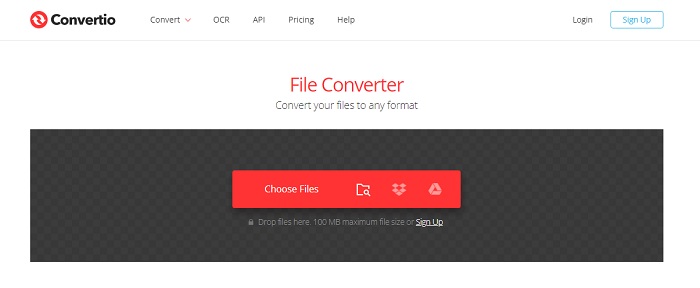
Una de les millors eines en línia que pots utilitzar de manera gratuïta si tens connexió a Internet és Convertio. Aquesta eina web et pot ajudar a canviar PNG a GIF tan fàcilment com un-dos-tres. No obstant això, aquesta eina no pot convertir el teu PNG en una sèrie d’imatges animades com el GIF, però sí que en pot canviar el format. A més, si canvies el PNG al format GIF, la mida del fitxer esdevé més petita i més comprimida. Tot seguit es mostren els passos sobre com canviar el format de la teva imatge a GIF. Segueix-los en ordre a mesura que anem avançant.
Pas 1. Cerca Convertio.io al teu cercador i obre’l.
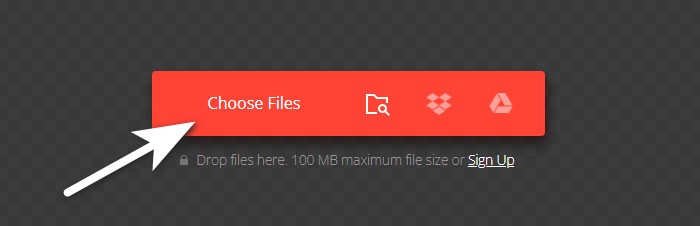
Pas 2. Fes clic a Choose File i localitza el fitxer a la carpeta, després fes clic a open per inserir-lo.
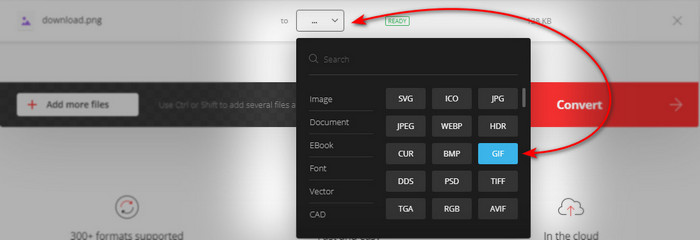
A continuació, fes clic al botó drop-down per canviar el format a GIF.
Pas 3. Prem el botó Convert per iniciar el procés i download per desar-lo al teu disc.

2.AnyConv
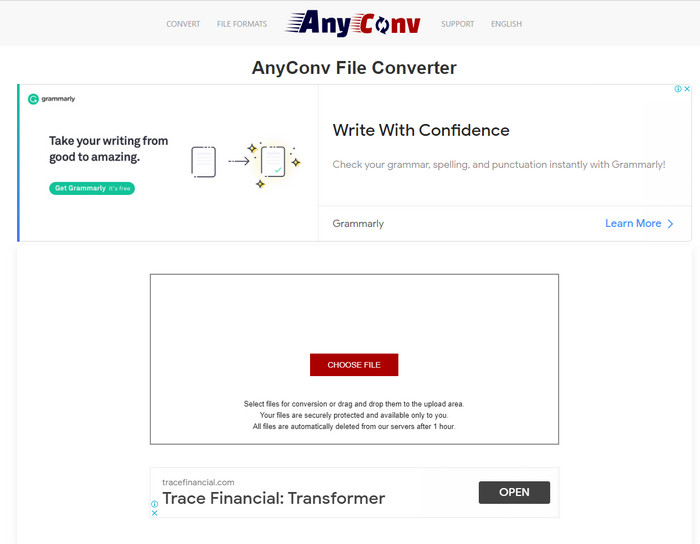
Anyconv és una gran eina web que pots utilitzar per canviar PNG animat a GIF de manera fàcil i efectiva. La interfície de l’eina web no és la millor, però tampoc no és tan dolenta. Tot i que l’eina et pot ajudar, hi ha molts anuncis molestos al seu lloc web que resulten fastigosos, perquè els anuncis són molt més grans que l’eina mateixa. Tanmateix, un cop feta la conversió, el fitxer serà eliminat del web perquè valora la teva privadesa. Però l’eina admet una varietat reduïda de formats en comparació amb Convertio. Així que, si vols provar com utilitzar aquesta eina, segueix els passos.
Pas 1. Obre el teu navegador i cerca el lloc web d’Anyconv.
Pas 2. Fes clic a Choose File, després localitza el fitxer a la carpeta i fes clic a open.
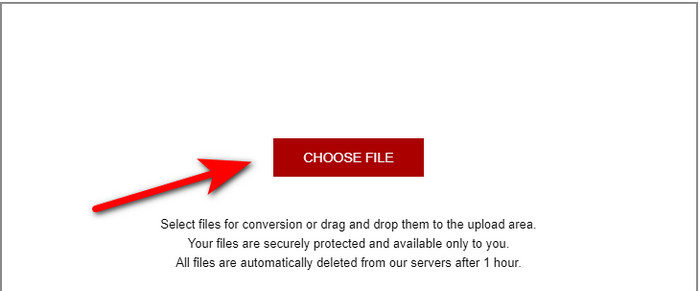
Pas 3. Canvia el format fent clic al botó drop-down i busca GIF.
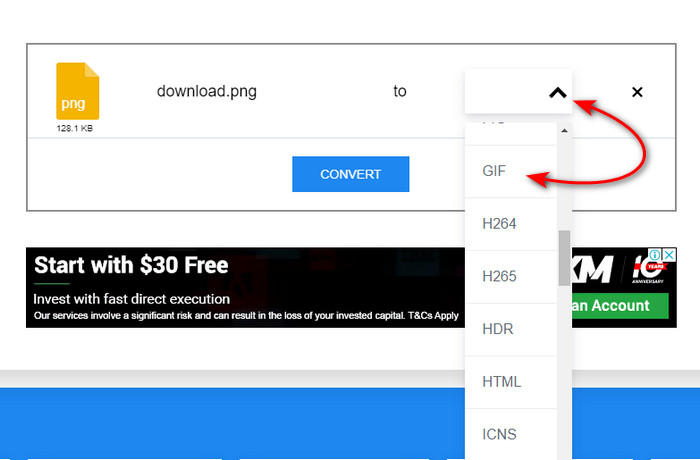
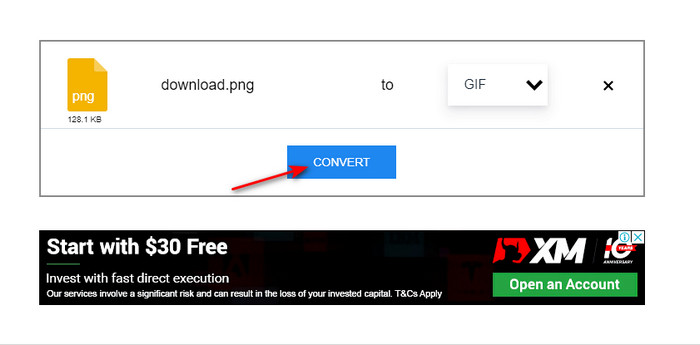
Després fes clic a Convert per començar la pujada i fes clic a download.
3.Conversió gratuïta. com
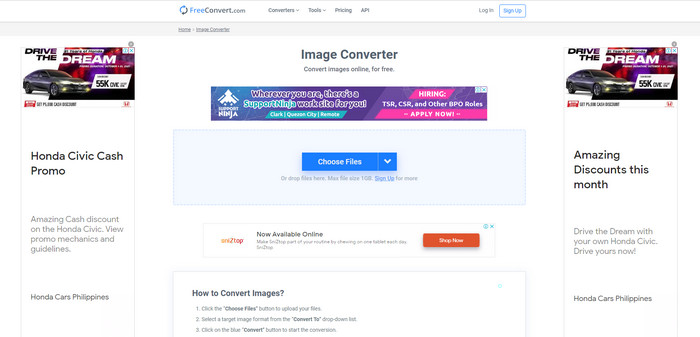
Una altra eina web de la llista que et pot impressionar és Free convert. com. Perquè és una eina web intuïtiva i ben desenvolupada a la qual pots accedir gratuïtament al web. La seva interfície té molts anuncis molestos que et poden molestar. No obstant això, l’eina inclou instruccions a la part inferior sobre com convertir amb Free convert. com, a diferència de les altres dues eines. A més, igual que les altres eines web, aquesta eina no pot crear una sèrie d’imatges GIF animades perquè no ho admet. Per tant, si vols saber com funciona aquesta eina, segueix els passos indicats a continuació.
Pas 1. Cerca Free convert.com al teu cercador per obrir-ne el lloc web principal.
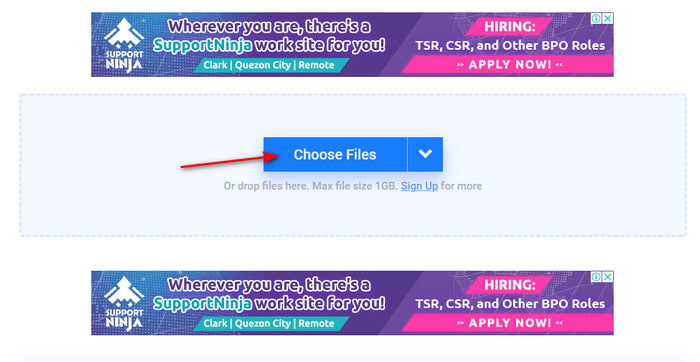
Pas 2. Fes clic a Choose File i apareixerà una carpeta de fitxers a la pantalla. Localitza el fitxer PNG i fes clic a open per inserir-lo.
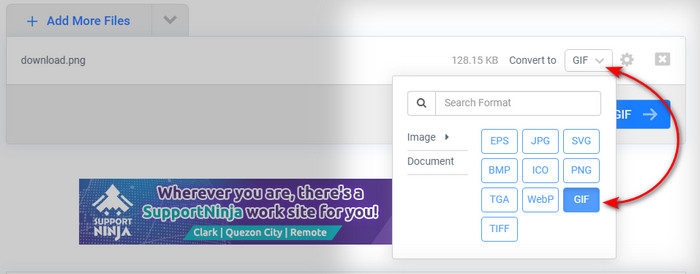
Pas 3. Canvia el format fent clic al botó desplegable Convert to i després tria el format GIF.
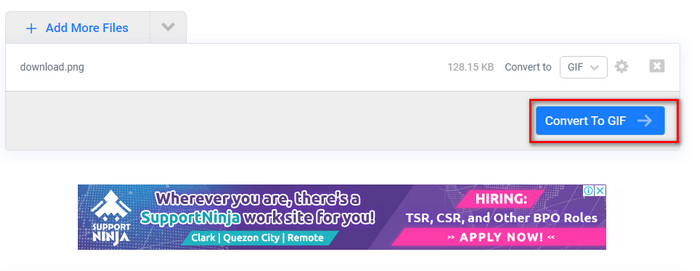
Per descarregar el fitxer, fes clic a Convert to GIF i espera uns minuts; quan el fitxer estigui llest, fes clic a Download GIF.
Part 2. La millor manera de convertir diversos PNG en un GIF
A diferència de les eines web anteriors, aquestes no poden produir imatges de moviment animades com Video Converter Ultimate. Perquè una de les funcions del fenomenal convertidor és el GIF Maker, que t’ajuda a convertir seqüències de PNG al format GIF. I molts usuaris ja estan satisfets amb el resultat final que aconsegueixen quan utilitzen aquesta eina. Per tant, si vols estar satisfet amb el teu GIF, prova d’utilitzar aquesta eina. Encara que no siguis un professional, igualment pots aconseguir el GIF fenomenal que vols tenir. Així que, per continuar, segueix amb cura els passos indicats a continuació.
Passos per utilitzar el GIF Maker de Video Converter Ultimate
Pas 1. Descarrega l’eina al teu disc dur, instal·la-la i després engega-la.
Descàrrega gratuïtaPer a Windows 7 o posteriorDescàrrega segura
Descàrrega gratuïtaPer a macOS 10.7 o posteriorDescàrrega segura
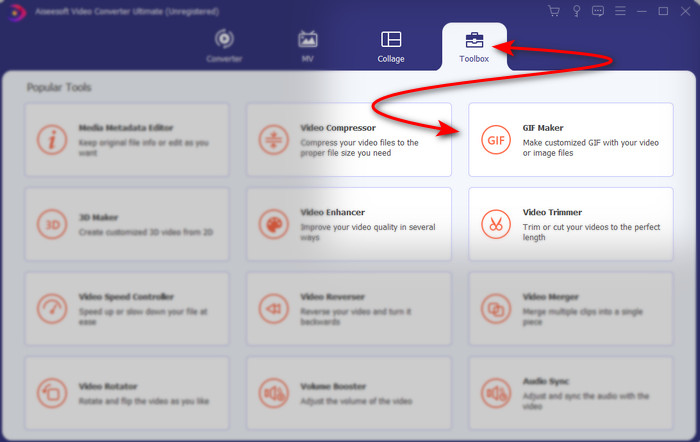
Pas 2. A continuació, ves a Toolbox i busca GIF Maker.
Pas 3. Després, per afegir els fitxers, fes clic a Photos to GIF i selecciona a la carpeta els fitxers PNG que vols convertir i fes clic a open.
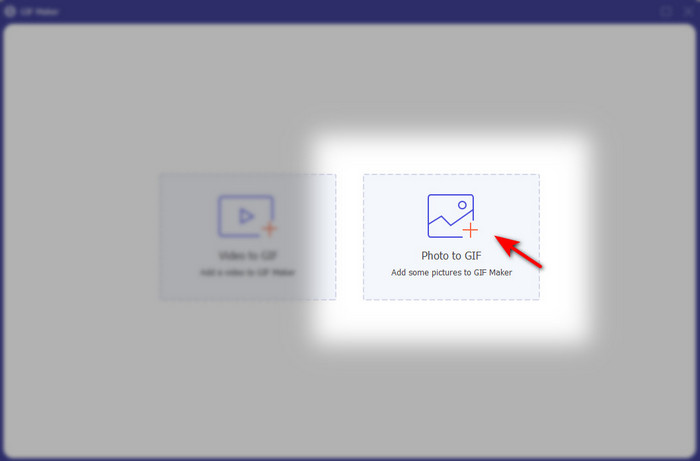
Pas 4. Output Settings apareixerà a la pantalla; ajusta el resultat final i fes clic a OK. Per fer una conversió per lots de PNG a GIF, fes clic al signe +; recorda que el resultat final esdevindrà un GIF animat. Tanmateix, si vols convertir un sol PNG, fes clic al botó Export per desar el resultat final al teu disc.
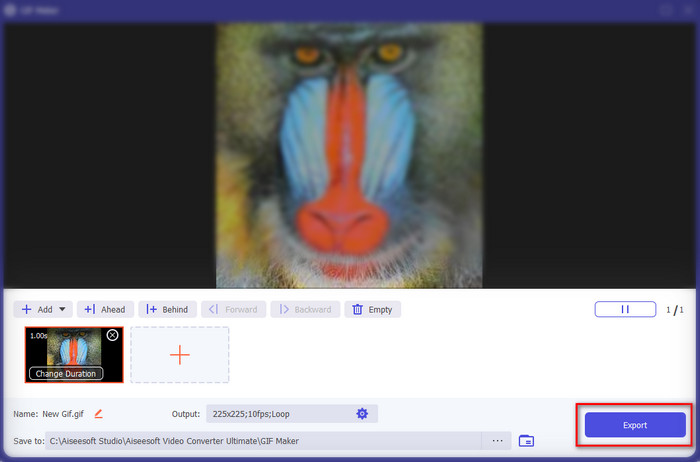
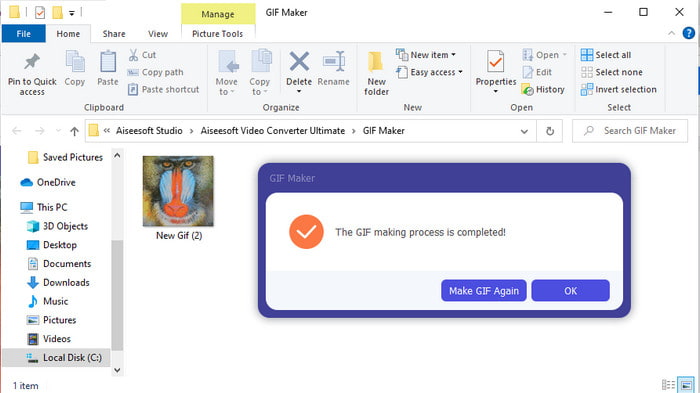
Pas 5. Espera uns segons i apareixerà una carpeta a la pantalla. Fes clic al fitxer de la carpeta per veure’l i compartir-lo més endavant.
Part 3. Preguntes freqüents sobre PNG a GIF
Per què el PNG té millor qualitat que els GIF?
Simplement perquè PNG admet 16,8 milions de combinacions de colors amb transparència d'1 bit a diferència del GIF que només admet 256 colors sense canals alfa. Tanmateix, els colors dels GIF estan molt més comprimits si estem a punt de comparar-los amb el PNG. A més, la mida del fitxer GIF és molt més petita que el format PNG.
Puc convertir un JPG en GIF?
Absolutament sí. Si voleu saber què és JPG i com convertir JPG en GIF, feu clic a aquest enllaç per anar a un lloc web nou.
Si converto PNG a GIF, se n'elimina la transparència?
No us haureu de preocupar perquè tant PNG com GIF admeten la transparència d'un color. Per tant, si convertiu PNG a GIF, espereu que la transparència no canviï, passi el que passi.
Conclusió
I ara que hem arribat al final, esperem que aquest article t’hagi ajudat a determinar com convertir el format d’imatge a GIF. No obstant això, hi ha una eina que pot desar una sèrie d’imatges animades com el GIF, i aquesta és el fenomenal Video Converter Ultimate. Aquesta eina t’ajudarà en moltes situacions, especialment pel que fa als GIF. Així que, si vols crear un GIF bonic, segueix els passos anteriors i descarrega aquest programari ara mateix.
-
 [Guia] Com convertir vídeos M4V a GIF animats a Windows/Mac
 Si voleu crear fitxers GIF animats amb els vostres vídeos M4V preferits, podeu obtenir informació sobre 2 maneres fàcils i eficients de convertir vídeos M4V a GIF amb configuracions personalitzades.
-
 WebM a GIF: 3 convertidors gratuïts de WebM a GIF per crear els vostres propis GIF
 WebM és un GIF? Com convertir un vídeo en un GIF? Hi ha un convertidor gratuït de WebM a GIF? Aquesta publicació comparteix 3 maneres gratuïtes d'ajudar-vos a convertir WebM a GIF.
-
 Com convertir vídeos MKV a GIF animats sense Photoshop / FFmpeg
 Després de descarregar i veure pel·lícules MKV a l'ordinador, és possible que vulgueu compartir moments meravellosos amb amics o a Internet com a GIF. En aquest article, podeu obtenir informació sobre les dues maneres més fàcils de convertir MKV a GIF.
