


 Video Converter Ultimate
 Gravadora de pantalla
 Reparació de vídeo
 Baixada segura
Què és el convertidor HEIC gratuït d'Apowersoft i els convertidors HEIC alternatius per utilitzar
Des que Apple va introduir el nou i avançat format d’imatge HEIC, molts de nosaltres l’hem apreciat perquè pot contenir una imatge d’alta resolució amb una mida de fitxer reduïda. Tot i que la capacitat de comprimir la mida del fitxer és impressionant, no hauríem d’oblidar que aquest format d’imatge és nou i que totes les plataformes que no estan relacionades amb Apple no el poden reproduir. Per tant, si vols que el fitxer HEIC s’adapti bé al receptor, caldrà que el converteixis a format JPEG, sobretot si el destinatari no és usuari d’iOS ni de Mac. Amb l’ajuda d’Apowersoft Free HEIC Converter, pots fer aquesta tasca ràpidament, però abans de descarregar-lo, aquí tens una ressenya del convertidor que has de llegir primer per ajudar-te a decidir ràpidament.

Part 1. Revisió completa del convertidor HEIC gratuït d'Apowersoft
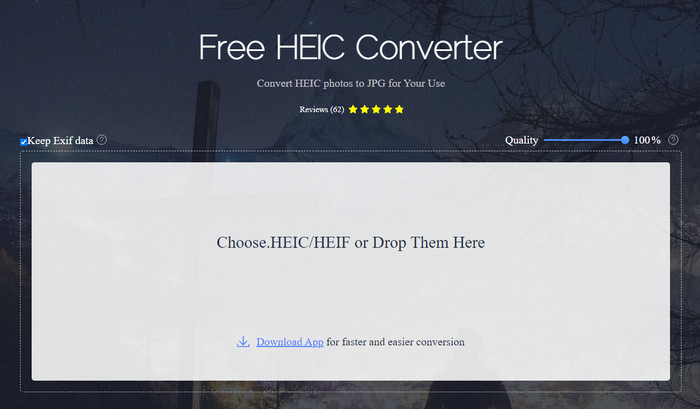
Com indica el nom, Apowersoft HEIC Converter t’ofereix l’oportunitat de convertir el teu fitxer HEIC a un format JPEG compatible de manera gratuïta. En comptes de descarregar un convertidor poc fiable a l’ordinador, pots utilitzar aquesta eina immediatament sense necessitat de descarregar ni instal·lar recursos addicionals. L’accés a l’eina web és segur perquè la teva connexió està protegida mentre ets al seu lloc web oficial. A més, pots pujar el fitxer HEIC fàcilment arrossegant-lo i deixant-lo anar aquí. Però, què fa que aquest convertidor en línia sigui diferent dels altres convertidors que pots fer servir al web o a l’escriptori? Aquí tens les funcions clau que pots obtenir si decideixes utilitzar-lo.
Funcions clau d’Apowersoft Free HEIC Converter:
◆ No cal descarregar el convertidor perquè podeu accedir al programari a la web.
◆ Admet la conversió de fitxers HEIC per lots o individualment a format JPEG.
◆ Manipuleu la qualitat de la imatge abans que la conversió estigui disponible.
◆ Després de la conversió, podeu desar el mateix fitxer EXIF al fitxer JPEG.
◆ Converteix el fitxer HEIC automàticament sense fer passos addicionals.
Pros
- La interfície de l'eina web és força decent i té una perspectiva general.
- Es conserva una imatge d'alta qualitat després de convertir el fitxer a JPEG.
- Convertir fitxers per lots és fàcil perquè admet la conversió simultània del fitxer.
Contres
- Tot i que diu que conserva les metadades, de vegades les metadades es perden després de convertir el format.
- El format de sortida està limitat a un, i és JPEG.
- Les funcions són limitades.
Part 2. 3 de les millors alternatives gratuïtes de convertidors HEIC d'Apowersoft en línia i fora de línia
FVC lliure HEIC a JPG convertidor
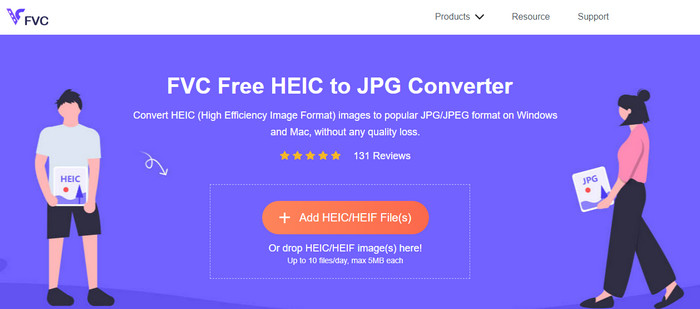
FVC Free HEIC to JPG Converter és el millor substitut d’Apowersoft free HEIC to JPG converter perquè té una interfície intuïtiva que t’ajudarà a completar la tasca en pocs segons. Amb un convertidor web com aquest, no caldrà que et descarreguis l’eina pròpiament dita per utilitzar-la, però sí que hauràs de descarregar-ne el llançador. Encara que descarregar el llançador sigui obligatori, aquesta eina continua tenint avantatge pel que fa a la velocitat de conversió. Encara que no tinguis experiència convertint HEIC a JPG, amb aquesta eina podràs fer la tasca fàcilment i de manera efectiva sense necessitat de tutorials que t’orientin.
Fins ara, l'eina web ha gestionat la tasca com cap altre convertidor en línia. Però no podem ignorar el fet que aquesta eina web té limitacions, com ara la mida del fitxer de cada fitxer i els fitxers permesos que podeu penjar al dia. Però si no voleu tenir aquestes limitacions, us recomanem que descarregueu la seva versió d'escriptori: Aiseesoft HEIC Converter. Aquest programari està disponible per a tots dos sistemes operatius, com Windows i Mac.
HEICtoJPEG.com
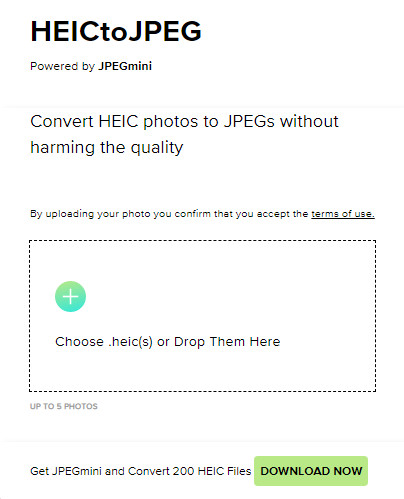
HEICtoJPEG.com és una altra alternativa a Apowersoft HEIC Converter a la qual pots accedir al web de manera gratuïta i segura. Igual que amb l’eina que hem ressenyat, aquí només pots convertir els teus fitxers HEIC a JPEG. Per tant, si vols convertir directament el format HEIC a JPEG sense ajustar-ne la qualitat, has de fer servir aquesta eina. Després d’obrir l’eina web, pots arrossegar i deixar anar el fitxer aquí i la conversió començarà automàticament. A més, pots fer conversions HEIC per lots amb aquesta eina web, i no té límit d’ús diari.
En general, l'eina web és fantàstica perquè admet la conversió per lots per a un procés ràpid. Tanmateix, no podeu maniobrar manualment la configuració avançada abans de convertir el format a JPEG com ho pot fer l'altra eina en línia. Tot i que l'eina web no és una opció professional, encara és millor per a principiants com nosaltres que volen fer una conversió senzilla al nostre HEIC.
Convertidor d'imatges Pixillion
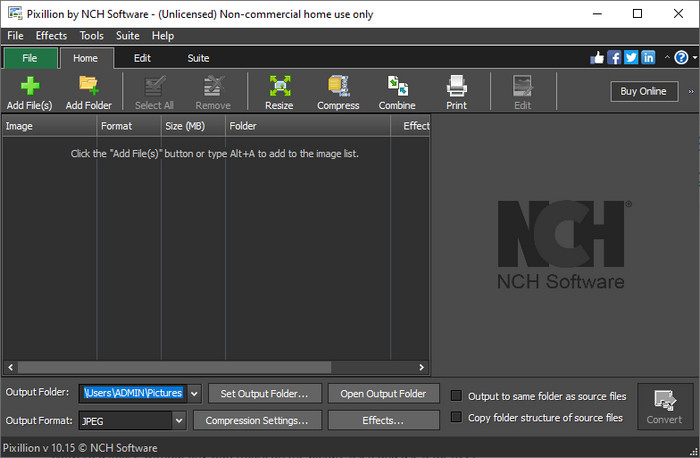
Suposem que la teva connexió a Internet no és estable i, per tant, no pots utilitzar Apowersoft Free HEIC Converter perquè aquesta eina és basat en el web. És possible convertir igualment? Sí, amb el Pixillion Image Converter. Aquest programari fora de línia et permet convertir la teva imatge a una multitud de formats de sortida, com ara JPG, BMP, PNG, etc. Amb una eina com aquesta, pots ajustar la teva imatge HEIC abans d’exportar-la: la pots redimensionar, comprimir, editar i fer-hi moltes més coses que l’eina web que hem presentat no et pot oferir.
Independentment del fitxer d'imatge que carregueu, podeu convertir fàcilment el format a la sortida desitjada i fer-lo compatible amb el vostre dispositiu actual. Genial, no? Sí, ho és. Però abans de poder utilitzar-lo, haureu de descarregar el programari i instal·lar-lo, la qual cosa és una mica complicat perquè aquest és un pas més, sobretot si voleu convertir un únic fitxer HEIC en un JPG o un altre format. No obstant això, l'eina és fantàstica i es pot descarregar gratuïtament al vostre sistema operatiu Windows.
Relacionat:
Part 3. Preguntes freqüents sobre Apowersoft HEIC Converter Review
L'exportació del fitxer HEIC convertit a Apowersoft Free HEIC Converter té una marca d'aigua?
Afortunadament, el fitxer que convertiu aquí no deixarà una marca d'aigua a la vostra imatge. Per tant, podeu gaudir de la imatge convertida sense cap filigrana a la pròpia imatge i utilitzar-la gratuïtament.
He d'iniciar sessió per utilitzar el convertidor Apowersoft HEIC?
Podeu iniciar sessió per comprovar el vostre compte, però no haureu d'iniciar sessió si voleu utilitzar el convertidor en línia. Per tant, podeu utilitzar-lo immediatament arrossegant-lo i deixant-lo anar al lloc web oficial de l'eina i convertint-lo automàticament.
Conclusió
Després de la revisió d'Apowersoft HEIC Converter, ara sabem si és el millor convertidor que hem d'utilitzar per resoldre el nostre problema HEIC convertint el format a JPG. Tot i que l'eina web és d'ús gratuït i accessible al web, encara incloem alguns inconvenients en aquest article. Per tant, si creieu que aquesta no és l'eina per a vosaltres, les tres alternatives poden omplir el buit que necessitareu al vostre convertidor que el convertidor que revisem no us pot donar. Però si tot això no és suficient, us suggerim que descarregueu l'eina definitiva que pot convertir el vostre fitxer HEIC a JPEG o PNG. Vols saber què és? Aleshores, heu de fer clic al botó de descàrrega que afegim més amunt per tenir-lo al vostre abast tant si feu servir Windows com Mac.
-
 Les millors maneres d'editar metadades MKV com un professional [Fàcil]
 No tens ni idea de com editar les metadades MKV? Alguns usuaris tenen dificultats per editar les etiquetes a MKV, si sou un d'ells, llegiu aquest article.
-
 Els 3 principals editors de metadades FLAC a Mac i Windows [Actualitzat el 2023]
 Voleu canviar les metadades de FLAC? En aquest cas, heu de llegir aquest article, ja que proporcionem coneixements suficients sobre l'últim editor de metadades FLAC que podeu utilitzar.
-
 Millor tècnica sobre com editar les metadades de WebM ràpidament
 Llegiu tots els detalls que oferim a continuació mentre inserim un tutorial sobre com editar les metadades de WebM. Feu clic a aquest enllaç per saber-ne més.
