


 Video Converter Ultimate
 Gravadora de pantalla
 Reparació de vídeo
 Baixada segura
Revisió definitiva sobre el convertidor HEIC que podeu utilitzar sense esforç
Hi ha més de 4.500 milions d'imatges preses cada dia a tot el món. Regularment, una persona feia gairebé 20 instantànies al dia com a mitjana. Amb la seva gran influència a tot el món, la majoria de nosaltres vam fer un pas més per emmagatzemar la imatge amb millor qualitat, com va fer Apple quan va canviar el format d'imatge estàndard a HEIC. Aquest format d'imatge pot contenir una foto d'alta qualitat però amb una mida inferior a la JPG o PNG. Així, amb la seva compressió millorada, molts de nosaltres podem estalviar més espai a la nostra unitat iOS si el fitxer d'imatge està en aquest format. Com a resultat, el format es va fer popular a tots els iOS 11 i macOS High Sierra.
Independentment de com sigui de bo el format, probablement no obriràs el fitxer si el traspasses a altres dispositius. El més probable és que un convertidor et resulti útil en aquest tipus de situació. Per resoldre aquest problema, continua llegint aquest article, on et presentem cinc convertidors HEIC que pots utilitzar de franc i també comprar en totes dues modalitats. Segueix llegint per obtenir la informació que necessites per solucionar-ho en menys de 7 minuts.

Part 1. Els 3 millors convertidors HEIC gratuïts disponibles al web
FVC lliure HEIC a JPG convertidor
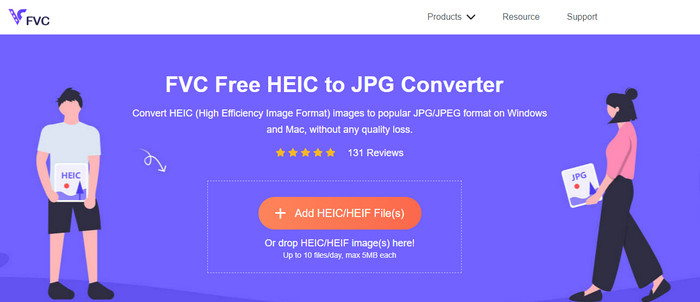
FVC Free HEIC to JPG Converter t’ofereix un convertidor HEIC gratuït senzill i efectiu que pots utilitzar al web. Amb aquesta eina en línia, pots arrossegar i deixar anar el fitxer fàcilment a la pàgina per penjar-lo; no cal iniciar manualment el procés de conversió perquè començarà automàticament. Tot i que aquesta eina basada en el web no admet la conversió per lots, continua considerant-se un dels millors convertidors en línia que has de conèixer. A diferència d’altres convertidors que redueixen la qualitat de la imatge que hi converteixes, aquesta eina no degradarà la qualitat del teu fitxer HEIC i la mantindrà igual un cop el converteixis a JPG.
Potser us pregunteu si feu servir aquesta eina, necessiteu descarregar fitxers addicionals, com ara l'instal·lador? Afortunadament, mentre feu servir això, no haureu de descarregar l'instal·lador a la vostra unitat i utilitzar-lo al moment. No és necessària cap configuració perquè l'eina és accessible al vostre navegador preferit, a diferència dels altres convertidors disponibles al mercat. Tot i que l'eina funciona perfectament al vostre fitxer HEIC, hi ha una funcionalitat limitada; això proporciona la mida i la conversió diàriament. Suposem que heu decidit utilitzar el convertidor en línia. Feu clic a l'enllaç de dalt per veure la seva pulcritud i les perspectives generals.
JPGHEIC.com
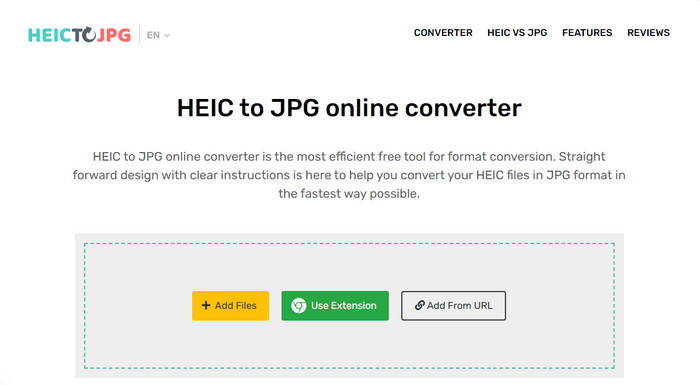
JPGHEIC.com funciona igual que el convertidor d’imatges HEIC que hem presentat abans. Però allò que fa que aquesta eina sigui impressionant és que no té cap limitació quant a la quantitat de vegades que la vulguis utilitzar ni quant a la mida dels fitxers. Amb aquesta eina, pots afegir fàcilment el fitxer multimèdia arrossegant-lo i deixant-lo anar a la pàgina principal. A més, també pots utilitzar una URL per penjar l’enllaç de la imatge HEIC que vols convertir a format JPG. Encara que l’eina té un lloc web oficial, també pots utilitzar l’extensió de Chrome per accedir-hi d’una manera més senzilla que no pas visitant la pàgina principal. Les funcions i característiques del convertidor web i de l’extensió no difereixen gaire.
Tot i ser un convertidor gratuït, hi ha alguns anuncis molests que podeu fer clic i obrir accidentalment. Per tant, assegureu-vos d'evitar fer-hi clic per evitar que s'obrin anuncis que puguin contenir virus. Després d'utilitzar aquesta eina, el fitxer que heu penjat aquí se suprimirà al cap d'una hora. Podeu accedir-hi abans que el fitxer s'elimini completament en aquesta eina web.
Freeconvert.com
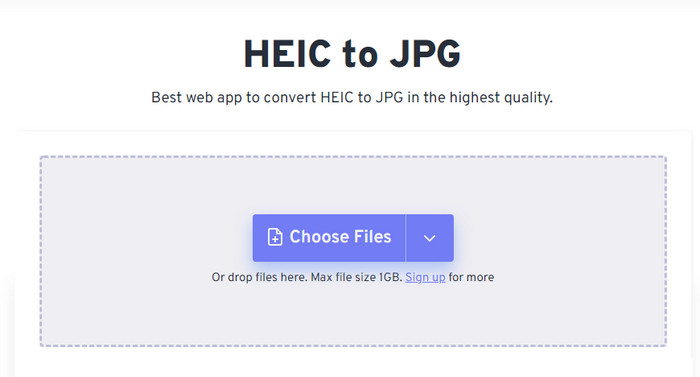
Freeconvert.com és un convertidor de fitxers HEIC fàcil d’utilitzar al teu navegador preferit i que admet la funció d’arrossegar i deixar anar per afegir-hi els fitxers HEIC de manera més còmoda. A diferència del convertidor en línia que hem esmentat més amunt, aquesta eina permet més formats de sortida que el JPG; també en pots exportar com a BMP, PNG, TIFF, WebP, etc. Tot i que l’eina en línia és molt interessant, té certes limitacions que poden resultar molestes, especialment pel que fa a la mida dels fitxers. Amb tot, la mida màxima admesa és d’1 GB, molt més gran que la de moltes altres eines en línia que pots trobar al web o en aquest article.
A més de la mida del fitxer compatible i la conversió, podeu canviar la dimensió, la compressió i eliminar les metadades del vostre fitxer HEIC. És un dels avantatges d'utilitzar l'eina; més important encara, si voleu manipular-los manualment. Tot i que té funcions addicionals que ho fan millor, la velocitat de conversió d'aquesta eina no és tan ràpida com esperàvem.
Part 2. Els 2 principals convertidors HEIC de pagament que es poden descarregar a Windows i Mac
Aiseesoft HEIC Converter: el millor convertidor HEIC a Windows i Mac
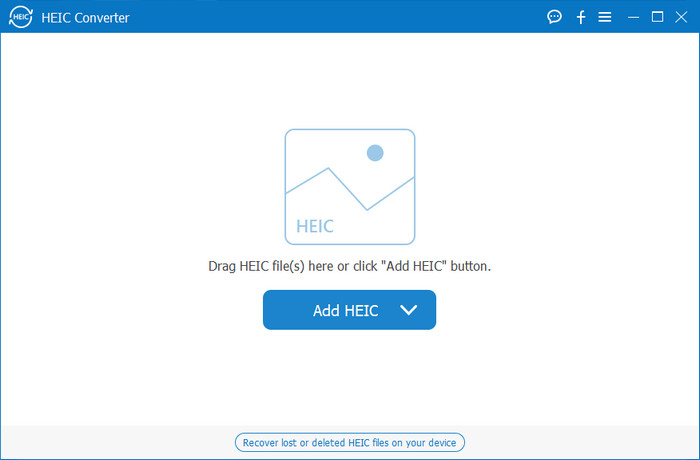
Tot pot anar tan fluid com sigui possible amb un convertidor HEIC professional per a Windows 10/11 i Mac, com ara Aiseesoft HEIC Converter. És el convertidor principal que hauries de triar per a tots dos sistemes operatius. En subscriure’t al programari, podràs gaudir d’un procés de conversió únic i ultra ràpid com no n’hagis vist cap altre. Un cop hagis penjat el teu fitxer HEIC, no hi veuràs cap diferència quan en converteixis el format a JPG. Siguis professional o no, és l’eina perfecta en què pots confiar per convertir el teu fitxer HEIC i assegurar-te que l’èxit sigui a l’abast.
A més de la velocitat de conversió semblant a un llamp, també podem tenir la possibilitat de reduir la qualitat si voleu i desar les dades EXIF que s'emmagatzemen al vostre HEIC a JPG. Pel que fa al rendiment, la velocitat de conversió, la interfície d'usuari senzilla i altres funcions consolidades, no queda res que aquesta eina no hagi marcat pel que fa a la conversió d'imatges. Un cop utilitzeu l'eina, podeu carregar tots els fitxers HEIC aquí fins que estigueu satisfet. Per obtenir més informació sobre les funcions que admet aquesta eina, llegiu el contingut següent.
Funcions:
◆ Admet la conversió de diversos fitxers HEIC a un format JPG simultàniament.
◆ La mida del fitxer de cada fitxer d'imatge no és un problema en aquesta eina.
◆ Una pèrdua de qualitat no serà un problema perquè l'eina conserva la mateixa qualitat.
◆ Amb la seva velocitat de conversió amb orgull, convertiu els vostres fitxers en molt poc temps.
◆ Utilitzeu el programari al vostre Windows o Mac.
Convertidor TunesBro HEIC
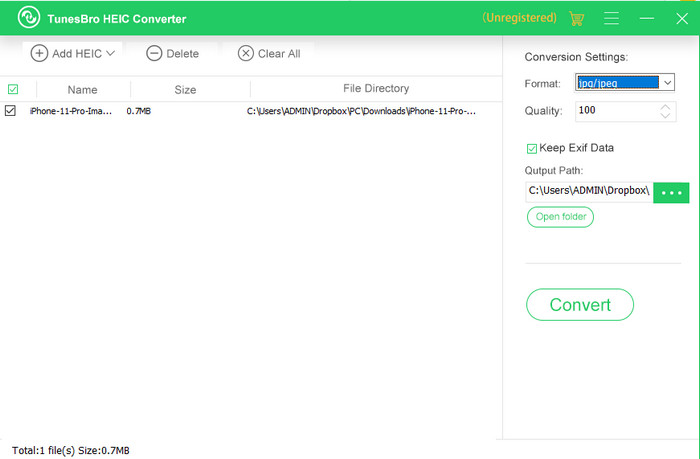
TunesBro HEIC Converter és un conversor HEIC molt conegut que pots descarregar al teu Windows i Mac. Igual que el convertidor de pagament que hem presentat, aquí pots convertir la teva imatge HEIC sense perdre la qualitat original i, a més, sense necessitat de connexió a Internet. Encara que no siguis un professional, podràs utilitzar l’eina fàcilment gràcies a la seva interfície intuïtiva. Fins i tot alguns convertidors populars no poden competir amb la funcionalitat global i el rendiment d’aquesta eina a l’hora de convertir. Tanmateix, el preu d’aquesta eina és més alt que el d’Aiseesoft HEIC Converter si comparem els preus de tots dos. Però continua sent més econòmic que altres convertidors.
A molts usuaris els resulta una mica car utilitzar-lo com a convertidor personal; el motiu pel qual és costós és perquè admet funcions que us poden ajudar a convertir. Si teniu intenció de convertir l'HEIC a un format estàndard, potser us agradaria triar-lo com a darrera opció per als usuaris amb un pressupost ajustat. Però si voleu tenir un convertidor per lots fàcil d'utilitzar, descarregueu l'eina al vostre escriptori.
Part 3. Quin és el millor? Gràfic de comparació dels 5 convertidors HEIC
| Característiques | FVC lliure HEIC a JPG convertidor | JPGHEIC.com | Freeconvert.com | Convertidor Aiseesoft HEIC | Convertidor TunesBro HEIC |
| Velocitat de conversió | Ràpid | Una mica Lent | Una mica Lent | El més ràpid | Ràpid |
| Converteix diversos fitxers HEIC |  | | |  | |
| Conserva les metadades després de la conversió | | | | | |
| Fàcil d'usar | | | | | |
| Dependent d'Internet | | | | | |
Part 4. Preguntes freqüents sobre els convertidors HEIC
Per què la conversió d'HEIC és lenta?
Si utilitzeu una eina que necessita Internet, heu de comprovar la vostra connexió a Internet, però si la vostra Internet és estable, el problema és l'eina que feu servir. Podeu posar-vos en contacte amb el servei d'atenció al client que admet l'eina que utilitzeu. Suposem que no en té, aleshores us suggerim que canvieu el convertidor. Però si es tracta d'una eina fora de línia, l'eina que utilitzeu no té acceleració de maquinari ni conversió ràpida. Per tant, abans de triar un convertidor fora de línia, heu de consultar alguns articles sobre la seva velocitat i fiabilitat.
Per què no s'admet HEIC?
Una de les raons per les quals no s'admet de forma nativa és que actualment s'utilitza el tipus de compressió. La compressió que admet HEIC és una compressió amb pèrdues moderna que no admeten tots els dispositius. Per tant, triar un convertidor és especialment important en aquest tipus de situacions.
HEIC només està disponible a iOS?
De moment, aquest format d'imatge és actual i serà el format estàndard per a la imatge que captureu a tots els iOS 11 i posteriors. Però aviat, el format també estarà disponible a Android i Windows, ja que és un dels millors formats que permet emmagatzemar una imatge d'alta qualitat amb menys mides que JPG.
Conclusió
Tots podem coincidir que escollir un convertidor HEIC és imprescindible, sobretot si ets tu qui rep imatges en format HEIC. Abans hem comentat que el format és excel·lent i, fins ara, ja ha quedat confirmat que és una opció millor que el JPG pel que fa a mida i qualitat del fitxer. Un cop hagis acabat de llegir aquest article, és el moment de triar l’eina que més t’escaigui, ja sigui en línia o fora de línia. Totes dues opcions són bones, però Aiseesoft HEIC Converter és millor en molts aspectes. Dona un cop d’ull a aquesta eina comprant-la i descarregant-la a l’ordinador d’escriptori i gaudeix-ne de totes les funcions.
-
 Converteix HEIC a JPG amb les 6 maneres efectives fora de línia i en línia
 Voleu saber com convertir HEIC a JPG? En aquest cas, afegim 6 maneres en línia i fora de línia que podeu utilitzar per acabar i gestionar aquesta tasca completament.
-
 5 de les millors eleccions de convertidors HEIC a JPG aquest 2025
 Amb el convertidor HEIC a JPC podeu canviar fàcilment el format d'imatge a un JPG portàtil. Vols saber quines són aquestes 5 eines? Llegeix aquest article.
-
 Converteix HEIC a PDF utilitzant les 4 millors maneres millorades el 2025
 Per conèixer més informació sobre el millor convertidor HEIC a PDF, podeu descarregar aquest 2025. Podeu llegir aquest article ja que els vam fer una ressenya.
