


 Video Converter Ultimate
 Gravadora de pantalla
 Reparació de vídeo
 Baixada segura
Apreneu a convertir HEIC a GIF amb els millors convertidors gratuïts
Vols convertir les teves imatges HEIC en GIFs en moviment? Doncs tenim una solució per a tu. Els fitxers HEIC són fitxers d’imatge d’alta qualitat que no ocupen gaire espai d’emmagatzematge. I, aparentment, les imatges HEIC són només imatges estàtiques. Així doncs, per tal de convertir un fitxer d’imatge en imatges animades, has de convertir el teu fitxer HEIC a format GIF. Els formats GIF poden ser imatges estàtiques o animades. Per tant, llegeix aquest article per conèixer el millor HEIC a GIF per convertir el teu fitxer sense pèrdua de qualitat.

Part 1. 4 millors eines per convertir HEIC a GIF
Quan es tracta de comoditat, segur que els convertidors en línia són els millors perquè no cal descarregar res. I si busqueu els millors convertidors de HEIC a GIF en línia, hem provat alguns dels millors convertidors de HEIC a GIF disponibles a Internet. Així, en aquesta part, coneixeràs els tres millors convertidors en línia de HEIC a GIF.
Aiseesoft Free Image Converter Online
Si estàs buscant el millor convertidor HEIC a GIF en línia, aquesta eina és el que estàs buscant. Aiseesoft Free Image Converter Online és una eina gratuïta en línia que et permet convertir imatges HEIC a format GIF, PNG i JPG. És coneguda per ser el convertidor HEIC a GIF en línia més ràpid que es pot trobar a internet. A més a més, a diferència d’altres convertidors en línia, no conté anuncis i té un procés de càrrega molt ràpid.
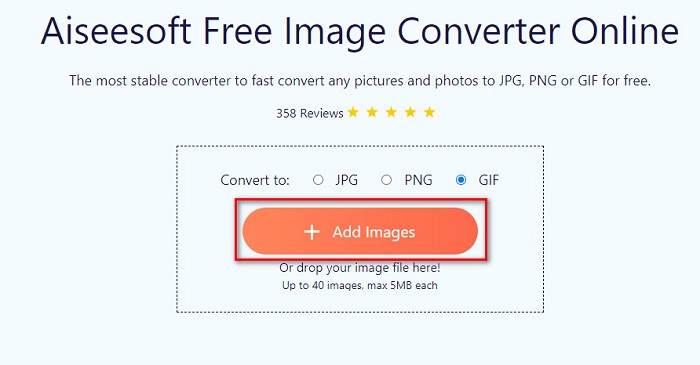
Pas 1. Cerca Aiseesoft Free Image Converter Online, o fes clic en aquest enllaç per anar directament a la seva pàgina web. A continuació, a la primera interfície, fes clic al botó Add Images.
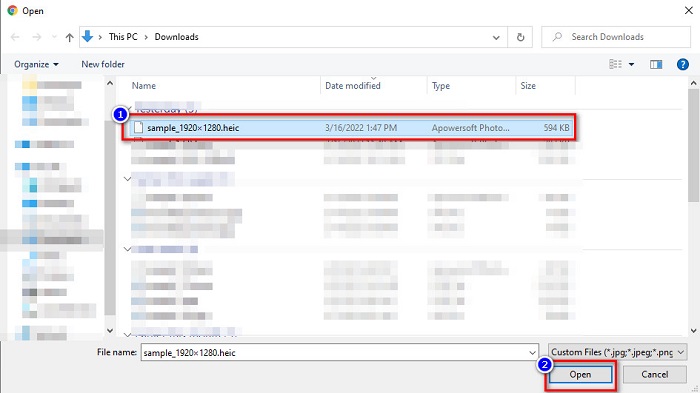
Pas 2. Llavors, apareixeran els fitxers del teu ordinador; localitza la teva imatge HEIC i fes clic a Open.
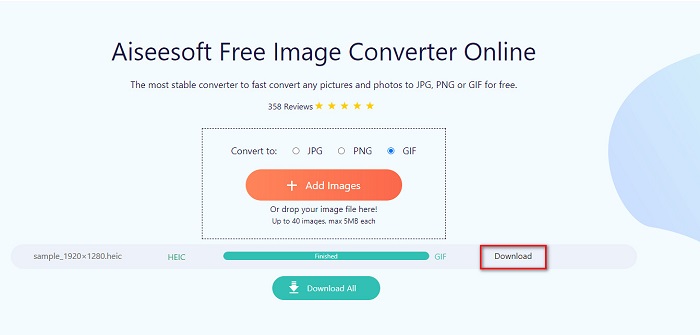
Pas 3. Fes clic al botó Download per descarregar la teva imatge GIF com a pas final.
Pros
- Té un procés de conversió ultra ràpid.
- No conté anuncis inquietants.
- Pot convertir qualsevol fitxer d'imatge a PNG, JPG i GIF.
- Accessible a tots els navegadors web, inclosos Google, Firefox i Safari.
Contres
- És possible que experimenteu un procés de conversió lent quan la vostra connexió a Internet sigui lenta.
CloudConvert
Un dels convertidors més utilitzats a internet és CloudConvert. Aquest convertidor pot transformar fàcilment fitxers HEIC a GIF gràcies a la seva interfície d’usuari senzilla. A més, admet molts formats d’imatge, incloent-hi HEIC, GIF, BMP, JPG, ICO i més. També pots ajustar la resolució, la mida del fitxer i la qualitat de la teva imatge. Tot i ser una aplicació basada en el web, no conté anuncis.
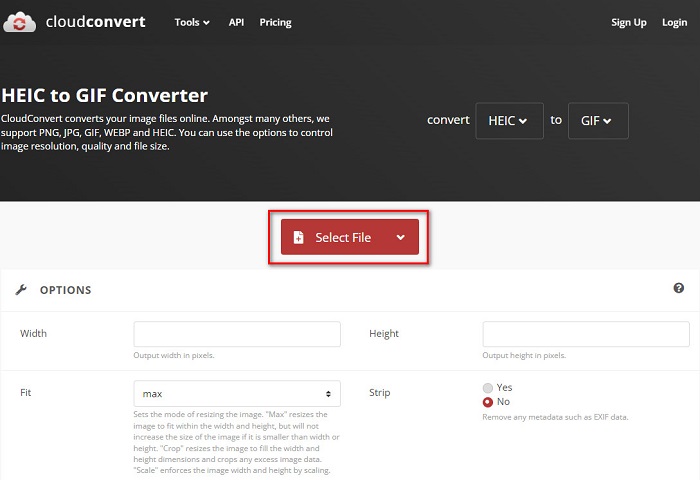
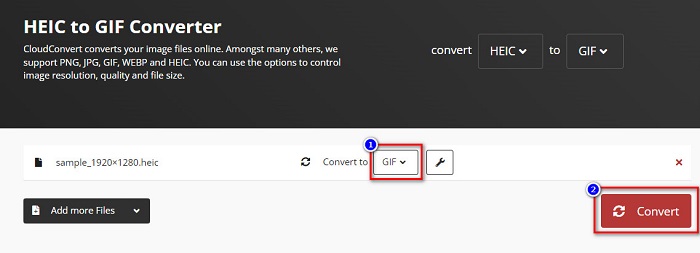
Pas 1. Al navegador, cerca el CloudConvert HEIC to GIF converter. Després, a la interfície principal del programa, fes clic al botó Select. Apareixeran els fitxers del teu ordinador perquè puguis seleccionar el teu fitxer HEIC i pujar-lo.
Pas 2. A continuació, fes clic al botó drop-down al costat de Convert to i després selecciona el format de sortida que vulguis. Després, fes clic al botó Convert per començar a convertir el teu fitxer HEIC a format GIF.
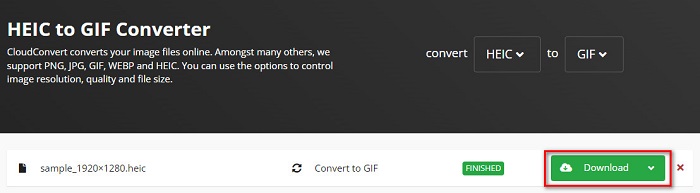
Pas 3. Finalment, fes clic al botó Download per descarregar el teu fitxer GIF quan la conversió hagi acabat.
Pros
- Té un procés de conversió ràpid.
- No conté anuncis molestos.
- Admet diversos formats de fitxer, inclosos HEIC, GIF, JPG, PNG, etc.
- Accessible a gairebé tots els motors de cerca com Google i Safari.
Contres
- Quan la connexió a Internet és lenta, és possible que experimenteu un procés de conversió lent.
OnlineConvertFree
Un altre convertidor HEIC a GIF en línia que val la pena provar és OnlineConvertFree. Aquest convertidor té una interfície de programari fàcil d’utilitzar i un procés de conversió ràpid. A més, si busques un convertidor que pugui comprimir i canviar la mida del teu fitxer, aquesta eina ofereix aquesta funció.
Tanmateix, conté anuncis que són inquietants per a molts usuaris. No obstant això, aquest convertidor encara pot convertir HEIC a GIF còmodament.
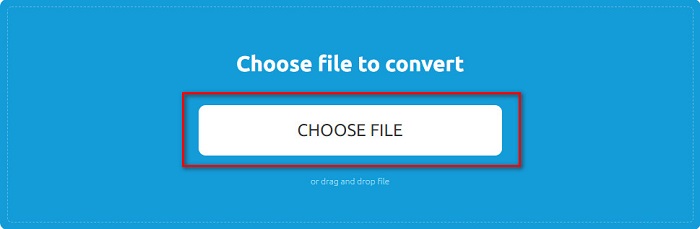
Pas 1. En primer lloc, cerca OnlineConvertFree al teu navegador. I a la interfície principal del programa, fes clic a Choose Files. A continuació, apareixeran els fitxers del teu ordinador, on seleccionaràs el teu fitxer HEIC i el pujaràs.
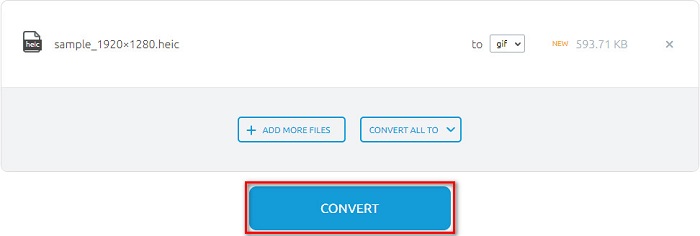
Pas 2. En segon lloc, fes clic al Convert button per convertir el teu fitxer HEIC a un fitxer GIF. Després apareixerà una nova interfície.
Pas 3. Finalment, desplaça’t cap avall i fes clic al botó Download per descarregar el teu fitxer GIF.

Pros
- Té una interfície d'usuari senzilla.
- És segur d'utilitzar.
Contres
- Conté anuncis.
CDKM
CDKM és una eina en línia que us ajuda a convertir fitxers HEIC a GIF. Aquest convertidor en línia és una eina fàcil d'utilitzar que la converteix en una eina amigable per a principiants. A més, admet formats de fitxer estàndard com HEIC, GIF, PNG, JPG i SVG. Tanmateix, aquest convertidor conté anuncis que us poden molestar. No obstant això, pot convertir el vostre fitxer ràpidament, per la qual cosa és un convertidor que cal provar.
Pas 1. Al navegador, cerca CDKM i ves a la seva pàgina web. A la interfície principal del programa, fes clic al botó Choose Files. Quan apareguin les carpetes del teu ordinador, selecciona el teu fitxer HEIC i puja’l a la interfície principal.
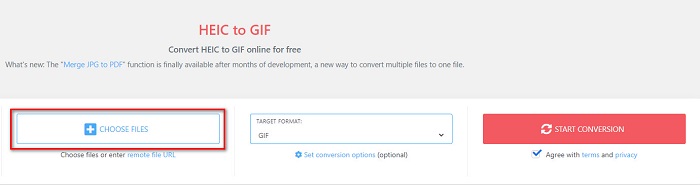
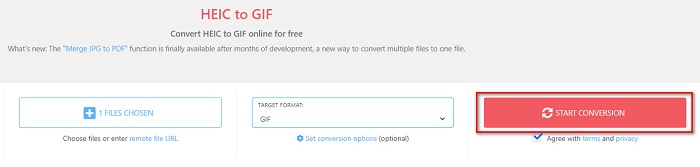
Pas 2. A continuació, fes clic al botó Start Conversion per convertir el teu fitxer HEIC a un fitxer GIF. Després, passa al pas següent.
Pas 3. I després, descarrega el teu fitxer GIF fent clic al botó Download que hi ha a sota.

Part 2. Quadre de comparació entre HEIC i GIF
HEIC és un format de fitxer d’imatge creat per Apple. Quan fas una foto amb un dispositiu Apple, veuràs que l’extensió de la imatge és .heic. A més, aquests fitxers d’imatge tenen una gran qualitat i una mida reduïda, cosa que fa que aquest format sigui popular. Tot i això, els fitxers HEIC no són compatibles amb molts dispositius. És fàcil obrir i veure fitxers HEIC en dispositius Apple. Però cal convertir-los a altres formats si els vols veure en altres plataformes.
D'altra banda, els fitxers GIF són formats d'imatge sense pèrdues que estan animats. Aquests formats d'imatge poden ser imatges animades o estàtiques. A més, gairebé totes les plataformes multimèdia admeten formats GIF.
| HEIC | GIF | |
| Comprimit/Descomprimit | Comprimit | Comprimit |
| Disponibilitat | Disponible en dispositius Apple. | Disponible a totes les plataformes de mitjans |
| Sense pèrdues/No | Sense pèrdues | Sense pèrdues |
| Qualitat d'imatge | Alta qualitat d'imatge | Tenen una qualitat inferior en comparació amb les imatges HEIC |
| Millor utilitzat per | S'utilitza millor per fer fotos | S'utilitza millor per animar videoclips curts. |
Part 3. Preguntes freqüents sobre la conversió de HEIC a GIF
Es pot reproduir GIF animat en un dispositiu Mac?
Sí. Un dispositiu Mac pot reproduir GIFs animats; tanmateix, hi ha ocasions en què no els pot reproduir, i en aquest cas has d’utilitzar un visor en línia si no els pot obrir.
Puc convertir imatges JPG en GIF?
Hi ha moltes maneres de convertir JPG a GIF. Els convertidors en línia esmentats més amunt et permeten convertir fitxers d’imatge JPG a GIF.
Pots desar GIF al teu iPhone?
Afortunadament, els dispositius iPhone admeten fitxers GIF. Per tant, podeu desar GIF al vostre iPhone. Però si no podeu desar un fitxer GIF, assegureu-vos de reiniciar el vostre iPhone i provar de baixar-lo de nou.
Conclusió
Com s’ha mostrat anteriorment, hi ha moltes maneres de convertir HEIC a GIF. No obstant això, no tots els convertidors en línia ofereixen un procés de conversió ultraràpid. Per això, si busques el millor convertidor HEIC a GIF en línia, utilitza Aiseesoft Free Image Converter Online.
-
 Què és el fitxer VOB i com convertir el fitxer VOB en GIF de forma gratuïta
 Voleu saber més sobre els fitxers VOB i com compartir-los després de ser arrencats? o Per què necessiteu convertir VOB a GIF? A continuació, llegiu atentament aquest article.
-
 Els 3 principals convertidors que no us hauríeu de perdre per convertir PNG a GIF animat
 Vols donar vida al teu PNG? A continuació, proveu de convertir el format animat PNG a GIF amb les eines útils disponibles i els passos sobre com fer-ho.
-
 5 millors maneres de canviar la imatge a GIF animat [Actualitzat el 2022]
 Necessites un convertidor d'imatge a GIF? Aquest article proporcionarà els cinc millors convertidors que podem trobar al mercat. Per tant, anem a descobrir aquestes eines llegint aquest article.
