


 Video Converter Ultimate
 Gravadora de pantalla
 Reparació de vídeo
 Baixada segura
7 maneres fàcils de convertir ràpidament HEIC a PNG en qüestió de segons
Vols fer que el teu fitxer HEIC sigui àmpliament compatible amb altres dispositius? Tenim el que estàs buscant! Aquest article et mostra les millors maneres de convertir el teu fitxer HEIC a PNG sense complicacions. Així que prepara’t mentre t’endinsem a conèixer les millors formes de convertir HEIC a PNG sense esforç.

Part 1. Per què convertir HEIC en format PNG
El format de fitxer HEIC és un format d'imatge creat per Apple. És un format d'imatge que utilitzen habitualment els dispositius Apple. Tot i que té una resolució d'alta qualitat, no ocupa massa espai al dispositiu. Tanmateix, els fitxers HEIC no són compatibles amb dispositius que no siguin d'Apple. En canvi, PNG, que significa Portable Graphics Format, és un format de fitxer d'imatge creat per substituir els formats GIF.
És el format d'imatge més utilitzat que no està comprimit, el que significa que té una mida de fitxer enorme. No obstant això, gairebé tots els dispositius admeten aquest format de fitxer d'imatge. Per tant, si voleu obrir la vostra imatge HEIC en altres dispositius a part d'Apple, millor convertir-la a un format de fitxer PNG.
Part 2. 5 maneres fàcils de convertir el vostre fitxer HEIC a fitxer PNG en línia
Cercar les millors maneres de convertir HEIC a PNG és bastant difícil. Tanmateix, hem cercat els mètodes millors i més senzills per canviar HEIC a un format de fitxer PNG.
Utilitzeu el convertidor gratuït de HEIC a PNG FVC
La millor manera de convertir HEIC a PNG és utilitzar una eina de conversió. I la millor eina que hem trobat a Internet és el FVC Free HEIC to PNG Converter. Aquest convertidor és una eina en línia que converteix de manera pràctica el teu fitxer HEIC a format PNG. A més, si vols convertir en lot diversos fitxers HEIC a PNG, aquesta eina també t’ofereix aquesta funció.
També és accessible en gairebé tots els navegadors habituals, per la qual cosa és una eina sense límit de navegador. A més, té una interfície de programari senzilla i no té límit de mida del fitxer, de manera que podeu convertir fitxers HEIC sense pensar en la mida del fitxer. Per tant, seguiu la guia senzilla següent si esteu interessats a utilitzar aquest convertidor en línia de HEIC a PNG.
Pas 1. Al navegador, cerca FVC Free HEIC to PNG Converter. També pots fer clic en aquest enllaç per anar directament a la seva pàgina web. Aquesta és la primera interfície que veuràs:

Pas 2. A continuació, fes clic al botó Add HEIC/HEIF File(s). Es mostraran les carpetes de l’ordinador, on seleccionaràs el teu fitxer HEIC.
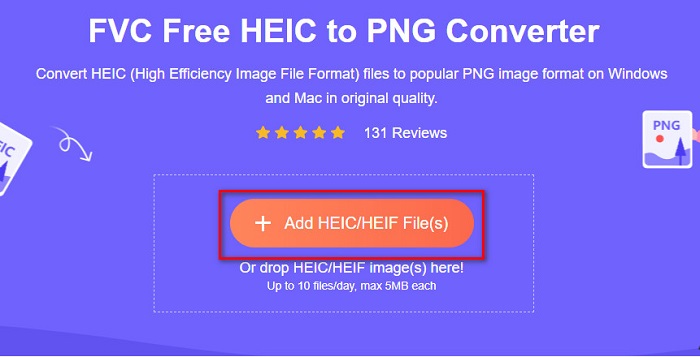
Pas 3. Després, es tornaran a mostrar les carpetes de l’ordinador, on seleccionaràs el teu fitxer HEIC. Prem Open. Llavors s’iniciarà la conversió de HEIC a PNG.

Pas 4. Finalment, a la interfície del programari, fes clic al botó Download per descarregar el teu fitxer PNG.

Simple, no? Podeu convertir el vostre fitxer HEIC a un fitxer PNG seguint aquests senzills passos.
Utilitzeu Xconvert.com
Xconvert és un convertidor HEIC a PNG gratuït en línia que converteix amb facilitat fitxers HEIC a fitxers PNG. Aquest convertidor en línia té una interfície senzilla, molt beneficiosa per als usuaris principiants. A més, pots canviar la resolució de la imatge quan facis servir aquest convertidor en línia. Tanmateix, com que depèn d’Internet, és possible que experimentis un procés de conversió lent si la connexió és lenta. També conté anuncis que et poden resultar molestos.
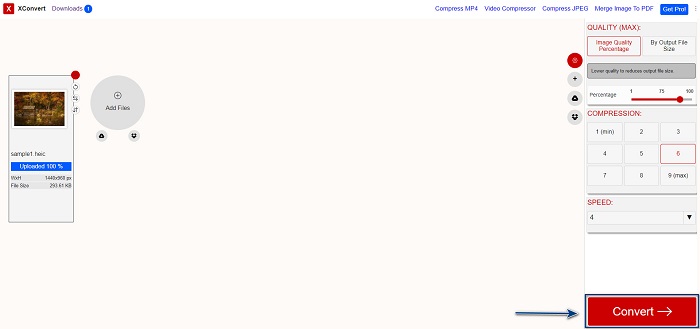
Pas 1. Cerca Xconvert.com al navegador. Al seu lloc web, fes clic al botó Add Files; després es mostraran els fitxers de l’ordinador i seleccionaràs el teu fitxer HEIC.

Pas 2. La teva imatge es pujarà a la interfície del programari. Un cop pujada, fes clic al botó Convert situat a la cantonada inferior dreta de la interfície. Després espera que el fitxer estigui llest per descarregar i passa al pas següent.
Pas 3. Quan el fitxer estigui llest, fes clic al botó Download per descarregar el teu fitxer PNG; damunt del botó de descàrrega també veuràs la mida de sortida i el temps que ha trigat a convertir-se.

Utilitzeu Zamzar
Una altra manera de convertir HEIC a PNG en línia és utilitzar el convertidor en línia Zamzar. Probablement hagis vist aquest convertidor quan buscaves un convertidor de HEIC a PNG. Aquest convertidor és accessible des de gairebé tots els navegadors disponibles. A més, té una interfície senzilla, cosa que el fa molt fàcil d’usar. No obstant això, el teu fitxer es pot corrompre si la connexió a Internet s’interromp durant el procés de conversió. Tot i així, molts usuaris fan servir aquest convertidor per canviar HEIC a PNG.
Pas 1. Al navegador que facis servir, cerca Zamzar. Al seu lloc web, fes clic al botó Add Files. Es mostraran els fitxers de l’ordinador i després pujaràs la teva imatge HEIC.

Pas 2. Després de pujar el fitxer HEIC, fes clic al botó drop-down i selecciona PNG com a format de sortida.

Pas 3. Finalment, fes clic al botó Convert Now per convertir el fitxer HEIC a format PNG. Després descarrega el teu fitxer PNG. Només has d’esperar uns segons, i ja està!

Utilitzeu Conversion Tools.io
Conversion Tool és un convertidor en línia de HEIC a PNG amb una interfície senzilla. Pot convertir el teu fitxer HEIC a PNG a gran velocitat. A més, no conté tants anuncis com altres convertidors en línia. Però l’inconvenient és que només pots convertir deu fitxers al dia i té un límit de mida de fitxer. Tot i això, si només has de convertir un fitxer petit, aquesta eina pot ser adequada per a tu.
Pas 1. Cerca Conversion Tools.io al navegador. A continuació, fes clic al botó Browse a la interfície principal del programari, o bé arrossega i deixa anar el teu fitxer HEIC sobre el botó Browse.

Pas 2. Després, fes clic al botó Run Conversion per començar a convertir el teu fitxer HEIC a un fitxer PNG. Després espera que la teva imatge es carregui i passa al pas següent.

Pas 3. Per acabar, fes clic al botó Download per descarregar el teu fitxer PNG.

Utilitzeu CDKM
L’última eina que et presentarem és CDKM. Aquesta eina et permet convertir fitxers HEIC a PNG amb només uns quants clics. No obstant això, utilitzar aquest convertidor en línia pot trigar uns segons a convertir, depenent de la velocitat de la teva connexió. També conté anuncis que poden ser irritants. Tot i així, no té cap límit de mida de fitxer, així que val la pena provar-la.
Pas 1. Al navegador, cerca CDKM online converter. A la interfície principal del programari, fes clic al botó Choose Files. Es mostraran les carpetes de l’ordinador; després selecciona el teu fitxer HEIC per pujar-lo.

Pas 2. A continuació, fes clic al botó Start Conversion per iniciar el procés de conversió.

Pas 3. Finalment, baixa una mica i veuràs el botó Download. Fes clic al botó Download per descarregar el teu fitxer PNG.

Part 3. Converteix HEIC a PNG al Mac
Els dispositius Apple admeten formats de fitxer HEIC i, amb Mac, podeu obrir un fitxer HEIC de manera nativa. Però si voleu convertir el vostre fitxer HEIC a PNG, podeu canviar-lo mitjançant l'aplicació Photo del Mac. En conseqüència, si sou un usuari de Mac, millor llegiu aquesta part.
Pas 1. Primer, arrossega i deixa anar el teu fitxer HEIC a l’aplicació Foto. Després previsualitza la foto HEIC i fes clic a File > Export > Export 1 Photo.

Pas 2. Després, a Photo Kind, fes clic al format de sortida que vulguis. Selecciona el format de fitxer PNG.

Pas 3. I tot seguit, fes clic al botó Export i selecciona la destinació del fitxer de sortida. Veureàs que el teu fitxer HEIC s’ha convertit a format PNG.

Part 4. Converteix el fitxer HEIC a PNG a l'iPhone
Si utilitzeu un iPhone, podeu obrir un fitxer HEIC al vostre dispositiu. Però si voleu convertir el vostre fitxer HEIC a PNG mitjançant un dispositiu iPhone, tenim una manera per a vosaltres. Seguint aquests senzills i senzills passos a continuació, podeu convertir HEIC a PNG sense esforç.
Pas 1. A l’aplicació Fotos del teu iPhone, toca el botó Select situat a la part superior de la pantalla. A continuació, selecciona el teu fitxer HEIC i toca la icona Share.
Pas 2. Llisca la pantalla cap amunt; veuràs l’opció Copy Photo, després toca-la.
Pas 3. Finalment, ves a l’aplicació Fitxers, toca el botó Browse i selecciona la ubicació de sortida desitjada (toca iCloud Drive o On my iPhone). Després enganxa-hi el fitxer HEIC.

Després d'enganxar el fitxer, veureu que el fitxer es convertirà automàticament en un fitxer PNG.
Part 5. Coneixements ampliats sobre el fitxer HEIC i el fitxer PNG
Si encara teniu dubtes si voleu convertir el vostre fitxer HEIC a PNG, us oferim un gràfic de comparació per ajudar-vos a distingir les diferències entre aquests dos fitxers. A més, us ofereix una visió general clara de les característiques HEIC i PNG. Llegiu atentament per conèixer la diferència entre els fitxers HEIC i els fitxers PNG.
| HEIC | PNG | |
| Compatibilitat | Només el dispositiu Apple admet aquest format de fitxer. | Gairebé tots els dispositius admeten aquest fitxer, inclosos els dispositius Apple. |
| Mida de l'arxiu | Fitxer de mida petita. | Pot assolir una gran mida de fitxer. |
| Qualitat d'imatge | Alta qualitat d'imatge. | Té una bona qualitat, però no millor que el fitxer HEIC. |
| Comprimit/Descomprimit | Comprimit | Sense comprimir |
| Edició | Conserva la qualitat de la imatge durant l'edició. | La qualitat pot degradar-se en editar. |
Part 6. Preguntes freqüents sobre la conversió de HEIC a PNG
La conversió de HEIC a PNG afectarà la mida del fitxer?
Sí. Quan convertiu HEIC a PNG, augmentarà la mida del fitxer, encara que no serà alta.
Podeu obrir fitxers PNG a Adobe Photoshop?
Certament. Podeu obrir fitxers PNG a Adobe Photoshop perquè Adobe Photoshop admet el format de fitxer PNG.
Podeu obrir el format de fitxer PNG als dispositius Apple de manera nativa?
Sí. Quan feu captures de pantalla del vostre iPhone, es desaran automàticament al vostre carret com a fitxer PNG.
Conclusió
Per fi! Hem arribat al final de la nostra aventura. Aquest article et ofereix les millors solucions per convertir el teu fitxer HEIC a format PNG. Tots els convertidors en línia de HEIC a PNG que hem mostrat més amunt poden convertir el teu fitxer de manera eficaç i sense esforç. A més, també hi ha altres opcions que pots utilitzar si ets usuari de Mac o d’iPhone. Però si busques el millor convertidor de HEIC a PNG amb funcions excel·lents, aleshores el convertidor FVC Free HEIC to PNG és la millor tria per a tu.
-
 Com obrir el fitxer HEIC a Windows, Mac i en línia
 Esteu buscant una manera d'obrir fitxers HEIC? Aquest article us ofereix les millors solucions per obrir fitxers HEIC a Windows, Mac i en línia.
-
 JPG VS GIF: 3 maneres sense esforç de com convertir JPG a GIF
 Vols saber la diferència entre JPG i GIF? O voleu canviar el format animat JPG al GIF? Aleshores llegiu aquest article per tenir una idea.
-
 5 millors maneres de canviar la imatge a GIF animat [Actualitzat el 2022]
 Necessites un convertidor d'imatge a GIF? Aquest article proporcionarà els cinc millors convertidors que podem trobar al mercat. Per tant, anem a descobrir aquestes eines llegint aquest article.
