


 Video Converter Ultimate
 Gravadora de pantalla
 Reparació de vídeo
 Baixada segura
Revisió completa del convertidor HEIC gratuït iMyFone i alternatives per utilitzar
Apple Inc. va tenir la idea d'utilitzar les compressions amb pèrdues avançades HEIC perquè podria estalviar espai d'emmagatzematge, a diferència del format d'imatge típic com el JPEG. Amb el seu modern estil de reducció, Apple l'adapta a iOS 11 i macOS High Sierra o les versions actualitzades. Malgrat la seva popularitat a tots els dispositius d'Apple, el seu suport en altres sistemes operatius com Windows i Android no és tan compatible amb el JPEG. A causa del creixent problema de compatibilitat, molts usuaris cerquen un convertidor HEIC que pugui utilitzar per canviar el format a JPEG o JPG.
Un dels convertidors que potser ja has vist al mercat és iMyFone Free HEIC Converter. Avui analitzarem amb més detall aquest programari i altres alternatives que pots utilitzar per canviar HEIC a JPG en pocs segons.

Part 1. Què és iMyFone Free HEIC Converter
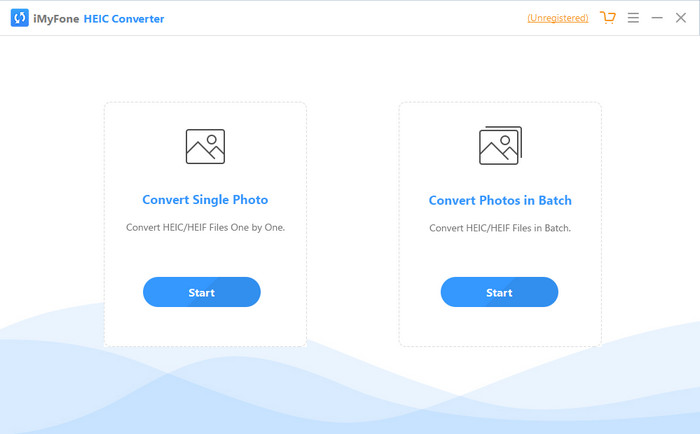
iMyFone HEIC Converter és un convertidor que necessitaràs per convertir el format HEIC al format d’imatge que desitgis, com ara JPEG. A diferència d’altres convertidors, pot transformar la imatge HEIC en JPEG sense afectar-ne la qualitat. Tens la possibilitat d’ajustar la qualitat de la imatge segons les teves especificacions. Amb un programari així, no t’hauràs de preocupar pels problemes de compatibilitat del teu fitxer HEIC, perquè et pot ajudar en menys d’un minut. A més de la conversió, també pots descarregar el programa en tots dos sistemes d’escriptori, perquè és compatible amb les versions de Windows i Mac.
Tot i que és compatible amb diferents sistemes operatius, encara podem veure que el programari fa perfectament la mateixa tasca en ambdós sistemes. Però, què fa que el convertidor sigui millor que l'altre convertidor al qual podeu descarregar o accedir al web? Si voleu mirar el programari, heu de llegir la segona part per conèixer les característiques, els avantatges, els contres i com utilitzar-lo.
Part 2. Revisió gratuïta del convertidor HEIC d'iMyFone | Característiques principals, avantatges, inconvenients i com utilitzar-lo
Característiques clau d'utilitzar iMyFone HEIC Converter a Windows i Mac:
◆ Té una opció per convertir un fitxer HEIC únic o un fitxer HEIC per lots.
◆ Convertiu el fitxer HEIC aquí sense degradar la qualitat de la imatge, però també podeu augmentar-ne la qualitat.
◆ Admet la conversió de HEIC a JPEG/JPG en menys d'un minut.
◆ Desa a l'instant el fitxer HEIC convertit a la unitat local per evitar el deteriorament del contingut de privadesa.
Pros
- Fa la feina de convertir el format HEIC fàcilment.
- La seva GUI és senzilla, de manera que podeu aprendre a utilitzar-la a l'instant.
- També admet la conversió de diversos fitxers HEIC d'una vegada sense limitacions.
Contres
- De vegades, els fitxers HEIC no es poden reconèixer aquí i només poden convertir HEIC a JPG.
- No podeu convertir els vostres fitxers HEIC si no heu comprat la versió premium, especialment després del període de prova.
- La funció d'arrossegar i deixar anar no es pot utilitzar.
Com utilitzar el convertidor iMyFone HEIC a Windows i Mac:
Pas 1. Descarrega iMyFone HEIC Converter des del lloc web oficial i tria si vols la versió per a Windows o per a Mac.
Pas 2. Obre el programari i veuràs dues opcions a la pantalla. Fes clic a Start en una d’elles per passar al pas següent.
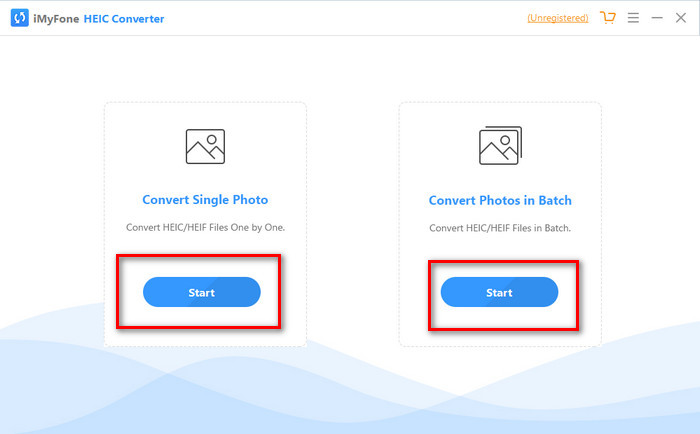
Podeu utilitzar Convertir foto única o Convertir foto en lot; sigui quina sigui la vostra elecció, no és diferent entre si.
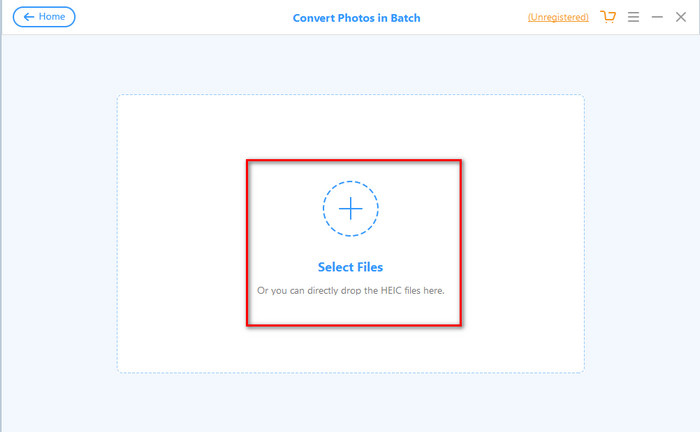
Pas 3. Afegeix el fitxer prement el botó + per pujar el fitxer HEIC que tens al teu disc.
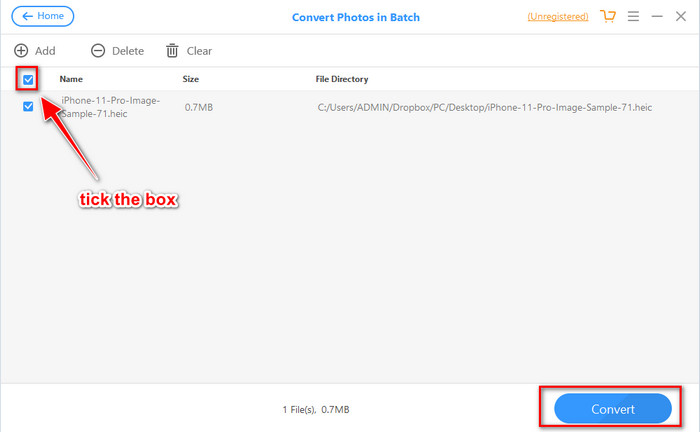
Pas 4. Marca la casella, prem Convert, ajusta la qualitat si ho vols i torna a fer clic a Convert per canviar el format.
Part 3. Les 3 millors alternatives per a iMyFone Free HEIC Converter en línia i fora de línia
FVC lliure HEIC a JPG convertidor
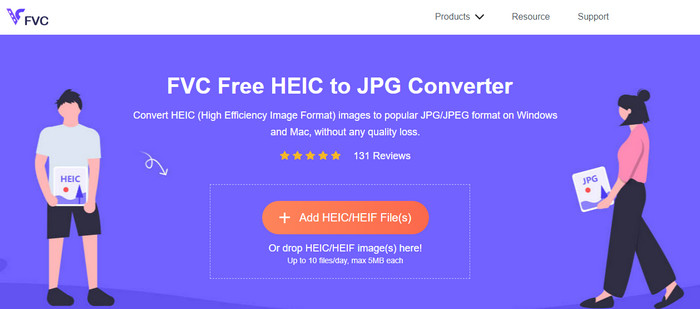
Si no vols descarregar iMyFone HEIC Converter i prefereixes convertir HEIC a JPG, et recomanem que facis servir el FVC Free HEIC to JPG Converter. Aquesta eina web et pot ajudar a completar la tasca de fer que el fitxer HEIC sigui compatible convertint-lo a JPEG. Igual que el convertidor que hem ressenyat, aquesta eina només pot convertir la imatge HEIC a JPEG, i no hi ha cap altra opció de format de sortida. En conjunt, l’eina web és un convertidor excel·lent al qual pots accedir des de diferents navegadors.
Tot i que l'eina web és gratuïta i està disponible en línia, hi ha algunes limitacions que cal tenir en compte. En primer lloc, la mida del fitxer de la imatge; Assegureu-vos que la foto tingui 5 MB o menys perquè és possible que tingueu problemes per penjar-la aquí. El següent és la conversió disponible per dia; només podeu utilitzar aquest convertidor per convertir HEIC deu vegades al dia. Tot i que hi ha limitacions durant l'ús de l'eina; encara és fantàstic haver-lo utilitzat per experimentar una conversió gratuïta.
Convertidor Aiseesoft HEIC
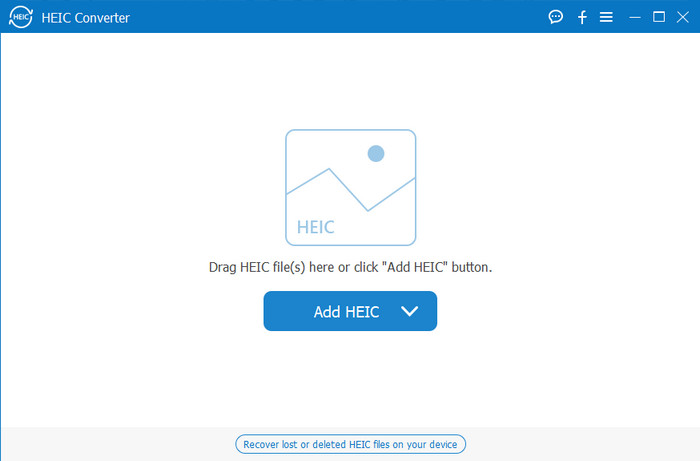
Aiseesoft HEIC Converter és la millor alternativa a iMyFone HEIC Converter que pots descarregar a l’ordinador. És un potent convertidor HEIC imprescindible si vols convertir els fitxers HEIC que tens. Si el programari que hem analitzat abans pot convertir ràpidament, aquest convertidor pot transformar el teu fitxer HEIC encara més ràpid que un parpelleig. Per tant, no caldrà esperar la conversió, perquè el convertidor ofereix una velocitat de conversió ultraràpida, fins i tot amb múltiples fitxers HEIC. A més de la velocitat de conversió, també pots arrossegar i deixar anar aquí els fitxers HEIC per tenir una manera més fàcil de pujar-los.
Què més? Si el programari que revisem no admet altres formats de sortida, podeu triar JPEG o PNG amb aquesta eina. A més, podeu ajustar la qualitat de la imatge HEIC segons les vostres especificacions arrossegant els controls lliscants. Deseu el fitxer EXIF que està lligat al fitxer HEIC i transferiu-lo al format que trieu. Increïble oi? L'eina és molt millor que l'altre convertidor que podeu trobar al mercat.
Relacionat:
Convertir HEIC a JPG a l’iPhone
Part 4. Preguntes freqüents sobre iMyFone Free HEIC Converter
L'exportació del fitxer JPG a l'iMyFone HEIC Converter deixarà una marca d'aigua?
No ho farà, així que podeu pujar el fitxer HEIC aquí, després convertir-lo i, un cop fet, podeu descarregar el fitxer sense la marca d'aigua.
Per què no puc convertir el meu fitxer HEIC a l'iMyFone HEIC Converter?
Si el període de prova ha finalitzat, no podreu tornar a utilitzar aquesta eina per convertir. Per tant, si el voleu utilitzar, haureu de comprar o registrar el codi aquí i després convertir el fitxer HEIC que vulgueu amb l'ajuda d'aquest convertidor.
És segur descarregar l'iMyFone HEIC Converter?
Sí, el convertidor és segur i es pot descarregar gratuïtament a qualsevol dispositiu d'escriptori. Per descarregar el programari de manera segura, heu de visitar el lloc web oficial del convertidor. Allà, podeu fer clic al botó de descàrrega per tenir el convertidor HEIC al vostre escriptori.
Conclusió
Després de la ressenya d’iMyFone Free HEIC Converter, ara ja tens un ampli coneixement sobre aquest convertidor. Ara has de decidir si és el millor convertidor HEIC que has d’utilitzar. Malgrat els inconvenients i desavantatges del programa, continua essent una excel·lent opció per a Windows i Mac. Així que, si decideixes utilitzar-lo, pots visitar el lloc web oficial per descarregar-lo i instal·lar-lo i així ajudar-te a convertir el fitxer HEIC que tens a JPEG. Però si estàs pensant a convertir el fitxer HEIC a PNG, aquesta eina no et pot ajudar. En aquest cas, has de descarregar Aiseesoft HEIC Converter si vols convertir HEIC a JPG o PNG amb facilitat. Prem el botó de descàrrega de dalt per aconseguir-lo ara mateix.
-
 Formes efectives d'importar HEIC a Lightroom a Windows i Mac
 Voleu saber com importar fitxers HEIC a Lightroom a Windows i Mac? Per tant, llegiu atentament aquest article per saber com fer-ho.
-
 Joyoshare HEIC Converter | Revisió d'aplicacions i funcions que heu de conèixer
 La millor revisió Joyoshare HEIC Converter que has de conèixer, ja que incloem els detalls i la funcionalitat que has de conèixer abans de tenir-la.
-
 Com veure i convertir fitxers HEIC a Android [Gratis] sense esforç]
 Voleu veure o convertir fitxers HEIC a Android sense destruir la qualitat de la imatge original? En aquest tipus d'escenaris, aquest article us ajudarà.
