


 Video Converter Ultimate
 Gravadora de pantalla
 Reparació de vídeo
 Baixada segura
Les millors maneres de convertir TIFF a HEIC a Windows i Mac
El TIFF, o Tag Image File Format, és un format d’imatge molt conegut entre els fotògrafs. Aquest format pot emmagatzemar imatges d’alta qualitat i és sense pèrdua. Ara bé, els fitxers TIFF són grans, cosa que en dificulta la compartició amb altres dispositius o aplicacions. Per tant, si vols tenir un fitxer d’imatge amb alta qualitat però sense una mida de fitxer enorme, la millor solució és convertir TIFF a HEIC.

Part 1. Com convertir TIFF a HEIC en línia i fora de línia
Convertir TIFF a HEIC pot semblar difícil, però és molt fàcil amb l'ajuda d'aquests convertidors de TIFF a HEIC en línia. I si voleu conèixer aquests millors convertidors en línia, aquesta part us presentarà els convertidors de TIFF a HEIC més destacats i gratuïts.
XConvert
XConvert és un convertidor en línia de TIFF a HEIC que converteix TIFF a HEIC amb facilitat. Aquest convertidor és gratuït i segur, de manera que no t’has de preocupar per les teves dades. A més, pots convertir diversos fitxers TIFF a HEIC en pocs clics. També pots ajustar la resolució i la mida del fitxer de la teva imatge amb aquest convertidor. Tot i que conté molts anuncis, continua sent capaç de convertir ràpidament els teus TIFF a HEIC.
Pas 1. Obre el navegador i cerca XConvert TIFF to HEIC converter. Després, a la interfície principal del programa, fes clic al botó Add Files. S’obriran les carpetes de l’ordinador perquè puguis seleccionar el fitxer TIFF que vols carregar.
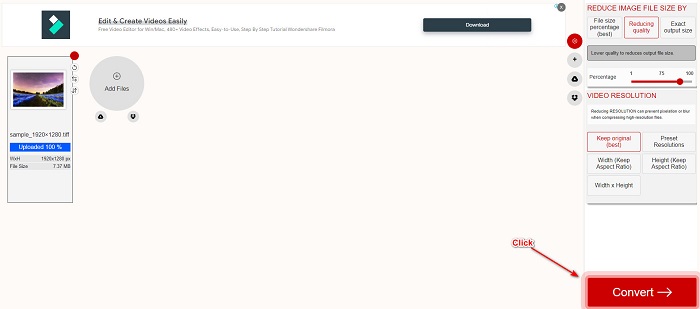
Pas 2. Quan el teu fitxer TIFF s’hagi carregat, fes clic al botó Convert per començar a convertir el teu fitxer TIFF al format de fitxer HEIC. A continuació, només cal que esperis que es descarregui el fitxer i passis al següent pas.
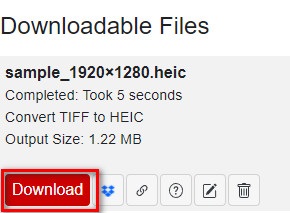
Pas 3. Finalment, fes clic al botó Download per descarregar el teu fitxer HEIC.
Pros
- És segur d'utilitzar.
- Té una interfície d'usuari senzilla.
- Té un procés de conversió ràpid.
Contres
- Conté anuncis molestos que us poden molestar.
Convertio
Convertio és un dels convertidors en línia més coneguts de la xarxa. També pot convertir fitxers TIFF a HEIC sense complicacions. A més, té una interfície molt fàcil d’utilitzar i no conté tants anuncis com l’eina esmentada anteriorment. A més a més, admet diversos formats d’imatge, incloent-hi TIFF, HEIC, JPG, PNG, GIF i altres. Tanmateix, com que és una aplicació basada en el web, és possible que el procés de conversió i descàrrega sigui lent si tens una connexió a internet deficient.
Pas 1. Al navegador, cerca Convertio online converter. Després, a la interfície principal del programa, fes clic al botó Choose File per carregar el teu fitxer TIFF.

Pas 2. A continuació, fes clic al botó drop-down per seleccionar el format de sortida desitjat, HEIC.
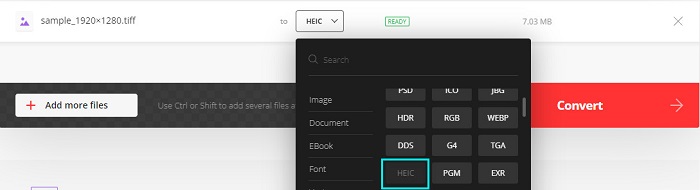
Pas 3. Finalment, fes clic al botó Convert per començar el procés de conversió. Després apareixerà una nova interfície des de la qual podràs descarregar la teva imatge HEIC.

Pros
- Admet nombrosos formats de fitxer com TIFF, HEIC, JPG, PNG, GIF i més.
- Té una interfície de programari fàcil d'utilitzar.
- Accessible a gairebé tots els navegadors web, inclosos Google, Firefox i Safari.
Contres
- És possible que experimenteu un procés de conversió lent quan la vostra connexió a Internet és lenta.
- Conté anuncis.
Filestar
Filestar és un convertidor fora de línia de TIFF a HEIC. Aquest convertidor es pot descarregar gratuïtament i de fàcil accés. A més, té una interfície d'usuari senzilla que la converteix en una eina amigable per a principiants. El que és encara més sorprenent és que té moltes funcions per oferir. Aquest convertidor pot canviar la mida, animar i fins i tot comprimir el vostre fitxer. A més, admet nombrosos formats de fitxer, com ara TIFF, HEIC, JPEG, PNG, WEBPM, MP4 i més.
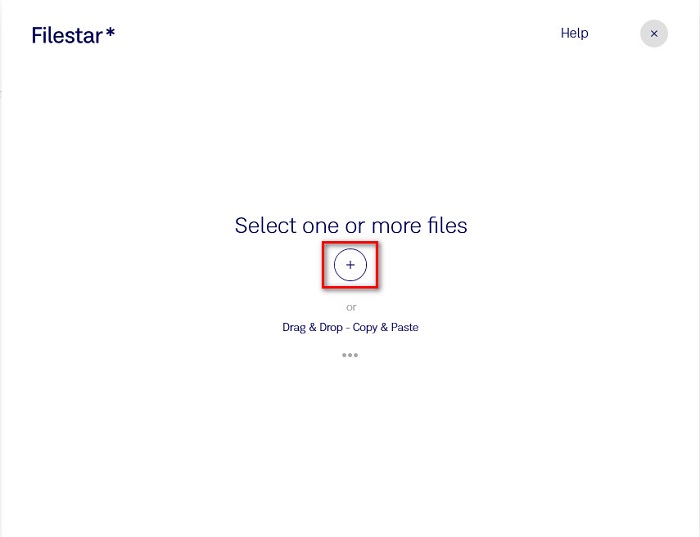
Pas 1. Desa Filestar a l’escriptori i instal·la’l. Després executa l’aplicació. Fes clic al botó amb el signe + per carregar el teu fitxer TIFF a la interfície principal del programa.
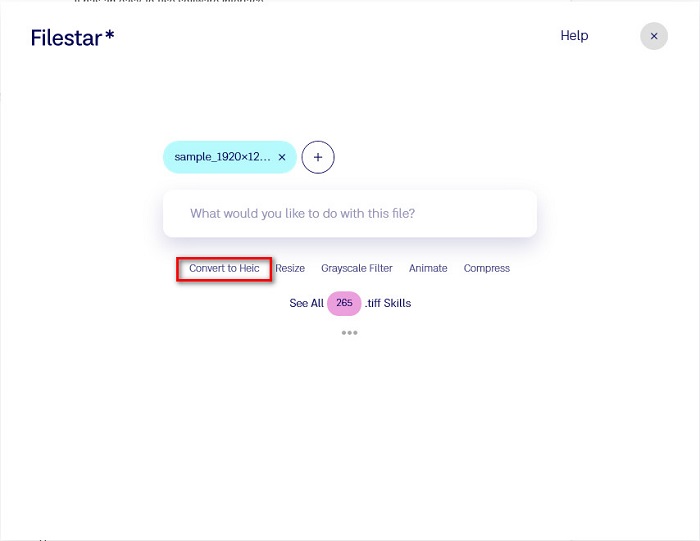
Pas 2. A continuació, a la pantalla següent, fes clic a l’opció Convert to HEIC.
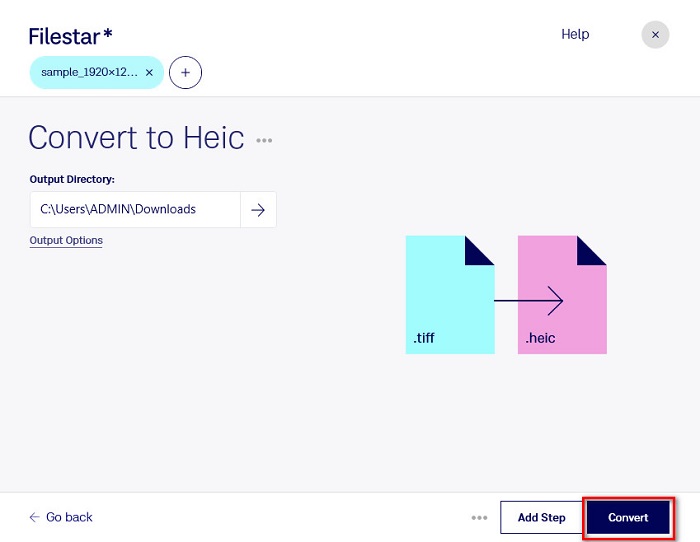
Pas 3. Per acabar, fes clic al botó Convert per convertir el teu fitxer TIFF a HEIC.
Pros
- Té una interfície d'usuari fàcil d'utilitzar.
- Us permet redimensionar i comprimir el vostre fitxer TIFF.
- Pot convertir per lots el vostre fitxer TIFF al format de fitxer HEIC.
Contres
- Només disponible a Windows.
Part 2. Recomanació: Converteix fitxers HEIC amb el millor convertidor HEIC
Si tens problemes per veure fitxers HEIC al teu ordinador amb Windows, aquí tens la solució. La millor manera de visualitzar un fitxer HEIC a Windows o en altres aplicacions d’edició és convertint el fitxer HEIC a un fitxer JPG o PNG, formats que Windows i moltes altres aplicacions admeten. L’eina també permet convertir en lot els teus fitxers HEIC a PNG o JPG. A més, té una interfície molt senzilla, cosa que la converteix en una eina apta per a principiants. Si t’interessa conèixer millor aquesta eina, llegeix la descripció següent.
Descàrrega gratuïtaPer a Windows 7 o posteriorDescàrrega segura
Descàrrega gratuïtaPer a macOS 10.7 o posteriorDescàrrega segura
Aiseesoft HEIC Converter:
- És 100% d'ús gratuït.
- Té una interfície d'usuari senzilla.
- Pot convertir per lots fitxers HEIC a JPG i PNG.
- Disponible a totes les plataformes multimèdia, inclosos Windows i Mac.
Part 3. Diferències entre TIFF i HEIC
TIFF i HEIC no tenen les mateixes característiques; per tant, si encara no esteu segur de si convertireu TIFF a HEIC, aquesta part us ajudarà amb això.
TIFF o Tag Image File Format és un fitxer d'imatge flexible amb una alta resolució. Els fotògrafs i dissenyadors gràfics solen utilitzar aquest fitxer d'imatge per a les seves fotos perquè les podeu transferir fàcilment a altres dispositius i altres aplicacions d'edició d'imatges com Adobe Photoshop. A més, aquests fitxers d'imatge tenen compressió sense pèrdues, el que significa que no perden qualitat ni dades. El que és més impressionant d'aquest fitxer és que també pot servir com a contenidor de fitxers per a petites imatges JPEG. A més, molts dispositius i plataformes multimèdia admeten aquest tipus de fitxers.
En canvi, el fitxer HEIC és un format d’imatge desenvolupat per Apple. Com que ha estat desenvolupat per Apple, només es pot visualitzar en dispositius Apple, com l’iPhone, el Mac i l’iPad. Tot i així, aquest format d’imatge ofereix una qualitat molt alta, cosa que el fa perfecte per fer fotografies. A més, els fitxers HEIC estan comprimits, de manera que tenen una mida de fitxer reduïda.
Part 4. Preguntes freqüents sobre com convertir TIFF a HEIC
Podeu veure imatges TIFF al Mac?
Sí. Amb l'aplicació de previsualització del Mac, podeu obrir de manera nativa una imatge TIFF en un dispositiu Mac.
Què és millor, TIFF o HEIC?
Les imatges TIFF i HEIC tenen una resolució d'alta qualitat. Tanmateix, és segur dir que HEIC és millor perquè les imatges HEIC tenen una mida de fitxer comprimida.
Es pot convertir TIFF a JPG?
Certament, sí. Alguns convertidors admeten convertidors TIFF a JPG. A més, alguns dels convertidors esmentats anteriorment també poden convertir TIFF a JPG.
Conclusió
Aquí ho tens! Hi ha moltes maneres de convertir el vostre TIFF a un fitxer HEIC. Però tots els convertidors presentats anteriorment tenen característiques diferents per oferir. Així que ara, està a les vostres mans quin convertidor utilitzareu per convertir el vostre fitxer TIFF al format de fitxer HEIC. Però si esteu buscant un convertidor HEIC amb les millors característiques per oferir, la millor eina per utilitzar és Aiseesoft HEIC Converter. Aleshores, a què estàs esperant? Baixeu-lo ara gratuïtament per experimentar l'eina de conversió HEIC definitiva.
-
 Converteix HEIC a PDF utilitzant les 4 millors maneres millorades el 2022
 Per obtenir més informació sobre el millor convertidor de HEIC a PDF, podeu descarregar aquest 2022. Podeu llegir aquest article ja que els vam oferir una ressenya.
-
 5 de les millors eleccions de convertidors HEIC a JPG aquest 2022
 Amb el convertidor HEIC a JPC podeu canviar fàcilment el format d'imatge a un JPG portàtil. Vols saber quines són aquestes 5 eines? Llegeix aquest article.
-
 Millor convertidor HEIC gratuït i de pagament que heu de conèixer [Actualitzat el 2022]
 Vols saber què és el convertidor HEIC? Si és així, incloem els 5 principals convertidors HEIC gratuïts i de pagament que podeu utilitzar per canviar el format HEIC.
